
Stuttering in Valorant FPS Drop Solution
Valorant is a fast, competitive shooter, and players notice stutter faster than they notice a lower average frame rate. A drop from a steady high number to a sudden dip during a duel can cost a round, even when the counter still looks fine on average. This guide separates the two symptoms, explains the settings that usually cause them on a Windows gaming PC, and shows how to test each one in order. It is a troubleshooting and buying guide. We have not run controlled tests on the hardware in the listing, and the steps below describe common causes rather than guaranteed results.
The hero listing above is the first pick for the query “Valorant stuttering fix”, with four alternatives in the same group. The card is a closest-match listing for the product class, so check the exact model, interface and compatibility yourself before buying. Riot’s own published requirements are the place to confirm what the anti-cheat needs on your system, since those requirements change over time.


Separate an FPS Drop From Stutter
An FPS drop is a fall in the average frame rate that lasts for the whole fight. Stutter is a short, repeated pause where frame timing breaks up, even though the average looks steady. They have different causes. A constant drop usually points to a limit in the CPU, GPU or a power setting. Stutter usually points to background work, a driver conflict, a full drive, or a thermal event that fires at intervals.
Start by reading the in-game frame rate counter while you play a full match in a training range and in a live match. Note whether the number falls for the whole round or only in bursts. Then open a frame-time overlay and look for spikes that repeat on a regular interval. Regular spikes suggest a background process or a power-management behaviour. Random spikes during big smoke or ability effects suggest the GPU is at its limit.
Why High Refresh Rates Expose Small Problems
At very high frame rates, the CPU has less time per frame to finish its work. A background task that costs a few milliseconds is invisible at 144 Hz but becomes obvious at 360 Hz, because the frame budget is much shorter. If your stutter appears only after you raise the frame cap, the CPU and background software are the first suspects, not the graphics card.
In-Game Settings That Cause Hitches
Frame Rate Cap and Vertical Sync
Set a frame rate cap slightly below the refresh rate of your monitor if the frame rate swings from one extreme to another. A stable cap often feels smoother than an uncapped number that bounces between very high and very low. Vertical sync can add latency in a competitive game, so turn it off unless you see tearing that bothers you. Test each change in the same training routine.
Low-Latency and Reflex Options
Many NVIDIA cards expose a low-latency option that reduces the render queue. Where Valorant offers a matching in-game option, enable it and compare the result. The effect depends on your GPU, your driver and your monitor, so treat it as a test and not a universal improvement.

NVIDIA GeForce RTX™ 5070 Ti OC Triple-Fan Graphics Card | 16GB GDDR7, 256-bit, Boost: 2572 MHz, PCIe® 5.0, HDMI®/DP 2.1, 2.98-Slot, NVIDIA Blackwell Architecture, DLSS 5


As an Amazon Associate we earn from qualifying purchases. Product prices and availability are accurate as of the date/time indicated.
Windows and Background Causes
Background Overlays and Launchers
Voice chat, screen capture, RGB control suites and browser tabs with live video all compete for CPU time. Close them one at a time before a match and watch the frame-time graph. If the spikes disappear when one program closes, you have found the cause, and you can decide whether the program is worth keeping open during play.
Power Plan and Game Mode
A balanced power plan can let the processor drop clock speed between bursts of work, and that transition can show up as a short hitch. Try a high-performance or balanced plan with minimum processor state set high, then retest. Windows Game Mode is worth keeping on for most titles, but its effect is small compared with background software, so do not expect it to solve a serious stutter alone.
Storage and Free Space
Valorant is a small install compared with open-world titles, but a nearly full system drive still slows down background writes and logging. Keep at least a comfortable margin of free space on the drive that holds Windows and the game. The M.2 SSD guide for gaming covers drives that keep that margin easy to maintain.
Comparing the Hardware in This Group
If the software tests do not remove the stutter, compare the hardware. The table lists the hero listing and the four alternatives by role. It does not list prices, because they vary by seller and change often. Check the live card for current pricing and exact specifications.
| Option | Role in this guide | Best for | What to confirm | Price |
|---|---|---|---|---|
| Hero listing | Closest match for the query | Players who want one clear starting point | Exact model and compatibility | Check current price |
| Alternative 1 | Same class, first alternative | Buyers who compare value inside the group | Interface and warranty terms | Check current price |
| Alternative 2 | Same class, second alternative | Upgrades in a system with free slots | Required connector or slot type | Check current price |
| Alternative 3 | Same class, third alternative | Builds with a fixed memory budget | Stated capacity and speed | Check current price |
| Alternative 4 | Same class, fourth alternative | Players who prefer a different brand | Return policy and review count | Check current price |
When the Processor Is the Limit
Valorant leans heavily on the processor when the frame rate is high, so a CPU that is too slow shows up as dips that follow the number of players and effects on screen. Watch the per-core graph during a busy round. If one core stays near full while the graphics card has spare capacity, the processor is the constraint. The best CPU for Valorant page compares processors by that behaviour, and the FPS gaming guide explains how to read the numbers. If the graphics card is the limit instead, the best GPU for Valorant page sets out the classes that match different targets.
Memory matters here as well. A single memory stick or a slow kit can limit the processor, so check that your system runs in dual channel. The DDR5 RAM for gaming guide covers capacity and speed choices.
Monitor, Refresh Rate and Input
A monitor that is set to the wrong refresh rate can make a good system look broken. Confirm that the display runs at its full rated refresh rate in Windows display settings, and that the cable and port support it. The refresh rate guide explains how the number affects smoothness, and the 240 Hz gaming monitor page compares panels that suit competitive play. If you are weighing a larger panel as well, the 1440p 240 Hz monitor roundup lists the trade-offs between sharpness and frame rate.
Input hardware can also change how a stutter feels, even though it does not cause frame drops. A mouse with a stable sensor and a steady polling rate makes an uneven frame easier to spot, so keep it in mind when you judge the result. The gaming mouse guide covers the options by shape and weight.
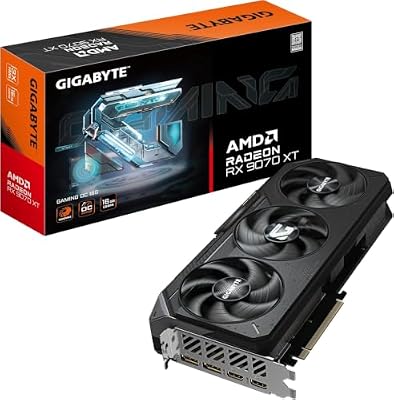
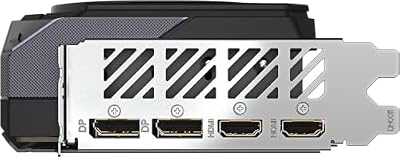
Radeon RX 9070 XT Gaming OC 16G Graphics Card - 16 GB GDDR6, 256 Bit, PCI-E 5.0, 3060 MHz Core Frequency, 2 x DisplayPort, 2 x HDMI, GV-R9070XTGAMING OC-16GD


As an Amazon Associate we earn from qualifying purchases. Product prices and availability are accurate as of the date/time indicated.
A Competitive Test Routine
Use the same routine each time you change something, so the results are comparable.
- Record a five-minute session in the training range with the frame-time overlay running.
- Set a frame cap slightly below the monitor refresh rate and repeat the session.
- Close all optional background programs, then repeat the session again.
- Change the Windows power plan and retest after a full restart.
- Confirm the monitor runs at full refresh rate and the cable supports it.
- Only if the graph still shows a hardware limit, compare CPU and GPU options.
Changing one item at a time keeps the cause visible. If you change five settings and the stutter disappears, you will not know which one worked, and the problem may return the next time an update changes a default.
Frequently Asked Questions
Why does Valorant stutter only in some matches?
Intermittent stutter usually comes from background work, a thermal event or a burst of effects that pushes one component to its limit. Check whether the hitches happen on the same map or the same type of round, and watch the processor and GPU graphs during those moments.
Is a higher frame cap always better?
No. A cap that matches your monitor refresh rate often feels steadier than an uncapped number that swings widely. Test your own system, because the best value depends on the processor, the graphics card and the monitor.
Do I need a new graphics card to fix stutter?
Not always. Many cases come from software, power settings or a full drive. Buy hardware only after the frame-time graph points to a clear limit that the software tests cannot remove.
Does the hero listing guarantee smoother gameplay?
No. The listing is a closest match for the product class and does not promise a result. Use the routine above to confirm the cause, then compare the options in the table against the limit you found.


