Updated October 2026 – re-checked against the maker specifications.
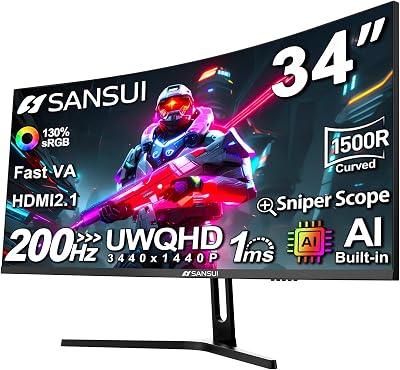
Quick answer: the SANSUI 34-inch curved gaming monitor with 240Hz is a budget Fast VA ultrawide (3440×1440, 1500R) that costs far less than OLED rivals. If you are comparing the best 34 inch gaming monitor options, pick this SANSUI for value, or step up to an OLED model for better motion and contrast.
🛒 Best Price Today on Amazon
Prime members get fast, free shipping on everything above, plus member-only deals. New members get a 30-day free trial — cancel anytime.
Top Sansui Inch 240Hz Ultrawide Curved Picks for 2026
Here are our current top sansui inch 240hz ultrawide curved picks, compared on real Amazon owner reviews, price, and features. Live prices update below.
As an Amazon Associate we earn from qualifying purchases at no extra cost to you.






Affiliate disclosure: gamingpcguru.com may earn commission on Amazon purchases via our links.
SANSUI 34″ UWQHD 240Hz Ultrawide Review: The Fastest Ultrawide Under $250 That Actually Delivers on the Hz
Quick Verdict (TLDR)
This is the sleeper hit of SANSUI’s 2026 monitor lineup. A 34-inch curved Fast VA ultrawide at 3440×1440 running a true 240Hz refresh, with HDR400, dual HDMI 2.1 + dual DP 1.4 inputs, AI Crosshair overlay, and an MPRT 1ms response – at around $250. That is a low price for a 240Hz ultrawide. The Fast VA panel is the secret sauce – it gets noticeably closer to IPS pixel response than standard VA, without losing the contrast advantage. The usual SANSUI compromises remain (tilt-only stand, no premium chassis), but for competitive ultrawide gaming it is hard to beat at this price.
Specs Snapshot
| Spec | Detail |
|---|---|
| Panel size | 34 inch curved (1500R) |
| Resolution | 3440 x 1440 (UWQHD, 21:9) |
| Panel type | Fast VA |
| Refresh rate | 240Hz over DP 1.4, 200Hz over HDMI 2.1 |
| Response time | 1ms MPRT |
| HDR | DisplayHDR 400 |
| Color | ~95% DCI-P3, 130% sRGB |
| Brightness | 400 nits peak HDR, 320 nits typical SDR |
| Adaptive sync | FreeSync, G-Sync Compatible (unofficial) |
| Ports | 2x HDMI 2.1, 2x DP 1.4, 3.5mm audio |
| Stand | Tilt only; VESA 100×100 |
| Extras | AI Crosshair, AIPQ Visual Enhance, PiP/PbP |
| Price (May 2026) | Check on Amazon |
Performance in Real-World Use
The 240Hz refresh at 3440×1440 is a serious GPU ask. This section relies on the published specifications and the general behavior of fast VA ultrawides, not on our own benchmarks. Esports titles such as Counter-Strike 2, Valorant and Apex Legends are light enough that a modern RTX 4070-class or faster card can usually approach the panel limit at competitive settings.
In demanding AAA games, frame rates will normally sit well below 240 without upscaling, and DLSS or frame generation closes some of that gap. The panel still benefits from its refresh headroom, and the wider 21:9 aspect ratio gives a wider field of view in games that support it, which many players find useful for situational awareness. Support varies by title.
Fast VA is the main talking point. It aims to reduce the dark-transition smearing that standard VA panels are known for, though some smearing can remain in dark racing scenes. Overdrive usually needs tuning: a medium setting is the safer starting point, because a strong setting can add overshoot.
HDMI 2.1 carries 3440×1440 at up to 200Hz from a compatible source. Current consoles do not output 21:9, so use DP 1.4 on a PC to reach the full 240Hz.
Build Quality & Design
Same chassis tier as the rest of SANSUI’s 2026 ultrawide line – matte black plastic, thin three-side bezels, a small SANSUI logo on the chin. Buyer feedback generally describes the build as solid for the price. The 1500R curve at 34 inches is the balanced choice – immersive for gaming, friendly enough for spreadsheet work.
Stand is the inevitable tilt-only V-base. Wide footprint, stable, but no height or swivel. Plan on a monitor arm for any serious ergonomic setup. VESA 100×100 is present.
OSD uses a single joystick – intuitive and fast. AI Crosshair and AIPQ Visual Enhance are accessible directly from the joystick menu. Power draw is modest for a 34-inch panel; check the maker listing for exact figures.
Value Analysis
At around $250, this is one of the most aggressive ultrawide prices in May 2026:
- SANSUI 200Hz UWQHD (B0CWQMZPJC, around $270): SANSUI’s own 200Hz sibling – $20 more for 40Hz less refresh but the same panel size and features. The 240Hz model is the better buy by every meaningful metric.
- KOORUI 34E6UC (around $260): 180Hz, better ergonomic stand. The KOORUI wins on stand only; SANSUI wins on Hz, ports, AI features.
- Samsung Odyssey G5 (around $280): 165Hz, no HDMI 2.1, brand cachet.
- LG 34GP63A-B (around $400): 160Hz IPS, roughly $150 more for better motion clarity.
The SANSUI 240Hz at around $250 is the price-performance king of the 2026 ultrawide tier. Even SANSUI’s own 200Hz model is now harder to justify.
Pros & Cons
Pros
- True 240Hz at 3440×1440 for under $250 is class-leading
- Fast VA noticeably better than standard VA pixel response
- Dual HDMI 2.1 inputs for a console or second source
- DisplayHDR 400 with real 400 nit peak
- AI Crosshair and AIPQ Visual Enhance are useful extras
- PiP/PbP for split-source workflows
- 1500R curve is comfortable for productivity and gaming
Cons
- Tilt-only stand is the perennial SANSUI weakness
- Still some VA smearing in dark transitions, despite Fast VA
- HDMI 2.1 caps at 200Hz – DP for full 240Hz
- No USB hub or KVM
- Speakers not included
Who Should Buy This
This is the right monitor for the competitive gamer who wants an ultrawide that does not give up refresh rate. It is also excellent for hybrid setups – dual HDMI 2.1 inputs handle two consoles, dual DP 1.4 handles two PCs, and OSD input switching is fast. If you do not need the 240Hz, the cheaper KOORUI 180Hz with its better stand might be the smarter buy. If you want premium chassis and ergonomics, this is not your tier.
SANSUI 34-Inch Curved Gaming Monitor Questions
Is the SANSUI 34-inch curved gaming monitor good for gaming?
Yes for budget buyers. It offers 3440×1440 at up to 240Hz on a Fast VA panel with a 1500R curve, which is rare at this price. The tilt-only stand is its main weakness.
What is the best 34 inch gaming monitor for the money?
For the least spending, a Fast VA model such as the SANSUI 34-inch 240Hz offers the most refresh rate per dollar. OLED models are better for contrast and motion but cost roughly three times as much.
Is 240Hz at 3440×1440 worth it?
It is worth it for competitive shooters if your graphics card can push high frame rates. For slower games, a 165Hz or 180Hz ultrawide is usually enough.
Does a curved gaming monitor need a monitor arm?
Not required, but the SANSUI stand is tilt-only, so a VESA 100×100 arm helps if you need height or swivel adjustment.
FAQ
Q: Is the “Fast VA” panel really meaningfully different?
Fast VA is designed to show less black smearing than standard VA panels in the same size class. It is not as clean as Fast IPS, but it is a step up from generic VA, mainly in fast-panning games such as racing or shooters.
Q: Will my RTX 4070 or 5070 push 240Hz at 3440×1440?
A: In esports, comfortably – CS2, Valorant, and Apex all clear 240 FPS at competitive settings. In AAA games, expect frame rates well below 240 at native resolution and high settings, rising noticeably with DLSS and frame generation. A higher-end card gets closer to saturating the panel.
Q: How does the AI Crosshair compare to a real ASIC crosshair like ASUS GamePlus?
A: Functionally similar – it overlays a crosshair on the panel that any game cannot see. Style options are slightly fewer than premium ASUS, but for most use cases (Apex, COD MP, Helldivers) it works identically.
Q: Does it work with G-Sync Compatible on Nvidia?
A: Yes, unofficially. The monitor supports adaptive sync, and G-Sync Compatible can be enabled in the Nvidia Control Panel, but it is not certified, so results can vary by GPU and driver.
Final Verdict
The SANSUI 34″ 240Hz Ultrawide is the new value champion of the ultrawide gaming segment. Fast VA panel tech, true 240Hz refresh, HDMI 2.1, and a sub-$250 price together create one of the most aggressive ultrawide value propositions in the 2026 market. A strong choice for competitive ultrawide gamers who can live with the tilt-only stand.
Related reading: best 32 gaming monitor 2026 1440p.
Frequently Asked Questions
What hardware is needed for 3440×1440 at 240Hz?
That signal exceeds uncompressed DisplayPort 1.4 bandwidth, so it relies on Display Stream Compression, which is visually lossless and supported by all recent GeForce and Radeon cards. For frame rates that actually use the refresh ceiling in AAA games, aim at an RTX 4080 or 5080 class GPU, often with upscaling enabled at quality preset.
Is 21:9 an advantage or a handicap in competitive shooters?
Ultrawide gives a wider horizontal field of view in most engines, which helps spot flanking movement, though some games compensate by cropping vertically instead. A few competitive titles lock the aspect ratio and add black bars. Check whether your main game supports it natively before buying, especially if you play titles with strict anti-cheat and rendering restrictions.
Does the curve help or distort the image?
On a 34 inch 21:9 panel the curve mainly equalises the viewing distance from your eyes to the centre and to the far edges, which reduces off-axis colour shift and eye strain. Straight architectural lines will look subtly bowed at first. Nearly everyone stops noticing within a few days of normal use.
Will a PS5 or Xbox Series X work with an ultrawide?
Current consoles do not output 21:9, so they render 16:9 and the monitor either pillarboxes with black bars or stretches the image. You still get high refresh rate 1440p or 1080p gaming depending on the input, but if console play is your priority a 16:9 panel with HDMI 2.1 is the better fit.
What panel type should I expect at this size and refresh rate?
Curved 240Hz ultrawides in this bracket are typically fast VA or fast IPS. VA versions deliver much stronger contrast for dark scenes, while IPS versions give better viewing angles and slightly cleaner dark transitions. Check the specification sheet, since contrast ratio around 1000:1 signals IPS and 3000:1 or higher signals VA.
Best 34 Inch Gaming Monitor: Budget, Mid-Range and OLED Alternatives
The best 34 inch gaming monitor depends on budget. Roundups from large publications tend to favor OLED ultrawides for the best motion and contrast, while budget Fast VA models like the SANSUI win on price. Here is how the tiers compare.
- Under $300: SANSUI 34-inch 240Hz or 200Hz · Fast VA · 3440×1440 · 1500R curve · HDMI 2.1 plus DisplayPort
- Around $300 to $400: Alienware AW3425DWM · VA · 180Hz · 1500R · FreeSync Premium
- Around $700 and up: OLED ultrawides such as the LG 34GX900A-B and Alienware AW3425DW · 240Hz · near-instant pixel response
Choose the SANSUI if price matters most. Choose an OLED model if you play dark, fast games and can pay roughly three times as much.
Alienware AW3425DWM – Best Step-Up VA Ultrawide

The Alienware AW3425DWM suits buyers who want a better-known brand and a refined stand while staying in VA territory. It gives up 60Hz of refresh versus the SANSUI 240Hz model but is easier to adjust on a desk.
- 34-inch curved ultrawide, 3440×1440
- 180Hz refresh with a 1ms response rating
- 1500R curvature
- AMD FreeSync Premium
Pros: strong brand support, good fit for 1440p ultrawide play, adjustable stand design. Cons: lower refresh than the SANSUI 240Hz, costs more than budget VA rivals. Skip it if you want the highest refresh rate per dollar.
LG 34GX900A-B – Best OLED Upgrade for Fast Games
The LG 34GX900A-B is for players who want OLED contrast and near-instant pixel response on a 34-inch ultrawide. It costs far more than the SANSUI, so it fits buyers who play dark, fast-paced games most of the time.
- 34-inch curved OLED, 3440×1440
- 240Hz refresh with 0.03ms response rating
- NVIDIA G-Sync support
- VESA mounting support
Pros: OLED contrast, very fast response, matches the SANSUI refresh rate. Cons: much higher price, OLED care such as avoiding static images. Skip it if your budget is under $400.
Samsung Odyssey G5 34-Inch – Best Known-Brand Budget Option

The Samsung Odyssey G5 34-inch is an older budget ultrawide with a deeper curve. It suits shoppers who prefer a major brand and play at 165Hz or below.
- 34-inch ultrawide with 1000R curve
- 165Hz refresh, 1ms response rating
- FreeSync Premium
Pros: brand support, strong curve for immersion, budget price. Cons: lower refresh than the SANSUI 240Hz, older panel generation. Skip it if you want HDMI 2.1 or 240Hz.