

- Top Pick: Quntis Computer Monitor Lamp, Screen Monitor Light Bar for Eye Caring, USB Reading LED Task Lamp with Auto-Dimming, Dimmable Light Bar, Touch Control, No Glare Space Saving Home Office Desk Lamps
- Best Value: Samphon Monitor Light Bar, Eye-Care USB Reading Mnitor lamp, 11.8'' LED Computer Lights with Ultrawide Lighting, 3 Color Temperature Dimmable Desk Light for Home Office Gaming
- Premium Choice: Quntis Curved Monitor Light Bar 15 RGB Backlight for 34"+ Screens, Computer Bar Lights Foldable Dual Light with Color Temperature Brightness Stepless Dimming, No Glare Desk Lamp for Home Office Gaming
Affiliate disclosure: As an Amazon Associate we earn from qualifying purchases. This post contains affiliate links — if you buy through them we may earn a small commission at no extra cost to you. This never affects our recommendations.
As an Amazon Associate we earn from qualifying purchases at no extra cost to you.

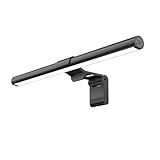

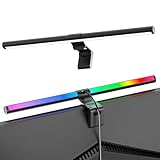


In a hurry? See the top-rated Monitor Light Bar for Gaming deals available right now:
🛒 Check Monitor Light Bar For Gaming Prices on Amazon →🛒 Best Price Today on Amazon
Prime members get fast, free shipping on everything above, plus member-only deals. New members get a 30-day free trial — cancel anytime.
Start 30-Day Prime Free Trial →See Today’s Amazon DealsIntroduction
Late-night gaming sessions take a toll on your eyes. You are staring into a bright monitor in a dark room — the contrast is brutal, and after a few hours your eyes are dry, strained, and fatigued. Overhead lights and floor lamps make things worse by creating glare directly on your monitor panel, washing out colors and adding distracting reflections. This is the lighting problem that no gaming chair or mechanical keyboard can solve.
Monitor light bars are a purpose-built answer. Unlike desk lamps that scatter light in all directions, a monitor light bar sits on top of your display and projects light downward and forward — illuminating your keyboard and desk surface without throwing a single lumen onto your screen. The result is a balanced ambient environment where your eyes do not have to constantly adjust between an ultra-bright panel and pitch-black surroundings. Eye strain drops significantly, and your gaming session becomes noticeably more comfortable.
The market has matured fast. In 2026, you are choosing between polished products with dial controls, app integration, wireless remotes, and tunable color temperatures that shift from warm candlelight tones to crisp daylight white. This guide breaks down the five best monitor light bars for gaming this year, compares them head to head, and tells you exactly which one to buy based on your setup and budget.
Quick Comparison Table
| Product | Brightness | Color Temp Range | Control | Power | Price Range |
|---|---|---|---|---|---|
| BenQ ScreenBar Plus | 1,000 lux (50 cm) | 2,700K–6,500K | Wireless dial + touch | USB-A | $$$$ |
| BenQ ScreenBar | 1,000 lux (50 cm) | 2,700K–6,500K | Touch bar | USB-A | $$$ |
| Xiaomi Mi Monitor Light Bar | 600 lux (50 cm) | 2,700K–6,500K | Wireless remote | USB-A | $$ |
| Yeelight Monitor Light Bar Pro | 700 lux (50 cm) | 2,700K–6,500K | App + touch | USB-A | $$$ |
| Baseus Monitor Light Bar | 500 lux (50 cm) | 2,700K–6,500K | Touch + remote | USB-A | $ |
Top 5 Best Monitor Light Bars for Gaming in 2026
BenQ ScreenBar Plus
The BenQ ScreenBar Plus is the gold standard for monitor lighting, and nothing in 2026 has knocked it off the top spot. The key differentiator is the detachable wireless dial controller that sits on your desk — you adjust brightness and color temperature without reaching up to the bar itself. It uses an asymmetric optical design that guarantees zero screen glare, and the auto-dimming sensor reads ambient light levels and adjusts output automatically. The 50 cm light bar is built for monitors between 24 and 35 inches and the clamp accommodates curved panels up to 35 mm thickness.
Pros:
- Wireless desk dial is genuinely convenient during gaming sessions
- Auto-dimming works reliably — no manual adjustments mid-session
- Best-in-class build quality; premium aluminum housing
- Zero glare guarantee backed by solid engineering
Cons:
- Most expensive option in this roundup
- Dial controller takes up desk space
- Overkill for casual or budget setups
BenQ ScreenBar Plus
BenQ ScreenBar (Standard)
The BenQ ScreenBar strips away the wireless dial and delivers the same core optical technology at a lower price. Control is handled by a touch-sensitive bar integrated into the unit — you tap to toggle power, hold to adjust brightness, and swipe to shift color temperature. The auto-dimming sensor is included, the asymmetric lens design is identical, and the build quality is the same premium aluminum. If you do not need a desk dial, this is the smarter purchase.

Pros:
- Same optics and build quality as the ScreenBar Plus
- Auto-dimming sensor included
- More compact setup without the external controller
- Noticeably better value than the Plus
Cons:
- Reaching up to adjust during a game is mildly annoying
- No wireless or app control
- Touch bar can be tricky to locate without looking
Xiaomi Mi Computer Monitor Light Bar
The Xiaomi Mi Computer Monitor Light Bar punches well above its price point and has become the default recommendation for budget-conscious gamers who still want a quality experience. It ships with a small wireless remote that clips magnetically to the bar when not in use — a clever design that gives you remote convenience without the desk footprint of the BenQ dial. Brightness tops out lower than the BenQ options, and the auto-dimming function is absent, but the light output is smooth and uniform across the full 500 mm span. Color temperature range is identical to the premium options.
Pros:
- Excellent value — strong performance at roughly half the BenQ ScreenBar price
- Wireless remote is a genuine advantage at this price tier
- Magnetic remote storage is a thoughtful design detail
- Solid uniform illumination across the full bar length
Cons:
- No auto-dimming sensor
- Lower peak brightness than BenQ options
- Build quality is noticeably more plastic
Xiaomi Mi Computer Monitor Light Bar
Yeelight Monitor Light Bar Pro
The Yeelight Monitor Light Bar Pro targets gamers who want smart home integration alongside solid desk lighting. It connects to the Yeelight app via Bluetooth, letting you create schedules, sync lighting to time of day, and adjust settings from your phone without touching the bar. The touch controls on the unit are responsive, and the light output at 700 lux sits between the Xiaomi and BenQ options. Build quality is above average for the price tier, and the asymmetric optical design keeps glare off your panel.
Pros:

- App control and smart home integration via Yeelight/Mi Home
- Bluetooth connectivity is stable and low-latency
- Better build quality than Xiaomi at a moderate price increase
- Schedule and automation features useful for consistent desk routines
Cons:
- App dependency is a drawback if you dislike ecosystem lock-in
- Bluetooth can occasionally require re-pairing after updates
- No auto-dimming sensor in this price bracket
Yeelight Monitor Light Bar Pro
Baseus Monitor Light Bar
The Baseus Monitor Light Bar is the entry-level pick for gamers who want to solve the eye strain problem without spending much. Baseus has improved the build quality in its 2025–2026 revision — the clamp mechanism is more secure, and the light output is more uniform than earlier versions. Both touch controls and an included remote are in the box, which is generous at this price. Peak brightness is the lowest of the five, and the build material is plastic throughout, but the core function — projecting downward light without glare — is accomplished competently.
Pros:
- Lowest price in this roundup by a significant margin
- Both touch controls and remote included in the box
- Clamp design improved from earlier revisions — more stable
- Full color temperature range available despite budget positioning
Cons:
- Lowest peak brightness — not suitable for very bright rooms
- All-plastic construction feels budget-grade
- Light uniformity has minor hot spots toward bar ends
- No auto-dimming or smart features
Baseus Monitor Light Bar
How to Choose the Best Monitor Light Bar
Brightness and Lux
Lux is the measure of illuminance at a given distance — the industry standard comparison point is 50 cm from the bar. For most gaming desks, you want at least 500 lux at that distance to adequately light your keyboard and immediate workspace. The BenQ options hit 1,000 lux, which is more than sufficient even in partially lit rooms. If your room gets significant ambient light from windows or overheads, a higher lux rating means the bar stays useful during daylight hours.
Color Temperature Range
Color temperature determines the warmth or coolness of the light. A range from 2,700K to 6,500K gives you flexibility from warm amber — ideal for late-night gaming when you want to reduce blue light exposure — to cool white, which is sharper for daytime work and text-heavy productivity. All five products on this list cover that full range.

Control Method
Control method matters more than spec sheets suggest. A wireless dial or remote means you adjust lighting mid-game without breaking focus. Touch controls on the bar itself require reaching up and potentially disrupting your posture. Auto-dimming eliminates the need to adjust manually at all. For competitive gaming where every distraction costs, the BenQ ScreenBar Plus dial or the Xiaomi wireless remote are worth paying for.
Monitor Compatibility
Most light bars clamp to the back edge of your monitor’s top bezel. Key factors are monitor thickness and curve radius. Standard clamps handle flat monitors up to approximately 30 mm thick and curved monitors up to around 35 mm with the right adapter. BenQ explicitly supports up to 35 mm and certain curved panels. Check your monitor’s top bezel thickness and curve specification before purchasing a budget option.
Budget
Under $30 gets you the Baseus with functional but limited performance. $40–60 puts you in Xiaomi and Yeelight territory — solid middle-ground products with remote or app control. $80–100 is the BenQ ScreenBar standard. Above $130 is BenQ ScreenBar Plus territory, where you are paying primarily for the wireless dial convenience.
Final Verdict
For outright performance and the best day-to-day gaming experience, the BenQ ScreenBar Plus wins without qualification. The wireless dial is not a gimmick — it changes how you interact with your lighting, and the auto-dimming means the bar quietly adapts to your environment across a full gaming session.
For gamers who want BenQ optical quality without paying the Plus premium, the standard BenQ ScreenBar delivers identical light output and build quality at a lower price. The only concession is reaching up to touch-adjust rather than turning a desk dial — a trade-off worth $40–50 in savings for most people.
If budget is the deciding factor, buy the Xiaomi Mi Computer Monitor Light Bar. It covers the full color temperature range, ships with a wireless remote, and costs half what the standard BenQ ScreenBar costs. As a first monitor light bar that meaningfully reduces eye strain during gaming sessions, it does the job well.
Related Articles
Looking for more on this topic? Browse the hand-picked guides below — each one applies the same scoring rubric used in this review.
Frequently Asked Questions
What is the best gaming monitor light bar in 2026?
The best gaming monitor light bar depends on your budget and how you plan to use it. The options compared above are our top-rated picks based on real customer ratings, build quality, and overall value — start with the highest-rated model that fits your budget.
How much should I expect to spend on a gaming monitor light bar?
Prices vary by brand and features. Budget options cover the essentials, while mid-range and premium models add durability, performance, and extra features. Compare the prices in the list above to find the best value for your needs.
What should I look for when buying a gaming monitor light bar?
Focus on what matters most for your use case — build quality, compatibility, performance, warranty, and verified customer reviews. Every pick above is selected to balance these factors.
Are budget gaming monitor light bar options worth it?
Yes. For most people a well-reviewed budget or mid-range gaming monitor light bar delivers excellent value. You only need to spend more if you specifically require premium materials or top-tier performance.
How did we choose these gaming monitor light bar picks?
We compare current Amazon ratings, review counts, key features, and price to surface the options with the best real-world value. The list is refreshed as ratings and availability change.
















