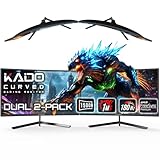
A dual curved monitor setup blends the immersion of curved panels with the productivity of two screens. The gentle wrap of each display eases eye movement across a wide workspace, and buying a matched two-pack guarantees identical color, size, and refresh rate, avoiding the mismatch that plagues piecemeal dual setups. For gamers and multitaskers alike, it is an efficient upgrade.
This review focuses on Kado’s dual curved monitor two-packs, which come in a range of sizes and refresh rates designed specifically for side-by-side use. Because these kits share a brand and curvature but differ in size and speed, the right choice depends on your desk and your workload.
As an Amazon Associate we earn from qualifying purchases at no extra cost to you.





🎮 Get More From Your Setup — Free
Prime Gaming gives you free PC games every month, in-game loot, and a free Twitch channel sub — plus fast free shipping on all the gear above. New members get a 30-day free trial.
Watch: Dual Monitor Curved — Video Review
Design & Build
The Kado two-packs are designed as coordinated pairs, all using a 1500R curve that wraps comfortably when the monitors are angled toward you. Sizes span 24-inch and 27-inch FHD models up to a 34-inch ultrawide, with built-in speakers and VESA compatibility for wall or arm mounting. Buying them as a matched set means bezels, stands, and panels are identical, producing a clean, symmetrical look. The build leans practical rather than premium, with sturdy stands and reasonable bezels, and the consistent 1500R curvature across the range keeps the visual experience uniform whichever size you pick.
Performance
Refresh rate is the main performance divider across these kits. The standard 24-inch and 27-inch FHD models run at 75Hz, which is smooth for office work, browsing, and media, and their 1080p resolution is easy to drive. The higher-end pairs, like the dual 24-inch 180Hz 1ms and the 34-inch 165Hz ultrawide, are aimed at gamers who want fast, fluid motion and lower input lag. The ultrawide two-pack at 2560×1080 gives each screen extra horizontal room for timelines and wide documents. Built-in speakers handle basic audio, and the IPS-like viewing on the angled panels keeps color consistent across the pair.
Pros & Cons
- Pro: Matched two-packs guarantee identical panels for a seamless dual setup.
- Pro: Consistent 1500R curve eases eye movement across both screens.
- Pro: Options span 75Hz productivity models to 180Hz gaming pairs.
- Pro: VESA support and built-in speakers add flexibility and convenience.
- Con: The 75Hz models are not ideal for fast competitive gaming.
- Con: Two curved monitors need a fairly wide desk.
- Con: Build quality is functional rather than premium.
Alternatives to Consider
If your desk cannot fit two panels, a single large ultrawide with picture-by-picture offers similar screen real estate in one unit. Within the Kado range, the 75Hz 24-inch or 27-inch two-packs are the value picks for office and general use, while the dual 24-inch 180Hz set is the choice for gamers who prioritize speed. Those wanting the widest workspace per screen should look at the 34-inch 165Hz ultrawide two-pack.
Related Guides
- CRUA 32" Curved Gaming Monitor, 4K UHD(3840 * 2160P) VA Screen, 1500R, 144Hz/160 Review (2026)
- Best FreeSync Gaming Monitor in 2026: Top 5 Picks for AMD GPU Owners
- Samsung Odyssey OLED G8 32 Inch 240Hz 2026
Frequently Asked Questions
Why buy a two-pack instead of two separate monitors?
A matched two-pack guarantees identical size, color, refresh rate, and bezels, producing a seamless dual setup. Buying separately risks subtle mismatches between panels.
Is 75Hz enough for a dual setup?
For productivity, browsing, and media, 75Hz is smooth and easy to drive. For fast-paced gaming, choose one of the 165Hz or 180Hz kits for noticeably better motion.
Do curved monitors work well side by side?
Yes, when angled toward you. The 1500R curve wraps each screen comfortably, and two angled curved panels create an enveloping, ergonomic workspace.
Can I wall-mount these monitors?
Yes. The Kado monitors include VESA compatibility, so you can use wall mounts or dual-monitor arms to free desk space and fine-tune positioning.
Verdict
For a clean, matched dual curved setup, the Kado two-packs deliver excellent value. The 27-inch 75Hz pair is the sweet spot for productivity, the dual 24-inch 180Hz set is the gamer’s pick, and the 34-inch ultrawide two-pack offers the most expansive workspace.