Stepping up to a larger display can dramatically enhance your computing experience, whether you’re deep in a gaming world, editing complex spreadsheets, or crafting your next masterpiece. But the sheer variety of 40-inch monitors can be overwhelming. You’re not just looking for size; you need the right resolution, refresh rate, panel type, and features to match your specific needs and budget.
This guide cuts through the noise, highlighting the best 40-inch computer monitors available today. We’ve analyzed key specifications and user feedback to bring you a curated selection, focusing on performance, value, and suitability for various tasks, from intense gaming sessions to productive work environments.
As an Amazon Associate we earn from qualifying purchases.





How to Choose a 40 Inch Computer Monitor
- Resolution: For a 40-inch monitor, aim for at least WQHD (3440 x 1440) for ultrawide formats or 4K UHD (3840 x 2160) for standard aspect ratios to ensure crisp visuals and ample screen real estate.
- Refresh Rate: Gamers should prioritize 120Hz or 144Hz for smooth motion. For general productivity and media consumption, 60Hz is often sufficient.
- Panel Type: IPS panels offer excellent color accuracy and wide viewing angles, ideal for creative work. VA panels provide deeper blacks and higher contrast, great for movies and gaming.
- Connectivity: Ensure the monitor has the ports you need, such as HDMI, DisplayPort, and USB Type-C for versatile connectivity and potential docking capabilities.
- Ergonomics & Features: Look for adjustable stands (tilt, height, swivel) for comfort. Features like HDR support and adaptive sync (FreeSync/G-Sync) can significantly enhance visual quality and gaming performance.
The Best 40 Inch Computer Monitors Reviewed
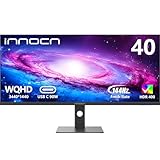
INNOCN 40C1R Ultrawide Monitor
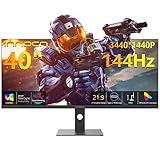
This ultrawide marvel delivers an immersive 21:9 aspect ratio with a sharp WQHD resolution and a fluid 144Hz refresh rate, making it a top choice for gaming and productivity alike. Its IPS panel boasts excellent color coverage and HDR400 support.
Samsung 43” M7 (M70F) Series Smart Monitor
The Samsung M7 offers a unique blend of a large 4K display and smart TV functionality, effectively doubling as a monitor and a media hub. Its versatility makes it ideal for users who want a single device for work, entertainment, and streaming.
Samsung 40” Odyssey G7 (G75F) Series Curved Gaming Monitor
For the dedicated gamer, the Odyssey G7’s curved design, 4K resolution, and high refresh rate provide an unparalleled immersive experience. Its rapid response times and adaptive sync technology ensure a competitive edge.
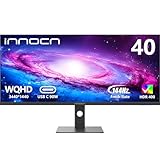
INNOCN 40″ WQHD 3440x1440P 144Hz Ultrawide Monitor
A strong contender in the ultrawide space, this INNOCN monitor matches its sibling’s impressive refresh rate and resolution, offering a vast canvas for multitasking and gaming without compromising on visual fluidity or detail.
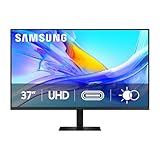
Samsung 37” ViewFinity S7 (S70D) 4K UHD Monitor
While slightly smaller, the ViewFinity S7 is a stellar option for those prioritizing color accuracy and high resolution. Its 4K UHD panel is perfect for content creators and professionals who demand precision in their visuals.
Frequently Asked Questions
What is the ideal resolution for a 40-inch monitor?
For a 40-inch monitor, WQHD (3440 x 1440) is excellent for ultrawide formats, while 4K UHD (3840 x 2160) is the standard for traditional aspect ratios, ensuring sharpness and detail.
Are 40-inch monitors good for gaming?
Yes, especially those with high refresh rates (120Hz+) and adaptive sync technologies. Ultrawide 40-inch monitors offer an immersive field of view, while 4K models provide stunning visual fidelity.
What is the difference between an ultrawide and a standard 40-inch monitor?
Ultrawide monitors have a 21:9 aspect ratio, offering more horizontal screen space for multitasking and immersive gaming. Standard monitors typically have a 16:9 aspect ratio.
Should I choose an IPS or VA panel for a 40-inch monitor?
IPS panels are generally preferred for color accuracy and wide viewing angles, making them ideal for creative professionals. VA panels offer deeper blacks and higher contrast, which can be advantageous for gaming and media consumption.
Final Thoughts
For an exceptional gaming and immersive productivity experience, the INNOCN 40C1R Ultrawide Monitor stands out. If smart TV features are a priority alongside a large display, the Samsung 43” M7 (M70F) Series Smart Monitor is a compelling choice. For pure gaming performance in a curved format, the Samsung 40” Odyssey G7 (G75F) Series Curved Gaming Monitor is hard to beat.