Your frame rate is fine in the benchmark, fine in the menu, and fine in every area you have already visited. Then you walk into a new room, a new effect fires for the first time, and the game freezes for a split second. That hitch has a name, and it is not your GPU being too slow. It is shader compilation stutter: the game is building graphics programs in the middle of play instead of before it. This guide works through the fixes in the order that solves the problem fastest, starting with patience and ending with hardware.
As an Amazon Associate, we earn from qualifying purchases.
Quick Answer
Shader compilation stutter happens when a game builds its shaders on the fly instead of ahead of time. Start by letting pre-compilation finish, then set the driver shader cache to unlimited, clear a corrupt cache, and lower settings that trigger fresh compiles. A fast SSD and a strong CPU shorten the hitches that remain.
Recognize the Symptom Before You Change Anything
Shader compilation stutter has a fingerprint that separates it from every other kind of hitching. It strikes the first time something appears: the first explosion, the first new enemy type, the first time you enter a district of the map. Play the same section a second time and the hitches are gone, because the compiled shaders are now sitting in a cache on your drive. Stutter that repeats in the exact same spot on every run is a different problem, usually streaming, thermals, or a genuine performance limit.
The reason this exists is a mismatch between consoles and PCs. A console has one fixed GPU, so developers ship shaders already compiled for it. A PC can contain thousands of GPU and driver combinations, so many games compile shaders at runtime, translating each effect into instructions your exact hardware understands. Modern APIs pushed more of that work onto the game itself, which is why some recent releases stutter badly in their opening hours and then smooth out.
Fix One: Let Pre-Compilation Actually Finish
Many current games compile shaders on a loading screen or in the main menu before you start playing. That progress bar is not decoration. Quitting out of it, alt-tabbing aggressively, or jumping into the game the moment the menu becomes clickable leaves part of the library unbuilt, and the game pays for it later with hitches at the worst moments.
When a game offers a shader pre-compilation step, let it run to completion, even when it takes several minutes. After a major game patch or a graphics driver update, expect to sit through it again, because both events can invalidate the existing cache. If a title recompiles shaders on every single launch instead of only after updates, that points to a cache problem, which is what the next two fixes address.
Fix Two: Stop the Driver From Throwing the Cache Away
Both major GPU drivers keep a shader cache, and both can be configured to discard it too aggressively. On NVIDIA hardware, open the NVIDIA Control Panel, go to Manage 3D Settings, and find Shader Cache Size. The driver default lets the cache be pruned, which means a game you return to after a few weeks may rebuild shaders you already paid for once. Setting the cache size to unlimited keeps compiled shaders on disk until you remove them yourself.
On AMD hardware, the equivalent control lives in Adrenalin under graphics settings, with a reset option covered in the next fix. The principle is the same on both platforms: disk space is cheap, recompilation is not, so give the cache room to persist.
Fix Three: Clear a Corrupt or Stale Cache
A cache can also become the problem. After a driver update, the stored shaders may no longer match the new driver, and some games respond by stuttering through compiles that should have been reused. Clearing the cache forces one clean rebuild, after which the hitches should fade again.
On Windows, the DirectX shader cache can be cleared through the Disk Cleanup tool by selecting the DirectX Shader Cache entry. NVIDIA users can also delete the contents of the DXCache and GLCache folders inside the NVIDIA folder in the local app data directory. AMD users can use the Reset Shader Cache option in Adrenalin. Steam adds its own layer: it downloads pre-built shader caches for many games, and toggling the shader pre-caching option in Steam settings off and back on can resolve cases where a downloaded cache is the broken piece. Expect one stuttery first session after any clear. That is the rebuild happening, and it should not repeat.
Fix Four: Reduce the Work That Triggers New Compiles
Every graphics setting that adds a new visual feature adds shaders that must be compiled the first time the feature appears. Ray tracing is the biggest single contributor, because it introduces entire families of shaders that rasterized rendering never uses. Texture quality, shadow detail, and volumetric effects add more. If a game stutters through its first hours, turning ray tracing off and dropping one tier on effects and shadows cuts the number of first-encounter compiles sharply.
The choice of graphics API matters in games that offer more than one. Some titles compile more aggressively and hitch more under DirectX 12, while their DirectX 11 path spreads the work out and feels smoother, or the reverse. If a game lets you switch, the alternative API is a legitimate fix rather than a downgrade. Capping the frame rate a little below your maximum also helps indirectly: it leaves CPU headroom free, and the CPU is what does the compiling.
Fix Five: Rule Out the CPU and Storage Bottleneck
Compilation is CPU work. When a shader compiles mid-game, a processor core spikes to full load for a few milliseconds, and if every core is already busy with the game itself, the hitch stretches. Background recording tools, overlays, and browsers competing for the same cores make it worse, so close them before blaming the game.
Storage speed is the second half. The game reads shader source data and writes compiled results constantly during a first playthrough, and a game installed on a mechanical hard drive or a nearly full, slow SSD pays for every one of those operations. Keeping the game and its caches on a fast NVMe drive, with reasonable free space left on it, shortens both the compiles and the streaming that often arrives in the same moment.
Hardware That Shortens the Hitches
None of the software fixes above cost anything, and they solve the problem completely for most games. Hardware enters the picture when the compiles themselves are slow: a stronger CPU chews through them faster, and a faster SSD feeds them and stores the results with less delay. These are the upgrades that map directly onto that work.
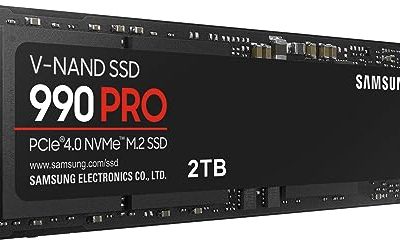
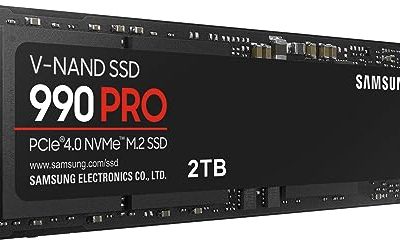
Samsung 990 PRO 2TB NVMe SSD

A flagship PCIe 4.0 drive for the game library, with sequential speeds that keep shader data and game assets moving during a first playthrough.
Specs
- Interface: PCIe 4.0 x4, NVMe 2.0
- Sequential read: up to 7,450 MB/s
- Sequential write: up to 6,900 MB/s
- Form factor: M.2 2280
WD Black SN850X 2TB NVMe SSD

A gaming-tuned PCIe 4.0 drive with a dedicated game mode, suited to large libraries where several games keep their shader caches on the same disk.
Specs
- Interface: PCIe 4.0 x4, NVMe
- Sequential read: up to 7,300 MB/s
- Sequential write: up to 6,600 MB/s
- Form factor: M.2 2280
SK hynix Platinum P41 2TB NVMe SSD

An efficient PCIe 4.0 drive that delivers near-flagship throughput, a good fit for laptops and small builds where heat limits sustained speeds.
Specs
- Interface: PCIe 4.0 x4, NVMe
- Sequential read: up to 7,000 MB/s
- Sequential write: up to 6,500 MB/s
- Form factor: M.2 2280
Crucial P3 Plus 2TB NVMe SSD

The budget route onto NVMe storage. It is slower than the drives above on paper and still far ahead of any mechanical drive for game and cache duty.
Specs
- Interface: PCIe 4.0 x4, NVMe
- Sequential read: up to 5,000 MB/s
- Sequential write: up to 4,200 MB/s
- Form factor: M.2 2280
AMD Ryzen 7 7800X3D Processor

Compilation is single-core-heavy CPU work, and this chip pairs strong per-core performance with a large stacked cache that also lifts gaming frame rates generally.
Specs
- Cores and threads: 8 cores, 16 threads
- Boost clock: up to 5.0 GHz
- L3 cache: 96 MB with 3D V-Cache
- Socket: AM5, 120 W TDP
How to Choose Your Fix Order
Work from free to costly, and stop when the hitches stop. Let pre-compilation finish and set the driver cache to unlimited first, because those two steps cost nothing and fix the majority of cases. Clear the caches next if the problem began right after a driver update or a big patch, since a stale cache is the usual trigger in that situation. Adjust settings and the API choice when one specific game is the problem while others run cleanly.
Choose hardware only when the pattern points at it: hitches paired with a pinned CPU core suggest the processor, while hitches paired with long loads and texture pop-in suggest storage. If every game on the machine hitches the same way even after the software steps, that pattern is the honest signal that an upgrade will do what settings cannot.
Who Should Skip This Guide
Skip this guide if your stutter repeats in the same place on every run, because that pattern points at streaming limits, thermals, or raw performance rather than compilation, and the fixes live elsewhere. Skip it if your games crash instead of hitching, since crashes are a stability problem with a different fix order. And skip the hardware section entirely if your games are older DirectX 11 titles with mature, fully cached shader libraries; their hitches almost never come from compilation.
Final Verdict
Shader compilation stutter feels like a hardware failure and usually is not one. It is a caching problem with a fix order: let the game build its shaders, stop the driver from discarding them, clear them once when they go stale, and trim the settings that generate the most new ones. Reach for a faster SSD or CPU only when the software steps expose them as the bottleneck, and the first-encounter hitches shrink from seconds of frustration to something you barely notice.
Frequently Asked Questions
Why does the stutter disappear when I replay the same level?
Because the shaders for everything in that level were compiled during the first run and stored in a cache. The second run loads the finished shaders instead of building them, so the hitches that marked each first appearance are gone.
Will clearing the shader cache make my games stutter more?
Only briefly. The first session after a clear rebuilds the cache, so expect the first-encounter hitches to return once. After that rebuild, the game should run at least as smoothly as before, and more smoothly if the old cache was corrupt or stale.
Does a faster SSD actually reduce shader compilation stutter?
It shortens it rather than eliminating it. Compilation itself is CPU work, but the game reads source data and writes compiled shaders throughout a first playthrough, so slow storage stretches each hitch. An NVMe drive keeps that side of the process from adding its own delay.
Why do console versions of the same game not stutter this way?
A console has one fixed hardware configuration, so the developer ships shaders already compiled for it inside the game. A PC release has to cover thousands of GPU and driver combinations, so many games compile shaders on your machine instead, either up front or as you play.
Product and ASIN Reference
| Product | ASIN |
|---|---|
| Samsung 990 PRO 2TB NVMe SSD | B0BHJJ9Y77 |
| WD Black SN850X 2TB NVMe SSD | B0B7CMZ3QH |
| SK hynix Platinum P41 2TB NVMe SSD | B09QVD9V7R |
| Crucial P3 Plus 2TB NVMe SSD | B0B25ML2FH |
| AMD Ryzen 7 7800X3D Processor | B0BTZB7F88 |