A game that pauses itself is more annoying than a game that crashes, because it keeps interrupting without ever fully breaking. The handheld still works, the save is still there, and yet every few minutes the action stops as if an invisible finger pressed pause. The good news is that a retro handheld only has a handful of ways to pause a game without being asked, and each one leaves a recognisable pattern behind. A pause menu that pops open points at the controls. A screen that sleeps points at a sensor or the battery. Read the pattern first and the fix is usually the cheap one.
As an Amazon Associate, we earn from qualifying purchases.
Quick Answer
Random pauses on a retro handheld usually come from one of four causes: a magnetic case tripping the sleep sensor, a sticking Start or Select button, a tired battery sagging under load, or a frontend hotkey mapped to pause. Match the fix to the pattern: if the screen sleeps, suspect magnets; if the pause menu opens, suspect the buttons.
First, Work Out Which Kind of Pause It Is
There are two different failures hiding behind the same complaint, and they need opposite fixes.
The pause menu opens by itself. The game is still running behind the menu, the screen stays lit, and pressing resume drops you straight back into play. Something is sending a pause input: a real button press you did not make, or a hotkey combination the frontend treats as pause. This is an input problem.
The screen goes dark or the device sleeps. There is no menu. You wake the handheld and the game is either still there or has dropped back to the frontend. Nothing pressed pause here; the device decided to sleep, or it lost clean power for a split second and the session stuttered. This is a sensor or power problem.
Timing narrows it further. Pauses that only happen inside one case, one bag, or one magnetic mount are sensor pauses until proven otherwise. Pauses that cluster near the end of a charge, when the battery indicator sits low, point at power. Pauses that happen in every game, at any charge level, but only after the device warms up in your hands tend to be a button membrane going soft and registering presses on its own. Pauses in exactly one emulator or one frontend are a settings problem, not hardware at all.
The Four Causes Behind Random Pauses
A magnetic case is tripping the sleep sensor
Many handhelds detect a closing lid or cover with a Hall effect sensor, a small magnetic switch inside the shell. A folio case with a magnetic clasp, a magnetic phone mount, or even a speaker magnet nearby can cross that sensor’s threshold and tell the device its lid just closed. The device sleeps, the game pauses, and nothing looks broken. The test costs nothing: play the same game for twenty minutes with the case removed and the handheld kept away from mounts and speakers. If the pauses stop, the case was the fault, and the permanent fix is a case without a magnetic clasp near the sensor, not a repair.
The Start or Select button is registering phantom presses
On most retro handhelds, Start, Select, or a Start-plus-Select combination opens the pause menu or the emulator menu. Those buttons sit on a rubber membrane with a conductive pad underneath, and grit, skin oil, or a worn pad can bridge the contact without a real press. Heat makes it worse, because a softened membrane flexes closer to the board as you grip the device. Blow out the button wells first. If phantom pauses continue, the membrane needs cleaning or reseating, which means opening the shell and lifting the board enough to wipe the contacts and the pad with a dry cloth or a small amount of isopropyl alcohol on a swab.
A tired battery is sagging under load
An aging lithium cell can show a healthy charge level and still dip its voltage sharply when the processor spikes, during a busy scene or a fast storage read. Some firmware answers that dip by sleeping the device or stalling the session, which feels exactly like a random pause. The giveaway is the pattern: pauses grow more frequent as the charge falls, and they vanish when you play while plugged into a wall charger. A USB-C power meter confirms it by showing the voltage wobble under load. A battery that sags is a battery at the end of its life; cleaning and settings changes will not fix it, and a visibly swollen cell should be replaced and retired, never punctured or squeezed back into place.
A hotkey or frontend setting is pausing the game
Frontends and emulators map pause to more than the pause button. Hotkey combos, a long-press on a shoulder button, an auto-pause toggle that fires when the frontend loses focus, or an aggressive screen timeout can all stop a game on a schedule that looks random. If the pauses happen in one app only, open that app’s input and hotkey settings, clear any combo that includes buttons you press constantly during play, and set the screen timeout to its longest value or off while gaming. No tools are needed for this cause, which is why it is worth ruling out before opening the device.
How to Choose Your Fix Path
Work from the pattern outward, and buy nothing until a free test has pointed at a cause. Start with the case test, because magnets are the most common culprit and the test takes one play session. Move to settings next if the problem lives in a single emulator. Choose cleaning tools when the pause menu itself opens uninvited, since that symptom is always an input fault: a blower for grit in the wells, a screwdriver set when the membrane itself needs attention. Choose power tools, a meter and a known-good charger, when pauses track the battery level or disappear on wall power.
The 5 Tools That Solve Most Random Pauses
MakerHawk USB-C Power Meter

This inline meter sits between the charger and the handheld and shows live voltage and current, which turns a vague suspicion about the battery into a reading. Watch it during the scenes that usually trigger a pause: a healthy setup holds steady, while a sagging battery or a weak charger lets the voltage dip at exactly the wrong moment. It also settles arguments about cables, since a cable that cannot carry the load shows up immediately in the numbers.
Specs
- Type: Inline USB-C power meter
- Measures: Voltage, current, power, capacity
- Connection: USB-C pass-through
- Display: Built-in readout screen
Anker 735 Charger (GaNPrime 65W)
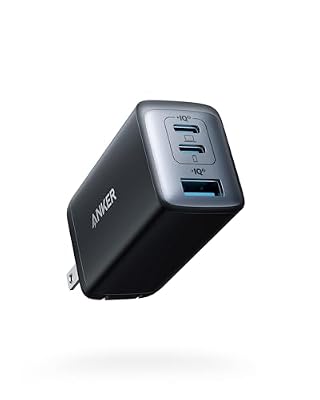
A known-good wall charger is the control in every power test. Playing while plugged into the 735 removes the battery from the equation: if the pauses stop on wall power, the battery or the old charger was at fault, and if they continue, you have ruled power out and can move on to buttons and sensors with confidence. Its extra ports also suit a desk setup with several handhelds.
Specs
- Brand: Anker
- Model: 735 Charger (GaNPrime)
- Output: 65W total
- Ports: 2 USB-C, 1 USB-A
Giottos Rocket Air Blaster

The first cleaning step needs no disassembly. A few firm squeezes of the Rocket Air around the Start and Select buttons drive out the grit and fibres that collect in the wells and bridge membrane contacts. The one-way intake keeps the blower from sucking dust in and firing it back out, and hand power means no propellant residue near the contacts. Use it before reaching for a screwdriver; a surprising share of phantom pauses end here.
Specs
- Brand: Giottos
- Type: Hand-powered air blower
- Valve: One-way intake
- Nozzle: Removable, directional
STREBITO 142-Piece Precision Screwdriver Set

When blowing out the wells is not enough, the membrane itself has to be cleaned, and that means opening the shell without chewing up small screws or cracking clips. This set covers the tiny Phillips, Torx, and tri-point drivers handheld shells use, and the included spudgers and pry tools let you lift a board and reseat a membrane without scratching traces. Work slowly, keep screws grouped by location, and stop if a battery underneath looks swollen.
Specs
- Brand: STREBITO
- Pieces: 142
- Includes: Precision drivers, spudgers, pry tools
- Case: Organised storage case
MetroVac DataVac Electric Duster

For a device that collects dust fast, or a whole shelf of handhelds to maintain, a corded electric duster replaces canned air entirely. The DataVac moves a steady stream of room air through button wells, vents, and speaker grilles, the exact places where debris migrates toward the sleep sensor and the membranes. It suits owners who clean several devices on a routine.
Specs
- Brand: MetroVac
- Type: Corded electric air duster
- Power: Mains electric motor
- Use: Dust removal without canned air
Who Should Skip the DIY Route
Skip opening the handheld if it is still under warranty, because breaking the shell seals can end coverage for a fault the maker would fix free. Skip the tools entirely if the pauses happen in exactly one emulator, since that pattern is a hotkey or timeout setting and no cleaning will change it. And stop at once if the battery is swollen, the shell is bulging, or the device gets hot in one spot while idle: that is a replacement and safe disposal job, not a cleaning job.
Frequently Asked Questions
Why does my handheld pause only when it is in its case?
Because the case is the trigger. Many handhelds sleep when a Hall effect sensor detects a magnet, which is how a closing cover normally puts them to sleep. A magnetic clasp or mount near that sensor crosses the same threshold mid-game. Play without the case for one session; if the pauses vanish, switch to a case without a magnetic clasp near the sensor area.
Can a dying battery really pause a game instead of shutting the device off?
Yes. A worn cell often holds its voltage at rest but dips under load spikes, and some firmware answers that dip by sleeping the device or stalling the session instead of cutting power completely. The pattern gives it away: pauses multiply as the charge drops and disappear on wall power. A USB-C power meter showing the dip confirms the diagnosis.
The pause menu opens by itself but the buttons feel fine. What is wrong?
Feeling fine and reading clean are different things. The conductive pad under Start or Select can bridge its contact through grit, oil, or heat-softened rubber without the button feeling any different from the outside. Blow out the wells first, then clean the membrane and contacts if the phantom presses continue.
Could a setting cause pauses that look random?
Yes, and it is the cheapest cause to rule out. Frontends map pause to hotkey combinations, long-presses, and focus-loss events, and a short screen timeout can sleep the display mid-game. If pauses happen in one emulator only, clear the hotkey combos you brush during play and lengthen the timeout before suspecting hardware.
Final Verdict
Random pauses are a pattern-recognition problem, not a parts problem. A pause menu that opens on its own means the buttons are talking when they should not be; a screen that sleeps means a magnet or a tired battery is making decisions for the device. Run the free tests in order, case off, settings checked, wall power connected, and only then reach for the blower, the meter, and the screwdrivers. Most handhelds that pause themselves are one small cause away from playing clean again.
Product and ASIN Reference
| Product | ASIN |
|---|---|
| MakerHawk USB-C Power Meter | B0D1QR72ZM |
| Anker 735 Charger (GaNPrime 65W) | B09C5RG6KV |
| Giottos Rocket Air Blaster | B00017LSPI |
| STREBITO 142-Piece Precision Screwdriver Set | B08SGLSZFJ |
| MetroVac DataVac Electric Duster | B001J4ZOAW |