Four voices in your channel are clean. The fifth sounds like a robot gargling gravel: metallic, warbling, and crunchy on every loud word. The part that makes this fault different from every other voice problem: the broken signal is not yours. The microphone, the settings, and possibly the fault itself sit on someone else’s desk, in someone else’s app. You cannot open their sound panel or run their tests. Everything you can do happens from the listener’s chair: compare what different ears hear, read the shape of the damage, and swap two recordings that prove which end owns the fault. Then you either relay a short, exact fix list, or fix your own receiving path and stop blaming their microphone.
As an Amazon Associate, we earn from qualifying purchases.
Quick Answer
When one teammate sounds robotic or distorted while everyone else is clear, compare ears before changing settings. If the whole squad hears the robot, the damage happened on their side. If only you hear it, your receiving path is mangling a healthy stream. Two recordings settle which end owns the fault.
The Listener’s Problem: A Signal You Cannot Touch
When your own microphone sounds robotic, you hold every card: record locally, match sample rates, strip processing layers one by one. None of that applies here. The voice arriving broken at your headset passed through their encoder, their upload, a server, and your download before you heard it. The robot was born at one of those stations, and from your chair most of them are invisible.
What you have instead of access is comparison: other listeners heard the same stream through different receiving paths, your teammate can produce evidence from inside their own chain, and the damage itself has a shape that points at its birthplace. The three tests below use those three assets.
Test One: Does the Whole Squad Hear the Robot, or Only You?
Ask the channel, mid-match, while the robot is talking: does everyone hear that, or just me? Each voice stream is encoded once at the sender and delivered separately to every listener. If the whole squad hears the same metallic warble, the corruption happened before or during encoding on your teammate’s side, and every receiving path is faithfully delivering damaged goods. Nothing on your PC can repair it.
If you alone hear the robot while the rest of the squad hears a normal human, the stream leaving their machine is healthy and something between the server and your eardrum is mangling your copy: your client’s handling of that one incoming stream, your download dropping the packets that carry their voice, or your playback chain resampling badly. Get that answer before anyone touches anything.
Test Two: Robotic or Distorted? Name the Damage Before Sending the Fix
Robotic and distorted are not two words for the same complaint, and you can tell them apart by ear. Robotic means digital damage: a metallic, warbling, underwater tone that comes and goes with their connection, their app, or their settings, worst on quiet, steady speech. Distorted means level damage: clean quiet words that crunch, crackle, and break up exactly when your teammate gets loud.
The distinction decides the message you send. Distortion that follows their volume was baked in before encoding, at their capsule or their gain, and no setting on any listener’s machine can un-clip a waveform that arrived clipped. The only fix lives on their desk: microphone closer, gain down. Robotic warble can be born at their encoder, in transit, or in your decoder, which is why Test One comes first. Describe the damage precisely: “you sound bad” sends a teammate into an hour of random slider changes, while “you crunch when you shout” sends them straight to their gain.
Test Three: Swap Two Recordings
Two recordings, one from each end, close the case. First, ask your teammate to record ten seconds of normal speech, including one loud sentence, in a local recorder on their own machine, and listen to it themselves. If that recording is robotic or crunchy, the fault sits inside their capture chain, before any app or network touches it, and the fix list is the capture list: sample rate matched everywhere, one processing layer at most, a clean USB path, gain set with the microphone close. That chain has its own guide on this site.
Second, record the call from your end. If their local recording is clean and the whole squad still hears a robot, the damage happens after their capture: their app’s suppression stack chewing on a healthy signal, their Bluetooth headset dropping into its narrow hands-free profile, or their upload shedding packets. If their recording is clean, the squad hears them fine, and your recording sounds clean on playback while the live call sounded robotic, the stream was healthy everywhere except your live decode path.
If Everyone Hears It: The Relay Script for Their End
When the verdict lands on their side, resist the urge to narrate a settings tour. Send a short ordered list, because a teammate mid-session will do three things, not thirteen. First, distortion means gain before everything: microphone a fist’s width from their mouth, input level down until their loudest callout stops crunching in a local recording. Second, robotic means one processing layer only: their app’s suppression or their headset suite’s, never both stacked, and any standalone voice filter closed. Third, match the sample rate between Windows and the app; on a Bluetooth headset, expect the hands-free profile to sound robotic by design, and treat a wired connection or separate microphone as the real cure. Fourth, if the robot appears only when their connection is busy, their upload is dropping voice packets, and a wired connection to the router proves it.
If Only You Hear It: Your Decode Path
A robot that only you can hear is your fault to fix, and the suspects differ from the capture chain: you are examining the receiving half of the line. Start by restarting the voice client; a client running for days can mishandle one incoming stream while handling the rest correctly. Then look at your download: voice packets arriving late or out of order are reconstructed by the decoder as monotone, warbling guesses, and a saturated connection or weak Wi-Fi link produces exactly that, often during busy fights.
Still robotic on a clean connection? Check your playback format. Your output device has a default format just like a microphone does, and a playback rate that fights the client’s stream can thin and metallicize incoming voices while game audio, on a different path, sounds normal. Set the output device to a standard rate, switch off spatial sound and playback enhancements for the test, and in the client itself, toggle hardware acceleration and try the alternate audio subsystem if it offers one.
How to Choose Gear for a Voice You Do Not Own
Most gear here belongs on your teammate’s desk, so treat this section as the list to send them once the tests name their chain as the fault, plus one piece for your own receiving end. Their side needs a microphone that hands the encoder a steady, close, already-quiet signal, because encoders and suppressors mangle weak, distant, gain-pumped voices far more readily than strong ones.
Samson Q2U

For the teammate whose voice crunches when they shout, a dynamic cardioid microphone is the strongest single change. It rejects the room, runs at low gain, and puts level in hardware where app sliders cannot re-decide it.
Specs
- Type: Dynamic, cardioid
- Connections: USB and XLR
- Monitoring: 3.5 mm headphone output
- Controls: Onboard gain and monitoring volume
Audio-Technica ATR2100x-USB

The same close-talk formula over USB-C, for the teammate whose robotic tone traces to a condenser headset mic processed to death. A tight pickup pattern and hardware gain give their encoder a calm signal that survives suppression intact.
Specs
- Type: Dynamic, cardioid
- Connections: USB-C and XLR
- Monitoring: 3.5 mm headphone output with volume control
- Digital output: Up to 24-bit, 192 kHz
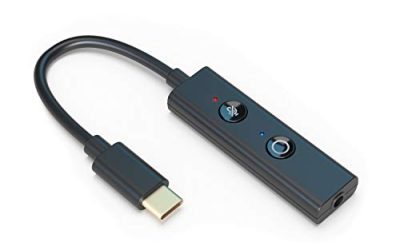
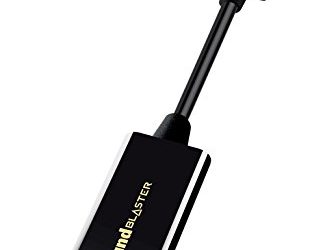
Creative Sound Blaster Play! 4

The two-way piece. On their desk it replaces a crackly onboard input with a clean USB path. On yours it gives incoming voice a fresh output path when your playback chain resamples badly.
Specs
- Type: USB-C audio adapter for headsets
- Playback: Up to 24-bit, 192 kHz
- Input: 4-pole 3.5 mm headset jack
- Controls: Mic mute button with LED indicator
TP-Link UB500 Bluetooth USB Adapter

For the teammate whose wireless headset keeps falling back to a crackly, narrow link because their PC’s Bluetooth radio is old or buried behind the case. A nano adapter in a front port stabilises the connection, though the hands-free profile stays narrow by design.
Specs
- Type: Bluetooth nano USB adapter
- Connection: USB, plug and play on Windows
- Design: Low profile, can stay in the port
- Use: Connects wireless headsets and earbuds to PC
InnoGear Boom Arm Microphone Stand

Distance is the hidden variable behind half the distortion here. A boom arm holds your teammate’s microphone at one close distance all session, so gain stays low, loud words stop clipping, and the encoder gets the level it was tuned for.
Specs
- Type: Adjustable scissor boom arm
- Mounting: Desk clamp
- Adapters: 3/8 inch to 5/8 inch included
- Fit: Standard microphone mounts and shock mounts
Who Should Skip This Guide
Skip this guide if the robotic or distorted voice is your own; your capture chain has its own guide on this site. Skip it if your teammate’s voice vanishes in chunks rather than arriving mangled, because missing audio is a gate and transport problem. Skip it if the returning sound is your own voice bouncing back at you, an acoustic loop on their desk. And skip it if everyone in the channel sounds robotic to you at once, which points at your playback chain or connection as a whole.
Frequently Asked Questions
Why does one teammate sound like a robot but everyone else is fine?
Because each voice is captured, encoded, and delivered on its own path, one player’s chain can mangle their stream while every other path stays healthy. Ask whether the whole squad hears it: shared damage means their side; damage only you hear means your receiving path.
Can my own headset make a teammate sound distorted?
It can make them sound robotic if your playback chain resamples their stream badly or your client decodes it poorly, and the everyone-or-only-you test exposes that. True clipping is different: if their loud words crunch for the whole squad, the waveform was clipped at their microphone before encoding, and no listener-side gear removes it.
Why do they sound fine in Discord but robotic in the game to me?
Each app decodes the stream with its own settings and audio path. If the squad hears them cleanly in both apps but you hear a robot in one, that app’s subsystem, hardware acceleration, or your connection during that game is the suspect. If everyone hears the robot in one app only, the fault is their sending app’s processing.
Should I just tell them to buy a better microphone?
Only after the recordings point at their capture chain. A robotic tone usually comes from processing, profiles, packets, or sample rates, and a new microphone inherits all four. Their local recording takes ten seconds and tells you whether hardware is on the list.
Final Verdict
A mangled voice you do not own is a comparison problem, not a settings problem. Ask who else hears it, name whether the damage is digital or clipped, and swap two recordings, and the fault assigns itself to their capture chain, their sending app, or your decode path. Fix the end the evidence names.
Product and ASIN Reference
| Product | ASIN |
|---|---|
| Samson Q2U USB and XLR Dynamic Microphone | B001R747SG |
| Audio-Technica ATR2100x-USB Microphone | B07ZPBFVKK |
| Creative Sound Blaster Play! 4 USB Audio Adapter | B08T9LM3LM |
| TP-Link UB500 Bluetooth USB Adapter | B09DMP6T22 |
| InnoGear Boom Arm Microphone Stand | B01L3LL95O |