A download that merely runs slowly is annoying. A download that keeps dropping to zero is a different problem entirely: the progress bar freezes, the time estimate balloons, and a two-hour install quietly turns into an overnight one. The good news is that a stall is a symptom with a shape, and the shape tells you which part of your system gave up. This guide teaches you to read that shape first, then apply the one fix that matches it, instead of randomly reinstalling launchers and rebooting routers.
As an Amazon Associate, we earn from qualifying purchases.
Quick Answer
Downloads drop to zero when one stage of the download pipeline stops: the drive cannot write and unpack as fast as data arrives, the network link blinks and the session resets, or the launcher gets stuck re-verifying the same chunk. Watch the graph for thirty seconds, match the pattern to the three stall types below, and fix that stage first.
A Download Is a Relay, Not a Pipe
Most people picture a download as water flowing through a pipe, so a flat line at zero feels like the water stopped. The better picture is a relay race with three runners. The network stage receives data from the server. The processor stage decompresses it, because modern games ship tightly packed to save bandwidth. The storage stage writes the unpacked files to your drive, often in thousands of small pieces scattered across the disk.
The baton only moves as fast as the slowest runner. When the storage runner falls behind, the launcher deliberately pauses the network runner rather than let data pile up in memory, and your graph drops to zero even though your internet is perfectly healthy. When the network runner drops the baton entirely, the launcher has to re-establish the session, and the graph sits at zero while it negotiates. When the processor stage chokes on a damaged chunk, the launcher throws the chunk away and asks for it again, which can loop for hours.
That is why the same flat line has three unrelated causes, and why the fix that cures one does nothing for the others. Everything below starts from identifying which runner stopped.
The Thirty-Second Pause Test
Before changing any setting, run this observation once. Start a download, let it stall, and then pause it manually for thirty seconds while watching Task Manager or your launcher’s disk graph. Then resume and watch what happens in the first minute.
If the disk stays busy during the pause and the download restarts fast, then decays into a jagged up-and-down pattern, the drive is the bottleneck and you have stall type one. If the disk sits idle during the pause and the download takes a long time to move at all after resuming, the connection or the session is the problem, which points to stall type two. If the download resumes, climbs briefly, and then freezes at exactly the same point or the same remaining size as before, the launcher is stuck on a specific chunk of data, which is stall type three.
Write down which pattern you saw. Every fix below is labeled by type, so you can skip straight to yours.
Stall One: The Sawtooth Means the Disk Is Drowning
The sawtooth is the most common stall pattern on fast connections. The graph rockets up, crashes to zero, rockets up again, and repeats. Each peak is the drive’s write cache absorbing data at full speed. Each crash is the cache running dry of room while the drive flushes it to actual storage at its much slower sustained rate. Budget solid-state drives without their own memory cache are famous for this, and mechanical hard drives do it from the first minute.
A nearly full drive makes it worse. Solid-state drives need free space to shuffle data around, and launchers need room to stage unpacked files next to the compressed ones. Keep a healthy margin of free space on the library drive, at least the size of the game you are installing plus a working buffer.
The fixes, in order: pause the download for a minute and let the drive finish flushing before resuming; move the game library to a faster internal solid-state drive if one exists; close other programs writing to the same disk, especially recording and backup tools; and, counterintuitively, cap the launcher’s download rate slightly below the drive’s sustained write speed. A capped, steady stream never overflows the cache, so the average speed ends up higher than the sawtooth’s peaks and crashes averaged together.
Stall Two: The Dead Stop Means the Link Blinked
The dead stop looks different: the graph runs cleanly, then falls to zero and stays there for minutes, sometimes until you pause and resume. The disk graph is idle the whole time. This is the signature of a connection that dropped just long enough for the download session to die. Launchers are patient with slow data but unforgiving of silent gaps.
On Wi-Fi, the usual culprits are a weak signal at the edge of coverage, an adapter that Windows puts to sleep to save power, and a router that reboots or reassigns addresses on a schedule. Disable power management for the network adapter in Device Manager, and test with the PC closer to the router or on the other band. A wired test, even with a temporary cable across the room, settles the question in one download: if the stalls vanish on a cable, the wireless link was the whole problem.
On a wired connection, suspect the cable itself. A damaged cable or a loose connector can make the network port repeatedly renegotiate its link speed, and every renegotiation is a dead stop. Swap the cable before you blame the provider. If stalls happen at the same time of day for every device in the house, the problem sits with the router or the line, and no PC setting will fix it.
Stall Three: The Loop Means the Launcher Is Re-Chewing the Same Chunk
The loop is the strangest pattern: the download freezes at the same remaining size, or the progress creeps backward as already-downloaded data gets downloaded again. One chunk of the game failed its integrity check, and the launcher keeps requesting, receiving, and rejecting it.
Corrupted cached data is the first suspect, so clear the launcher’s download cache from its settings and restart it. The second suspect is security software scanning every chunk as it lands; add the game library folder to your antivirus exclusion list and test again. The third suspect is memory or storage errors corrupting data in transit, which matters if loops follow you across different games and launchers. Running the launcher’s verify or repair function on the stuck title forces a clean comparison against the server’s copy and breaks the loop by replacing the bad region instead of endlessly re-requesting it.
How to Choose the Fix and the Gear That Ends the Stall
Software fixes come first, because two of the three stall types cost nothing to cure. Buy hardware only when the pattern points at a physical limit: a sawtooth that survives every setting change means the drive itself is the ceiling, and a dead stop that survives a cable swap means the wireless link or the port hardware is. Match the purchase to the stall type, not to the biggest headline speed.
Samsung 990 PRO 2TB NVMe SSD

The definitive cure for sawtooth stalls on a desktop with a free M.2 slot. Its onboard memory cache keeps write speeds steady through hundred-gigabyte installs instead of collapsing once a small cache fills.
Specs
- PCIe 4.0 x4, NVMe 2.0, M.2 2280; up to 7,450 MB/s read and 6,900 MB/s write; 2 GB LPDDR4 DRAM cache; 1,200 TBW endurance; five-year warranty.
WD Black SN850X 2TB NVMe SSD

A gaming-focused alternative with the same anti-stall ingredients: a proper DRAM cache, strong sustained writes, and a dashboard that reports drive health so you can spot a failing disk before it starts looping downloads.
Specs
- PCIe Gen4 x4, M.2 2280; up to 7,300 MB/s read and 6,600 MB/s write; DRAM cache; 1,200 TBW endurance; Game Mode 2.0 through the WD Black Dashboard.
DbillionDa Cat 8 Ethernet Cable, 6 ft

The cheapest dead-stop fix there is. Replacing a kinked or chewed cable removes the link renegotiations that silently kill download sessions, and the shielded build holds up in runs near power strips.
Specs
- Cat 8 rated up to 40 Gbps and 2000 MHz; 26 AWG shielded F/FTP pairs; gold-plated RJ45 connectors; weather-resistant PVC jacket for indoor or outdoor runs.
TP-Link Archer TX20U Plus USB Wi-Fi Adapter

For PCs stuck on Wi-Fi, the high-gain antennas and desktop stand let you place the receiver where the signal actually is, instead of behind a metal case under a desk where stalls are born.
Specs
- Wi-Fi 6 AX1800, 1201 Mbps on 5 GHz plus 574 Mbps on 2.4 GHz; two high-gain 5dBi antennas; USB 3.0 with a 1-meter desktop cable; WPA3 support; Windows 10 and 11.
TP-Link TL-SG105 5-Port Gigabit Switch
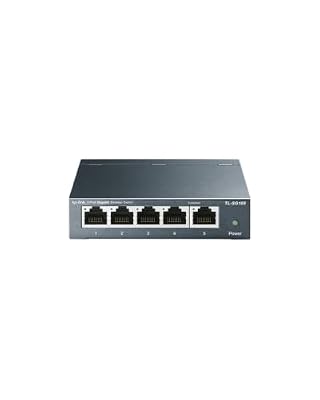
When the router is rooms away and its ports are full, a small switch near the desk turns one good wired run into stable ports for the PC and consoles, ending Wi-Fi stalls for every device at once.
Specs
- five 10/100/1000 Mbps auto-negotiation ports; unmanaged plug and play; fanless metal housing; IEEE 802.3x flow control; desktop or wall mounting.
Who Should Skip These Fixes
Skip this guide if your downloads never actually reach zero and simply run at a steady, disappointing speed, because that is a throughput problem with different causes and different fixes. Skip it if every device in the home stalls at the same moment, since that pattern belongs to the provider or the line coming into the house. And skip the hardware section entirely if the pause test showed a launcher loop; no drive or cable repairs a corrupted cache.
Frequently Asked Questions
Why does the download sit at zero while the disk shows full activity?
That is the decompression stage working, not a fault. The launcher already has the data and is busy unpacking and writing it. Leave it alone; pausing at this moment usually makes the total install slower, not faster.
Can a fast internet plan cause stalls on an old drive?
Yes, and it is one of the most common causes. The faster the data arrives, the faster a small write cache fills and the harder the graph crashes to zero. Capping the download rate below the drive’s sustained write speed keeps the stream steady.
Why do stalls always happen near the end of an install?
The final stage of most installs is heavy unpacking and file verification, which is disk and processor work with little network traffic. A graph near zero at the end usually means your drive is finishing the job, not that the connection died.
Does pausing and resuming actually help?
For dead stops, yes: resuming forces a fresh session and a new connection to the content server. For sawtooth stalls it only helps briefly, because the cache fills again within minutes. Use it as a diagnostic, not a cure.
Final Verdict
A download pinned at zero is not one problem but three wearing the same disguise. Read the graph before you change anything: a sawtooth indicts the drive, a dead stop indicts the link, and a loop indicts the launcher or its data. The pause test separates them in half a minute, the matching software fix is free, and hardware money should only flow toward the stage the pattern proved guilty. Fix the right runner, and the relay finishes the race.
Product and ASIN Reference
| Product | ASIN |
|---|---|
| Samsung 990 PRO 2TB NVMe SSD | B0BHJJ9Y77 |
| WD Black SN850X 2TB NVMe SSD | B0B7CMZ3QH |
| DbillionDa Cat 8 Ethernet Cable, 6 ft | B07QLXC6QR |
| TP-Link Archer TX20U Plus USB Wi-Fi Adapter | B0B5YPK9L1 |
| TP-Link TL-SG105 5-Port Gigabit Switch | B00A128S24 |