A gaming PC that roars during a loading screen is rarely broken. In most builds the fans are fine; default fan curves simply react to every brief temperature spike as if it were an emergency, so the system surges all evening. This guide covers that problem: normal fans, running normally, just louder than they need to be. If a fan rattles, grinds or clicks, that is a failing bearing or a cable touching a blade, and no setting here will fix it. What settings can fix is volume, and the order matters: find the loudest source first, then tune curves, then consider hardware.
As an Amazon Associate, we earn from qualifying purchases.
Quick Answer
Start by finding the loudest single fan, then fix its curve: most gaming PC noise comes from aggressive default fan curves, not bad hardware. Add hysteresis so fans stop surging, cap peak speeds you never need, use fan-stop modes at idle, and only replace fans after the free settings changes are done.
First, Find the Fan That Is Actually Loud
Do not start by replacing anything. Start by isolating. With the PC under a repeatable game load, open your motherboard or GPU control software and, one group at a time, briefly slow each set of fans: case fans, CPU cooler fan, GPU fans. The group whose slowdown changes the sound the most is your target. Often it is one exhaust fan against a restrictive grille, or a GPU fan that jumps to a high duty cycle at 60 degrees.
Also identify the type of noise. Air noise is a smooth whoosh that scales with speed. Turbulence noise is a harsher tone from an intake fan sitting directly behind a dense filter or drive cage. Vibration is a hum that changes when you press a fingertip against the case panel. Each type has a different fix: a quieter fan behind the same blocked grille makes almost the same turbulence noise as the loud one it replaced.
Fix the Curve Before the Hardware
The single biggest noise reduction is a calmer fan curve, and it is free. Three changes do most of the work.
First, flatten the middle. Default curves often reach near-maximum speed at temperatures a gaming load hits constantly. Move the steep part of the curve to a temperature your system only reaches in the worst moments, and let the fans sit at a moderate, steady speed through normal play, rather than surging.
Second, add hysteresis, sometimes labelled fan step-up and step-down time. Without it, a CPU bouncing between 59 and 61 degrees makes its fan bounce with it, several times a minute. A step-up delay of a few seconds ignores brief spikes from shader compilation or loading, and a longer step-down delay stops the fan dropping and climbing repeatedly, removing the pulsing quality that makes a PC feel loud.
Third, cap the top end honestly. Many case fans gain very little airflow between a high duty cycle and full speed, but a lot of noise. Capping them where temperatures stop improving usually costs one or two degrees and buys a clearly quieter system.
Fan-Stop Modes and the Idle Problem
Most modern graphics cards stop their fans entirely below a temperature threshold, and many power supplies do the same. Extend that idea where your hardware allows it: a fan-stop setting on case fans means a PC that is silent while browsing or watching video. Two cautions apply. The stop threshold must sit below the temperature your case reaches at idle in a warm room, or the fans will start and stop in a loop, which is more annoying than a slow constant spin. And a stopped intake with a spinning exhaust can pull dust through unfiltered gaps, so keep a slow intake running if your case lacks filters on every opening.
The power supply fan is the one fan you cannot control; if it is the loudest source, check its intake is not blocked, and accept that an undersized or ageing unit works harder.
PWM Versus DC Control
How a fan is controlled decides how low it can go. A 4-pin PWM fan receives a constant 12 volts and a control signal, and most can run stably down to a low duty cycle, some stopping entirely at zero duty. A 3-pin DC fan is controlled by lowering its voltage, and below roughly 5 volts many stall, which limits the quiet end of the curve and can cause stall-and-restart cycling at low settings.
In the BIOS or UEFI, each header must be set to the mode matching the fan plugged into it. A PWM fan on a header left in DC mode, or the reverse, often runs at full speed or behaves erratically, and this mis-set header is a surprisingly common cause of a PC that is loud for no obvious reason. Also check which sensor each curve follows: a curve tied to a spiky CPU sensor surges constantly.
Placement, Vibration and the Airflow Path
Where the PC sits changes how loud it sounds. A case on a desk reflects noise straight at you and turns the desktop into a sounding board; the same PC on the floor or a stand feels quieter. Rubber mounts or silicone pins instead of hard screws stop vibration passing into thin steel panels, which often hum at one specific fan speed. If your build hums only at one RPM, that resonance is the cause, and decoupling the fan or nudging the curve so it does not rest at that speed removes it.
Airflow restrictions are the last physical factor. A fan pressed against a dense dust filter or a mostly solid front panel must spin faster for the same cooling, and faster is louder. Cleaning clogged filters is unglamorous but effective.
Gear That Helps When Settings Are Not Enough
If the free fixes are done and one fan is still the problem, these products address specific steps in this guide: two fans, a controller for headers with poor curve control, paste for a cooler that spins up because heat is not leaving the chip, and a meter to replace guesswork with a number.
Noctua NF-A12x25 PWM

The reference point for a quiet 120 mm case or heatsink fan: strong static pressure for its speed, so it holds airflow through filters and fins where cheaper fans must spin harder. A supplied Low-Noise Adaptor caps the top speed.
Specs
- Size: 120 x 120 x 25 mm, 4-pin PWM
- Speed range: 450 to 2,000 RPM, 1,700 RPM with the Low-Noise Adaptor
- Rated noise: 22.6 dB(A) at full speed, 18.8 dB(A) with the adaptor
- Airflow: 102.1 cubic metres per hour; static pressure 2.34 mm H2O
be quiet! Silent Wings 4 120mm PWM High-Speed

The pick for radiators and dense heatsinks, where pressure matters more than raw airflow. Its ceiling is high, so treat it as a fan you deliberately cap with a curve: at a capped speed it stays composed, and the pressure headroom means a cooling loop never needs it near maximum.
Specs
- Size: 120 x 120 x 25 mm, 4-pin PWM
- Speed: up to 2,500 RPM; rated noise 31.2 dB(A) at full speed
- Airflow: 76.7 CFM; static pressure 3.96 mm H2O
- Bearing: fluid-dynamic, 6-pole motor; anti-vibration mounting corners included
Noctua NA-FC1 Fan Controller
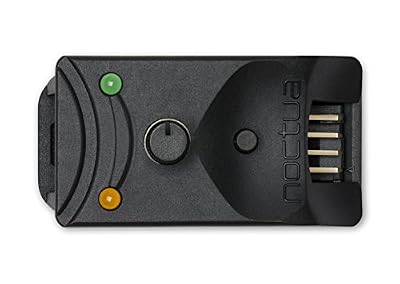
For builds whose motherboard headers offer poor curve control. The NA-FC1 sits between the header and up to three PWM fans, trims their speed manually, and can follow the motherboard signal at a reduced level instead of replacing it. A no-stop mode keeps fans above a safe minimum.
Specs
- Connector: 4-pin PWM, controls up to three fans via the included three-way splitter
- Modes: standalone manual control, or offset control combined with motherboard control
- Power: from the fan header, or from the PSU via an included SATA adaptor cable
Noctua NT-H1 Thermal Paste

A CPU cooler that ramps constantly is sometimes a contact problem: old, dried paste makes the chip run hotter, and the curve responds to the heat. Re-pasting will not silence a loud fan design, but it can lower the temperatures the curve reacts to.
Specs
- Type: hybrid thermal compound for CPU and GPU coolers
- Contents: 3.5 g syringe; no spreading or burn-in time required
BAFX Products BAFX3370 Decibel Meter

A basic sound level meter turns tuning into comparisons: measure, change one thing, measure again. It will not match laboratory accuracy, and it does not need to; it only needs to show whether a change helped.
Specs
- Measuring range: 30 to 130 dBA, A-weighted
- Display: backlit LCD with max hold; powered by a 9V battery
How to Choose
Choose your first move by symptom. If the PC surges and pulses, the fix is curve shape and hysteresis, and it costs nothing. If it is loud only at idle, look at fan-stop settings and minimum speeds. If one fan is loud at every speed, decouple it, check what it blows against, and only then replace it, matching the replacement to the job: pressure fans for radiators and heatsinks, airflow fans for open case positions. If the noise is the power supply, no fan purchase here applies; check its intake and load instead.
Who Should Skip This Guide
Skip it if your noise is a rattle, grind, click or buzz that started suddenly: those are mechanical faults, covered by diagnosis and replacement, not tuning. Skip it if your temperatures are already at the edge under load, because every quieting step here trades a little cooling headroom for volume, and a throttling system has none to trade. Skip the hardware section if you have not yet changed a single setting; in most builds the settings alone deliver most of the improvement.
Frequently Asked Questions
Will lowering fan speeds overheat my PC?
Not if you reshape the curve rather than slashing it. Keep full speed available at the top of the curve, flatten the middle, and watch temperatures under your usual game load afterwards. If load temperatures rise by a degree or two while noise drops clearly, the trade is sound; if they climb steeply, your case needs airflow, not a slower curve.
Why do my fans keep surging up and down?
Because the temperature sensor they follow is spiking, and the curve has no hysteresis. CPU temperatures jump several degrees in a second during loading screens and shader compilation. A step-up delay makes the fan wait until a spike proves sustained, and a step-down delay stops it dropping straight afterwards.
Is PWM or DC fan control quieter?
PWM, in most cases. A PWM fan can usually hold a lower stable minimum speed than a DC-controlled fan, which stalls when its voltage drops too far, and PWM avoids the stall-and-restart cycling that makes some DC fans tick at low settings. The bigger factor is matching header mode to fan type; a mis-set header can force full speed either way.
Should I set my fans to stop at idle?
Yes, if the start and stop thresholds have a gap between them and idle temperatures are stable. A stopped fan is silent, but one that starts and stops every minute is more distracting than one spinning slowly. Keep dust in mind if your case pulls air through unfiltered openings while intakes are stopped.
Final Verdict
Fan noise in a gaming PC is usually a settings problem wearing a hardware costume. Isolate the loudest fan, flatten its curve, add hysteresis so it stops chasing spikes, cap the speeds that buy noise instead of cooling, and sort out header modes and vibration before spending anything. When a fan genuinely has to go, replace it with one matched to its position. The trade-off is small: a degree or two for a system that no longer competes with the game.
Product and ASIN Reference
| Product | ASIN |
|---|---|
| Noctua NF-A12x25 PWM | B07C5VG64V |
| be quiet! Silent Wings 4 120mm PWM High-Speed (BL094) | B0B6WPZFBX |
| Noctua NA-FC1 Fan Controller | B072M2HKSN |
| Noctua NT-H1 Thermal Paste | B002CQU14A |
| BAFX Products BAFX3370 Decibel Meter | B00ECCZWWI |