In your text editor, your browser, and every chat app on the desktop, your typing is perfect: one press, one letter, every time. Then you launch a game, open its chat, and the doubles arrive: “gg” becomes “ggg”, callouts stutter, and a search term inside the game fills with letters you pressed once. Close the game and the fault closes with it. That boundary rules out the usual suspect. A worn, bouncing switch doubles everywhere, because the fault travels with the hardware; the general double-typing guide on this site owns that case. A fault that exists only while a game holds focus lives in the extra layers a game puts between your keys and its text fields.
As an Amazon Associate, we earn from qualifying purchases.
Quick Answer
When letters repeat only inside games, the switches are innocent and a game-focus layer is adding the second copy: the game reading two input feeds at once, a game-linked profile firing a repeat or turbo assignment, hair-trigger actuation settings that only your game profile uses, or an overlay hook echoing keystrokes. Run the split field test below to learn which layer you have, then remove only that one.
The Split Field Test: One Passage, Three Fields
Do not change a setting yet. Type the same short passage, with double-letter words such as “letter” and “mississippi”, in three places, and note where the repeats land.
Field one: a plain desktop editor. This is your ground truth, and by the terms of this guide it is clean. If it ever doubles, stop here: that is switch chatter, and the general double-typing guide owns it.
Field two: the game’s chat or search field. Reproduce the fault where it lives. Count whether every letter doubles evenly, or only some keys, and whether the repeats come on quick taps or only when a key is held a moment too long.
Field three: the game’s keybind screen. Press the same letters as binds. If binds fire exactly once while chat text doubles, the press arrives once and the game’s text path adds the copy: Cause One or Cause Four. If binds also double-fire, the duplication happens before the game splits text from actions: Cause Two or Cause Three.
One more split decides the scope. Try a second game. Repeats in every game point at a shared layer: the vendor profile system, an overlay, or your actuation settings. Repeats in one game only point at that title’s own input handling.
Cause One: The Game Reads Two Input Feeds at Once
Desktop apps receive your typing through one well-worn path, and it delivers each press once. Games are different. A game can listen for keyboard input as raw device input for movement, and again as finished text for its chat field, and some engines and in-game browsers end up subscribed to both for the same field. The press arrives twice through two doors, and the chat field prints both copies. Movement binds stay clean because they read key state, held or not held, rather than counting events, which is why the test shows doubled text beside honest binds.
There is no switch to flip for this inside most games, so work around the layer. Test the same field in the game’s other display modes, since the chat layer often changes between fullscreen and borderless, and close launcher and overlay browsers that ride along with the game. If the doubling survives in one title only, it is that title’s bug: report it with your split field results, and use a desktop chat app for that game’s text until a patch lands.
Cause Two: A Game-Linked Profile Carries a Repeat or Turbo Assignment
Keyboard software from Razer, Corsair, Logitech, and SteelSeries can load a different profile the moment a game gains focus. Inside that profile, a letter key can carry more than its letter: a turbo or repeat assignment, or a macro recorded with a stray second press. On the desktop the default profile runs and typing is perfect; in the game the loaded profile adds the copy.
Open the vendor software while the game runs and check which profile it reports as active. Set one persistent profile for everything and retest in the game’s chat. If the repeats stop, the game-linked profile owns the fault. Audit it for turbo, repeat, and macro assignments on letter keys, and rebuild it from the default profile rather than editing around the damage. Run the same audit in any third-party remapper with game-specific rules.
Cause Three: Hair-Trigger Settings That Only Your Game Profile Uses
Many players keep two setups: a safe desktop profile and a game profile with shallow actuation and rapid trigger switched on, sometimes applied to the whole board. A rapid trigger reset point sits a hair above the actuation point, so a press that trembles, or a finger that eases off unevenly at the end of a tap, can cross the line twice and report two presses from one. Desktop typing never meets this because the desktop profile’s deeper actuation leaves a wide margin. The fingerprint is uneven repeats: some letters, on quick taps, more in heated moments than calm ones, and binds double-firing along with chat text.
Raise the actuation point in the game profile, or widen the rapid trigger reset distance, and retest the passage. If your board applies rapid trigger per key, confine it to the movement cluster and return the letter keys to a standard reset. If the repeats vanish, keep the deeper settings: the margin you added is the fix, and it costs nothing outside the game profile where it was missing.
Cause Four: The Game’s Own Repeat Handling in Text Fields
Games that draw their own text fields often implement held-key repeating themselves instead of inheriting the operating system’s behaviour. A press held a fraction too long can cross a short in-game repeat delay and add a second character, while the same press in a desktop field stays single because the desktop delay is longer. The fingerprint is repeats that arrive only on slightly-held keys, evenly across all letters, in one game’s fields.
Test it directly: tap the passage with deliberately short, staccato presses. If the doubles disappear, lengthen the repeat delay where the game exposes one, and check the operating system’s repeat delay as well, because some games read it as their starting value. The setting is the fix when the game offers it.
How to Choose a Keyboard That Keeps Game Layers Honest
If this fault class keeps returning, three traits matter. First, visible profile state: a board that names its active profile turns a silent game-profile misfire into something you see the moment the game loads. Second, onboard memory, so the mapping the board sends is stored in the board and no live software layer can rewrite it per game. Third, per-key actuation control, so rapid trigger can live on the movement cluster without putting the letter keys on a hair trigger.
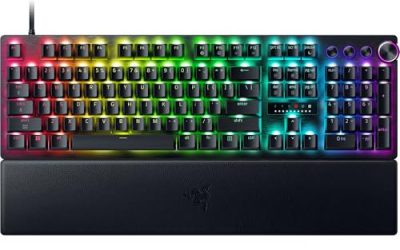
Razer Huntsman V3 Pro 8KHz

The audit-friendly flagship. Its analog optical switches cannot bounce, actuation adjusts per key, and Synapse lists game-linked profiles in one place while onboard memory stores the mapping in the board itself.
Specs
- Layout: Full-size, model RZ03-05530200-R3U1
- Switches: Analog optical, adjustable actuation 0.1 mm to 4.0 mm
- Polling rate: 8,000 Hz HyperPolling, wired
- Features: Rapid Trigger, Snap Tap priority input
- Tier: premium
SteelSeries Apex Pro Gen 3

The profile-visible option. The OLED display names the active profile as the game gains focus, and OmniPoint 3.0 switches let you deepen actuation on letter keys while movement keys stay shallow.
Specs
- Layout: Full-size, model 64660
- Switches: OmniPoint 3.0 HyperMagnetic, adjustable actuation 0.1 mm to 4.0 mm
- Features: Rapid Trigger, OLED Smart Display
- Connection: Wired USB
- Tier: premium
Corsair K70 RGB PRO
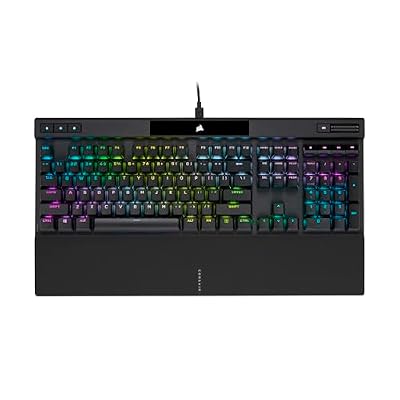
The hardware-playback board. iCUE profiles can be stored on the keyboard and played back with the software closed, removing the live profile layer from the game entirely.
Specs
- Layout: Full-size aluminum frame, model CH-9109410-NA
- Switches: Cherry MX Red linear, soldered
- Polling rate: 8,000 Hz with AXON hyper-processing, wired
- Keycaps: Double-shot PBT
- Tier: mid-range
Logitech G PRO X TKL Lightspeed

The tournament all-rounder. G Hub game profiles are easy to audit and lock to one persistent profile, and onboard memory mode lets the board carry that verified profile into every game unchanged.
Specs
- Layout: Tenkeyless, model 920-012127
- Switches: GX Brown tactile mechanical, soldered
- Connection: LIGHTSPEED 2.4 GHz wireless, Bluetooth, USB wired
- Battery life: Up to 50 hours of play
- Tier: mid-range
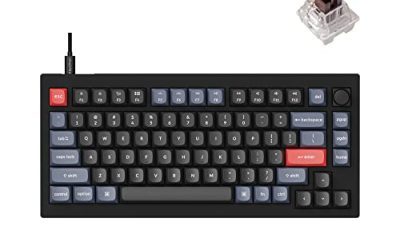
Keychron V1

The open-firmware answer. QMK and VIA put every layer and assignment where you can read them, adjustable debounce is built in, and with no vendor app required, there is no game-linked profile layer to go wrong.
Specs
- Layout: 75 percent, 82 keys with rotary knob
- Switches: Keychron K Pro Brown tactile, hot-swappable 3-pin and 5-pin sockets
- Firmware: QMK and VIA support with adjustable debounce
- Connection: USB-C wired, 1,000 Hz polling rate
- Tier: budget
Who Should Skip This Guide
Skip it if a plain desktop editor doubles too, because that is switch chatter and the general double-typing guide owns that ladder. Skip it if only one specific app doubles while every game types clean, which is the one-app doubling fault. Skip it if the game shows the wrong characters rather than extra copies of the right ones, a remap fault covered by the wrong-characters-in-games guide. Skip it if keys go missing in games instead of repeating, and if only the spacebar doubles, which has its own guide.
Frequently Asked Questions
Why do my letters double only in game chat and nowhere else?
Because the game receives your typing through layers your desktop apps never use. Its chat field may be subscribed to two input feeds at once, a game-linked profile may add a repeat assignment, or the field may run its own short repeat delay. The switches send one signal everywhere; only the game’s path turns it into two letters.
How do I tell a profile problem from a game bug?
Run the split field test in two games. Repeats in every game, with the same keys, point at the shared layers: the vendor profile system, an overlay, or your actuation settings. Repeats in one title only, surviving a persistent single profile, point at that game’s own input handling, and your test results are the evidence its developers need.
Can rapid trigger really type a letter twice?
Yes, inside the profile that enables it. A rapid trigger reset point sits just above the actuation point, so a trembling press or an uneven release can cross the line twice and report two presses. Deepening the actuation point or widening the reset distance in the game profile restores the margin your desktop profile already has.
Will a new keyboard fix repeats that happen only in games?
Only if it removes the layer causing them. A board with visible profile state, onboard memory, and per-key actuation control closes the profile and hair-trigger causes for good. If the split field test convicts one game’s text field, no keyboard fixes that title’s bug; the workaround and the bug report are the honest ending there.
Final Verdict
A keyboard that repeats characters only in games is telling the truth about the game’s input path, not about its switches. Run the split field test to learn whether text, binds, or both are doubled, and whether every game or one game is guilty. Then remove the layer that matches: work around a double-fed chat field, rebuild a game-linked profile carrying a repeat assignment, deepen a hair-trigger game profile, or lengthen a game’s own repeat delay. Most cases end with the keyboard you already own.
Product and ASIN Reference
| Product | ASIN |
|---|---|
| Razer Huntsman V3 Pro 8KHz (Full-Size) | B0FRPHGXJZ |
| SteelSeries Apex Pro Gen 3 (Full-Size) | B0D4RKYZJ5 |
| Corsair K70 RGB PRO (Cherry MX Red) | B09NCMHTSB |
| Logitech G PRO X TKL Lightspeed (GX Brown) | B0BQBSH6NQ |
| Keychron V1 Mechanical Keyboard (K Pro Brown) | B09NLWG6X1 |