One key goes silent. Every other key works, the game runs fine, and yet W, Space, or Enter stops registering, or registers only when you press it at an angle with real force. A single dead key feels like a dead keyboard, but the two failures have almost nothing in common. One key dying is a local fault with a short list of causes, most within reach of a keycap puller and five patient minutes. Work through the isolation steps below in order. Each one either fixes the key or removes a suspect, so by the end you know exactly which part failed and whether it is worth repairing.
As an Amazon Associate, we earn from qualifying purchases.
Quick Answer
A single dead key is usually debris under the cap, a worn switch, or a software remap, not a failing keyboard. Prove the fault follows the key by testing on a second port and PC, rule out Filter Keys and remapping layers, then clean the switch. On a hot-swappable board, swap the suspect switch into another socket to learn whether the switch or the board is at fault first.
First, Map the Failure Pattern
Before touching a tool, note exactly how the key fails, because the pattern points at the cause. A key that works when pressed hard or off-center has a mechanical contact problem: the switch is closing late or barely at all. A key dead at every pressure, on a board where its neighbors work, usually has a broken switch, a cracked solder joint, or debris blocking travel. A whole row or column dying together is a circuit board trace or controller fault, and no amount of cleaning fixes it. Keys that fail only inside one game are almost never hardware; that pattern belongs to the software step below.
Step 1: Rule Out the PC, the Port, and the Cable
Move the keyboard to a different USB port and retest the dead key. Then plug the board into a second computer or laptop if one is nearby. If the key works there, your keyboard is innocent: the original port, a hub in the chain, or the PC’s USB power settings were at fault. Remove any hub or extension cable for this test, since a marginal hub can starve a keyboard in ways that look exactly like a dying switch.
If the key stays dead on the second machine, the fault travels with the keyboard, and you can stop troubleshooting the PC. That one observation splits the problem cleanly in half before you open anything up.
Step 2: Rule Out Software — Remaps, Layers, and Filter Keys
Software can silence one key with surgical precision. Check three culprits before assuming hardware. First, remapping tools let you disable a key or assign it an empty function; gamers do this to the Windows key on purpose and sometimes to a neighbor by accident. Open your board’s software, find the key in the layout view, and reset it to its default. Second, check which layer is active. Many boards carry function layers where a key becomes a media control or a macro, and a stuck layer toggle makes the key look dead in normal typing. Third, look at Windows accessibility settings. Filter Keys ignores brief keystrokes, which can swallow a light press entirely, and it turns on by itself if the right Shift key is held down for several seconds. Turn it off and retest before going further.
Step 3: Clean Under the Keycap
If the fault is hardware and local, debris is the most common cause. Hair, dust, and crumbs work their way under a cap and either block the stem’s travel or foul the contact leaves inside the switch. Unplug the board. Pull the dead key’s cap straight up with a wire keycap puller, then inspect the switch housing. Blast the area with short bursts of compressed air, holding the can upright. If you can see grit around the stem, a soft brush clears it. Refit the cap, reconnect, and test.
For a mechanical switch that still misbehaves after an air clean, a drop of electrical contact cleaner worked into the switch with repeated presses can clear oxidation from the leaves. Use cleaner rated safe for plastics, use very little, and let it evaporate fully before reconnecting. Skip this on membrane boards, where there is no contact to clean.
Step 4: The Switch Swap Test — Prove Switch or Board
Hot-swappable boards offer the cleanest diagnostic in all of keyboard repair. Pull the dead key’s switch out with a switch puller, take a switch from a key you rarely use, such as Scroll Lock, and trade places. If the dead spot now works and the borrowed position is now silent, the switch itself is dead; replace just that switch. If the original position stays dead with a known-good switch in it, the fault is in the socket or the circuit board trace under it, and the switch was never the problem.
On a soldered board the same logic applies, but the test costs real work with an iron, so it is worth doing only if you already solder. For everyone else, a board-level fault means the honest fix is a replacement board, which is why the buying section weights hot-swap sockets so heavily.
Step 5: Membrane and Laptop Boards — The Honest Limits
Membrane keyboards, including most laptop keyboards, do not have individual switches. One key dying there usually means the conductive trace on the printed sheet has worn or cracked, and there is no per-key repair part. Cleaning under the cap occasionally revives a key blocked by grit, and that is worth two minutes. Beyond that, a dead laptop key means replacing the whole keyboard assembly, and a dead membrane desktop board is cheaper to replace than to chase.
How to Choose a Replacement That Survives a Dead Key
If the diagnosis ends at the circuit board, choose the next keyboard so a single switch can never end it again. The deciding feature is a hot-swappable PCB, which turns a dead switch into a two-minute part swap. Optical and Hall effect switches remove the metal contact leaves entirely, so the oxidation failure described above has nothing to attack. Beyond the switch system, look for PBT keycaps that tolerate repeated pulling and firmware remapping you can fully reset to defaults. The five boards below cover those priorities at different sizes and budgets.
Razer Huntsman V3 Pro 8KHz

Razer’s flagship uses analog optical switches, so actuation is read by light rather than by metal leaves touching. There is no contact to oxidize, and actuation point and Rapid Trigger reset are adjustable per key in software, which also means a marginal key can sometimes be rescued by lowering its actuation point before you replace anything.
Specs
- Switch type: Razer Analog Optical Switches Gen-2
- Actuation: adjustable actuation and Rapid Trigger mode
- Polling rate: true 8000 Hz wired polling
- Keycaps: doubleshot PBT
- Connectivity: wired USB, full-size layout with media controls
Corsair K70 RGB PRO
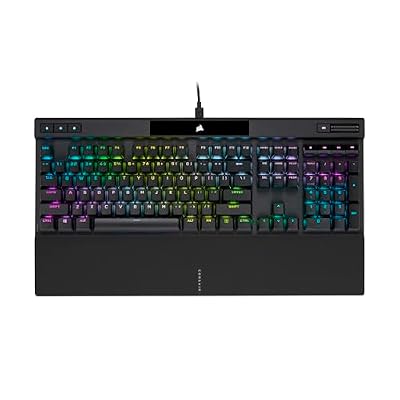
The K70 RGB PRO is the conservative pick: a full-size aluminum-frame board with mechanical switches, per-key RGB, and Corsair’s AXON processing for very fast scan rates. It is soldered rather than hot-swappable, so it suits players who accept that a dead switch is a warranty conversation, not a home repair.
Specs
- Switch type: Cherry MX mechanical or Corsair OPX optical-mechanical, depending on version
- Polling rate: up to 8000 Hz with AXON hyper-processing
- Frame: anodized aluminum
- Keycaps: PBT double-shot Pro keycap set
- Extras: detachable USB-C cable, dedicated media roller
SteelSeries Apex Pro Gen 3

The Apex Pro Gen 3 uses OmniPoint Adjustable HyperMagnetic switches, Hall effect sensors that read key position magnetically. Like optical switches, they never rely on metal contacts, so the classic worn-leaf failure does not apply. Adjustable actuation, Rapid Trigger, and a Protection Mode that reduces accidental presses on neighboring keys round out a board built around per-key control.
Specs
- Switch type: OmniPoint Adjustable HyperMagnetic (Hall effect)
- Actuation: adjustable from light touch to full press, with Rapid Trigger
- Display: OLED Smart Display with gifs and notifications
- Connectivity: wired, full-size with magnetic wrist rest
- Software: GG and Engine for per-key settings and full factory reset
Logitech G PRO X TKL Lightspeed

This is the wireless esports option, a tenkeyless board with LIGHTSPEED wireless, Bluetooth, and USB wired modes. The tri-mode connection also makes the step-one isolation test easy, since you can check the same key over three different links in a minute.
Specs
- Switch type: GX mechanical switches (tactile, linear, or clicky)
- Connectivity: LIGHTSPEED wireless, Bluetooth, and wired USB
- Layout: tenkeyless with detachable cable
- Keycaps: dual-shot PBT
- Extras: LIGHTSYNC RGB, carry case included
Keychron V1

The V1 is the budget lesson in repairability. It is fully hot-swappable, so any standard mechanical switch drops in without solder, and it supports QMK and VIA for remapping you can inspect and reset key by key. If a switch dies on this board in two years, the repair is one spare switch and a puller.
Specs
- Switch type: hot-swappable mechanical (Keychron or Gateron switches, version dependent)
- Layout: 75 percent, 84 keys, with optional knob version
- Firmware: QMK and VIA support for full remapping
- Keycaps: OSA PBT double-shot, non-shine-through
- Connectivity: wired USB-C
Who Should Skip the Repair Path
Skip straight to replacement if a full row or column is dead, if the board took a liquid spill across several keys, or if the keyboard is a membrane model with a trace fault. Also skip repair on a board still under warranty: opening the case can void coverage, and a single dead key is exactly what warranty service exists for. Everyone with one stubborn key on a mechanical board should run the steps first, because the fix is very often free.
Final Verdict
A dead key is a symptom, not a sentence. Map the pattern, prove whether the fault lives in the PC or the board, clear the software suspects, clean the switch, and use the swap test to name the guilty part. Most single-key failures end at cleaning or at one replacement switch. When the board itself is at fault, replace it with a hot-swappable, optical, or Hall effect model from the picks above.
Frequently Asked Questions
Why did only one key stop working while the rest are fine?
Because that switch carries its own contacts and its own wear. The most-used keys accumulate the most debris and oxidation, so they fail first and alone. A shared cause like a cable or controller fault almost always takes out groups of keys or the whole board instead.
Can a dead key be caused by software instead of hardware?
Yes. A remap set to an empty function, an active function layer, or Windows Filter Keys can each silence one key completely. The giveaway is that the key works on another PC, or works in the keyboard’s own testing software while staying dead in normal typing and games.
Is it worth soldering a replacement switch into a soldered board?
Only if you already own an iron and the board is valuable to you. The switch is a small part, but desoldering risks lifting the pad under it, which turns a one-key fault into a permanent one. On a hot-swappable board the same repair needs no iron and takes minutes.
How do I stop another key from dying later?
Keep grit out with a cover or a quick brush-down, pull caps once in a while to clear what collects underneath, and avoid eating over the board, since crumbs are the leading invader. Choosing optical or Hall effect switches for your next board removes contact wear from the list entirely.
Product and ASIN Reference
| Product | ASIN |
|---|---|
| Razer Huntsman V3 Pro 8KHz | B0FRPHGXJZ |
| Corsair K70 RGB PRO | B09NCMHTSB |
| SteelSeries Apex Pro Gen 3 | B0D4RKYZJ5 |
| Logitech G PRO X TKL Lightspeed | B0BQBSH6NQ |
| Keychron V1 | B09NLWG6X1 |