An external drive plugged into the front of the case vanishes halfway through a file copy, then reappears. A wireless dongle drops its connection every few minutes at the front jack, yet the same drive and the same dongle run for hours without a hiccup on the rear ports. When the fault follows the port and never the device, the drive is almost never the problem. The problem is the path: front ports are the only USB ports in the PC that do not connect straight to the motherboard, and everything about that detour can fail.
As an Amazon Associate, we earn from qualifying purchases.
Quick Answer
Front ports sit at the end of the longest, weakest USB path in the case: a thin internal cable, one shared header, and jacks built to a price. Rear ports are soldered to the board. If a drive drops only at the front, walk the path link by link: reseat the header plug, reroute the cable, then bypass or replace the weakest link.
How to Choose
The diagnostic frame for this fault is The Weakest Link Walk. A rear port is one hop from the chipset: socket, board trace, done. A front port is four hops. The signal leaves the motherboard through a wide internal header plug, travels the length of the case on a bundled internal cable, arrives at a small circuit board behind the front panel where both jacks share one feed, and only then reaches your drive. Every hop is a suspect, and the walk tests them in order instead of guessing.
Link one is signal quality. The internal cable on many cases is a long, thin, unshielded run, often draped across power supply cables and the back of the graphics card. USB 3 signaling is far less forgiving of that run than USB 2, which is why a front port may hold a keyboard all day yet drop a drive the moment a fast transfer starts. Link two is shared power. Both front jacks draw from the same header feed, so a spinning drive’s start-up surge, or a drive plus a charging phone on the neighbouring jack, can sag the rail enough to reset the connection. Link three is the header plug itself. The wide USB 3 plug is stiff, shallow, and famous for creeping half out of its socket when the cable is pulled tight around a drive cage; one tilted contact produces drops that come and go with case vibration. Link four is the front jack board, the cheapest part of most cases, where worn jack contacts lose their grip on the plug.
The walk itself takes minutes. Run the same drive, with the same cable, on a rear port under the same workload: that is your control. Move it to the front and repeat. If it drops, swap to the other front jack. Drops on both jacks point back down the shared path to the cable or header plug; a drop on one jack only convicts that jack. Power the case down, reseat the header plug until it sits flat, and reroute the internal cable away from power cables before you spend anything.
Choosing the fix is choosing which link to retire. If the walk convicts the cable run or the header, the honest repair is inside the case, and it costs nothing but time. If the jacks themselves are worn, or the case wiring is simply poor, bypassing the front panel entirely is the rational spend: feed a desktop hub from a healthy rear port, move a dropping dongle onto a quality adapter, or move the drive’s data inside the case onto an NVMe SSD and stop depending on an external connection at all. The five products below cover those three routes.
Anker A8313 USB-C Hub

The bypass route, and the first purchase to consider if the walk convicts the case wiring. Instead of fighting the front panel, feed this hub from a rear port that has already passed the control test and put your drive and dongles on the desk, on a short, healthy cable run. It suits a machine whose front jacks are worn or whose internal cable cannot be rerouted clear of interference, and it doubles as the permanent home for a capture dongle or headset receiver that needs to stay put.
Specs
- Model: Anker A8313
- Interface: USB-C host connection
- Role: rear-fed desktop hub for drives and dongles
- Best for: retiring a faulty front panel path
Tier: mid-range
TP-Link UB500 Bluetooth Adapter

Dongles suffer worst at the front panel, because a weak, noisy link that a drive tolerates as a brief pause reads to a wireless receiver as a dropped connection. If your Bluetooth devices stutter or vanish only while the receiver sits in a front jack, replacing the bargain receiver with the UB500 and seating it in a rear port or the hub above removes both suspects at once: the worn jack and the bargain radio. It is the cheapest single change in this guide and the right first step when the dropping device is a headset or controller receiver rather than storage.
Specs
- Model: TP-Link UB500
- Connection: USB nano adapter
- Wireless: Bluetooth 5.0
- Best for: dongles that drop on front jacks
Tier: budget
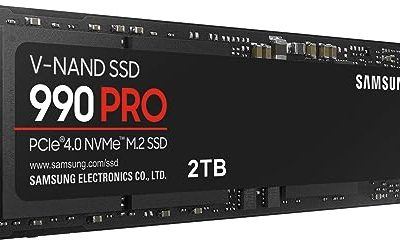
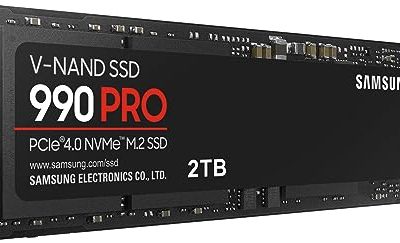
Samsung 990 PRO 1TB NVMe SSD

The relocation route at the premium end. If the device that keeps dropping is the external drive holding your game library or capture footage, the permanent fix is to stop streaming that data through the weakest cable in the case. A 990 PRO on the motherboard never negotiates with a front jack, never shares a header rail, and removes the dropout question entirely while also loading faster than any external drive. Choose it when the walk shows the front path is sound for light devices but hopeless under sustained transfer load.
Specs
- Capacity: 1TB
- Interface: PCIe 4.0 NVMe, M.2 2280
- Sequential read: up to 7,450 MB/s
- Best for: retiring an external game library drive
Tier: premium
WD Black SN850X 1TB NVMe SSD

The same relocation logic at a mid-range step. The SN850X gives a gaming library a permanent internal home with headroom to spare, and it is the natural pick when a second internal drive is the plan and the front panel will be left to keyboards and the occasional flash drive, the light work it can still do reliably. If the walk convicted only the power link, note the pattern this solves: an internal drive draws from the power supply’s drive cables, not from a shared USB header, so the start-up surge problem disappears with the move.
Specs
- Capacity: 1TB
- Interface: PCIe 4.0 NVMe, M.2 2280
- Sequential read: up to 7,300 MB/s
- Best for: a second internal library drive
Tier: mid-range
Crucial P3 Plus 1TB NVMe SSD

The budget relocation. The P3 Plus is the low-cost way to prove the concept: move the one drive that matters inside the case, leave the front ports to light-duty devices, and see whether anything you care about ever drops again. For bulk storage and older game libraries its speed is well beyond the external connection it replaces, and it converts an intermittent hardware hunt into a one-time install. Pick it when the walk points at the case path but the budget says the bypass hub and a new panel module can wait.
Specs
- Capacity: 1TB
- Interface: PCIe 4.0 NVMe, M.2 2280
- Sequential read: up to 5,000 MB/s
- Best for: affordable internal storage upgrade
Tier: budget
Who Should Skip This Guide
Skip this guide if your devices drop on the rear ports too, or drop no matter which port you use. That is a different fault, owned by the general guide to USB devices randomly disconnecting, where power settings, hubs, and drivers are the suspects. Skip it if a USB Wi-Fi adapter disappears from Device Manager entirely after sleep; that enumeration fault has its own guide. Skip it if the dead ports belong to your monitor’s built-in hub after waking; that is a monitor deep-sleep problem with its own fix path. And skip it if plugging in a USB device freezes or shuts down the whole PC, which points at a short or a protection trip rather than a weak signal path.
Frequently Asked Questions
Why do drives drop on front USB ports but work at the back?
Because the two port groups are built differently. Rear ports are soldered directly to the motherboard, while front ports reach the board through a long internal cable and a shared header plug. Signal loss on that cable run, a header plug that has crept loose, or a power sag shared between both front jacks will drop a drive under load while the rear ports, with none of those weak links, run the same drive perfectly.
Can one bad front port take down the other one?
Yes. Both front jacks are fed by the same header and usually sit on one small circuit board, so a failing cable, a loose header plug, or one device dragging the shared power rail down can reset both ports at once. That shared behaviour is diagnostic: drops on both front jacks, never at the rear, almost always mean the fault is in the shared path rather than in either jack.
Why does the drive drop only during large file transfers?
Sustained transfers are the worst case for a marginal path. The drive draws its highest current while writing continuously, and the port has to hold full USB 3 signaling without a pause. A cable run with interference, or a rail already sagging from a neighbouring device, may survive plugging in and browsing files yet fail minutes into a heavy copy, which is why the walk uses the same heavy workload on every port.
Is it worth replacing the case front panel module?
Only when the walk convicts the jacks themselves: one dead jack, a plug that no longer grips, visible damage. If both jacks drop together, the cable and header plug further down the path are the likelier suspects, and reseating or rerouting costs nothing. When the module is the fault and the case maker sells a replacement, it is a cheap repair; when it does not, a rear-fed hub achieves the same result from the desk.
Final Verdict
Front-only USB dropouts are a path problem, not a device problem, and The Weakest Link Walk finds the failing hop in one sitting: control on a rear port, test each front jack, reseat the header plug, reroute the cable. Fix the link the walk convicts and the front ports usually recover. When the case wiring itself is the weak link, stop fighting it: bypass the panel with a rear-fed hub, move a dropping dongle onto the UB500, or relocate the drive onto an internal NVMe SSD and close the question for good.
Product and ASIN Reference
| Product | ASIN |
|---|---|
| Anker A8313 USB-C Hub | B08CK9X9Z8 |
| TP-Link UB500 Bluetooth Adapter | B09DMP6T22 |
| Samsung 990 PRO 1TB NVMe SSD | B0BHJJ9Y77 |
| WD Black SN850X 1TB NVMe SSD | B0B7CMZ3QH |
| Crucial P3 Plus 1TB NVMe SSD | B0B25NXWC7 |