Dialogue sounds like it is coming through a pillow. Music has lost its sparkle, effects feel distant, and turning the volume up only makes everything louder without making it clearer. That dull, underwater quality is what players call a muffled speaker, and on a retro handheld it is usually good news: muffled means a blockage or a setting, not a dead driver. High frequencies are the first thing a clogged grille or a bass-heavy EQ swallows, and both are fixable at home with no parts. This guide works through the causes in order, from pocket lint to a failing driver.
As an Amazon Associate, we earn from qualifying purchases.
Quick Answer
Most muffled handheld speakers are blocked, not broken. Dust and lint in the grille mesh absorb the high frequencies that carry clarity, so clean the grille with a soft brush and an air blower, remove any case covering the speaker, and reset the EQ to flat. Test with headphones: if they sound clear, the audio path is fine and the fault sits at the grille or the driver.
Muffled Is Not Crackling: Name the Sound First
Two speaker complaints get confused constantly, and they have almost opposite causes. Crackling is distortion: pops, buzzes, and breakup, usually tied to the audio buffer or a loose connection. Muffled is a clarity problem: the sound is complete but dull, quiet in the details, and heavy in the low end, like listening through a wall. Crackling points at electronics. Muffled points at something physical sitting between the driver and your ear, or at a setting tilting the frequency balance.
One comparison splits the diagnosis in half before you clean anything. Plug in wired earbuds and play the same scene. If they sound clear, the amplifier and audio path are healthy, and the fault is downstream: the grille, whatever covers it, or the driver. If they sound just as dull, the problem is upstream in software — an EQ preset, a system sound mode, or the emulator’s audio settings — and no cleaning will change it. Note whether both speakers are equally dull: one muffled side means one blocked grille or one failing driver; both sides dull usually means a setting or a shared cause like moisture.
The Four Usual Causes, in Order of Likelihood
A packed grille. Handhelds live in pockets, bags, and couch cushions, and their speaker grilles are fine mesh or rows of small holes that collect lint, dust, and skin oil. The layer builds slowly, which is why muffled sound creeps in over months instead of arriving overnight. Rule this cause out first because it costs nothing to fix.
A covered speaker. Many handhelds put their speaker openings on the bottom edge or low on the front face, exactly where palms, a grip case, or a silicone sleeve rest during play. A skin or badly fitted screen protector can overlap a grille too. If the sound clears when you remove the case or shift your grip, you have found it.
Moisture. Sweat from long sessions, a humid room, or a small splash leaves the grille mesh and driver cone damp, and a damp driver sounds thick and quiet until it dries. Moisture muffling follows a specific event and fades over a day or two of dry air.
Software tilt. A warm or bass-boost EQ preset, a third-party EQ app, a night or dialogue mode, and some Android sound effects all cut treble by design. In emulators, a low output sample rate or an aggressive audio filter does the same. If the dullness started right after you changed a setting or installed an audio app, start here instead of with the brush.
Clean the Grille Without Damaging It
Power the handheld off first. Hold it with the grille facing down so anything you loosen falls out instead of settling deeper. Start with a dry, soft brush — a clean toothbrush or a small paintbrush — and sweep across the mesh with light strokes. Follow with a hand air blower, the squeeze-bulb type used for camera lenses, held a short distance away: short puffs lift dust out of the mesh without driving it inward. Painter’s tape pressed gently on the grille pulls out lint brushing misses.
Two warnings matter. Never push a pin, needle, or SIM tool into the grille holes; the mesh tears easily and the driver sits closer to the surface than you expect, so a puncture turns cleaning into a speaker replacement. Treat canned air with suspicion too: a close, sustained blast can force debris deeper. Short bursts from a distance are acceptable, but the hand blower is the safer default, which is why it leads the product list below. If moisture is your suspect, skip cleaning and let the handheld sit powered off in moving air, ideally with a silica gel pack nearby, until the sound clears.
The Software Half: EQ, Modes, and Emulator Settings
If the headphone test pointed upstream, work through the software chain before touching hardware again. Set every EQ you can find — system, music app, third-party sound apps — to flat or off, then retest with the same scene. Check the mono audio setting too: mono itself does not dull sound, but the accessibility modes bundled with it on some systems apply filtering that does. Turn off night mode, dynamic range compression, and hearing-protection volume processing for the test, because each reshapes the output.
Inside the emulator, confirm the audio output rate is set to the standard 48000 Hz and that no low-pass filter preset is active; some front ends ship with a retro filter that intentionally softens sound to imitate old televisions. If only one emulator sounds dull while others are clear, the cause is that emulator’s settings, full stop. Restore its audio section to defaults and change one option at a time.
The Tools and Replacements That Match Each Cause
Giottos Rocket Air Blaster

The first tool for the most common cause. This hand-squeezed rubber blower pushes a focused puff of air through a detachable nozzle — exactly the gentle pressure a speaker grille needs: enough to lift dust and lint out of the mesh, never enough to drive it deeper or damage the driver behind it. It also serves cartridge slots and shoulder buttons.
Specs
- Type: hand-powered air blower
- Body: natural rubber bulb
- Nozzle: detachable, angled tip
- Role: first-pass grille and port cleaning
MetroVac DataVac Electric Duster
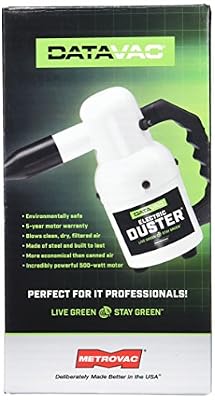
For debris a hand blower cannot clear — lint packed into seams around the speaker opening, dust caked along a case edge — this corded electric duster delivers a stronger, continuous stream. Use it in short bursts from a clear distance, grille facing down, and let the hand blower finish the delicate mesh itself.
Specs
- Type: corded electric air duster
- Power: mains-powered motor
- Use: short bursts from a distance
- Role: heavy debris around grille seams and case edges
STREBITO 142-Piece Precision Screwdriver Set

The kit for the last resort: opening the shell. When cleaning and settings change nothing and one speaker stays dull, the remaining checks — a loose speaker connector, debris trapped behind the grille, a damaged driver — all live inside the case. This set covers the small Phillips, Torx, and tri-point screws handheld shells use, plus spudgers for the clips.
Specs
- Pieces: 142 bits and tools
- Bits: Phillips, Torx, tri-point, Pentalobe, and more
- Extras: spudgers, pry tools, tweezers
- Role: opening the shell to inspect or reseat the speaker
AYN Thor Pro

The replacement for a driver that has genuinely failed. If one speaker stays muffled after cleaning, reseating, and a software reset, the driver itself is done, and on many handhelds a new machine beats a parts hunt. The Thor Pro is the premium end of the retro handheld market — Snapdragon 8 Gen 2, a 6.31-inch OLED main display, dual-screen clamshell — so it replaces the whole class of device, not just the speaker.
Specs
- Processor: Snapdragon 8 Gen 2
- Main display: 6.31-inch OLED
- Form: dual-screen clamshell
- Role: premium replacement for a failed unit
Anbernic RG406H

The mid-range replacement, and the sensible one if the failed handheld was a budget device. The RG406H runs Android 13 on a Unisoc T820 with a 4-inch IPS touch display, and covers the same emulation range as most machines it would replace. Treat it as the answer only after the free fixes have been honestly exhausted.
Specs
- Processor: Unisoc T820
- Display: 4-inch IPS touch, 960 x 720
- System: Android 13
- Role: mid-range replacement for a failed unit
How to Choose
Let the headphone test choose the path. Clear headphones and a dull speaker mean a physical cause: clean the grille with the blower, check for a case covering the openings, and let a damp machine dry before spending anything. Dull headphones mean software: flatten the EQ, disable sound modes, reset the emulator audio settings. Only a machine still muffled after both paths — especially on a single side — justifies opening the shell or pricing a replacement; the screwdriver kit is the gate to that decision, not the first step.
Who Should Skip This Fix List
Skip it if your handheld is under warranty and the dullness appeared without any spill or drop you know of; opening the shell can void coverage, and a driver that failed on its own is the manufacturer’s problem. Skip cleaning if the speaker went muffled right after a serious soaking — that machine needs drying and possibly professional help, not brushes. And skip the replacement handhelds if the headphone test shows dullness everywhere, because a new handheld with the same EQ settings sounds the same.
Frequently Asked Questions
Why does my handheld speaker sound like it is underwater?
That underwater quality is missing treble. The high frequencies are absorbed before they reach you, usually by lint and dust packed into the grille mesh, sometimes by a case covering the speaker or a bass-heavy EQ preset. Clean the grille and flatten the EQ first; those two steps cover most cases.
Can I clean the grille with a pin or canned air?
No pin, ever: the mesh tears and the driver sits just behind it, so a puncture creates the very failure you are trying to avoid. Canned air is a second choice behind a hand blower — keep the nozzle at a distance and fire short bursts so debris lifts out rather than driving in.
Why is only one of the two speakers muffled?
Because the cause is local to that side: one grille is blocked, a case or grip covers one opening, or one driver is failing. Remove the case and clean that grille; if it stays dull while the other side is clear, suspect the driver on that side.
When is a muffled speaker a repair case instead of a cleaning job?
When it survives cleaning, drying, and a full software reset unchanged — particularly if it is one-sided, followed a drop, or comes with buzzing at high volume. Those signs point to a damaged or displaced driver, which means opening the shell to reseat or replace the speaker module, or using the warranty if one is active.
Final Verdict
Muffled sound feels like failing hardware, but on a retro handheld it is usually housekeeping: a grille filtering dust, a case sitting over a speaker, or an EQ quietly cutting the treble. Run the headphone test, clean with air and a soft brush rather than anything sharp, flatten the software, and let moisture dry. The screwdriver and the replacement handhelds are for the small minority of cases that survive all of that — you will know yours is one of them because nothing free changed the sound at all.
Product and ASIN Reference
| Product | ASIN |
|---|---|
| Giottos Rocket Air Blaster | B00017LSPI |
| MetroVac DataVac Electric Duster | B001J4ZOAW |
| STREBITO 142-Piece Precision Screwdriver Set | B08SGLSZFJ |
| AYN Thor Pro | B0FV3HKG9P |
| Anbernic RG406H | B0DNF3LD4C |