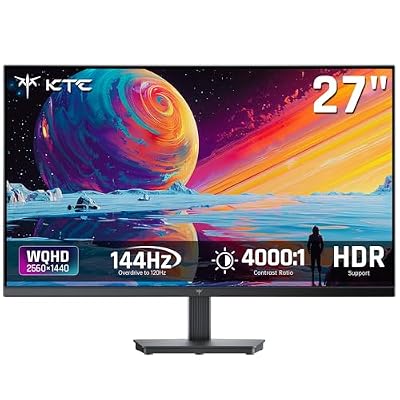
Gaming Monitor 27″ 1440p 144Hz 2026
A 27-inch 1440p monitor running at 144Hz is the sweet spot for most PC gamers in 2026. It delivers much sharper image detail than 1080p, keeps motion smooth at high frame rates, and does not demand the GPU horsepower that 4K asks for. If you are choosing a gaming monitor for a mid-range or upper mid-range build, this size and resolution combination is where most of the value sits. This guide explains which specs matter, how to weigh panel type against response time, and how to compare the options without getting lost in marketing numbers.
This is a buying guide for the product class, not a review of one model. The hero listing above was chosen from a search for 27-inch 1440p gaming monitors, and the alternatives came from the same search. It is the closest match we found, so check the card for the exact model, panel type and current price before you buy.

Why 27 Inches at 1440p Works for Gaming
At 27 inches, a 2560 x 1440 panel gives roughly 109 pixels per inch. That is dense enough that text and fine foliage look clean from a normal desk distance, yet the image is still large enough that you do not need to sit very close. Compared with a 24-inch 1080p screen, the difference in clarity is obvious in most games, especially in open worlds where distant detail matters.
The resolution also lines up well with current GPU tiers. A mid-range card can usually push 1440p at high settings with upscaling enabled, while 4K at the same frame rate demands a far more expensive graphics card. For most buyers, the extra money is better spent on a faster GPU for 1440p than on a 4K panel they cannot drive at 144 frames per second. The monitor size guide for gaming explains when 27 inches is the right call.
Specs That Matter Most on a 1440p 144Hz Monitor
Refresh Rate and Frame Rate Matching
A 144Hz panel can display up to 144 frames per second, but it only feels smooth if your system delivers frame rates close to that number. A monitor cannot fix a slow GPU. If your graphics card typically lands between 70 and 100 frames per second in the games you play, the extra refresh headroom still helps with tearing and consistency, but you will not see the full benefit. Pair the panel with adaptive sync, either FreeSync or G-Sync Compatible, so the display follows the frame rate rather than tearing. Our best 240Hz gaming monitor roundup covers the next step up if 144Hz is not enough.
Panel Type: IPS, VA and Fast IPS
Most 27-inch 1440p gaming monitors use either an IPS or a VA panel. IPS panels generally offer wider viewing angles and more consistent colour, which makes them a good all-round choice for games, photos and office work. VA panels usually deliver higher contrast and deeper blacks, which helps in dark scenes, but they can show more smearing in fast motion depending on the model. Fast IPS variants aim to combine colour accuracy with quicker response, and they are common in this price band.
Response Time and Overdrive
Response time is quoted in milliseconds, but the number depends on how the manufacturer measured it. Look for real-world reviews that describe motion clarity and overshoot rather than relying only on the headline figure. Overdrive settings can speed up pixel transitions, yet too much overdrive creates visible overshoot, which looks like bright halos behind moving objects. Start in the middle setting and adjust while you play a fast shooter or racing title.
HDR Claims
Many monitors advertise HDR support. Some budget panels accept an HDR signal without the brightness or local dimming needed to make it look convincing. If HDR matters to you, check the peak brightness, the number of dimming zones and whether the vendor’s HDR label is backed by an independent test. Otherwise, treat HDR as a bonus feature rather than a reason to pay more.
Comparison Table: 27-Inch 1440p 144Hz Options
The table groups options by the role they usually fill. Price ranges are broad, and specific figures change often, so check the live listing before you decide.
| Option type | Best for | Panel and features to check | Typical price range |
|---|---|---|---|
| Budget 27-inch 1440p 144Hz | First upgrade from 1080p | IPS or VA, adaptive sync, basic HDR | Check current price |
| Mainstream 1440p fast IPS | Mixed gaming and productivity | Fast IPS, good colour, overdrive tuning | Check current price |
| Competitive 1440p high refresh | Shooters and esports titles | High refresh headroom, low input lag, quick response | Check current price |
| Premium 1440p with HDR | Single-player and cinematic games | Higher peak brightness, local dimming, wide colour | Check current price |
Connectivity and GPU Pairing
Before buying, confirm that your graphics card has a port that supports 1440p at 144Hz. DisplayPort is the simplest route, since most modern cards handle 1440p at high refresh over it without trouble. HDMI is fine on newer cards with HDMI 2.1, but older HDMI 2.0 ports can limit refresh rate or colour depth at this resolution. Check both the monitor and the GPU spec sheets, not just the box art.
If you plan to use the screen for both work and play, a height-adjustable stand and a USB hub are useful extras. They cost little and make a daily-use display easier to live with. For a broader look at dual-screen layouts, our dual monitor gaming setup guide covers how to pair a main 1440p screen with a secondary panel.
Who Should Buy a 1440p 144Hz Monitor
Competitive Players
If you play fast shooters or competitive titles, a 27-inch 1440p panel with a high refresh rate gives you a clear advantage over 60Hz screens. Motion is smoother, and enemies are easier to track at range. Our guide to refresh rates for gaming explains where the returns start to flatten out, which helps you decide whether 144Hz is enough or whether 240Hz is worth the extra cost.
Single-Player and Mixed Use
For story games, open worlds and creative work, colour accuracy and panel quality usually matter more than the last few frames per second. A good IPS panel at 144Hz is an excellent all-rounder. If you want to explore that route in more depth, our best IPS gaming monitor roundup compares the panel category directly.
Setup and Calibration Tips
Many people never set the refresh rate to its full value. Windows sometimes starts at 60Hz, so open the display advanced settings and select 144Hz manually. Next, enable adaptive sync in your GPU control panel and in the monitor’s on-screen menu. Then adjust brightness and contrast to a comfortable level in a dim room rather than a bright showroom setting.
For resolution scaling, keep the native 2560 x 1440 setting for the sharpest text. If a game runs too slowly, try in-game upscaling before you lower the native resolution, since the image usually holds up better. Our guide to the best 1440p monitor for gaming covers more specialised setup questions, and the best GPU for 1440p gaming helps you match the screen to a card that can keep up.
Frequently Asked Questions
Is 27 inches too big for 1440p?
No. A 27-inch screen at 1440p has a pixel density that suits most desks and viewing distances. If you sit very close, a 24-inch panel may feel more comfortable, but the 27-inch size is the common default for good reason.
Do I need a high-end GPU for 144Hz at 1440p?
Not always. Many games reach high frame rates at 1440p on mid-range cards with sensible settings and upscaling. Competitive titles usually run faster than demanding single-player games, so the required GPU depends heavily on the games you play.
Is IPS or VA better for gaming?
Neither is universally better. IPS gives wider viewing angles and more consistent colour, while VA often delivers stronger contrast. Choose based on the games you play and how much you value colour accuracy compared with dark-scene contrast.
Should I pay extra for HDR on a 27-inch monitor?
Only if the model has real brightness and local dimming. Budget HDR labels often add little visible improvement, so judge HDR by independent reviews rather than the logo.
Final Recommendation
For most buyers in 2026, a 27-inch 1440p monitor at 144Hz with a fast IPS panel and working adaptive sync is the most sensible choice. It balances sharpness, smoothness and cost, and it pairs well with a mainstream GPU. Compare the hero listing and the alternatives on the cards, confirm the port version and panel type, and check the current price before you order. For the wider market, see the best gaming monitor 2026 roundup and the best budget gaming monitor guide. If you mostly play competitive shooters, prioritise refresh and response. If you mostly play single-player games, prioritise colour and contrast.