Gaming Headset Wireless 2026
A wireless gaming headset removes the cable that often tangles with your desk, chair and mouse cord. Modern models can offer clear audio, a usable microphone and battery life that lasts a full week of evening sessions. The trade-offs are cost, charging habits and connection type, since wireless performance depends on the technology behind it. This guide explains what to look for in a wireless gaming headset in 2026, how connection options differ, and how to compare the listed options by the role they play rather than by bold marketing claims.
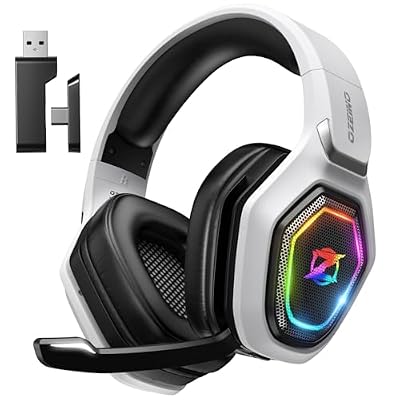
The hero listing above was picked from a search for wireless gaming headsets, and the alternatives came from the same search. It is the closest match we found, not a confirmed copy of a named model. Check the card for the exact connection type, battery rating and current price before you buy.

Why Choose a Wireless Gaming Headset?
The main benefit is freedom of movement. You can stand up, reach for a drink or move around the room without a cable pulling on the headset. Wireless headsets also suit consoles, PCs and mobile devices if the model supports more than one connection. For players who switch between a desk and a sofa, that flexibility matters more than any single spec.
The downside is that every wireless link adds complexity. Batteries need charging, connections can drop in crowded wireless environments, and some models add latency that matters in competitive play. The right choice depends on how you use the headset and how much you care about the last few milliseconds of audio delay.
Key Specs for a Wireless Gaming Headset
Connection Type: 2.4GHz Dongle Versus Bluetooth
Most gaming-focused wireless headsets use a 2.4GHz USB dongle. That connection is designed for low-latency audio and generally suits competitive games better than Bluetooth. Bluetooth is convenient for phones and general listening, but it typically adds more delay and may not support a microphone at the same quality. Some headsets offer both, which can be useful if you want to use one headset across devices. Check which connection is used for the microphone as well as the audio.
Battery Life and Charging
Battery ratings vary widely, and manufacturers often quote figures under different test conditions. Read reviews that report real-world battery life at typical volume levels. Also check how the headset charges. A USB-C port is convenient, and some models keep working while plugged in, which helps during long sessions. A headset that runs out in the middle of a match is more frustrating than one with a slightly shorter quoted life.
Microphone Quality
Gaming headsets often disappoint on microphone quality. Look for a detachable or boom microphone with noise reduction, and read recordings or reviews that describe how the mic sounds to teammates. If you stream or record voice chat, a dedicated microphone may serve you better, and our best gaming mic for PC guide covers that route.
Comfort, Weight and Clamp
Comfort decides whether you keep wearing the headset. Ear cushions, headband padding and weight all matter, especially over several hours. Glasses wearers and people with larger heads should check the clamp force and cushion depth. Materials such as memory foam and breathable fabric can make a noticeable difference.
Sound Profile and Software
Most gaming headsets offer a tuned sound profile, and some include virtual surround features. Surround can help with directional cues in shooters, but the effect varies by person. Companion software often provides an equaliser, microphone settings and firmware updates. Read about the software before buying, since some apps are heavy or require accounts.
Comparison Table: Wireless Gaming Headset Options
The table compares headset roles, not exact models. Price ranges are broad, so the live listing is the final authority on cost and features.
| Option type | Best for | Key features to check | Typical price range |
|---|---|---|---|
| Budget wireless 2.4GHz headset | Casual PC and console play | USB dongle, basic mic, lightweight frame | Check current price |
| Mid-range multi-platform headset | PC, console and mobile use | 2.4GHz plus Bluetooth, detachable mic, long battery | Check current price |
| Premium wireless gaming headset | Competitive and streaming players | Low-latency wireless, strong mic, comfort padding | Check current price |
| Wireless headset with surround features | Shooter players who value directional audio | Virtual surround software, EQ, firmware updates | Check current price |
Which Wireless Headset Suits Your Setup?
If you play mainly on PC, a headset with a 2.4GHz dongle and a good microphone gives you the most consistent experience. If you switch between PC and console, check that the headset supports both platforms and that the microphone works on each. If you mostly play on a phone or tablet, Bluetooth support can be convenient, but expect more latency.
Budget buyers should compare the mid-range choices closely, since the value sits there for most people. Our best budget gaming headset roundup shows where the price-to-feature balance falls, and the best wireless gaming headsets 2026 guide compares the wider market. For a general pick across categories, see the best gaming headset 2026 roundup.
Wireless Versus Wired: A Practical Choice
Wired headsets avoid battery worries and usually cost less for the same audio quality. They also avoid wireless interference and never need charging. The trade-off is cable management. If your setup is tidy and you rarely move, a wired model can be the better buy. Our best wired gaming headsets guide covers the alternative route in detail, and the best wireless headset for gaming roundup explains what separates the wireless options.
Setup and Maintenance Tips
Place the USB dongle on a direct port or a short extension, not behind metal or a crowded hub. Update firmware when available, and set the microphone input level in your operating system so voice chat is clear without clipping. Charge the battery fully before a long session, and store the headset in a cool, dry place when it is not in use. Clean the ear cushions regularly to keep them comfortable.
If you use a headset in a shared room, check the microphone pickup pattern and set the sidetone level so you do not talk too loudly. Small adjustments often improve voice chat more than buying a new headset.
Frequently Asked Questions
Is a wireless gaming headset as good as wired?
Modern 2.4GHz wireless headsets perform very well for most players. The main differences are battery management and the small latency gap, which matters mostly in fast competitive play.
Does Bluetooth work for gaming?
It works for casual play, but it usually adds more delay than a dedicated 2.4GHz connection. Competitive players generally prefer the dongle.
How long should the battery last?
Look for real-world reviews rather than only the quoted figure. A battery that lasts several evening sessions suits most players, and quick charging helps if you forget to top up.
Can I use a wireless headset with a console?
Many models support consoles through a dongle or a dedicated adapter. Check the platform list on the card before buying, since microphone support varies. Console-focused buyers can also look at the best PS5 gaming headset and best Xbox gaming headset guides.
Final Recommendation
For most gamers in 2026, a wireless headset with a 2.4GHz dongle, a usable detachable microphone and comfortable padding is the best choice. Check real-world battery reviews, confirm which platforms the microphone supports, and decide whether surround features matter to you. Compare the hero listing and the alternatives on their cards, read recent reviews and check the current price before you order.