Gaming Keyboard Mechanical RGB 2026
A mechanical RGB gaming keyboard combines individually switched keys, customisable lighting and a layout that suits how you play. Compared with membrane boards, mechanical switches give clearer actuation, more consistent feel and far better durability. RGB lighting adds visual feedback and a personal touch to the desk, though it is the least important factor for performance. This guide explains how to choose the right switch type, layout, build quality and software support, and how to compare options by the role they play rather than by marketing claims.
The hero listing above was picked from a search for mechanical RGB gaming keyboards, and the alternatives came from the same search. It is the closest match we found, not a confirmed copy of a named model. Check the card for the exact switch type, layout and current price before you buy.
What Makes a Keyboard Mechanical
Each key on a mechanical keyboard sits on its own switch, and the switch registers the press mechanically rather than through a rubber dome. That design delivers a more defined feel and usually a longer lifespan, since switches are often rated for tens of millions of keypresses. Most buyers notice the difference immediately when they type or move through menus. The choice of switch then becomes the main decision.
Key Specs Worth Comparing
Switch Type: Linear, Tactile and Clicky
Linear switches press smoothly without a bump, which many gamers prefer for fast strafing and repeated inputs. Tactile switches give a small bump at the actuation point, which can help with typing rhythm and confirm presses without sound. Clicky switches add an audible click and a sharp tactile feel, which suits people who enjoy the feedback but may bother others in a shared room. Try to test switches in person if possible, since the difference in feel is large.
Hot-Swappable Sockets
Some keyboards accept switch replacement without soldering. Hot-swap sockets let you change switch types later, which keeps the board useful as your preferences evolve. If you do not plan to tinker, a fixed-switch board is simpler and often cheaper. Hot-swap is a convenience feature rather than a performance feature.
Layout: Full-Size, TKL and 75 Percent
A full-size keyboard includes a numeric keypad. A tenkeyless or TKL board removes that section, which saves desk space and brings the mouse closer to your body. A 75 percent layout keeps the function row and arrow keys while trimming the spacing around them. For most gamers, a TKL or 75 percent board offers a good balance of compactness and usability. Pick the layout that matches your mouse position and the number of keys you actually use.
Build Quality, Plate and Gasket Mounting
Build quality shows in the case, the plate and how the keycaps feel. Aluminium or reinforced plastic cases add weight and stability. Gasket-mounted designs use soft layers to reduce hollow or pinging sounds, while top-mounted boards are simpler and common in the budget tier. Keycap material also matters. PBT plastic resists shine better than ABS and tends to feel more solid over time.
Polling Rate and Software
Most gaming keyboards offer a 1000Hz polling rate, which is more than enough for nearly every player. Check the software for RGB profiles, macro support and firmware updates. Some software is heavy or intrusive, so read reviews about the companion app and whether the keyboard works fully without it.
Comparison Table: Mechanical RGB Keyboard Options
The table compares keyboard roles, not exact models. Price ranges are broad, so the live listing is the authority on cost and features.
| Option type | Best for | Key features to check | Typical price range |
|---|---|---|---|
| Budget mechanical RGB full-size | First mechanical board, office and gaming | Fixed switches, basic RGB, numeric keypad | Check current price |
| TKL mechanical RGB | Desk space and mouse freedom | Linear or tactile options, detachable cable, RGB | Check current price |
| Hot-swap 75 percent RGB | Enthusiasts who want custom switches | Hot-swap sockets, gasket mount, PBT keycaps | Check current price |
| Premium aluminium RGB board | Long-term daily use and typing | Aluminium case, dampening, premium switches | Check current price |

ASUS ROG Azoth Extreme Wireless Mechanical Gaming Keyboard – 75% TKL, ROG NX Snow Linear Switches, PBT Keycaps, Aluminum Chassis, Carbon Fiber, Gasket Mount, Color OLED Screen, PC/Mac Support - Black


As an Amazon Associate we earn from qualifying purchases. Product prices and availability are accurate as of the date/time indicated.
Choosing a Switch for Gaming
For fast competitive shooters, many players pick a linear switch with a light actuation force, since it allows quick, repeated presses. For mixed play and typing, a tactile switch often feels more balanced. The right choice depends on your hands and habits. If you can, try a sample pack or a keyboard with swappable switches before committing. Our best keyboard switches for gaming guide explains the differences in more depth, and the best mechanical keyboard for gaming roundup compares full boards by switch and layout.
Actuation distance also matters. Some modern boards let you set the point at which a key registers, which can matter for quick movement in certain titles. Read the specifics on the product page, since the feature varies by model and software.

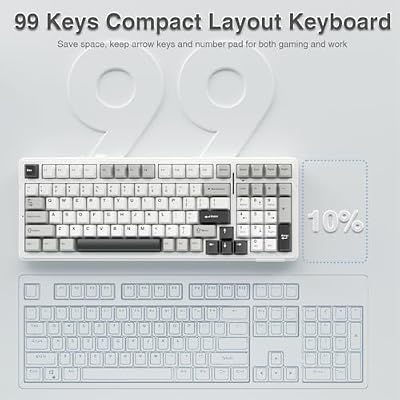
AULA F99 Wireless Mechanical Keyboard,Tri-Mode BT5.0/2.4GHz/USB-C Hot Swappable Custom Keyboard,Pre-lubed Linear Switches,RGB Backlit Computer Gaming Keyboards for PC/Tablet/PS/Xbox


As an Amazon Associate we earn from qualifying purchases. Product prices and availability are accurate as of the date/time indicated.
Budget Considerations
You do not need to spend heavily to get a good mechanical keyboard. A well-built budget board with a reliable switch will serve most gamers for years. Spend more only if you want a specific feature, such as hot-swap sockets, a gasket mount or a premium case. If you want a wireless option, the best wireless gaming keyboard guide covers that route, and the best keyboards for gaming roundup lists more boards. The best budget gaming keyboard roundup shows where the value sits, and the best mechanical keyboards under 150 guide covers the mid-range tier in more detail.
The RGB lighting itself is a cosmetic choice. If you like the look, pay for it. If not, a plain backlight or an RGB model with the lights off costs no less, so do not let lighting drive the decision on its own.
Setting Up Your Keyboard
Install the companion software only if you need it for lighting profiles or macros, and keep firmware up to date to fix issues. Set the polling rate to the highest value the board supports, then check that your USB port delivers the power the board needs. If you use a mouse and keyboard together, the best gaming mice and keyboards guide suggests combinations that work well side by side.
For a complete desk layout, the best RGB gaming setup 2026 roundup shows how lighting, keyboard and accessories can match. Keep lighting moderate in a shared room, and consider a wrist rest for long sessions.
Frequently Asked Questions
Are mechanical keyboards better for gaming than membrane?
Many gamers prefer them for feel, durability and key consistency. Membrane boards can still perform well and are cheaper, so the choice depends on how much you value the mechanical feel.
Which switch is best for FPS games?
Linear switches are popular in fast shooters because they press smoothly. Tactile switches also work well for players who prefer feedback. Try both if you can.
Does RGB lighting affect performance?
No. RGB is a visual feature. It does not change how quickly the keyboard registers presses. Choose it for the look, not for speed.
Is a TKL keyboard enough for gaming?
For most players, yes. A TKL layout keeps the keys you use in games and frees desk space. If you rely on a numeric keypad for work, a full-size board may suit you better.
Final Recommendation
For most gamers in 2026, a TKL or 75 percent mechanical RGB keyboard with a well-reviewed switch type is the best balance of comfort, durability and desk space. Choose linear switches for fast shooters, tactile switches for mixed use, and check whether hot-swap matters to you. Compare the hero listing and the alternatives on their cards, confirm the switch type and layout, and check the current price before you order.