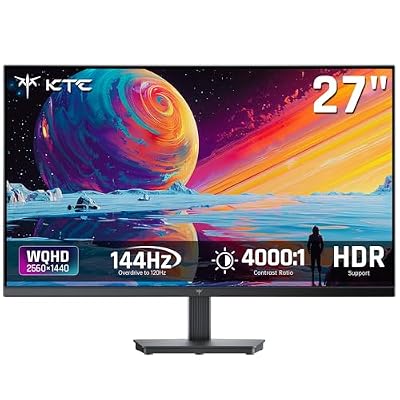
Gaming Monitor 4K 144Hz 2026
A 4K gaming monitor with a 144Hz refresh rate sits at the top of the desktop display market. It offers four times the pixel count of 1080p and roughly twice that of 1440p, which makes text, textures and distant detail look remarkably sharp. The catch is that a 4K panel asks a great deal from your graphics card, cabling and budget. This guide explains when a 4K 144Hz monitor is worth buying, which specs matter most, and how to avoid paying for capabilities your PC cannot use. It is a buying guide for the product class, not a review of a single model.
The hero listing above was chosen from a search for 4K gaming monitors with a 144Hz refresh rate, and the alternatives came from the same search. It is the closest match we found, not a confirmed copy of a named model. Check the card for the exact panel, port set and current price before you order.


Is 4K at 144Hz Realistic for Your PC?
The honest answer depends on the games you play and the settings you accept. A 4K monitor at 144Hz needs a very strong GPU to reach high frame rates in demanding titles without help from upscaling. Many players in 2026 run 4K with DLSS, FSR or a similar upscaler set to a balanced or quality mode, and then tune the remaining settings to keep frame rates high. If you insist on native 4K with maximum settings in modern games, expect frame rates well below 144 in heavy scenes.
That does not mean 4K is a poor choice. Older or lighter games, esports titles and well-optimised single-player games can run near the refresh limit. The key is to match the panel to the graphics card you own or plan to buy, rather than assuming the refresh figure on the box will always be reached.
Specs That Matter on a 4K 144Hz Monitor
Connectivity and Bandwidth
A 3840 x 2160 image at 144Hz is a demanding signal. Check that your GPU and monitor both support the port standard needed for that refresh rate. DisplayPort 1.4 with display stream compression is a common route on current hardware. HDMI 2.1 is also capable, but older HDMI 2.0 ports may limit the refresh rate or colour depth at 4K. Read the port list on both spec sheets before you commit.
Pixel Density at 27 and 32 Inches
Screen size changes how sharp 4K appears. A 27-inch 4K panel packs roughly 163 pixels per inch, which looks very crisp at a normal desk distance and makes text especially clean. A 32-inch 4K panel has a lower density, around 137 pixels per inch, which can look slightly less sharp up close but gives a larger, more cinematic image. Choose the size based on your desk depth and how far you sit from the screen.
Panel Type and Response
Most 4K gaming monitors use IPS or VA panels, with OLED models becoming more common at higher prices. IPS offers consistent colour and good viewing angles. VA gives stronger contrast, which helps in dark scenes. OLED offers very fast response and deep blacks, but it needs care with static elements and typically costs more. Compare response and motion clarity across reviews rather than relying on a single headline number.
Upscaling Support
Upscaling is effectively part of a 4K gaming plan. Confirm that the games you play support the upscaler available on your GPU, and test the image quality in each title. A good upscaler can make a 4K image look close to native at a much lower render cost. The monitor itself does not provide this, but it determines how much headroom you need. For a monitor shortlist, the best 4K monitor for gaming guide is a good starting point.
Comparison Table: 4K 144Hz Monitor Options
The table compares monitor roles rather than exact models. Price ranges are broad, so check the live listing for the current figure.
| Option type | Best for | Key features to check | Typical price range |
|---|---|---|---|
| Entry 4K 144Hz IPS | Strong GPU owners who want sharp text and games | DisplayPort 1.4 or HDMI 2.1, adaptive sync, basic HDR | Check current price |
| Mainstream 27-inch 4K high refresh | Desk setups with competitive and single-player play | Fast IPS, good colour, stand adjustment | Check current price |
| 32-inch 4K gaming panel | Immersive play at a comfortable distance | Larger screen, uniform backlight, USB hub | Check current price |
| OLED 4K high refresh | Premium single-player and media | Very fast response, high contrast, burn-in care | Check current price |
Pairing a 4K Monitor With the Right GPU
A 4K display is only as good as the graphics card behind it. Mid-range cards can run 4K in many games with aggressive upscaling and lower settings, but they will struggle to hold 144 frames per second in the newest releases. High-end cards offer more margin. Our best GPU for 4K gaming guide compares cards by the resolution they can realistically handle, and the best GPU for gaming on a budget roundup shows where 4K stops being practical.
The processor matters too, especially in high-frame-rate esports titles where the CPU limits performance before the GPU does. The best 4K gaming CPU guide explains how to balance the processor with a 4K panel.
Which Buyers Should Choose 4K 144Hz?
A 4K 144Hz monitor suits people who already own or plan to buy a high-end GPU, play a mix of demanding single-player games, and value image detail above raw competitive speed. It is also a strong choice for creative work where text and fine detail matter, and for players who want a display that will remain useful for several years of upgrades.
If your budget is tighter, a 1440p 144Hz panel usually gives a better balance of smoothness and cost. The best 4K gaming monitors roundup lists the main choices across price tiers. Our best gaming monitor 2026 roundup covers the main resolution tiers side by side, and the best 4K OLED gaming monitors guide focuses on the premium end of the market.
Setup Tips for 4K Gaming
Set the display to 3840 x 2160 and the highest refresh rate it supports in your operating system settings. Confirm that the cable and port carry the full bandwidth, since a lower refresh rate can be selected silently when the link negotiates down. Enable adaptive sync if the monitor supports it. In games, start with an upscaler set to balanced or quality, then raise individual settings only if the frame rate stays comfortable.
Use a stable, well-ventilated desk setup and keep cables tidy. The best HDMI cable for gaming guide helps you choose a cable that will carry the signal reliably, which is especially important at 4K and high refresh.
Frequently Asked Questions
Do I need an RTX 4090 for 4K 144Hz?
Not necessarily. Many games run well at 4K with upscaling on high-end cards, but whether you need the top tier depends on the titles you play and the frame rate you want. Check benchmarks for your specific games.
Is 4K better than 1440p for gaming?
4K shows more detail, while 1440p is easier to drive at high frame rates. For most players, 1440p at 144Hz offers better smoothness per pound, and 4K suits those with strong hardware who prioritise sharpness.
Which port should I use for 4K 144Hz?
DisplayPort 1.4 is a common, reliable choice on current GPUs. HDMI 2.1 also works, but confirm that both the monitor and graphics card support the required bandwidth.
Is a 27-inch or 32-inch 4K monitor better?
A 27-inch panel is sharper at normal desk distances, while a 32-inch panel gives a larger image. Choose based on your desk depth and viewing distance.
Final Recommendation
A 4K 144Hz monitor is worth buying if you have a strong graphics card, you value image detail, and you accept that upscaling will be part of your routine in demanding games. Confirm the port version, the panel type and the adaptive sync standard, and compare the hero listing and alternatives on their cards before buying. If your GPU is mid-range, a 1440p 144Hz screen will usually deliver more consistent results for the money.