Gaming Laptop Upgradeable Memory in 2026: What You Can Actually Change
Upgradeability is one of the first things buyers ask about a gaming laptop, and one of the most misunderstood. Many people assume they can upgrade the graphics card or processor later, and that assumption is usually wrong. Memory and storage are different. In many gaming laptops they can still be replaced, but the details vary widely by model. This guide explains what you can realistically change, how to check the memory configuration on a listing and how to plan a laptop that will still be useful in a few years.
This is a buying guide. We do not quote performance gains from memory upgrades, because the effect depends on the game, the graphics chip and the rest of the system. Where we describe how a laptop is built, we describe the typical design patterns and what manufacturers commonly allow. Confirm the memory design of the exact model before you buy, because the spec sheet and the service manual are the authoritative sources.
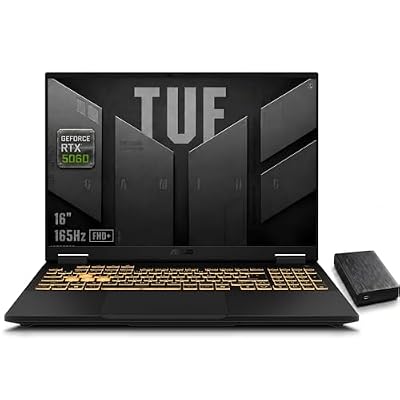
The listings below were returned for this search. The first is the primary pick and the others are close alternatives. The listing above may not match the exact model you had in mind, so confirm the memory type, slot count, maximum capacity and price on the card before ordering.


What Is Usually Upgradeable in a Gaming Laptop
The graphics chip is almost always soldered to the motherboard, so you cannot upgrade it. The processor is also usually soldered in gaming laptops, which means the platform you buy is the platform you keep. Memory and storage are where upgrades are most often possible. That is good news, but it does not mean every laptop has accessible slots.
Soldered Memory Versus SO-DIMM Slots
Some gaming laptops use memory that is soldered to the board. That design is common in thin models, and it means the capacity you choose at purchase is fixed. Other laptops use SO-DIMM sockets, which are removable memory modules. Those models can be upgraded, but the maximum capacity per slot and the total number of slots set the real limit. Check both figures before you buy.
Storage Slots
Most gaming laptops with a removable drive use M.2 slots. Some have one slot and some have two. Storage upgrades are often easier than memory upgrades, but the number of free slots and the supported drive types matter. Check whether the laptop has a second slot before you plan to add capacity later.
How Memory Configuration Affects Gaming
Capacity and Channel Layout
System memory feeds the processor and the graphics chip. Too little capacity forces the system to swap data, which can cause stutter in demanding games. Many players find that 16GB is a workable minimum for current titles, while larger capacities give more headroom for background apps and streaming. The more important question is whether the memory runs in dual-channel mode. Two matched modules generally perform better than one large module in a single slot.
Speed and Timing
Memory speed also matters, though the gain is usually smaller than the gain from enough capacity. Read reviews that test memory configurations on the specific model, because the laptop’s memory controller and power limits can change the outcome. Do not pay large premiums for memory speed without evidence that it helps the games you play.
Comparison Table: Memory Upgrade Factors by Listing
The table lists the five listings returned for this search, with the memory factors to check for each. It does not state prices, because prices change often and differ by seller.
| Option | ASIN | Best for | Price guidance | What to check |
|---|---|---|---|---|
| Primary pick (hero) | B0HFZMZ7HV | Buyers who want room to expand later | Check current price | SO-DIMM slots, maximum capacity, soldered memory |
| Alternative 1 | B0H2YXDXQN | Players who plan to add memory later | Check current price | Free slots and the capacity already installed |
| Alternative 2 | B0HDRNHHFN | Streamers who run heavy background apps | Check current price | Total capacity and dual-channel layout |
| Alternative 3 | B0F5KTGDS9 | Buyers who want a fixed, well-tuned configuration | Check current price | Memory speed and reviews of the stock setup |
| Alternative 4 | B0DZZWMB2L | Buyers who prioritise storage expansion | Check current price | Free M.2 slots and drive support |
Use the table to build your own checklist. The best row depends on how long you want the laptop to last and how much you expect your needs to grow.
Planning an Upgrade Path
If you want a laptop that stays useful for several years, plan the memory before you buy. Buy the capacity you need now, then check whether a free slot or a larger module can take you further later. Keep the original memory if you upgrade, since it can be resold or reused. The best RAM for a gaming laptop guide covers the common configurations, and the guide to the right amount of RAM for gaming explains how much capacity suits different games.
If you are comparing memory choices in general, the DDR4 versus DDR5 gaming guide and the DDR5 speed comparison give useful background on speed and generation, which apply to desktop and laptop memory alike.
What to Check on the Listing
- Whether the memory is soldered or uses removable SO-DIMM slots.
- The number of slots and the capacity currently installed.
- The maximum supported capacity, stated by the manufacturer.
- The number and type of M.2 storage slots.
- Warranty terms on upgrades, since some manufacturers treat opening the chassis differently.
Mistakes to Avoid
Assuming Every Gaming Laptop Can Be Upgraded
Many thin gaming laptops solder their memory and offer no free slots. Check the design before you plan an upgrade, because you cannot add capacity that the board does not support. If you are unsure, read the manufacturer’s service documentation.
Buying a Single Large Module Without Checking Channels
A single module in a laptop with two slots may leave the second slot empty and limit performance. Two matched modules generally run in dual-channel mode and perform better. Check the configuration before you buy extra memory.
For desktop memory guidance that applies to the same modules, the DDR5 RAM for gaming, the memory for a gaming PC, the 32GB DDR5 kits, the safe DDR5 overclocking, and the best gaming laptop 2026 are useful next steps.
Frequently Asked Questions
Can I upgrade the graphics card in a gaming laptop?
In most gaming laptops, no. The graphics chip is soldered to the board, so you cannot swap it later. Choose the GPU class you need when you buy, and use memory and storage upgrades to extend the laptop’s useful life.
Is it safe to upgrade laptop memory myself?
Many laptops allow memory upgrades with basic tools, but the process varies. Follow the manufacturer’s service guide, ground yourself to avoid static damage and check whether opening the chassis affects the warranty. If you are unsure, ask a qualified technician.
How much memory should a gaming laptop have?
Many buyers find 16GB a workable minimum for current games, and 32GB gives more room for streaming and heavy background use. The right figure depends on your games and habits. Check the maximum supported capacity so you can grow if needed.
Final Verdict
Upgradeability in a gaming laptop is usually limited to memory and storage, and even those depend on the design. Check whether the memory is soldered or uses removable slots, confirm the maximum capacity and count the free M.2 slots. Plan the purchase around the capacity you need now and the room you want later. Confirm the details on the listing and read the manufacturer’s documentation before you buy.