Budget Gaming Laptop RTX 5050 Review
A budget gaming laptop with an RTX 5050 is an entry point into current-generation graphics. The card is not built for maxed-out 4K gaming, and it will not match a 5070 class machine in demanding titles. What it does offer is a sensible balance for players who want to run newer games at 1080p with medium settings, plus support for modern features such as upscaling, without spending the price of a premium gaming laptop. The key to a good budget purchase is knowing which corners are acceptable to cut and which ones will hurt you within a year.
This article is a buying guide, not a detailed research. We did not run our own tests on a unit, so we do not publish frame rates or thermal numbers. The featured listing and the alternatives below are candidates to check. The listing above may be a close match rather than an exact model, so verify the GPU, memory, storage, display, and live price on the product card before you buy.


What the RTX 5050 Can and Cannot Do
An RTX 5050 laptop is best judged at 1080p. At that resolution, many esports titles and lighter AAA games can run at comfortable frame rates on medium or high settings, with upscaling used where it helps. Demanding games will need you to lower textures, shadows, and ray tracing quality. If you plan to play at 1440p, expect to rely more on upscaling and to accept lower settings. Setting realistic expectations before you buy will save disappointment later.
Memory and Video Memory
Video memory is the first place budget laptops show their limits. Most laptop variants of this class ship with a modest amount of VRAM, so high-resolution textures in newer games can become a constraint. Check the VRAM size on the spec sheet, and aim for system memory of at least 16GB. Memory that can be upgraded later is a useful bonus, because it lets you add capacity without buying a new machine.
Storage and Upgrade Paths
Game installs grow fast. A 512GB drive fills quickly, so a 1TB NVMe drive is the more comfortable target. Check whether the laptop has a second M.2 slot, since budget models sometimes ship with one drive and no room to add another. If the drive is a slower model, consider the price difference against a faster unit, because load times and texture streaming both depend on storage speed.
Budget Laptop Trade-Offs Compared
The table below compares the common trade-offs in budget RTX 5050 laptops. It is a checklist for comparing listings rather than a ranking of specific products. Price ranges are approximate, and the live price on the card is what counts.
| Trade-off | Acceptable when | Risky when | What to check |
|---|---|---|---|
| 8GB system memory | You only play light games | You multitask or stream | Upgradable slots, total RAM |
| 1080p 144Hz panel | You play esports titles | You want high-end visuals | Panel brightness, color, refresh rate |
| Basic cooling design | You game in short sessions | You play for hours | Long-session reviews, fan noise |
| Single 512GB SSD | You install few games | Your library is large | Second M.2 slot, storage size |
What to Verify Before You Buy
Start with the GPU name and the power profile if the listing shows one. Then confirm the memory, storage, and display. Budget laptops often save money on the panel, so check brightness and color specs. Next, check the ports. You want at least one USB-C port with charging and video output, plus USB-A for peripherals. Finally, read the warranty and the return policy, since a cheap laptop with a weak warranty can cost more over time.
Charger and Power Delivery
Budget laptops often use a single charger rated for everyday use. Check the wattage, because a larger adapter may be needed for performance modes. A stable charger matters more than a light one on a budget machine. Our gaming laptop battery life guide covers power settings that help a budget laptop last longer.
Thermals and Fan Noise
Lower-priced cooling designs can run loud under load. If you game with headphones, this matters less. Look for reviews that report fan noise and surface temperature at the default profile. A quieter laptop with moderate performance is often more pleasant than a louder one with slightly higher frame rates.
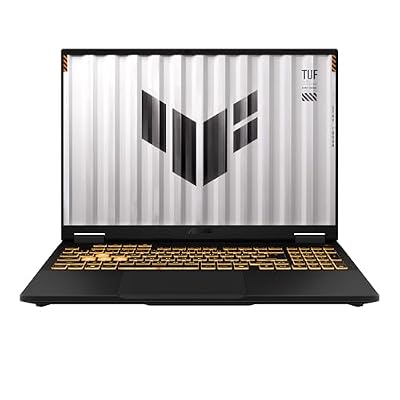
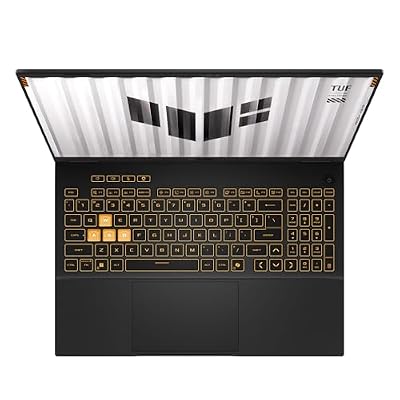
ASUS TUF Gaming F16 (2025) Gaming Laptop, 16” FHD+ 165Hz 16:10 Display, Intel® Core™ i5 Processor 13450HX, NVIDIA® GeForce RTX™ 5050, 16GB DDR5, 512GB PCIe Gen4 SSD, Wi-Fi 6E, Win 11 Home




As an Amazon Associate we earn from qualifying purchases. Product prices and availability are accurate as of the date/time indicated.
Who Should Buy a Budget RTX 5050 Laptop
This class suits students, casual players, and anyone who wants to run esports and lighter AAA titles without spending a premium. It is a poor match for people who plan to play the most demanding new games at high settings, or who want to stream and edit video on the same machine. For a broader look at value options, our budget gaming laptop guide covers more price tiers. If you are open to a desktop, our gaming PC for 500 dollars guide shows how much performance a budget tower can deliver.
Students and Everyday Use
For school work, the laptop should be comfortable to type on and quiet enough for a classroom. An RTX 5050 gives you gaming as a bonus. Check the keyboard and battery life first. Our work laptop guide lists the features to weigh.
Casual Players Who Want a Cheap Entry
Casual players can get good value by focusing on esports titles, indie games, and older AAA releases. Lower settings are fine for many people, and upscaling helps extend the life of the GPU. If your library is mostly lighter games, this category offers a practical starting point.
Related Guides on GamingPCGuru
Use these guides alongside this article when you compare budgets, displays, cooling, and the wider market before you buy.
- affordable gaming laptop guide, for lower-cost picks with smaller GPUs.
- cheap gaming laptops roundup, for the lowest-priced laptop options.
- budget gaming laptops roundup, for more low-cost laptop options.
- gaming laptops under 400 dollars, for entry-level laptop picks.
Frequently Asked Questions
Can an RTX 5050 laptop run new AAA games?
Many newer AAA games can run at 1080p with medium settings and upscaling enabled. Very demanding titles may need lower presets. Check reviews of the specific game on similar hardware before you buy, because results vary.
Is 8GB of system memory enough?
For light gaming, 8GB can work, but 16GB is the practical minimum for modern games and multitasking. If the memory is soldered, consider choosing a configuration that already has 16GB rather than planning to upgrade later.
Should I buy a budget laptop or save for a higher GPU?
If you mainly play esports and lighter games, a budget RTX 5050 laptop is often enough. If you want high settings in the newest AAA titles, saving for a higher GPU class will give you more room for years. Decide based on your game list, not the headline spec.
Final Verdict
A budget RTX 5050 laptop is a reasonable buy for 1080p gaming, esports, and light AAA titles, provided you accept limits in video memory and cooling. Use the featured listing and the four alternatives as a shortlist, then verify memory, storage, display, power profile, and live price before you commit.