

Gigabyte AORUS 15 BSE RTX 5070 Gaming Laptop Guide
A 15-inch gaming laptop with an RTX 5070 sits in one of the most common buying positions in the market. It is portable enough to move between rooms, powerful enough for current AAA titles at sensible settings, and usually priced below the flagship desktop-replacement class. The Gigabyte AORUS 15 BSE family is aimed at that buyer. This guide explains what an RTX 5070 laptop can and cannot do, what to check on any configuration of this model, and how to decide whether it fits your play style.
Laptop buyers are often misled by one number. The GPU name on the box does not tell you how fast the card runs in that chassis. A laptop RTX 5070 is limited by its power budget and cooling, and two machines with the same GPU name can differ a lot in sustained performance. This article focuses on the factors that separate good configurations from bad ones. It does not publish frame-rate figures, because they vary by title, settings, and the exact configuration on sale.
If you are still choosing a form factor, compare this category against our overview of the best gaming laptops of 2026 and against the budget gaming laptop guide before you commit.
What an RTX 5070 Laptop Can Realistically Do
The desktop RTX 5070 is rated at 250W of total graphics power with 12GB of GDDR7 memory on a 192-bit bus. Laptop versions of the same generation run at lower power limits to fit the chassis, so their results depend on how the manufacturer sets those limits and how well the cooling holds them. Treat the desktop rating as a reference for the chip family, not as the number that applies to your laptop.
In practice, a well-cooled 15-inch RTX 5070 laptop is a strong 1080p gaming machine and a capable 1440p machine for many titles, with upscaling and sensible settings doing much of the work. For 4K at high settings, a laptop of this class is the wrong tool. If 4K is a requirement, a desktop or a larger laptop is the honest answer.
Sustained performance versus peak performance
Laptops often hit a high benchmark score for the first few minutes and then settle lower as the chassis heats up. Long gaming sessions reveal the real figure. Before buying, look for reviews that test sustained performance over 30 minutes or more, and check whether the reviewer measured the actual power limit the laptop used. A machine that holds steady clocks for an hour is a better buy than one that scores higher in a short test and then slows down.
Display, Refresh Rate, and Matching Your Monitor
The display determines how much of the GPU’s work you actually see. A high-refresh panel rewards a GPU that can keep frame rates close to the panel’s rate in your favourite games. If you mostly play competitive shooters, a higher refresh rate matters more than peak graphics settings. If you play large single-player titles, a panel with good color accuracy and brightness may matter more.
Check the panel’s resolution against the GPU’s realistic output. A 1440p panel on an RTX 5070 laptop often means using upscaling in demanding titles, which is a reasonable trade if the image holds up. A 1080p panel gives the GPU an easier job and usually higher frame rates. For a monitor-first buyer’s view, our guide on how to choose a gaming monitor in 2026 covers the same trade-offs from the screen side.
Cooling, Noise, and the Long-Session Test
Cooling is the single biggest differentiator within a laptop model family. Thicker chassis, more heat pipes, and larger vents generally allow higher sustained power. Look at the fan noise under load as well as the temperatures. A laptop that stays cool but sounds like a jet during play is a poor daily companion. Reviews that report decibel levels at sustained load are more useful than generic praise.
Use a cooling pad only if the review evidence shows a real benefit for the specific model. Pads can lower surface temperatures, but they do not change the internal power limits the manufacturer set. Our guide to cooling pads for gaming laptops explains when a pad is worth buying and when it is not.
Battery Life and Power Use
A gaming laptop with a discrete GPU will not deliver desktop-like battery life under load. Plan to play near a power outlet. For light work such as browsing and document editing, most machines of this class run on the integrated graphics and last a reasonable working day, but the figure varies sharply with the display and the power profile. Our overview of gaming laptop battery life explains realistic expectations and the settings that extend runtime.
Memory, Storage, and Upgrade Paths
Check how much memory comes standard and whether the slots are accessible. Gaming laptops often ship with two memory slots, which makes a later upgrade straightforward. A configuration with a single module or soldered memory limits your options. For a 15-inch gaming laptop, 16GB is the minimum comfortable amount for current games, and 32GB gives more room for streaming, mods, and background software. Our guide to RAM for gaming laptops covers the module choices and upgrade rules.
Storage follows the same logic. Confirm the laptop has at least one NVMe slot that you can reach, and check whether it has a second slot for expansion. Game installs grow quickly, and a drive that fills up early forces you to uninstall titles you still play.
If you are comparing this model with other 15-inch options in its class, read our RTX 5070 review for the GPU itself, then the RTX 5070 Ti review to see what the next tier adds. Shoppers with a tighter budget should also check our roundup of gaming laptops under $1,500, which covers alternatives at a lower price point.
Buyer Checklist
- Confirm the exact GPU name and its power limit on the configuration you are buying, not just the model family.
- Read at least one review with sustained-load testing and noise measurements.
- Match the display’s resolution and refresh rate to the games you actually play.
- Check memory slots, RAM capacity, and the number of NVMe slots for future upgrades.
- Confirm the warranty terms and the return window before the first long gaming session.
Configuration Comparison
The table below lists what to compare across any configuration of this laptop family. The hard figures are manufacturer or reference ratings for the desktop RTX 5070 chip family. Laptop specifications, prices, and ratings differ by configuration and change over time, so check the live product cards in the list above rather than relying on a figure in this article.
| Factor | What to look for | Reference figure | Why it matters |
|---|---|---|---|
| GPU | RTX 5070 laptop variant and its power limit | Desktop RTX 5070: 250W total graphics power, 12GB GDDR7 | Sets the ceiling for frame rate in demanding games |
| Cooling | Sustained-load temperatures and noise in reviews | Reviewer measurements, not marketing claims | Decides whether performance holds over long sessions |
| Display | Resolution and refresh rate matched to your games | Panel specifications on the listing | Determines how well the GPU’s output shows on screen |
| Memory | Capacity and slot access | Module count on the configuration | Affects multitasking and future upgrades |
| Storage | NVMe slots and capacity | Drive size and open slots | Game library growth and expansion |
| Battery | Runtime under light use | Reviewer runtime tests | Sets how far from an outlet you can play |
Hero Pick and Alternatives
The hero listing is the reference configuration for this guide. Confirm on its card that it lists an RTX 5070 laptop variant, the display you want, and enough memory and storage for your library. A configuration that drops to a lower GPU tier or a single memory module should be compared carefully against the others before you pay.
The alternative below is a different laptop in the same category. Compare the two on cooling evidence first, then on display and upgradeability. For most buyers, a well-cooled machine with easy memory access will age better than a slightly cheaper one with soldered RAM.

acer Predator Helios Neo 16 AI Gaming Laptop | Intel Core Ultra 9 Processor 275HX | NVIDIA GeForce RTX 5070 Ti | 16" WQXGA 240Hz G-SYNC | 16GB DDR5 | 1TB Gen 4 SSD | Killer Wi-Fi 6E | PHN16-73-92B8


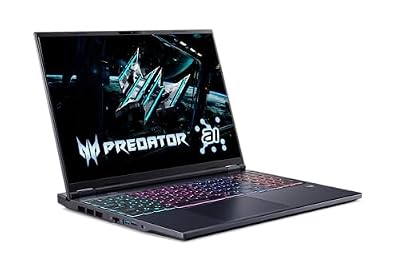


As an Amazon Associate we earn from qualifying purchases. Product prices and availability are accurate as of the date/time indicated.
Frequently Asked Questions
Can an RTX 5070 laptop run modern games at 1440p?
Many current titles run at 1440p with a combination of sensible settings and upscaling on a well-cooled RTX 5070 laptop. Demanding games may need lower settings to hold a high frame rate. Check reviews that test the specific games you play, because results vary widely between titles.
Is a 15-inch laptop better than a 16-inch one for gaming?
The size matters less than the cooling design and the power limit the manufacturer sets. A 16-inch chassis can offer more room for cooling, but a well-designed 15-inch machine can perform strongly. Compare the cooling reviews rather than the screen size alone.
Should I buy a gaming laptop or a desktop with the same GPU?
A desktop with the same GPU family usually sustains higher performance and costs less per unit of performance, and it is easier to upgrade. A laptop wins on portability and works without a separate monitor setup. Choose the laptop if you need to move the machine, and a desktop if you play mainly at one desk.
Does an external GPU make sense for a laptop?
External GPU enclosures are a niche option and they add cost and complexity. For most buyers, a laptop with a built-in RTX 5070 or a separate desktop is the simpler and more reliable path.
Summary
The Gigabyte AORUS 15 BSE family suits buyers who want a portable RTX 5070 gaming machine for 1080p and capable 1440p play. Its real value depends on the exact configuration: the GPU power limit, the cooling performance under sustained load, the display, and the memory and storage options. Check those points on the live listing and in sustained-load reviews, and the laptop will serve you well for the games you play most.







