

Best 16-Inch Gaming Laptop RTX 5070 Ti 2026
A 16-inch gaming laptop with an RTX 5070 Ti hits a practical middle ground. The screen is large enough for comfortable gaming and productivity, the chassis is lighter than the 18-inch class, and the GPU is strong enough for high settings at 1440p in most current games. The problem is that many machines with the same GPU label perform very differently, because the power limit, cooling design, display, and memory configuration change from model to model. This guide explains what to check so you can pick the right 16-inch machine rather than the one with the best-looking product photo.
The product grid below lists the featured configuration and four alternatives. Treat them as a shortlist to verify, not as a ranking based on measured results. We have not included benchmark figures, because they depend on the exact model, firmware, power profile, and cooling setup.
What Makes a Good 16-Inch RTX 5070 Ti Laptop
Start with the GPU power limit. Laptop GPUs are sold under the same model name across many chassis, and the sustained power limit can differ enough to change frame rates noticeably. A machine that runs the 5070 Ti at a higher sustained limit will usually hold its clocks better in long sessions. The spec sheet often states the total graphics power range, so check that figure before comparing prices. If the manufacturer does not publish it, look for independent reviews that measure it.
Cooling and Sustained Performance
Thin 16-inch chassis can deliver strong burst performance and then slow down once heat builds up. Look for reviews that run a stress test or a long gaming session, then report sustained clocks and fan noise. A laptop that stays quiet and stable under load is a better daily machine than one that wins a five-minute benchmark and throttles after an hour. Good vent placement and a keyboard deck that stays cool make a noticeable difference in comfort.
Display: Refresh Rate, Resolution, and Panel Type
The display is where a 5070 Ti laptop earns or wastes its GPU headroom. A 1440p panel at a high refresh rate is the most common sweet spot for this class of GPU, because it lets the card push high frame rates without the extra load of 4K. A 1080p panel at 240Hz is a strong choice for competitive play. Panel type matters too. Fast IPS and OLED panels offer very different contrast and response characteristics, and OLED needs careful attention to burn-in and brightness in long sessions. Check the panel spec on the listing rather than trusting the refresh rate printed in the title.
Memory and Storage
Look for at least 16GB of system memory, and prefer 32GB if you multitask, stream, or run creative software alongside games. Confirm whether the memory is soldered or upgradable, because that determines your upgrade path. For storage, a fast NVMe drive with 1TB or more is a sensible baseline, since current games are large. Check whether the laptop has a second M.2 slot for later expansion.

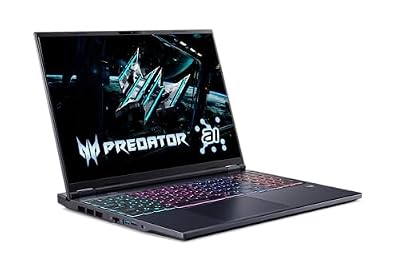
acer Predator Helios Neo 16 AI Gaming Laptop | Intel Core Ultra 9 Processor 275HX | NVIDIA GeForce RTX 5070 Ti | 16" WQXGA 240Hz G-SYNC | 16GB DDR5 | 1TB Gen 4 SSD | Killer Wi-Fi 6E | PHN16-73-92B8




As an Amazon Associate we earn from qualifying purchases. Product prices and availability are accurate as of the date/time indicated.
Comparing the Five 16-Inch Configurations
The table below lists the five configurations in this group with the specific checks each one needs. The aim is to show which numbers to compare across listings, rather than to assign a ranking. Prices change frequently, so confirm live pricing before ordering.
| Configuration | Role in This Group | GPU Power Limit to Verify | Display to Verify | Memory and Storage to Verify | Price and Rating |
|---|---|---|---|---|---|
| Featured (B0FN15LKGD) | Reference configuration | Sustained limit in spec sheet or review | Resolution and refresh rate | RAM capacity, upgrade slots | Check live listing |
| Alternative 1 (B0FRVBCRYP) | Alternate chassis | Confirm limit against featured model | Confirm panel type | Confirm storage slots | Check live listing |
| Alternative 2 (B0FZLPVMWY) | Alternate configuration | Confirm thermal design | Confirm refresh rate | Confirm memory type | Check live listing |
| Alternative 3 (B0FHJ3R5SJ) | Alternate configuration | Confirm sustained limit | Confirm resolution | Confirm RAM upgrade path | Check live listing |
| Alternative 4 (B0F9YKNN6P) | Alternate configuration | Confirm power adapter output | Confirm colour gamut | Confirm storage capacity | Check live listing |
The most useful comparison is the sustained GPU power limit, followed by the display. If two listings share the same GPU name but one has a higher verified limit and a better cooling review, the higher-limit machine is usually the better buy at similar prices. If the display does not match your refresh rate target, the extra GPU headroom goes unused.
Who Should Buy a 16-Inch RTX 5070 Ti Laptop
This class suits buyers who want a single machine for gaming, school or office work, and occasional creative tasks, and who value a balance between screen size and portability. It is a poor fit if you need a machine that lasts a full working day on battery, because gaming laptops with a high-power GPU rarely do. If you mainly play at a desk, a desktop build gives more performance for the same money. For a desktop comparison, see the RTX 5070 Ti review to understand what the card delivers in a full-size system.
Buyer’s Checklist for 2026
- Confirm the sustained GPU power limit and check it against independent reviews.
- Match the display refresh rate and resolution to your target games.
- Choose at least 16GB of RAM, with 32GB preferred for mixed use.
- Check for a second storage slot and whether memory can be upgraded.
- Verify the adapter output and the warranty, including whether it covers the display and battery.
- Read reviews on noise and skin temperature, not only peak performance.
If a 16-inch model is more than you need, a smaller and cheaper gaming laptop can cover the same games at lower settings. The list of the best budget gaming laptops covers that tier. For brand-specific options, the guides to the best ASUS gaming laptop and the best MSI gaming laptop show how models within each brand line up.
Related Guides
- best gaming laptop in 2026
- gaming laptops under $1,500
- gaming laptop battery life guide
- cooling pads for gaming laptops
- best RAM for a gaming laptop
Frequently Asked Questions
Is an RTX 5070 Ti laptop good for 1440p gaming?
Yes, for most current titles at high settings, especially with upscaling enabled. Frame rates depend on the game, the settings, and the laptop’s sustained power limit, so check reviews for the games you play most.
Should I choose 16GB or 32GB of RAM?
Sixteen gigabytes is enough for most gaming. Choose 32GB if you stream, edit video, or keep many applications open. Check whether the memory is upgradable before you buy.
Is a 16-inch laptop better than an 18-inch one for gaming?
A 16-inch model is lighter and often cooler to carry, while an 18-inch model offers more screen space and sometimes more room for cooling. The right choice depends on portability needs and how often you move the machine.
Does refresh rate matter more than resolution on a gaming laptop?
For competitive games, refresh rate usually matters more, because it lets the GPU reach higher frame rates on a smooth display. For single-player games and creative work, resolution and colour accuracy matter more. Pick the panel that matches how you play.
A 16-inch RTX 5070 Ti laptop can be a strong all-round machine when the power limit, display, and cooling line up with your goals. Verify those three things on the listing and you will avoid most of the common disappointments in this category.







