Acer Predator Triton 16 RTX 5070 Review: Who Should Buy This Gaming Laptop
The Acer Predator Triton 16 with an RTX 5070 laptop GPU is aimed at buyers who want desktop-class gaming performance in a portable chassis. It targets the middle of the laptop market, where the GPU is strong enough for modern 1440p-class gaming on a laptop and the cooling is designed to handle long sessions. This review looks at what the configuration is good at, where laptops like it compromise, and who should spend money on it.
One caveat applies from the start. Laptop GPUs with the same model name can run at different power limits depending on the chassis, cooling, and BIOS. The RTX 5070 in one laptop may not perform exactly like the RTX 5070 in another. The information below describes the general profile of this class of machine, not a benchmark promise for every variant, and the live product card shows the configuration currently listed.
What the RTX 5070 Laptop Configuration Delivers
The laptop version of the RTX 5070 is built on NVIDIA’s current architecture, and it brings the same DLSS features and hardware encoder found on the desktop card. In practice, that means strong upscaling support in games that offer it, and a good path for streaming or recording without taxing the CPU too heavily. For a laptop, that combination matters more than raw rasterization alone, because heat and power limits cap what the chip can sustain.
The processor in this class is typically a high-core laptop CPU paired with fast DDR5 memory. Those parts handle game logic, background apps, and multitasking well, but laptop CPUs run within a fixed thermal envelope. Sustained all-core loads will reduce clock speeds over time, which is normal for the category. If your workload is mostly gaming and light creative work, this balance suits you. If you render video for hours, a desktop will still do more for the money.
Gaming Performance: What to Expect in Practice
In real use, a laptop with an RTX 5070 GPU is best suited to high settings at 1440p, or to 1080p with the highest settings and upscaling turned on for demanding titles. Competitive shooters with high refresh rates will run well if you lower a few heavy settings such as shadows and volumetric effects, which cost frames without adding much to competitive visibility. Open-world games with dense geometry will benefit most from DLSS, and you should test a few scenes in each game you own before deciding whether the settings are acceptable.
Thermals are the real differentiator in this class. A laptop that holds its clocks under a long session feels much better than one that throttles after twenty minutes. Look for reviews that test sustained load, not just the first benchmark run, and look for a laptop that offers a performance mode you can switch on when you plug in. Keep the vents clear and the laptop on a hard surface. Our note on the best cooling pad for a gaming laptop covers when an external cooler actually helps and when it does not.
Comparison Table: Where This Laptop Sits
The table compares the Triton 16 RTX 5070 against the other laptop categories a buyer usually considers. Price tiers are relative. Exact pricing and ratings come from the live cards, which update more often than this article.
| Laptop class | Typical GPU tier | Best use | Portability | Relative price tier |
|---|---|---|---|---|
| Acer Predator Triton 16 RTX 5070 | Upper-mid laptop GPU | 1440p-class gaming, streaming, light creative work | Medium weight, 16-inch chassis | Mid to high |
| Thin and light gaming laptop | Mid-range laptop GPU | 1080p gaming, school or office use | High | Mid |
| Higher-tier RTX 5080 laptop | Upper laptop GPU | High-settings 1440p and creative work | Lower | High |
| Desktop with RTX 5070 | Desktop GPU | Fixed-location gaming, upgrades | None | Mid |
Build Quality, Display, and Daily Use
A 16-inch gaming laptop is a larger, heavier machine than a thin ultrabook, so plan to carry it in a bag rather than in one hand. The display is the part you will look at most, so check the panel’s refresh rate and color coverage in the listing before you buy. A high refresh panel helps fast games feel smooth, and a panel with good color coverage helps with photo and video editing. Battery life on a machine like this is short under gaming load, so expect to plug in for most sessions.
For a broader view of battery trade-offs across gaming laptops, read our guide to gaming laptop battery life. If you travel often and need a laptop that works well on the road, the article on the best gaming laptop for traveling abroad covers weight, power adapters, and regional considerations.
Memory, Storage, and Upgrade Paths
Check how much memory the configuration ships with and whether the RAM slots are accessible. Many gaming laptops let you add or replace memory, which extends the machine’s useful life. Storage works similarly, but you should confirm whether the laptop has a free M.2 slot before you buy. If you plan to keep the laptop for several years, these details matter more than a small difference in launch benchmarks. Our guide to the best RAM for a gaming laptop explains which capacity and speed to target.
Alternatives Worth Considering
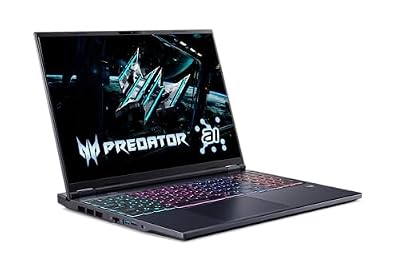
The other laptops in the list above represent the main alternatives. If price matters more than the top GPU tier, a laptop with a lower-tier GPU can deliver a similar experience at 1080p. If you want a larger screen budget and a better panel, look at higher-tier models. The product card below shows one further option to compare against this configuration.

acer Predator Helios Neo 16 AI Gaming Laptop | Intel Core Ultra 9 Processor 275HX | NVIDIA GeForce RTX 5070 Ti | 16" WQXGA 240Hz G-SYNC | 16GB DDR5 | 1TB Gen 4 SSD | Killer Wi-Fi 6E | PHN16-73-92B8




As an Amazon Associate we earn from qualifying purchases. Product prices and availability are accurate as of the date/time indicated.
Brand choice also matters. If you prefer a particular manufacturer’s support network or keyboard layout, read our note on the best MSI gaming laptop and the best ASUS gaming laptop to see how those brands approach cooling and build.
Who Should Buy This Laptop, and Who Should Skip It
Buy this class of laptop if you want one machine for gaming, streaming, and moderate creative work, and you value performance over thinness. It suits students and professionals who need a single system at home and do not want to build a desktop. It also suits buyers who expect to upgrade memory or storage later.
Skip it if your main concern is portability, long battery life, or quiet operation during light work. A thin laptop with a lower-tier GPU will serve those needs better. Skip it also if you mainly play esports titles at very high frame rates, since a desktop with a stronger CPU and a higher-refresh monitor will do more for that use case. For a desktop alternative, see our best affordable gaming PC guide.
Buying Checklist
Before you buy, confirm the exact GPU name in the listing, check the display refresh rate and resolution, read a thermal review that tests sustained load, and check memory and storage upgrade options. Compare the price against the live card, and check the return policy in case the laptop does not meet your expectations in your own games.
Before you commit, compare this configuration with the thin-and-light and higher-tier options in our best gaming laptop of 2026 roundup and the gaming laptops under 1500 guide.
Frequently Asked Questions
Is an RTX 5070 laptop GPU as fast as a desktop RTX 5070?
No. Laptop GPUs run at lower power limits to fit the chassis and cooling, so performance is usually below the desktop version of the same model name. The gap depends on the specific laptop, so check sustained-load reviews rather than relying on the model name alone.
Can this laptop run modern games at 1440p?
It can run many modern titles at 1440p with adjusted settings and upscaling enabled. Very demanding games may need medium settings for a steady frame rate. Test your own games in the first week and adjust as needed.
Will the laptop get too hot for long sessions?
Gaming laptops run warm under sustained load, and some throttle after extended play. Use a performance mode when plugged in, keep the vents clear, and consider a cooling pad if the chassis still gets too hot.
Is this a good laptop for streaming?
Yes, for most streamers. The GPU’s hardware encoder handles most of the video work, which keeps the game running smoothly. Check the stream settings and dropped-frame counter during a test session before going live.
The Acer Predator Triton 16 with an RTX 5070 is a capable gaming and streaming laptop for buyers who accept the weight and heat that come with desktop-class graphics in a portable form. Confirm the exact configuration, read sustained-load reviews, and use the live product cards above to check current price before you order.