

Gaming Laptop Under $2000 RTX 5070 2026: What Your Money Gets You
A gaming laptop with an RTX 5070 under $2,000 is one of the most practical buys for 1440p gaming on the go. The RTX 5070 laptop class handles high settings in most current games, and a budget near $2,000 usually buys a mainstream CPU, 16GB or more of RAM, and a decent display. The trick is knowing which parts to trust and which to check, because two laptops with the same GPU name can perform very differently.
The hero listing and alternatives came from the query “gaming laptop under 2000 RTX 5070”. Listings for this query vary in CPU, memory, storage, display and power limit. Use the table in this guide as a checklist, and confirm each detail on the live product page. This article speaks about the RTX 5070 laptop class in general terms and does not claim benchmark numbers for any one model.
What RTX 5070 Performance Means on a Laptop
Laptop versions of the RTX 5070 generally carry less video memory than the 12GB desktop card of the same name. Read the VRAM figure on each listing rather than assuming it matches the desktop card. For 1440p gaming at high settings, less memory can become the limit in newer titles. If you see stutter, lower texture quality first, since it costs the least visible detail.
Laptop GPUs also run at a configured power limit. The same GPU name can deliver different frame rates in two laptops because one has more cooling and a higher limit. This is the single most useful thing to check in reviews, more useful than the model name on the box.
What to Expect at 1440p and 1080p
At 1080p, an RTX 5070 laptop has comfortable headroom in most games and can hold high refresh rates in lighter titles. At 1440p, expect to balance settings. Shadows, volumetric fog and ray tracing are usually the first effects to lower. Upscaling, where a game supports it, is a legitimate way to keep frame rates steady without a visible drop in sharpness for most players.
Where the Money Goes Under $2,000
CPU and Thermals
A current mid-range CPU is enough for this GPU class. A laptop CPU that is too weak will limit frame rates in strategy and open-world games even with a fast GPU. Pay attention to cooling design. Laptops in this price range with a thicker chassis and larger vents usually hold their performance longer than thin models that throttle after several minutes of play.
Memory and Storage
Look for 16GB of RAM as a minimum, and 32GB if you multitask or stream. Many listings ship with a 1TB SSD, which is a reasonable starting point. Check whether the RAM is upgradeable. Some laptops have an accessible slot, while others use soldered memory that cannot be expanded later. Our RAM guide for gaming laptops explains which module types and capacities to look for.
Display
A 144Hz or higher panel is worth prioritizing if you play competitive titles. A 1080p or 1440p panel with good brightness works well for most players. Check the panel type, refresh rate and whether the display supports adaptive sync. A bright, color-accurate screen matters more on a laptop than on a desktop, because you use the built-in display every day.

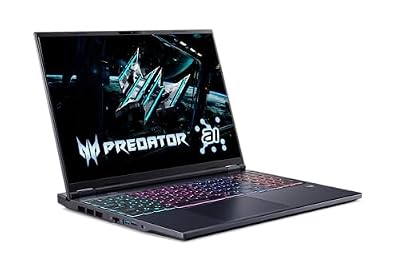
acer Predator Helios Neo 16 AI Gaming Laptop | Intel Core Ultra 9 Processor 275HX | NVIDIA GeForce RTX 5070 Ti | 16" WQXGA 240Hz G-SYNC | 16GB DDR5 | 1TB Gen 4 SSD | Killer Wi-Fi 6E | PHN16-73-92B8




As an Amazon Associate we earn from qualifying purchases. Product prices and availability are accurate as of the date/time indicated.
Comparing Listings at This Budget
The table below lists the five ASINs returned for the query. Prices and ratings move often, so the table does not show them. Check the live listing before you buy.
| Option | ASIN | What to verify | Price | Rating |
|---|---|---|---|---|
| Hero listing | B0FN15LKGD | GPU power limit, RAM size and upgrade path, SSD size | Check live listing | Check live listing |
| Alternative 1 | B0FRVBCRYP | Panel refresh rate and brightness | Check live listing | Check live listing |
| Alternative 2 | B0FZLPVMWY | Cooling design and fan noise reviews | Check live listing | Check live listing |
| Alternative 3 | B0FHJ3R5SJ | CPU generation and included warranty | Check live listing | Check live listing |
| Alternative 4 | B0F9YKNN6P | Port selection for external monitors | Check live listing | Check live listing |
If you are torn between two listings, pick the one with more RAM and the better cooling design. A slightly higher power limit and a larger vent area usually matter more for sustained frame rates than a small difference in the CPU model.
Who This Laptop Suits and Who Should Wait
An RTX 5070 laptop under $2,000 suits students, remote workers who game in the evening, and players who want one machine for everything. It is a good fit if you want 1440p at high settings and do not need the highest frame rates. It is less suitable if you want a machine for demanding 4K gaming, which needs a higher GPU tier, or if you mostly play lightweight titles and would be happier with a cheaper machine.
If budget is the main concern, compare the options in our budget gaming laptop guide and our budget gaming laptops roundup. Desktop buyers at the same price should check our gaming PC under $1,000 guide to see whether a desktop gives better value for your use.
Buying Tips That Save Money and Frustration
Check the return window before you order. Laptops are easy to return in the first few weeks, and you will learn more about fan noise and screen quality in real use than from any spec sheet. Check whether the warranty includes on-site or mail-in service, and whether the seller is the manufacturer or a third party.
Watch the sales calendar. Holiday and seasonal discounts can move a listing well below its usual price, but compare the sale price against the same configuration at other times. Our guide to Black Friday gaming laptop deals covers how to judge whether a discount is real.
Plan for heat and battery life. A laptop running a demanding game will be hot and loud, and battery life under load is short. A cooling pad can reduce surface temperature, though it does not fix weak internal cooling. If you care about unplugged use, read our battery life guide before deciding.
If you plan to undervolt the GPU to lower temperatures, follow a tested guide and monitor temperatures during the first sessions. Our notes on undervolting an RTX 5070 for cooler temps and how to check GPU and CPU temperature explain what to watch for.
Frequently Asked Questions
Is an RTX 5070 laptop good enough for 1440p gaming?
Yes, for most current games at high settings, with some effects lowered in the most demanding titles. Upscaling helps keep frame rates steady. Check whether the laptop’s power limit is high enough to hold those frame rates after several minutes of play.
How much RAM should a laptop at this price have?
Sixteen gigabytes is the minimum for comfortable gaming. Thirty-two gigabytes is better if you stream, run browsers with many tabs or use the laptop for creative work. Check whether the RAM is upgradeable before buying.
Should I choose an RTX 5070 laptop or an RTX 5070 Ti laptop?
The RTX 5070 Ti tier gives more headroom at 1440p but costs more and runs hotter. If your budget stops at $2,000, the RTX 5070 laptop is the sensible pick, and you should prioritize cooling and memory over a small GPU step up. Compare the two classes in our RTX 5070 versus RTX 5070 Ti guide.
Is a laptop better than a desktop at this budget?
A laptop gives portability and a built-in display, while a desktop at the same price usually offers more GPU performance per dollar and easier upgrades. Choose a laptop if you move the machine often. Choose a desktop if you mostly game at a desk.
Final Verdict: Gaming Laptop Under $2000 RTX 5070
A gaming laptop with an RTX 5070 under $2,000 is a solid choice for 1440p high-settings gaming on the move. Focus on the GPU power limit, cooling design, RAM size and upgrade path, and the display. Use the five listings above as a checklist, confirm the details on the live page, and check the return window. A well-cooled configuration with 16GB or more of RAM will serve you better than a cheaper machine that throttles or runs out of memory.







