

HP Omen 16 RTX 5070 Ti Review: Who Should Buy This Gaming Laptop
The HP Omen 16 with an RTX 5070 Ti is a mainstream gaming laptop aimed at players who want desktop-class graphics in a portable chassis without paying flagship prices. The RTX 5070 Ti desktop card carries 16GB of GDDR7 memory, and that is the number most buyers see first. The laptop version is a different product. Laptop GPUs run at a set power limit that the manufacturer chooses, and that limit determines how much of the card’s potential reaches your screen. This review explains what to check on any Omen 16 listing, what the RTX 5070 Ti class is good at, and where the compromises sit.
Read this as a buying framework rather than a set of benchmark numbers. We have not reviewed every configuration, and specs change between regions and between model years. The hero listing for this article is the one matched to the query “HP Omen 16 RTX 5070 Ti”. The alternatives are other gaming laptops in the same performance tier, included so you can compare the trade-offs directly.
What the RTX 5070 Ti Means in a Laptop
On the desktop, the RTX 5070 Ti is a 1440p card that can handle 4K with upscaling. In a laptop, the same architecture is limited by heat and power. That is why two laptops with the same GPU name can perform differently. The power limit, often called TGP, decides how hard the GPU can work before it throttles. A higher limit usually means higher frame rates and more heat. Before you buy, check the listing or the manufacturer’s spec sheet for the stated GPU power, not only the model name. If the sheet does not state it, treat the performance as unverified.
The cooling system matters just as much. A laptop with two fans, large heat pipes and good vents can hold a high power limit for long sessions. A thin chassis with a small cooler will drop clock speeds after a few minutes of play. This is the main reason to read reviews that test sustained performance, not only short benchmark runs. For a general comparison of GPUs in this class, our RTX 5070 Ti review covers the desktop card, and RTX 5070 vs 5070 Ti shows where the step up matters.
Display, Keyboard and Daily Use
A gaming laptop is also a daily laptop, so the screen, keyboard and build deserve attention. Look for a panel with a refresh rate that matches the GPU’s realistic output in your games. A 165Hz or higher panel is useful only if the GPU can reach those frame rates in the titles you play. For most players at 1440p, a high refresh rate display paired with upscaling gives the best balance. If you plan to use the laptop on a desk for most of the day, consider the keyboard layout, the number row and the trackpad, since these affect comfort over long sessions.
Battery life is limited in every gaming laptop. Expect a few hours of light use on battery, and much less when the GPU is active. Keep the power adapter with you, and use the manufacturer’s performance profiles to choose between quiet operation and full power. Our guide to gaming laptop battery life explains how to set expectations for portable play.
Memory and storage on the listing
Check how much system memory the configuration includes and whether it can be upgraded. Sixteen gigabytes is the minimum for current games, and 32GB is more comfortable if you multitask or record gameplay. Also confirm the storage capacity and whether there are two M.2 slots. A laptop with a single slot can still be upgraded, but the process varies by model. Our guide to the best RAM for a gaming laptop covers memory choices that are safe for most models.
Comparison With the Alternatives
The Omen 16 sits among several laptops that use the same GPU family. The table below sets the hero listing next to the alternatives in this group. Use it to decide which features you care about most, then verify the exact configuration on the live listing.
| Role | ASIN | Best for | Price | Rating | Verify before buying |
|---|---|---|---|---|---|
| Hero pick | B0FZLPVMWY | RTX 5070 Ti laptop for 1440p gaming on the go | See live listing | See live listing | GPU power limit, cooling, display refresh rate |
| Alternative 1 | B0FN15LKGD | Buyers comparing the same GPU tier at a different price | See live listing | See live listing | Memory size and upgrade slots |
| Alternative 2 | B0FRVBCRYP | Buyers who prioritize build quality | See live listing | See live listing | Chassis weight and thermal design |
| Alternative 3 | B0F9YKNN6P | Buyers who want a larger display | See live listing | See live listing | Panel type and brightness |
| Alternative 4 | B0FHJ3R5SJ | Buyers who want a slimmer laptop | See live listing | See live listing | Sustained GPU clocks under load |
If you want a laptop that you can carry to class or travel with, weight and size matter more than the last few frames per second. If you mostly play at a desk and want the best sustained performance, a larger chassis with better cooling is usually the better buy. Our roundup of the best gaming laptops for 2026 places this class alongside the wider market, and gaming laptops under $1500 covers lower-priced options.
Who Should Buy the Omen 16 and Who Should Skip It
This laptop suits a player who wants solid 1440p performance with upscaling, a high refresh rate display and the option to play away from a desk. It is a reasonable pick for students and remote workers who also game. It is a weaker choice if your main goal is 4K at maximum settings, because the laptop power limit and the cooling will hold you back. A desktop with the same GPU tier will give more sustained performance for the money. For a direct comparison between laptop and desktop approaches, see our gaming PC vs console guide, and our best GPUs for 1440p gaming explains the desktop equivalents.
Common mistakes when buying this class of laptop
Buyers often compare only the GPU name and the price. That skips the power limit, the cooling and the display. Another common mistake is ignoring the charger wattage, since a weak adapter can limit performance on battery and while plugged in. Finally, many buyers forget to check the warranty and the service options in their country. Read the listing details and the return policy before you order.

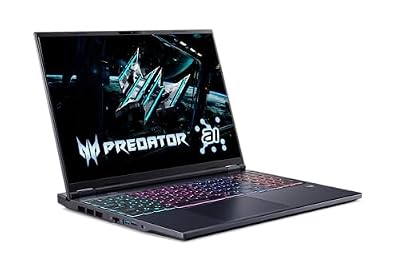
acer Predator Helios Neo 16 AI Gaming Laptop | Intel Core Ultra 9 Processor 275HX | NVIDIA GeForce RTX 5070 Ti | 16" WQXGA 240Hz G-SYNC | 16GB DDR5 | 1TB Gen 4 SSD | Killer Wi-Fi 6E | PHN16-73-92B8




As an Amazon Associate we earn from qualifying purchases. Product prices and availability are accurate as of the date/time indicated.
Frequently Asked Questions
Is an RTX 5070 Ti laptop good for 1440p gaming?
Yes, for most current titles at high settings with upscaling enabled. The result depends on the laptop’s power limit and cooling, so check sustained performance tests before you decide.
Is the RTX 5070 Ti in a laptop the same as the desktop card?
No. The architecture is related, but laptop GPUs run at a lower and manufacturer-set power limit. Performance can differ widely between laptops with the same GPU name.
Should I upgrade the RAM on this laptop?
If the listing has 16GB, 32GB is more comfortable for modern games and multitasking. Check whether the memory is soldered or in slots before you buy, because that decides whether you can upgrade later.
Is this laptop good for travel?
It can be, but weight, charger size and battery life all matter. Check the chassis weight and carry the adapter. Our guide to gaming laptops for travel lists the trade-offs.
Final Verdict
The HP Omen 16 with an RTX 5070 Ti is a practical 1440p gaming laptop for players who need portability. Its value depends on the exact power limit, cooling and display in the configuration you buy. Verify those details on the live listing, compare the alternatives in the table, and skip the model if your main goal is sustained 4K performance. For a wider view of the gaming laptop market, see our best budget gaming laptop guide and our cooling pad guide for extra thermal headroom.







