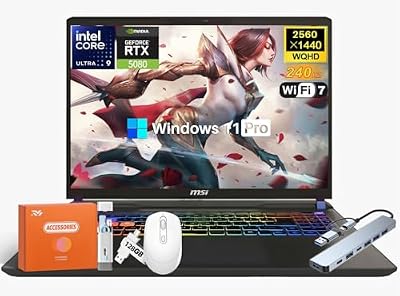
Best Esports Gaming Laptop RTX 5060 Ti 2026
An esports gaming laptop is judged differently from a laptop built for showcase AAA titles. Competitive players care about consistent frame rates, a fast display, low input latency, and a machine that holds those numbers through a long ranked session. An RTX 5060 Ti sits in a useful position for this job. It can drive high frame rates in popular competitive shooters and MOBAs at 1080p, and it leaves headroom for streaming or voice chat running in the background.
The shortlist below includes a featured configuration and four alternatives. Treat it as a set of candidates to verify rather than a ranking. The listing above may be a close match to the esports category, not a confirmed model for your exact game settings, so check the GPU, memory, panel specs, and price on the card. We have not included benchmark numbers, because results depend on the title, the CPU, the power profile, and the display settings.


What an Esports Laptop Needs Beyond the GPU
In competitive games, the GPU is only one part of the frame rate equation. The processor often decides how high you can go in CPU-heavy titles, and the memory configuration affects consistency. A laptop with a fast processor and a sustained GPU power limit will deliver steadier results than one with a stronger graphics card paired with a weak CPU or a throttling chassis. Check both processor generation and memory speed on the spec sheet before comparing prices.
Refresh Rate and Panel Response
For esports, a 1080p panel at 240Hz is a strong choice because the RTX 5060 Ti can push high frame rates in lighter competitive titles. A 165Hz panel is a reasonable compromise if you also play more demanding games. Look at the panel response time and whether the laptop supports variable refresh rate. Confirm the refresh rate in the spec table, since the title of a listing does not always match the default panel setting.
Input Latency and Connectivity
Latency is partly about the display and partly about your setup. A wired Ethernet port helps with consistent online play, and a modern Wi-Fi standard is useful if Ethernet is not an option. Check for a dedicated Ethernet port or a suitable adapter. A fast USB port for a gaming mouse and keyboard matters too, and a USB-C port with video output lets you connect a higher-refresh external monitor at your desk.
Cooling for Long Sessions
Esports players often play for hours, which exposes thermal weaknesses. Look for independent long-session tests that report sustained clocks and fan noise. A laptop that stays stable through a three-hour session is more useful than one that is fast for ten minutes. A cooling pad can help on some designs, and our cooling pad guide covers what to look for.

ASUS ROG Strix G16 (2025) Gaming Laptop, 16” ROG Nebula Display 16:10 2.5K 240Hz/3ms, NVIDIA® GeForce RTX™ 5060 Laptop GPU, Intel® Core™ Ultra 9 Processor 275HX, 32GB DDR5, 1TB PCIe SSD, Wi-Fi 7


As an Amazon Associate we earn from qualifying purchases. Product prices and availability are accurate as of the date/time indicated.
Esports Laptop Configuration Classes Compared
The table below compares the main classes you will see for RTX 5060 Ti esports laptops. It is a checklist for comparing listings, not a ranking of individual products. Price ranges are approximate, and the live price on the listing always takes precedence.
| Configuration class | Best for | Typical price range | What to verify |
|---|---|---|---|
| 15 or 16-inch, 1080p 240Hz panel | Ranked shooters and MOBA play | Check current price | Sustained power limit, CPU generation, fan noise |
| 15-inch, 1440p 165Hz panel | Mixed esports and AAA gaming | Check current price | Frame rate headroom, brightness, thermal reviews |
| Compact 14-inch, 1080p 144Hz panel | Portable competitive play | Check current price | Cooling design, charger size, keyboard quality |
| Streamer-oriented model with extra RAM | Gaming with streaming and voice chat running | Check current price | 32GB memory, storage, port layout |
Buying Checklist for Competitive Players
Start with your main game. If you mostly play a single esports title, check reviews of that title on similar hardware. Next, confirm the panel refresh rate and whether the laptop can run at its full refresh rate on battery or only when plugged in. Then verify the memory and storage. Esports titles are lighter than AAA games, but background apps and streaming software consume memory. Finally, check the keyboard and trackpad feel, since you will spend hours on them.
Keyboard and Mouse Setup
Competitive players often connect an external mouse and keyboard. Check whether the laptop has enough USB ports for both and a headset. If your deskspace is limited, a compact mouse and a tenkeyless keyboard can save room. For mouse choice, our guide to esports mousepads covers the surface that pairs well with a precise sensor.
Monitor Upgrade Option
A laptop screen is convenient, but many players eventually add an external monitor. If you plan to do that, choose a laptop with a video output port that supports a high refresh rate. Our budget gaming monitor guide lists the refresh-rate and panel options to consider.

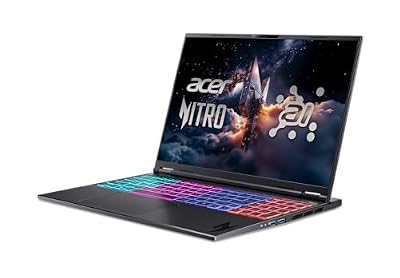
Acer Nitro 16S AI Copilot+ PC Gaming Laptop | AMD Ryzen AI 9 365 Processor | NVIDIA GeForce RTX 5070 Ti Laptop GPU | 16" WQXGA IPS 180Hz Display | 32GB DDR5 | 2TB Gen 4 SSD | Wi-Fi 6E | AN16S-61-R5K4







As an Amazon Associate we earn from qualifying purchases. Product prices and availability are accurate as of the date/time indicated.
Who Should Buy an Esports Laptop With an RTX 5060 Ti
This category suits players who want a portable machine for competitive play, LAN events, or gaming at a friend’s house, and who accept that a laptop will not match a desktop with a larger GPU and better cooling. If you play the most demanding single-player games at 4K, a desktop is a better route. For a desktop comparison, our gaming PC under 1000 dollars guide shows what the same budget buys in a tower.
Ranked Players
Ranked players benefit most from stable frame rates and consistent input. Prioritize a sustained power limit, a fast panel, and a cooling design that stays quiet enough to focus. Avoid choosing purely on peak benchmark scores.
Students Who Game Competitively
Students who want one device for classes and ranked play should check the keyboard, battery life, and weight. Our work laptop guide explains how to balance study and gaming needs.
Related Guides on GamingPCGuru
Use these guides alongside this article when you compare budgets, displays, cooling, and the wider market before you buy.
- best gaming laptop 2026 guide, for how the wider laptop market compares.
- gaming laptops under 1500 dollars, for the next price tier up.
- gaming PC for streaming guide, for encoding and recording headroom.
- gaming laptop battery life guide, for settings that stretch a charge on the go.
Frequently Asked Questions
Is an RTX 5060 Ti laptop enough for competitive shooters?
For most popular competitive shooters at 1080p, an RTX 5060 Ti laptop can reach high frame rates, especially with a sensible settings preset. Check reviews of your specific game, since CPU limits can matter more than the GPU in some titles.
Should I prioritize 240Hz or 165Hz?
A 240Hz panel is better for lighter esports titles where you can sustain very high frame rates. A 165Hz panel is a reasonable choice if you also play demanding games and want a more balanced experience. Pick the one that matches your main game.
Is wired Ethernet still worth it?
For ranked play, a wired connection can reduce variation in latency compared with Wi-Fi. If the laptop has an Ethernet port, use it. If not, a quality USB adapter is an option, though it adds a little complexity.
Final Verdict
The best esports gaming laptop with an RTX 5060 Ti is the one with a fast panel that matches your main game, a processor that keeps up with competitive titles, and a cooling design that holds performance through long sessions. Use the featured listing and the alternatives as a starting shortlist, then verify the exact specs, price, and power profile before you buy.