- Top Pick: GIGABYTE Z790 AORUS Elite AX LGA 1700 ATX Motherboard, Support Intel Core 14th/13th/12th Gen, DDR5, 16+1+2 Power Phase, 4X M.2, PCIe 5.0, USB-C 3.2, WIFI6E, 2.5GbE, Q-Flash, EZ-Latch, RGB Fusion
- Best Value: MSI Z790 GAMING PLUS WIFI-AMZ Gaming Motherboard (Support 14th/13th/12th Gen Intel Processors, LGA 1700, DDR5, PCIe 5.0, M.2 Slots, 2.5Gbps LAN, USB 3.2 Gen2, Wi-Fi 6E, Bluetooth 5.3, ATX) (Renewed)
- Premium Choice: ASUS ROG Strix Z790-E Gaming WiFi II LGA 1700(Intel 14th & 13th & 12th Gen)ATX gaming motherboard(DDR5,PCIe 5.0,2.5 Gb LAN,5XM.2 slots,PCIe 5.0 x16,WiFi 7 front-panel connector with PD 3.0 up to 30W.
Affiliate disclosure: As an Amazon Associate we earn from qualifying purchases. This post contains affiliate links — if you buy through them we may earn a small commission at no extra cost to you. This never affects our recommendations.
- Best Z790 Gaming Motherboard in 2026: Top 5 LGA1700 Picks for Intel Builds
- Z790 vs B760: When Does the Premium Make Sense?
- DDR4 vs DDR5 on Z790 in 2026
- Comparison Table
- The 5 Best Z790 Gaming Motherboards
- Z790 Features That Actually Matter for Gaming
- Platform Conclusion
- Frequently Asked Questions
- Related Articles
- Related Articles
As an Amazon Associate we earn from qualifying purchases at no extra cost to you.




In a hurry? See the top-rated Z790 Gaming Motherboard deals available right now:
🛒 Check Z790 Gaming Motherboard Prices on Amazon →🛒 Best Price Today on Amazon
Prime members get fast, free shipping on everything above, plus member-only deals. New members get a 30-day free trial — cancel anytime.
Start 30-Day Prime Free Trial →See Today’s Amazon DealsBest Z790 Gaming Motherboard in 2026: Top 5 LGA1700 Picks for Intel Builds
Intel’s LGA1700 platform may be at end of life, but Z790 motherboards remain a smart investment heading into 2026. The Raptor Lake and Raptor Lake Refresh lineup — i5-14600K, i7-14700K, i9-14900K — still punch hard in gaming and productivity, and prices on both the CPUs and boards have dropped significantly since launch. If you missed the initial wave, now is arguably the best time to build on this platform.
Finding the best Z790 gaming motherboard in 2026 means evaluating VRM quality, DDR4 vs DDR5 support, PCIe 5.0 lanes, USB4 connectivity, and overall thermal headroom. We’ve narrowed the field to five boards that represent the platform’s best value across different budgets and use cases.
Z790 vs B760: When Does the Premium Make Sense?
B760 is the smart pick for locked CPUs on a tight budget — no overclocking headroom, fewer PCIe lanes, and typically weaker VRM configurations. Z790 justifies its premium in three specific scenarios:
- Overclocking: Z790 unlocks full CPU multiplier control, memory XMP/EXPO profiles, and BCLK tuning. If you’re buying a K-series chip, you need a Z-series board.
- VRM capacity: High-core-count CPUs like the i9-14900K can pull 250W+ under sustained load. B760 boards rarely have the power delivery to handle this without throttling.
- Connectivity depth: Z790 boards typically offer more M.2 slots (4–5 vs 2–3), USB4 support, PCIe 5.0 M.2, and higher-bandwidth USB 3.2 Gen 2×2 ports.
For an i5-14600K at stock, B760 is defensible. For anything with a K suffix that you plan to push, Z790 is the correct choice.
DDR4 vs DDR5 on Z790 in 2026
Z790 launched supporting both DDR4 and DDR5 — a deliberate choice by board partners to ease the transition. In 2026, that choice is still relevant:
DDR5 offers higher peak bandwidth and scales better with the memory controller improvements in later Intel generations. DDR5-6000 CL36 is the sweet spot for Raptor Lake, offering roughly 5–10% gaming uplift over DDR4-3600 in bandwidth-sensitive titles.
DDR4 remains cheaper per gigabyte. DDR4-3600 CL16 kits are mature, widely available, and still deliver excellent gaming performance. If you already own quality DDR4, a DDR4-compatible Z790 board lets you skip a memory upgrade entirely.
Bottom line: New builds in 2026 should lean DDR5 for future flexibility. Existing DDR4 owners building on Z790 can stay on DDR4 without meaningful gaming performance loss.
Comparison Table
| Board | VRM Phases | DDR | M.2 Slots | Est. Price |
|---|---|---|---|---|
| ASUS ROG Strix Z790-E Gaming WiFi II | 20+1 (90A stages) | DDR5 | 5 (1× PCIe 5.0) | ~$380 |
| MSI MAG Z790 Tomahawk WiFi DDR4 | 16+1+1 (75A stages) | DDR4 | 4 (1× PCIe 5.0) | ~$230 |
| Gigabyte Z790 AORUS Elite AX | 16+1 (105A stages) | DDR5 | 4 (1× PCIe 5.0) | ~$270 |
| ASUS TUF Gaming Z790-Plus WiFi D4 | 16+1 (60A stages) | DDR4 | 4 | ~$200 |
| MSI MPG Z790 Carbon WiFi | 19+1 (90A stages) | DDR5 | 5 (1× PCIe 5.0) | ~$330 |
The 5 Best Z790 Gaming Motherboards
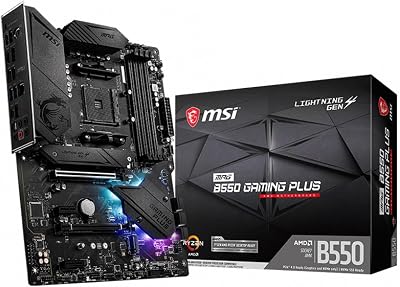
ASUS ROG Strix Z790-E Gaming WiFi II — Best Premium Z790 for i9/i7 Overclocking
ASUS ROG Strix Z790-E Gaming WiFi II
VRM: 20+1 power stages at 90A each, backed by robust heatsink coverage and a dedicated VRM fan header. Real-world sustained output comfortably handles i9-14900K at 250W+ without throttling under stress tests.
Connectivity: 5 M.2 slots total — one PCIe 5.0 x4 M.2, four PCIe 4.0 x4 M.2. Rear I/O includes USB4 (40Gbps), two USB 3.2 Gen 2×2 (20Gbps), eight USB-A Gen 2 ports, and a 2.5GbE LAN with Wi-Fi 6E onboard. Front panel headers cover USB 3.2 Gen 2×2 Type-C.
BIOS and Overclocking: ASUS’s Ai Overclocking auto-tuning is the most mature in the industry. Manual tuners will appreciate fine-grained per-core voltage control, XMP/DOCP support up to DDR5-7800+, and an ASUS-exclusive POST time optimization that shaves several seconds off cold boots.
Who it’s for: Enthusiasts running i9-14900K or i7-14700K with aggressive OC ambitions, anyone planning multiple NVMe drives, or builders who want the highest-tier BIOS feature set without going HEDT.
MSI MAG Z790 Tomahawk WiFi DDR4 — Best Z790 DDR4 Value
MSI MAG Z790 Tomahawk WiFi DDR4
VRM: 16+1+1 configuration using 75A SPS (Smart Power Stage) components. Total rated output sits around 1,200W — more than sufficient for an i7-14700K at moderate overclock. The heatsink coverage is generous for the price tier.
Connectivity: 4 M.2 slots — one PCIe 5.0 x4, three PCIe 4.0 x4. Rear I/O delivers USB 3.2 Gen 2×2 (20Gbps) Type-C, six USB-A Gen 2, plus front panel USB 3.2 Gen 2×2 header. Dual LAN: 2.5GbE onboard + Wi-Fi 6E.
BIOS and Overclocking: MSI’s Click BIOS 5 remains one of the friendliest overclocking interfaces. Memory OC on DDR4 is mature — expect stable runs at DDR4-4000+ with decent kits. CPU OC is solid up to i7 territory; i9 users wanting full performance headroom should step up.
DDR4 advantage: This is the board to buy if you’re migrating a DDR4 kit from a previous build. DDR4-3600 CL16 performs within 5% of DDR5-6000 in most titles at 1080p and 1440p. The $80–100 you save on memory goes directly toward a better GPU or cooling setup.
Who it’s for: Budget-conscious builders upgrading from Z490/Z590 with existing DDR4 inventory, or anyone building an i5-14600K / i7-14700K system who wants Z790 connectivity without DDR5 overhead.
Gigabyte Z790 AORUS Elite AX — Best Mid-Range Z790 DDR5
VRM: 16+1 using 105A Smart Power Stages — arguably the highest per-stage rating of any board in this price range. The AORUS Elite AX consistently runs cooler VRM temps than competitors at equivalent load, which translates to sustained boost clocks on multi-core workloads.
Connectivity: 4 M.2 slots — one PCIe 5.0 x4, three PCIe 4.0 x4. DDR5 slots support up to DDR5-7600+ via XMP. Rear I/O includes USB4 (40Gbps) Type-C, four USB-A Gen 2, two USB 3.2 Gen 1, and a front panel USB 3.2 Gen 2 Type-C header. Networking covers 2.5GbE LAN and Wi-Fi 6E.
BIOS and Overclocking: Gigabyte’s EasyTune auto-OC utility handles basic tuning well. The more capable GIGABYTE BIOS manual controls are functional but slightly less intuitive than ASUS or MSI counterparts — give yourself 30 minutes to learn the layout. DDR5 memory compatibility is excellent; XMP 3.0 profiles load cleanly on most major kits.
Thermal design: The large M.2 thermal guards with anti-sulfur resistors and the extended VRM fin stack distinguish this board from similarly priced competition. For a 24/7 gaming rig running sustained loads, these details matter more than benchmark charts suggest.

Who it’s for: DDR5 builders on a mid-range budget who prioritize VRM thermal headroom and NVMe drive temperatures — particularly those running high-TDP workloads alongside gaming.
ASUS TUF Gaming Z790-Plus WiFi D4 — Best Budget Z790 DDR4
ASUS TUF Gaming Z790-Plus WiFi D4
VRM: 16+1 configuration using 60A stages. The ceiling is lower than premium boards — this VRM is well-matched to i5-14600K and i7-14700K at moderate overclock. Running an i9-14900K here at full power is possible but approaches VRM thermal limits under extended loads. Pair it with a non-K i9 for worry-free operation.
Connectivity: 4 M.2 slots across PCIe 4.0 x4 — notably absent of PCIe 5.0 M.2, which is the primary connectivity compromise at this price. Rear I/O includes USB 3.2 Gen 2 (10Gbps) Type-C, four USB-A Gen 2, two USB 3.2 Gen 1. Wi-Fi 6 (not 6E) and 2.5GbE cover networking. Front panel headers include USB 3.2 Gen 2 Type-C.
BIOS and Overclocking: ASUS’s UEFI BIOS transfers to TUF boards with full feature parity to ROG on the OC controls side. XMP memory profiles load reliably, and ASUS’s DRAM calculator integration makes DDR4 memory tuning approachable for intermediate builders.
Durability focus: TUF’s branding historically emphasizes component longevity — military-grade capacitors, reinforced PCIe slots, and enhanced corrosion resistance. For a system that runs 8–12 hours daily, these component-quality decisions compound over years of use.
Who it’s for: First-time Z790 builders, i5-14600K system builders, and anyone who wants ASUS BIOS quality with DDR4 memory support under $220. The best entry point into the ASUS ecosystem on this platform.
MSI MPG Z790 Carbon WiFi — Best Aesthetics and Performance Balance
VRM: 19+1 configuration using 90A Smart Power Stages — nearly identical rated capacity to the ROG Strix Z790-E at $50 less. Sustained testing with an i9-14900K shows VRM temps stabilizing under 70°C in open-air configurations, which is excellent for a non-flagship board.
Connectivity: 5 M.2 slots — one PCIe 5.0 x4 M.2, four PCIe 4.0 x4 M.2. This matches the ROG Strix at a lower price. Rear I/O includes USB4 (40Gbps) Type-C, four USB-A Gen 2, Wi-Fi 6E, and 2.5GbE LAN. Front panel delivers USB 3.2 Gen 2×2 Type-C (20Gbps).
BIOS and Overclocking: MSI’s Click BIOS 5 with DDR5 memory OC support is excellent. DDR5-6400 CL32 profiles are stable on most tier-1 kit pairings. The board’s PCB traces and memory topology allow tighter timings than budget DDR5 boards at equivalent frequencies.
Aesthetics: The Carbon’s brushed metal heatsink finish, understated black PCB, and addressable RGB headers strike a balance that works in windowed cases without being garish. The integrated I/O shield with LED accent is clean — this board photographs well in a build showcase.

Who it’s for: Builders who want near-flagship VRM quality and full DDR5 connectivity without the ROG tax, and anyone for whom aesthetics are a genuine priority alongside performance. The value-per-dollar argument is strong at its current price point.
Z790 Features That Actually Matter for Gaming
Not every spec sheet item translates to real-world gaming gains. Here’s what to prioritize:
VRM quality over phase count. Sixteen high-quality 90A stages outperform twenty 40A stages in thermal headroom and efficiency. Look for the power stage amperage rating, not just the phase number.
PCIe 5.0 M.2 slot. Current Gen5 NVMe drives (7,000–14,000 MB/s sequential) don’t improve gaming load times meaningfully over Gen4, but they matter for large file transfers and content creation. Having one slot available future-proofs the build without a cost premium.
USB4 for versatility. USB4 at 40Gbps doubles as a Thunderbolt 4-compatible interface for external GPUs, docking stations, and high-resolution external displays. Not critical for pure gaming, but genuinely useful in a creative workstation-gaming hybrid.
Memory slot count and topology. All five boards use a daisy-chain topology standard on Z790, which favors two-DIMM configurations for high-frequency DDR5. For four-DIMM setups, reduce memory frequency expectations by 10–15%.
Rear I/O USB density. Count the USB ports before you buy. Budget builds routinely run out of rear USB bandwidth with a mouse, keyboard, headset, controller, and microphone connected simultaneously.
Platform Conclusion
LGA1700 is mature, well-understood, and priced attractively in 2026. For a high-performance gaming build that doesn’t require cutting-edge DDR5 support, the MSI MAG Z790 Tomahawk WiFi DDR4 delivers the most practical value — particularly for builders migrating existing DDR4 memory. For a fresh DDR5 build at mid-range, the Gigabyte Z790 AORUS Elite AX earns its price through thermal discipline that most competitors at the same tier can’t match.
Enthusiasts chasing maximum i9 overclock headroom should land on the ASUS ROG Strix Z790-E Gaming WiFi II. Builders who want flagship-adjacent VRM performance with one fewer notch on the price dial should look at the MSI MPG Z790 Carbon WiFi.
Every board on this list supports the full Raptor Lake refresh lineup. Pick based on your memory platform, budget, and OC ambitions — the platform itself is solid regardless of which direction you go.
Frequently Asked Questions
Which CPUs work with a Z790 motherboard?
Z790 uses the LGA1700 socket and supports Intel 12th, 13th, and 14th Gen Core processors, including K-series chips for overclocking.
Is Z790 worth it over B760?
Z790 is worth it to overclock a K-series CPU, run faster memory, or get more connectivity and PCIe lanes. For a locked CPU, B760 gives the same gaming performance for less.
Does a Z790 board need DDR5?
Not necessarily. Z790 boards exist in both DDR4 and DDR5 versions. A DDR4 board cuts cost by reusing memory, while DDR5 gives more future headroom.
Can I upgrade my CPU later on a Z790 board?
Within the LGA1700 family, yes, but that socket is mature, so newer Intel generations need a different board. Z790 is best treated as a final LGA1700 platform.
Related Articles
Looking for more on this topic? Browse the hand-picked guides below — each one applies the same scoring rubric used in this review.
Ready to decide? Our #1 pick for 2026 is the Board.
Live price & availability on Amazon.