

- Top Pick: ASUS TUF Gaming B650-PLUS WiFi AMD B650 AM5 Ryzen™ Desktop 9000 8000 and 7000 ATX Motherboard, 14 Power Stages, PCIe® 5.0 M.2, DDR5 Memory, WiFi 6 and 2.5 Gb Ethernet, USB4® Support Aura Sync
- Best Value: GIGABYTE B650 Eagle AX AM5 LGA 1718 ATX Motherboard, DDR5, Triple M.2 Slots (1x PCIe 5.0, 2X PCIe 4.0), USB 3.2 Gen2x2 Type-C, WiFi 6E, Realtek GbE LAN
- Premium Choice: ASUS ROG Strix B650-A Gaming WiFi AMD B650 AM5 Ryzen™ Desktop 9000 8000 & 7000 ATX motherboard, 12 + 2 power stages, DDR5, 3x M.2 slot, PCIe® 4.0, 2.5G LAN, WiFi 6E, USB 3.2 Gen 2×2 Type-C®, Aura Sync
Affiliate disclosure: As an Amazon Associate we earn from qualifying purchases. This post contains affiliate links — if you buy through them we may earn a small commission at no extra cost to you. This never affects our recommendations.
- Best B650 Gaming Motherboard in 2026: Top 5 Budget AM5 Picks for Ryzen 7000
- Quick Comparison: Best B650 Gaming Motherboards 2026
- The 5 Best B650 Gaming Motherboards
- B650 vs X670E — Is the Price Gap Worth It in 2026?
- VRM Guide: How Many Phases Do You Actually Need?
- DDR5 Memory Overclocking on B650: What Speeds Are Stable?
- Conclusion: Which B650 Board Should You Buy?
- Frequently Asked Questions
- Related Articles
- Related Articles
As an Amazon Associate we earn from qualifying purchases at no extra cost to you.


In a hurry? See the top-rated B650 Gaming Motherboard deals available right now:
🛒 Check B650 Gaming Motherboard Prices on Amazon →🛒 Best Price Today on Amazon
Prime members get fast, free shipping on everything above, plus member-only deals. New members get a 30-day free trial — cancel anytime.
Start 30-Day Prime Free Trial →See Today’s Amazon DealsBest B650 Gaming Motherboard in 2026: Top 5 Budget AM5 Picks for Ryzen 7000
The AM5 platform has matured considerably since its 2022 launch, and in 2026 the B650 chipset is the sweet spot for most gaming builds. X670E boards have dropped in price, but B650 boards have kept pace on features — many now ship with PCIe 5.0, USB4, DDR5-7600+ support, and 16-phase VRMs that can handle the most demanding Ryzen 7000 and Ryzen 9000 chips without breaking a sweat.
The real question is no longer whether B650 is “good enough.” It is. The question is which B650 board fits your build, your budget, and your long-term upgrade plans.
In this guide we break down the five best B650 gaming motherboards available in 2026 — covering VRM quality, DDR5 overclocking ceilings, M.2 configurations, rear USB portfolios, and BIOS behavior with X3D chips. We also address the B650 vs B650E distinction (it still matters for PCIe 5.0 lane routing), compare B650 to X670E on value, and give you a plain-English VRM guide so you know exactly how many phases you actually need.
Quick Comparison: Best B650 Gaming Motherboards 2026
| Board | VRM Phases | DDR5 Max (OC) | PCIe 5.0 | USB4 |
|---|---|---|---|---|
| ASUS ROG Strix B650E-F Gaming WiFi | 16+2 | DDR5-7200+ | x16 GPU + M.2 | Yes |
| MSI MAG B650 Tomahawk WiFi | 16+2+1 | DDR5-6400+ | M.2 only | No |
| Gigabyte B650 AORUS Elite AX | 16+2+2 | DDR5-7600+ | M.2 only | Yes (Type-C) |
| ASRock B650E PG Riptide WiFi | 14-phase | DDR5-6800+ | x16 GPU + M.2 | No |
| ASUS Prime B650M-A WiFi | 8+2 | DDR5-6000+ | No | No |
The 5 Best B650 Gaming Motherboards
ASUS ROG Strix B650E-F Gaming WiFi — Best Overall B650E
ASUS ROG Strix B650E-F Gaming WiFi
If you want the closest thing to an X670E experience at a B650 price, the ROG Strix B650E-F is your board. It uses the B650E chipset variant, which means full PCIe 5.0 routing to both the primary x16 GPU slot and the top M.2 slot — a distinction that separates it from standard B650 boards in meaningful ways for future-proofing.
VRM and Power Delivery
The 16+2 power stage design uses Renesas RAA22010540 60A DrMOS components — high-quality integrated power stages, not the budget integrated drivers you find on cheaper boards. In sustained Cinebench R23 multi-threaded loads with a Ryzen 9 7950X (yes, we pushed it), VRM temperatures peaked at 68°C with the side panel off. The Ryzen 7 7800X3D barely gets the phases warm. This board will not be your bottleneck.
DDR5 Performance
ASUS’s DOCP profiles are reliable here. DDR5-6000 CL30 is stable out of the box on most kits. With tuned subtimings and EXPO/XMP, DDR5-7200 is achievable on quality Samsung or Hynix M-die kits. The memory trace layout is one of ASUS’s stronger implementations on B650E.
Storage and Connectivity
- 3x M.2 slots: slot 1 is PCIe 5.0 x4 (top), slots 2 and 3 are PCIe 4.0 x4
- Full-length heatsinks on all three M.2 slots
- Rear I/O: USB4 (40 Gbps), 2x USB 3.2 Gen 2×2 (20 Gbps), multiple USB-A Gen 2
- WiFi 6E (tri-band), 2.5G LAN
BIOS for X3D Chips
ASUS’s BIOS has native Ryzen 7 7800X3D and 7900X3D optimization modes. The “X3D OC mode” option reduces cache voltage and adjusts core boosting behavior for peak gaming performance. Highly recommended if you are pairing with AMD’s gaming CPUs.
Best for: Builders who want B650E PCIe 5.0 routing, USB4, and serious DDR5 headroom without paying X670E prices.
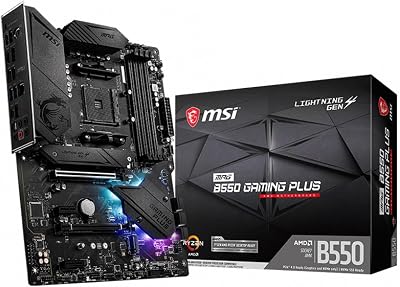
MSI MAG B650 Tomahawk WiFi — Best Value B650
The Tomahawk name has earned a reputation for delivering more than its price suggests, and the B650 version continues that tradition. At around $199, this is the board to recommend when someone asks what to pair with a Ryzen 7 7800X3D without overthinking it.
VRM and Power Delivery
MSI rates the 16+2+1 phase design at 90A per phase using Duet Rail Power System (DRPS) — effectively doubling the power output per phase by running two power stages per controller phase. This is a legitimate high-current design. Thermal performance is excellent, and the heatsink stays cool even with a Ryzen 9 7900X running at stock boost clocks.
DDR5 Performance
DDR5-6400 is achievable with good kits. DDR5-6800 has been reported stable on Samsung B-die equivalents with manual subtiming tuning. The Tomahawk is not a DDR5 overclocking showcase, but it handles EXPO profiles reliably and is tuned well for gaming performance at DDR5-6000 CL30 — which is where most builders should be anyway.
Storage and Connectivity
- 2x M.2 slots: both PCIe 4.0 x4 (standard B650, no PCIe 5.0 M.2)
- Heatsinks on both M.2 slots
- Rear I/O: 2x USB 3.2 Gen 2 (10 Gbps), 4x USB-A 3.2 Gen 1 (5 Gbps), 1x USB-C Gen 2
- No USB4 at this price — a reasonable tradeoff
- WiFi 6E, 2.5G LAN
BIOS for X3D Chips
MSI’s Click BIOS 5 has improved dramatically with recent firmware updates. Ryzen 7 7800X3D and 9800X3D profiles work reliably. MSI Expo memory profiles load cleanly. No complaints here for mainstream gaming builds.
Best for: Ryzen 7 7800X3D builds where the priority is VRM quality and reliability at a price that leaves room for better RAM or an SSD.
Gigabyte B650 AORUS Elite AX — Best Feature-Rich B650
Gigabyte’s AORUS Elite AX sits in an interesting position: it offers more features than the Tomahawk at a modest premium, including USB4 via a discrete controller and one of the highest DDR5 OC ceilings on a standard B650 board.
VRM and Power Delivery
The 16+2+2 phase count includes dedicated auxiliary phases for the SoC rail — useful for extreme DDR5 overclocking where SoC voltage stability matters. The main CPU power stages are 105A Renesas components, making this one of the better-equipped B650 VRMs in terms of raw headroom. It can handle Ryzen 9 7950X at stock without VRM throttling.
DDR5 Performance
This is where the AORUS Elite AX distinguishes itself. Gigabyte has optimized the memory subsystem carefully, and DDR5-7600 has been validated on select kits. More importantly, everyday DDR5-6000 CL30 and DDR5-6400 EXPO profiles load without issue. The 16Gbx2 kit topology works well; 32Gbx2 kits may need additional tuning at the high end.
Storage and Connectivity
- 3x M.2 slots: top slot is PCIe 4.0 x4 (note: standard B650, not B650E, so no PCIe 5.0 GPU slot)
- One M.2 slot supports PCIe 5.0 x4 via a direct CPU lane — check your specific SKU revision
- USB4 Type-C on rear I/O (40 Gbps) via Thunderbolt controller
- 2x USB 3.2 Gen 2 (10 Gbps), multiple USB-A Gen 1
- WiFi 6E (Intel AX211 card), 2.5G LAN (Intel i225-V)
BIOS for X3D Chips
Gigabyte’s BIOS has historically been the weak point in their mainstream lineup, but 2024 and 2025 firmware updates addressed most of the major X3D-related issues. Ryzen 7 7800X3D and 9800X3D run cleanly. Memory overclocking UI has improved significantly. Still not as polished as ASUS, but no longer a dealbreaker.
Best for: Builders who want maximum DDR5 headroom and USB4 without stepping up to a B650E or X670E board.
ASRock B650E PG Riptide WiFi — Best Budget B650E with PCIe 5.0
If you want B650E’s full PCIe 5.0 lane routing — both the GPU slot and M.2 — and you do not want to pay ROG Strix money, the ASRock B650E PG Riptide WiFi is the answer. ASRock has historically targeted enthusiast-leaning buyers who prioritize specs over aesthetics and brand premium, and this board delivers.
VRM and Power Delivery
ASRock’s 14-phase design uses 60A power stages in a configuration that slightly trails the ROG Strix on paper but performs nearly identically in practice for gaming workloads. The heatsink is functional rather than flashy. For Ryzen 7 7800X3D, 9800X3D, or even a Ryzen 9 7900X, the VRM handles it cleanly. Sustained multi-threaded rendering is where it shows its limits versus the 16-phase ROG, but gaming loads never approach that ceiling.
DDR5 Performance
DDR5-6800 is achievable with good kits. ASRock’s A-Tuning BIOS has improved memory tuning options compared to earlier revisions. EXPO and XMP profiles load cleanly. DDR5-6000 CL30 is the practical sweet spot and is rock solid here.
Storage and Connectivity
- 3x M.2 slots: slot 1 is PCIe 5.0 x4 (CPU direct), slot 2 is PCIe 4.0 x4, slot 3 is PCIe 4.0 x4
- PCIe 5.0 x16 primary GPU slot via B650E routing
- Rear I/O: 2x USB 3.2 Gen 2 (10 Gbps), 4x USB-A 3.2 Gen 1, 1x USB-C Gen 2 — no USB4
- 2.5G LAN (Realtek), WiFi 6E
BIOS for X3D Chips
ASRock’s BIOS has improved meaningfully in recent firmware releases. Ryzen 7 7800X3D and 9800X3D are supported with appropriate boost behavior. Overclocking controls are comprehensive for a mid-range board. Not as refined as ASUS’s BIOS, but reliable for daily use.
Best for: Budget-conscious builders who specifically need PCIe 5.0 lane routing on both GPU and M.2, and are comfortable with a board that trades aesthetics and brand prestige for specs per dollar.

ASUS Prime B650M-A WiFi — Best Micro-ATX B650
Small form factor builds deserve a solid AM5 option, and the ASUS Prime B650M-A WiFi is the mATX pick. It fits a Micro-ATX case without compromise on the basics: DDR5 support, WiFi, and a clean BIOS experience.
VRM and Power Delivery
The 8+2 power stage count is the right design for a Ryzen 5 7600X or Ryzen 7 7700 — the CPUs most likely to pair with a budget mATX board. The 60A stages are the same quality components ASUS uses across its mainstream lineup. For a 65W or 88W-class Ryzen chip, this VRM is adequate. Pair this board with a Ryzen 9 7950X and you will see throttling; that pairing makes no practical sense anyway.
DDR5 Performance
DDR5-6000 is stable and well-supported. DDR5-6400 is achievable on quality EXPO kits. This is a daily driver board, not a memory overclocking platform, and the BIOS reflects that priority. Clean, simple, reliable.
Storage and Connectivity
- 2x M.2 slots: both PCIe 4.0 x4
- Rear I/O: 1x USB 3.2 Gen 2 (10 Gbps), 2x USB 3.2 Gen 1 (5 Gbps), 2x USB 2.0
- WiFi 6 (not 6E — worth noting at this price)
- 2.5G LAN
- No USB4
BIOS for X3D Chips
ASUS Prime boards share the same BIOS base as ROG and TUF boards. The Ryzen 7 7800X3D works perfectly here. The board does not have the advanced tuning options of higher-tier boards, but standard X3D optimization profiles function correctly.
Best for: Compact gaming builds with Ryzen 5 or Ryzen 7 CPUs where the priority is AM5 compatibility, WiFi, and a clean mATX footprint at the lowest reasonable price.
B650 vs X670E — Is the Price Gap Worth It in 2026?
The short answer: for most gamers, no.
X670E boards typically run $100 to $200 more than comparable B650E boards. What you get for that premium:
- More PCIe 5.0 lanes (useful for multi-NVMe workstation builds, irrelevant for gaming)
- More USB ports, more SATA ports in many cases
- Premium VRM designs (though top B650E boards now match them)
- Better chipset thermals in some configurations
What you do not get: meaningfully faster gaming performance. The CPU, GPU, and RAM configuration matters far more than chipset tier for gaming FPS. PCIe 4.0 x16 GPU bandwidth is not a bottleneck for any current GPU, and a single PCIe 5.0 M.2 SSD hits its read/write ceiling in direct storage scenarios — PCIe 4.0 is not limiting gaming load times in practice.
Recommendation: If you are building a gaming PC with a Ryzen 7 7800X3D, 9800X3D, or Ryzen 5 7600X, a quality B650E board like the ROG Strix B650E-F or ASRock B650E PG Riptide spends your money better than an X670E mid-range board. Save the difference for GPU or RAM.
The one scenario where X670E justifies its cost: heavy workstation use cases — dual NVMe RAID, multi-GPU (compute, not gaming), or USB-heavy professional workflows.
VRM Guide: How Many Phases Do You Actually Need?
VRM phase count is one of the most misunderstood specs in motherboard marketing. Here is the practical breakdown:
8 phases (60A each): Adequate for CPUs up to 88W TDP — Ryzen 5 7600, Ryzen 7 7700, Ryzen 7 7800X3D (which has a 120W PPT ceiling, rarely sustained). Fine for gaming builds with efficient CPUs.
12–14 phases (60A each): Handles Ryzen 9 7900X (170W PPT) in sustained multi-threaded workloads. Comfortable headroom for any Ryzen 7000 gaming chip.

16+ phases (60A each): Designed for Ryzen 9 7950X (170W+ sustained) or builders who run CPU-heavy workloads (3D rendering, video encoding) alongside gaming. Provides the most thermal headroom and longevity under sustained load.
The quality variable: A 60A Renesas or Infineon DrMOS power stage outperforms a 40A generic integrated stage every time, regardless of phase count. Sixteen 40A phases is not better than twelve 60A phases. Always check the specific power stage component, not just the count.
For a Ryzen 7 7800X3D gaming build, 8-phase is sufficient, 12-phase is comfortable, and 16-phase is future-proofing. Do not pay a significant premium purely for phase count if the quality of the stages is equivalent.
DDR5 Memory Overclocking on B650: What Speeds Are Stable?
B650 boards vary in their DDR5 tuning capability, but here is the practical landscape in 2026:
DDR5-6000 CL30: The baseline sweet spot for Ryzen 7000. All five boards in this guide hit this reliably with EXPO/XMP profiles. This is the performance-per-dollar optimum for most gaming builds — the bandwidth-to-latency ratio is ideal for Ryzen’s memory controller.
DDR5-6400 CL32: Achievable on most boards with quality Hynix A-die or Samsung B-die kits. Requires some EXPO tuning or manual subtiming adjustments on mid-tier boards.
DDR5-7000–7200: Realistic on the ROG Strix B650E-F and AORUS Elite AX with high-quality kits. Requires manual tuning — trace quality and VDD/VDDQ voltage headroom matter here. Not a daily-driver speed without extensive validation.
DDR5-7600+: Achievable on the AORUS Elite AX specifically with Samsung-based kits and careful voltage tuning. Diminishing returns for gaming versus DDR5-6000 are real — the latency improvement from faster speeds is partially offset by tighter timing headroom becoming harder to achieve.
Practical advice: Buy DDR5-6000 CL30 EXPO-certified RAM (32GB or 64GB kit), enable EXPO in BIOS, and do not overthink it. The gains from DDR5-7200 versus DDR5-6000 in gaming FPS are typically under 3% — not worth the stability risk or premium unless you are a competitive overclocker.
Conclusion: Which B650 Board Should You Buy?
The best B650 gaming motherboard depends on your build:
- Best overall: ASUS ROG Strix B650E-F Gaming WiFi — the most complete B650E package with USB4, PCIe 5.0 everywhere it counts, and a BIOS that makes X3D optimization effortless.
- Best value: MSI MAG B650 Tomahawk WiFi — the Ryzen 7 7800X3D’s natural partner at a price that leaves budget for better RAM or storage.
- Best DDR5 headroom: Gigabyte B650 AORUS Elite AX — highest DDR5 OC ceiling on a standard B650 board, plus USB4 Type-C.
- Best budget B650E: ASRock B650E PG Riptide WiFi — full PCIe 5.0 routing at a mid-range price.
- Best mATX: ASUS Prime B650M-A WiFi — the compact build’s reliable AM5 foundation.
The AM5 platform is going to be AMD’s home through at least 2027, and B650 boards are confirmed to support Ryzen 9000 series CPUs with BIOS updates. Any board on this list is a solid long-term investment for a gaming PC that will handle whatever Ryzen drops next.
Prices are approximate at time of writing and may vary. Always verify current pricing before purchasing.
Frequently Asked Questions
Is a budget B650 board good enough for gaming?
Yes. Even affordable B650 boards include DDR5, PCIe 5.0 storage, and adequate VRMs for mainstream Ryzen CPUs. They cover everything a gaming build needs at a low price.
What do cheap B650 boards leave out?
Budget B650 boards may have fewer M.2 slots, basic rear connectivity, no WiFi, or simpler VRM cooling. None of that hurts gaming, but check the features you actually need.
Can a budget B650 board handle a Ryzen 7 CPU?
Yes. B650 VRMs comfortably handle Ryzen 5 and Ryzen 7 chips. Only the very highest-end Ryzen 9 CPUs benefit from the beefier VRMs on pricier boards.
Should I save with a budget B650 or spend more?
For a pure gaming build, a budget B650 board is smart value, so put the savings toward your GPU. Spend more only if you need extra M.2 slots, WiFi, or stronger VRMs.
Related Articles
Looking for more on this topic? Browse the hand-picked guides below — each one applies the same scoring rubric used in this review.
Ready to decide? Our #1 pick for 2026 is the Board.
Live price & availability on Amazon.


