

- Top Pick: GIGABYTE Z790 AORUS Elite AX LGA 1700 ATX Motherboard, Support Intel Core 14th/13th/12th Gen, DDR5, 16+1+2 Power Phase, 4X M.2, PCIe 5.0, USB-C 3.2, WIFI6E, 2.5GbE, Q-Flash, EZ-Latch, RGB Fusion
- Best Value: MSI Z790 GAMING PLUS WIFI-AMZ Gaming Motherboard (Support 14th/13th/12th Gen Intel Processors, LGA 1700, DDR5, PCIe 5.0, M.2 Slots, 2.5Gbps LAN, USB 3.2 Gen2, Wi-Fi 6E, Bluetooth 5.3, ATX) (Renewed)
- Premium Choice: ASUS Z790-AYW WiFi W II Intel Z790 (LGA 1700) ATX Motherboard with PCIe® 5.0, 3X M.2, 12+1 DrMOS, DDR5, WiFi 6, 2.5Gb LAN, HDMI, USB 10Gbps Type-C®, USB 10Gbps Type-C®, Thunderbolt™, USB4®, Aura Sync
Affiliate disclosure: As an Amazon Associate we earn from qualifying purchases. This post contains affiliate links — if you buy through them we may earn a small commission at no extra cost to you. This never affects our recommendations.
- Quick Picks
- Z790 vs Z690: Should You Upgrade Platforms?
- DDR5 vs DDR4 on Z790: Which Variant to Buy
- VRM Explained: Why It Matters for i9 Builds and Overclocking
- Top 5 Z790 Gaming Motherboard Picks
- Full Comparison Table
- What to Look For in a Z790 Motherboard
- Verdict
- Frequently Asked Questions
- Related Articles
- Related Articles
As an Amazon Associate we earn from qualifying purchases at no extra cost to you.


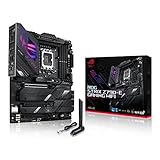


In a hurry? See the top-rated Z790 Gaming Motherboard deals available right now:
🛒 Check Z790 Gaming Motherboard Prices on Amazon →🛒 Best Price Today on Amazon
Prime members get fast, free shipping on everything above, plus member-only deals. New members get a 30-day free trial — cancel anytime.
Start 30-Day Prime Free Trial →See Today’s Amazon DealsQuick Picks
| Rank | Board | Best For | Price Range |
|---|---|---|---|
| #1 | ASUS ROG Strix Z790-E Gaming WiFi | Best Overall | ~$450 |
| #2 | MSI MAG Z790 Tomahawk WiFi | Best Value | ~$230 |
| #3 | Gigabyte Z790 AORUS Elite AX | Best Mid-Range | ~$280 |
| #4 | ASUS Prime Z790-P WiFi | Best Budget | ~$190 |
| #5 | ASRock Z790 Steel Legend WiFi | Best Versatile | ~$210 |
Z790 vs Z690: Should You Upgrade Platforms?
If you’re building a new Intel system in 2026, Z790 is the right foundation. But if you’re asking whether to scrap an existing Z690 build — the answer is almost certainly no.
Z790 and Z690 use the same LGA1700 socket and support the same Intel 12th, 13th, and 14th Gen processors. The platform differences are incremental: Z790 adds more PCIe 5.0 lanes (enabling Gen5 M.2 NVMe), more USB 3.2 Gen 2×2 headers, and better chipset bandwidth overall. For a from-scratch build, Z790 is worth paying the modest premium. You get future headroom, better I/O, and Gen5 SSD support that will matter more as pricing on those drives continues to drop.
For upgraders already on Z690 with a solid 12th or 13th Gen chip: stay put. A motherboard swap alone buys you nothing in gaming frame rates. Spend the money on a GPU instead.
Bottom line: New build? Z790. Upgrading from Z690? Pass.
DDR5 vs DDR4 on Z790: Which Variant to Buy
Most Z790 boards ship in DDR5-only versions. A smaller number — notably ASRock’s Steel Legend lineup — offer DDR4 variants, which matter if you’re migrating from a previous platform and want to reuse existing RAM.
DDR5 is now the clear long-term play. Prices have normalized and performance headroom at high frequencies (DDR5-6400 and above) delivers real gains in CPU-intensive workloads and future titles. If you’re buying RAM fresh, go DDR5 without hesitation.
DDR4 variants of Z790 boards make sense in one scenario: you have a quality DDR4-3600 CL16 or faster kit sitting in a retiring Z490/Z590 build. Reusing it saves $80–120 and lets you invest that money in storage or cooling instead.
Rule of thumb: Buying RAM new? DDR5. Reusing DDR4 from an old build? Get a DDR4-variant board.
VRM Explained: Why It Matters for i9 Builds and Overclocking
The Voltage Regulator Module (VRM) is the cluster of components on the motherboard that conditions and delivers power to your CPU. Every CPU needs stable, clean power — but it’s especially critical for high-TDP chips like the Core i9-13900K or i9-14900K that can draw 250W+ under sustained load.
A VRM is rated by two key numbers: phase count and current rating per phase.
- A board with 16 phases at 60A per phase can theoretically deliver 960A — more than enough headroom for a 14900K under the heaviest overclocks.
- A budget board might list “16 phases” but use doubler chips (teamed phases), effectively delivering fewer discrete power stages. Real phase counts matter more than marketing numbers.
For i5 and i7 chips at stock: almost any Z790 board from a major brand is sufficient. For i9 chips or aggressive overclocking, you want confirmed 16+1 or higher with 60A+ inductors, solid cooling on the VRM heatsinks, and a reputable power stage IC (Renesas, MPS, Monolithic Power).
Who needs to care: i9 builders, anyone doing manual overclocking, and small-form-factor builds with airflow constraints. For everyone else, mid-range VRM quality is plenty.
Top 5 Z790 Gaming Motherboard Picks
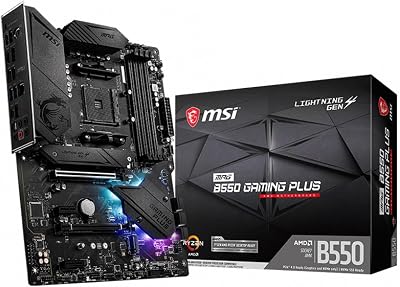
1. ASUS ROG Strix Z790-E Gaming WiFi — Best Overall
ASUS ROG Strix Z790-E Gaming WiFi
Who it’s for: Enthusiasts building around i9-13900K/14900K, hardcore overclockers, streamers and creators who need Thunderbolt 4.
VRM Tier: 18+1 power stages, 90A Renesas ICs — top-tier for any Intel consumer platform workload.
Key Specs:
- Socket: LGA1700 | DDR5 (up to DDR5-7800+ OC)
- 4x M.2 slots (PCIe 5.0 + PCIe 4.0 mix)
- Thunderbolt 4 (USB4 40Gbps)
- WiFi 6E + 2.5GbE LAN
- USB 3.2 Gen 2×2 front panel header
- PCIe 5.0 x16 primary slot
Pros:
- Best VRM on this list — handles i9 with headroom to spare
- Thunderbolt 4 is rare at this tier; critical for eGPU or high-bandwidth peripherals
- BIOS is class-leading for overclocking granularity (AI OC, manual, per-core tuning)
- Robust audio codec (ROG SupremeFX)
- Three-year warranty
Cons:
- Premium price (~$450) is hard to justify for i5/i7 stock builds
- Large ATX footprint — some cases will block the rear USB-A ports with PSU shrouds
- ROG aesthetic (heavy RGB, aggressive styling) is polarizing
The ROG Strix Z790-E earns its flagship status. The 18+1 Renesas VRM stage means even a fully unlocked i9-14900KS at 253W package power stays within thermal limits without throttling. Thunderbolt 4 on a gaming board is a genuine differentiator — attach a 40Gbps storage array or a Thunderbolt dock and the board functions as a workstation backbone. If you’re dropping $400+ on a CPU, match it with a board that won’t bottleneck it.
2. MSI MAG Z790 Tomahawk WiFi — Best Value Z790
Who it’s for: i7-13700K/14700K builders wanting a feature-complete board without flagship pricing, value-conscious enthusiasts.
VRM Tier: 16+1+1 phases, 75A MPS power stages — strong mid-to-high tier.
Key Specs:
- Socket: LGA1700 | DDR5 (up to DDR5-7200+ OC)
- 4x M.2 slots (1x PCIe 5.0, 3x PCIe 4.0)
- WiFi 6E + 2.5GbE LAN
- USB 3.2 Gen 2×2 Type-C front panel header
- PCIe 5.0 x16 primary GPU slot
- Intel I225-V 2.5G LAN
Pros:
- VRM handles i9 at stock and mild overclock without complaint
- Competitive pricing — consistently under $250 in 2026
- PCIe 5.0 on both GPU and primary M.2 slot
- Clean layout; minimal cable obstruction around 24-pin
- MSI’s BIOS is accessible and well-documented
Cons:
- No Thunderbolt 4/USB4
- Rear USB port count is adequate but not generous
- WiFi antenna positioning can be awkward in tight cases
The Tomahawk is the board we recommend to most builders. It sits at that rare intersection of genuinely good hardware (75A stages, full PCIe 5.0 support) and honest pricing. You give up Thunderbolt 4 and some premium BIOS features relative to the ROG Strix, but for a gaming build centered around an i7 or even an i9 at moderate settings, those trade-offs are invisible in practice. MSI’s BIOS has improved significantly over the past two years, and memory tuning is straightforward for DDR5-6000 XMP/EXPO profiles.
3. Gigabyte Z790 AORUS Elite AX — Best Mid-Range Pick
Gigabyte Z790 AORUS Elite AX
Who it’s for: Builders who want PCIe 5.0 M.2, reliable DDR5 OC support, and AORUS build aesthetics at a mid-range price.
VRM Tier: 16+1+2 phases, 70A Renesas power stages — capable for i7, marginal for heavy i9 OC.
Key Specs:

- Socket: LGA1700 | DDR5 (up to DDR5-7600+ OC)
- 4x M.2 slots (2x PCIe 5.0, 2x PCIe 4.0)
- WiFi 6E + 2.5GbE LAN
- USB 3.2 Gen 2×2 rear port
- PCIe 5.0 x16 primary slot
Pros:
- Two PCIe 5.0 M.2 slots is uncommon at this price — great for Gen5 SSD pairing
- Renesas power stages lend confidence for light-to-moderate OC
- Solid thermal coverage on M.2 heatsinks
- Gigabyte’s EasyTune software is simple to use for beginners
Cons:
- BIOS fan curve control is less granular than ASUS/MSI equivalents
- 70A stages mean i9 builds should stay at stock or PL1 limits
- Some users report DDR5-6400+ instability requiring BIOS manual tuning
The AORUS Elite AX punches above its price for storage enthusiasts. Dual PCIe 5.0 M.2 slots mean you can run two Gen5 drives simultaneously — a real advantage for content creators or anyone working with large file sets. For pure gaming, the performance gap between Gen5 and Gen4 NVMe is minimal, but the future-proofing argument is legitimate. The VRM is competent for most use cases; just don’t buy this board with plans to daily-drive a 14900K at 300W.
4. ASUS Prime Z790-P WiFi — Best Budget Z790
Who it’s for: i5-13600K/14600K builders, first-time builders, anyone prioritizing platform access over overclocking capability.
VRM Tier: 12+1 phases, 60A power stages — sufficient for i5/i7 at stock or light OC.
Key Specs:
- Socket: LGA1700 | DDR5
- 3x M.2 slots (PCIe 4.0)
- WiFi 6E + 2.5GbE LAN
- USB 3.2 Gen 2 Type-C rear
- PCIe 5.0 x16 primary GPU slot
Pros:
- Lowest Z790 entry point from a tier-1 brand (~$190)
- ASUS BIOS reliability is well-established — a great first-board experience
- Clean ATX layout with straightforward cable routing
- 2.5GbE and WiFi 6E at this price is excellent value
Cons:
- No PCIe 5.0 M.2 — Gen4 NVMe only
- VRM thermal design is basic; no active cooling, minimal heatsink mass
- Not suited for i9 or sustained heavy workloads
- Fewer fan headers than competitors at this tier
The Prime Z790-P is the correct answer when someone asks “what’s the cheapest Z790 board I can trust?” ASUS’s BIOS stability and their three-year warranty make this a low-risk entry. Pair it with an i5-13600K or 14600K — both CPUs deliver excellent gaming performance and stay well within the VRM’s comfort zone. Skip overclocking on this board. If you want to push frequencies, spend $40 more and get the Tomahawk.
5. ASRock Z790 Steel Legend WiFi — Best Versatile Pick
Who it’s for: Builders migrating from older platforms with DDR4 RAM, value buyers who want above-average VRM at a competitive price.
VRM Tier: 16+1 phases, 70A Dr.MOS — strong for the price tier.
Key Specs:
- Socket: LGA1700 | DDR5 (primary) or DDR4 variant available
- 4x M.2 slots (1x PCIe 5.0, 3x PCIe 4.0)
- WiFi 6E + 2.5GbE (Realtek RTL8125BG)
- USB 3.2 Gen 2×2 front header
- PCIe 5.0 x16 primary slot
Pros:

- DDR4 variant exists — real money saver for platform migrations
- 16+1 VRM at ~$210 is genuinely generous; handles i9 at moderate limits
- Four M.2 slots with one Gen5 for future SSD upgrade path
- Steel Legend aesthetics are understated — works in windowed cases without RGB commitment
Cons:
- ASRock BIOS is functional but less polished than ASUS/MSI
- Realtek 2.5GbE vs Intel I225-V — marginal for gaming, noticeable for NAS workloads
- DDR4 variant requires careful SKU selection at purchase
ASRock’s Steel Legend is consistently underrated. The 16+1 Dr.MOS VRM at this price competes directly with boards $50–80 more expensive. The DDR4 variant is the key differentiator: if you’re pulling memory from a retiring Ryzen or 11th Gen Intel build, this is the board that makes reuse viable on the Z790 platform. Just confirm the SKU clearly — DDR4 and DDR5 variants share the same name and look nearly identical in product listings.
Full Comparison Table
| Feature | ROG Strix Z790-E | MAG Z790 Tomahawk | Z790 AORUS Elite AX | Prime Z790-P | Steel Legend WiFi |
|---|---|---|---|---|---|
| Price | ~$450 | ~$230 | ~$280 | ~$190 | ~$210 |
| VRM Phases | 18+1 | 16+1+1 | 16+1+2 | 12+1 | 16+1 |
| VRM Rating | 90A | 75A | 70A | 60A | 70A |
| DDR5 Support | Yes | Yes | Yes | Yes | Yes (+ DDR4 SKU) |
| PCIe 5.0 GPU | Yes | Yes | Yes | Yes | Yes |
| PCIe 5.0 M.2 | 1 slot | 1 slot | 2 slots | No | 1 slot |
| M.2 Slots Total | 4 | 4 | 4 | 3 | 4 |
| WiFi Standard | WiFi 6E | WiFi 6E | WiFi 6E | WiFi 6E | WiFi 6E |
| Thunderbolt 4 | Yes | No | No | No | No |
| USB4 40Gbps | Yes | No | No | No | No |
| LAN Speed | 2.5GbE | 2.5GbE | 2.5GbE | 2.5GbE | 2.5GbE |
| Best For | i9 + OC | i7 value | Mid storage | i5/i7 budget | DDR4 migrate |
What to Look For in a Z790 Motherboard
VRM Quality and Phase Count
Don’t buy phase count marketing. A board listing “20 phases” using doublers may deliver less clean power than a “16 phase” board using discrete stages. Look for confirmed Dr.MOS or Renesas/MPS power stage ICs and per-phase amperage ratings. For i9 chips: minimum 16+1 at 70A. For i5/i7 at stock: 12+1 at 60A is sufficient.
M.2 Slot Count and Generation
Three M.2 slots is the practical minimum for a gaming build in 2026 (OS drive, game library, scratch). Four slots give you a data drive lane. PCIe 5.0 M.2 matters if you’re buying a Gen5 NVMe — current flagships like the Samsung 9100 Pro and Crucial T705 require it to hit rated speeds. Gen4 drives work in Gen5 slots at Gen4 speeds.
USB4 and Thunderbolt 4
Only the ROG Strix Z790-E on this list includes Thunderbolt 4 / USB4 at 40Gbps. If you attach eGPUs, high-bandwidth storage arrays, or pro-grade audio interfaces, this port changes your workflow. For pure gaming, its absence is irrelevant.
WiFi Standard
Every board on this list ships with WiFi 6E (6GHz band support). If your router supports 6GHz, the upgrade in congested environments is real. WiFi 7 Z790 boards exist but command a significant premium — hold off unless you’re also buying a WiFi 7 router.
Form Factor
All five boards here are full ATX (305 x 244mm). If you’re building in a mid-tower or full tower, ATX is the default. For Micro-ATX or Mini-ITX builds, the board selection shrinks dramatically and premium features like multi-M.2 and high-phase VRM become harder to find.
Audio and Rear I/O
Onboard audio matters if you use analog headphones or speakers directly from the rear panel. The ROG Strix Z790-E’s SupremeFX codec is the best here. Mid-range boards use Realtek ALC4080 or similar — perfectly adequate for gaming headsets. Check rear USB port count if you run a heavily populated desktop.
Verdict
Best overall: The ASUS ROG Strix Z790-E Gaming WiFi is the benchmark for Z790 in 2026. Its 18+1 VRM, Thunderbolt 4, and top-tier BIOS make it the right board for anyone maxing out an i9 chip or doing serious overclocking. The price is steep but justified.
Best for most builders: The MSI MAG Z790 Tomahawk WiFi wins the value argument decisively. At ~$230 you get a 16+1 VRM capable of handling i9 at stock, full PCIe 5.0 support, WiFi 6E, and a clean layout. It’s the board we’d put in our own build.
Best budget entry: The ASUS Prime Z790-P WiFi gets you onto Z790 with a trusted brand and reliable BIOS at ~$190. Pair it with an i5 or i7 and don’t look back.
Best DDR4 migration: The ASRock Z790 Steel Legend WiFi is the only board here with a genuine DDR4 variant and a strong 16+1 VRM — a rare combination that serves upgraders reusing existing memory kits.
The right board depends on your CPU, RAM strategy, and how much I/O headroom you need. Any of these five will run your Intel 12th, 13th, or 14th Gen processor reliably — the differences are in headroom, longevity, and features at the margin.
Frequently Asked Questions
What is a Z790 motherboard for?
Z790 is Intel enthusiast chipset for the LGA1700 socket, supporting 12th, 13th, and 14th Gen Core CPUs. It enables CPU and memory overclocking and offers extensive connectivity.
Do I need Z790 for gaming?
Only if you want to overclock a K-series CPU or run high-speed memory. For locked Intel CPUs, a cheaper B760 board delivers the same gaming performance.
Does Z790 support DDR4 and DDR5?
Z790 boards come in both DDR4 and DDR5 versions. Check the specific model, since they are not interchangeable. DDR5 offers more headroom, while DDR4 saves money.
Is Z790 a good choice in 2026?
Z790 remains a capable platform for LGA1700 builds, especially with a 13th or 14th Gen CPU. Just note it is a mature socket, so future CPU upgrades are limited.
Related Articles
Looking for more on this topic? Browse the hand-picked guides below — each one applies the same scoring rubric used in this review.
















