

- Top Pick: Logitech K400 Plus Wireless Touch TV Keyboard for PC-Connected TV – Black | Easy media control, built-in touchpad, HTPC for PC-connected TV, compatible with Windows, Android, Chrome OS, Laptop, Tablet
- Best Value: Arteck Universal Backlit 7-Colors Bluetooth Touch TV Keyboard with Easy Media Control and Build-in Touchpad for TV-Connected Computer, Smart TV, Desktop, Laptop, iPad, Surface, Tablet, HTPC
- Premium Choice: Arteck Universal 2.4G Wireless and Bluetooth Touch TV Keyboard Multi-Device with Easy Media Control and Build-in Touchpad Keyboard for Smart TV, TV Box, TV-Connected Computer, Mac, HTPC
Typing a Wi-Fi password, a streaming login, or a search query with a TV remote is the chore that sends people shopping for a keyboard. The decision hiding in this keyword is how the keyboard will meet the screen. Some models plug a small receiver into a USB port, others pair over Bluetooth, and a few do both. Whether a smart TV, a streaming box, or a living-room PC is at the other end changes which one will actually work from the couch.
This guide is for people who sit several feet from a TV and want to browse, search, and control media without a separate mouse, as well as for HTPC builders and Android TV box owners planning their 2026 setup. It compares nine wireless keyboards on the details their titles state: connection types, touchpad, backlight, battery type, size, and the devices they list. Because a TV’s own software decides what it accepts, always check your model’s support for USB or Bluetooth keyboards first.
Quick Picks
As an Amazon Associate we earn from qualifying purchases at no extra cost to you.
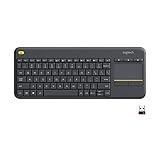


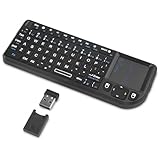


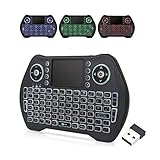

| Product | Best for | Key spec from the listing |
|---|---|---|
| Logitech K400 Plus | Plug-and-play couch typing | Built-in touchpad, media control |
| Arteck Universal Backlit 7-Color | Dark living rooms | Bluetooth, backlight, touchpad |
| Arteck Universal 2.4G and Bluetooth | Switching several devices | 2.4G plus Bluetooth, multi-device |
| Rii Mini 2.4G Bluetooth | Small backlit remote-style | Backlit, touchpad, 2.4G and Bluetooth |
| Arteck 2.4G Stainless | Full-size layout, USB receiver | 2.4G, stainless, touchpad mouse |
| REIIE H9+ Mini | Handheld Android box control | 2.4GHz only, backlit, no Bluetooth |
| Rii X8 Mini | Rechargeable dual-mode mini | BT plus 2.4G, RGB backlight |
| Easytone Backlit Mini | Console and TV-box owners | Rechargeable Li-ion, multimedia keys |
| TECKNET Bluetooth Keyboard | Typing across four devices | 2.4G plus BT, numeric pad, 12 hot keys |
How to Choose
Match the connection to the screen
A 2.4G keyboard needs a free USB port on the TV, box, or PC for its receiver, and it works without pairing menus. A Bluetooth keyboard needs a TV or box that supports Bluetooth input. Dual-mode models, which list both, give you a fallback when one path fails. The REIIE H9+ is 2.4GHz only, so it is a poor fit for a device with no spare USB port.
Size and touchpad layout
Mini keyboards fit one hand and a lap, but cramped keys slow serious typing. Full-size layouts, including the Logitech K400 Plus, the Arteck stainless model, and the TECKNET, are more comfortable for longer text. A built-in touchpad replaces a mouse for apps with on-screen pointers. Check whether a touchpad is listed, because the TECKNET relies on the usual keyboard layout and does not mention one.
Backlight, battery, and charging
If you type in a dark room, a backlight saves guesswork. Backlit and rechargeable models lose a bit of battery life to the light, and the Arteck backlit, Rii, REIIE, and Easytone listings call out backlighting. Rechargeable Li-ion designs like the Easytone and TECKNET avoid disposable cells, but you need to recharge them. For a keyboard that sits in a drawer most of the time, replaceable batteries can be more forgiving.
Where budget TV keyboards cut corners
Touchpads can be small and imprecise, key travel is often shallow, and the listed device compatibility is sometimes broader than reality. Titles that name many operating systems do not guarantee your specific TV will accept the keyboard. Ignore lists of consoles and boxes unless your model appears in the manufacturer’s own documentation. A short trial period on any return policy is worth confirming, since the only real compatibility check is plugging the keyboard into your own screen.
The 9 Best Options
Logitech K400 Plus
A familiar choice for a couch keyboard. The title describes a wireless touch TV keyboard for PC-connected TVs, with a built-in touchpad, easy media control, and compatibility with Windows, Android, Chrome OS, laptops, and tablets. It suits a household that wants one dependable keyboard parked next to the sofa.
- Strength: the built-in touchpad removes the need for a separate mouse.
- Strength: media control keys are part of the listing.
- Trade-off: the title lists no backlight or Bluetooth.
Skip it if you type in the dark or need Bluetooth pairing, since neither appears in the listing.
Arteck Universal Backlit 7-Colors Bluetooth Touch TV Keyboard
A Bluetooth keyboard with color backlighting for evening use. The listing includes easy media control, a built-in touchpad, and use with TV-connected computers, smart TVs, desktops, laptops, an iPad, a Surface, tablets, and HTPCs. It is aimed at evening viewers who browse, search, and sign in to apps after the lights go down.
- Strength: seven backlight colors help in a dim room.
- Strength: the device list spans phones, tablets, and computers.
- Trade-off: the title mentions Bluetooth only, with no USB receiver option.
Skip it if your TV lacks Bluetooth input support.
Arteck Universal 2.4G Wireless and Bluetooth Touch TV Keyboard
The multi-device version of the Arteck line. The title names both 2.4G and Bluetooth, media control, a built-in touchpad, and use with a smart TV, a TV box, a TV-connected computer, a Mac, and an HTPC. It reads as the flexible choice for a buyer who is not sure which connection their TV or box will prefer.
- Strength: dual-mode connectivity gives a backup connection path.
- Strength: the target device list includes smart TVs and TV boxes.
- Trade-off: no backlight is mentioned.
Skip it if you want lighting for dark rooms.
Rii Mini 2.4G Bluetooth Keyboard with Backlit and Touchpad
A compact option for smart TVs and HTPC use. The listing is short: 2.4G, Bluetooth, a backlight, and a touchpad, for smart TV and HTPC setups. Its small body makes it easy to keep on a coffee table or in a drawer between sessions.
- Strength: backlight plus both wireless modes is a useful mix.
- Strength: a mini size is easier to hold and store.
- Trade-off: the title offers little detail beyond those features.
Skip it if you want a full-size layout or battery details.
Arteck 2.4G Wireless Touch TV Keyboard (Stainless)
A full-size, ultra-compact keyboard with a stainless build. The title lists 2.4G wireless, easy media control, a built-in touchpad mouse, and use with TV-connected computers, smart TVs, and HTPCs. It is the one to look at if you want a sturdier-feeling board and your host device offers a USB port.
- Strength: the stainless build stands apart from plastic-only rivals.
- Strength: a full-size layout is easier for longer typing.
- Trade-off: it is 2.4G only, with no Bluetooth and no backlight.
Skip it if your TV has no free USB port.
REIIE H9+ Mini Keyboard (Backlit Version)
A handheld mini keyboard that doubles as a remote. The title lists a 2.4GHz wireless connection, a touchpad, a backlight, and use with PCs, Raspberry Pi 2, tablets, smart TVs, Android TV boxes, and Windows 7, 8, and 10. It states plainly that Bluetooth is not supported. That clarity is useful, because buyers know exactly which port they need before ordering.
- Strength: the handheld remote-style design suits Android TV boxes.
- Strength: a backlight is included in this version.
- Trade-off: no Bluetooth, so it needs a USB port on the host.
Skip it if your streaming device only accepts Bluetooth.
Rii X8 Mini Keyboard
A portable dual-mode mini keyboard for HTPC and IPTV setups. The title lists Bluetooth and 2.4G, RGB backlighting, a rechargeable battery, a multi-function touchpad mouse, and use with tablets, PCs, Android TV, smart TVs, Macs, and Nvidia Shield. It is a natural match for streaming-box users who want a backlit, rechargeable board in a small package.
- Strength: dual-mode connectivity with a rechargeable battery.
- Strength: RGB backlighting helps in a dark room.
- Trade-off: a mini layout limits comfortable long typing.
Skip it if you prefer full-size keys or plan to write long messages from the couch.
Easytone Backlit Mini Wireless Keyboard
A mini keyboard with a touchpad and media keys, written for a wide range of boxes and consoles. The listing includes a rechargeable Li-ion battery, multimedia keys, a backlight, and compatibility with Android TV box, HTPC, PS3, smart TV, PC, Xbox, Linux, Windows, and macOS. Its wide compatibility list is aimed at buyers with a mix of boxes, consoles, and computers around the TV.
- Strength: multimedia keys and a touchpad combine in one body.
- Strength: the rechargeable battery avoids disposable cells.
- Trade-off: the title does not state a connection type, so verify whether it uses a receiver.
Skip it if you need to know the wireless method before buying.
TECKNET Bluetooth Keyboard
A full-size rechargeable keyboard that spans several devices. The title lists 2.4G and Bluetooth for four-device switching, an ultra-slim body, a numeric pad, quiet full-size keys, 12 hot keys, and use with PC, laptop, smart TV, and phone. It is the choice for someone who wants a single keyboard for a desk, a TV, and a phone.
- Strength: four-device switching suits a mixed household.
- Strength: a numeric pad and 12 hot keys help with work tasks.
- Trade-off: no touchpad is mentioned, so on-screen navigation may be harder.
Skip it if you need a pointer built into the keyboard.
Which One Fits Your Situation
You want simple couch control of a PC-connected TV
The Logitech K400 Plus fits this job, with a built-in touchpad and media keys.
You watch in a dark room
The Arteck Universal Backlit or the Rii X8 Mini both list backlighting, with the Rii adding dual-mode connectivity.
You run an Android TV box or Raspberry Pi
The REIIE H9+ is built for that, but it is 2.4GHz only, so make sure the box has a spare USB port.
You also type documents or share one keyboard across devices
The TECKNET Bluetooth Keyboard, with four-device switching and a numeric pad, is the more comfortable choice for longer typing.
Common Mistakes
- Buying a 2.4G-only keyboard for a TV with no free USB port.
- Assuming a smart TV accepts Bluetooth keyboards without checking its settings.
- Choosing a mini keyboard for long documents and then fighting cramped keys.
- Skipping the touchpad when the TV’s apps rely on on-screen pointers.
- Trusting long device-compatibility lists more than the TV maker’s own support page.
Related guides
- Aio Liquid Coolers For High Performance Gaming
- How To Lower Input Delay In Competitive Shooters
- Wireless Gaming Headsets Under 100 For Pc
Frequently Asked Questions
Will any wireless keyboard work with a smart TV?
Not always. Smart TVs differ in which USB and Bluetooth keyboards they accept. Check your TV’s manual or settings before buying.
Is 2.4G or Bluetooth better for TV use?
2.4G needs a USB port but pairs by plugging in the receiver. Bluetooth saves the port but depends on the TV’s Bluetooth support. Dual-mode models cover both, which makes them the safest choice when you are unsure what your screen supports.
Do I need a touchpad?
For apps that expect a pointer, yes. For text entry and menu navigation alone, a plain keyboard may do.
Are backlit keyboards worth it?
In a dark room they help, though they add some battery drain. Rechargeable models spare you from swapping cells every few weeks, though you will want a charging cable near the couch.
















