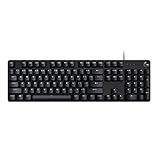
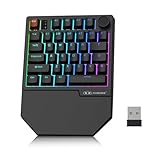
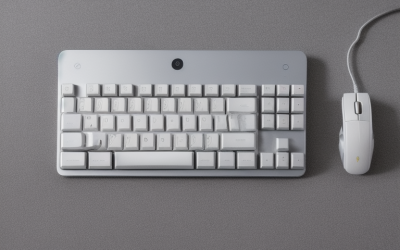
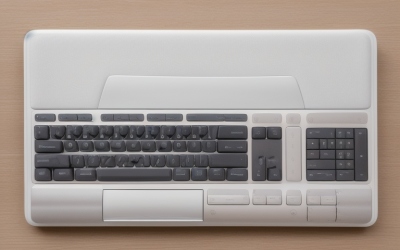
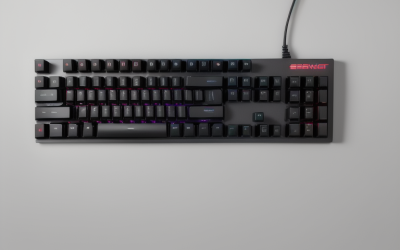
- Top Pick: Redragon K521 Upgrade Rainbow LED Gaming Keyboard, 104 Keys Wired Mechanical Feeling Keyboard with Multimedia Keys, One-Touch Backlit, Anti-Ghosting, Compatible with PC, Mac, PS4/5, Xbox
- Best Value: TKL Gaming Keyboard Mouse, Wired LED Keyboard RGB Mouse for PS4 Xbox PC Mac | 87 Keys Gaming Keyboard and 800-3200 DPI Rainbow Backlit Mouse
- Premium Choice: Gaming Keyboard and Mouse and Mouse pad and Gaming Headset, Wired LED RGB Backlight Bundle for PC Gamers and Xbox and PS4 Users – 4 in 1 Edition Hornet RX-250
Typing a long message with a thumbstick on a virtual keyboard is slow enough that many Xbox owners start looking for something better. The keyboard that fixes this problem depends on how you play. A small chatpad clips onto the controller for party chat and search boxes, while a full-size wired board plugs into a USB port for typing, browsing, and the games that accept keyboard and mouse input. The two routes lead to very different products, so this search is really two decisions in one.
This guide compares eight options whose titles name Xbox compatibility: two controller chatpads, three keyboard-and-mouse combos, one bundle that adds a headset, and two standalone wired keyboards. Some listings that appeared in the same search, including a 65 percent board with no console wording in its title and an Xbox-themed mechanical keyboard whose title names only Windows and Android, were left out. Everything here is taken from the listing titles. For 2026, the practical rule is to match the form factor to where you sit and what you do most.
Quick Picks
As an Amazon Associate we earn from qualifying purchases at no extra cost to you.





| Product | Best for | Key spec from the title |
|---|---|---|
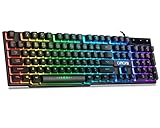
| Redragon K521 | Full-size wired typing | 104 keys, rainbow LED, anti-ghosting |
| TKL keyboard and mouse set | Compact combo for a desk | 87 keys, 800 to 3200 DPI mouse |
| Hornet RX-250 4-in-1 bundle | One-box starter setup | Keyboard, mouse, mouse pad, headset |
| CHONCHOW keyboard and mouse | Gamers wanting side buttons | 104 keys, 3600 DPI, 2 side buttons |
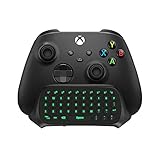
| TiMOVO controller keyboard | Chatting from the couch | Chatpad, 3.5mm jack, 2.4G receiver |
| Wired RGB keyboard (104 keys) | Basic desk keyboard with number pad | Mechanical feel, multimedia keys |
| MoKo controller keyboard | Chatpad with a headset connection | RGB backlight, audio jack, 2.4G receiver |
| RedThunder 60% combo | Small desks and travel | 61 keys, 7200 DPI optical mouse |
How to Choose
Chatpad or full keyboard
A chatpad is a small keyboard that attaches to the controller, which makes it ideal when you play from a couch and want quick replies in party chat. A full-size or compact USB keyboard is better for typing in a browser, searching a store, or playing a title that supports keyboard and mouse. Think about where the console lives: a TV across the room favors a chatpad, while a desk or a dock favors a wired board.
Key count and layout
Layout is the main trade-off in size. A 104-key board includes a number pad and is the most familiar for typing, an 87-key tenkeyless board drops the number pad to free up mouse room, and a 61-key 60 percent layout drops function keys and arrows to save even more space. If you need arrow keys and function shortcuts regularly, avoid the smallest layouts. Anti-ghosting claims matter if you press several keys at once.
Switch feel, mouse DPI, and connection
The phrase “mechanical feeling” in several titles usually means a membrane keyboard designed to feel clicky, not true mechanical switches. Treat it as a typing-feel description rather than a durability promise. For mice in the combos, DPI figures from 800 to 7200 are common, and a range of settings matters more than the headline number. Wired models skip pairing and battery concerns, while chatpads rely on a 2.4G receiver or the controller connection.
What to ignore and where corners get cut
Ignore RGB modes and color names as a deciding factor, since they affect looks, not input. Entry-level combos often include a mouse pad or headset to look generous, but the headset quality rarely matches a standalone one. Confirm that your Xbox generation is named, such as Xbox One or Series X/S, and read the compatibility line carefully; a keyboard that works with a console may not work with every game.
The 8 Best Options
Redragon K521
The K521 is a wired 104-key keyboard with a rainbow LED backlight, multimedia keys, one-touch backlight control, and anti-ghosting. The title lists PC, Mac, PS4, PS5, and Xbox compatibility, so it works as one board across several devices. That makes it a sensible pick for a household where the same keyboard moves between a console and a laptop.
- A full 104-key layout with a number pad suits typing and browsing.
- Multimedia keys and one-touch backlight control add convenience.
- Trade-off: the title says mechanical feeling, which usually signals a membrane board rather than true mechanical switches.
Skip it if you want a compact board or a built-in controller attachment. Buyers with a narrow media console shelf should measure first, since a full-width layout needs real surface area.
TKL gaming keyboard and mouse set
This set pairs an 87-key tenkeyless wired LED keyboard with an RGB mouse that goes from 800 to 3200 DPI. The title names PS4, Xbox, PC, and Mac, making it a handy combo for a shared living room. Because the board drops the number pad, the mouse gets more space beside it on a coffee table or lap desk.
- The tenkeyless layout leaves more room for mouse movement.
- A keyboard and mouse arrive together in a single purchase.
- Trade-off: the title does not give a brand or model name, which makes follow-up support less clear.
Skip it if you need a number pad or a name-brand product. Players who want to adjust mouse sensitivity in fine steps should check how the DPI range is switched in the manual.
Hornet RX-250 4-in-1 bundle
Billed as a four-piece edition, the Hornet RX-250 bundles a wired LED RGB backlit keyboard, a mouse, a mouse pad, and a gaming headset. It names PC, Xbox, and PS4 users as its audience, so the whole set can follow you if you ever change platforms or move the setup to a PC.
- Four items in one set simplify setup for a first console desk.
- The headset is included for voice chat.
- Trade-off: bundles tend to prioritize quantity, and no individual spec such as DPI is given.
Skip it if you already own a good headset or want to pick each part separately. Mixed bundles are rarely strongest in every piece, and the headset is usually the weakest link.
CHONCHOW keyboard and mouse
The CHONCHOW combo includes a wired 104-key backlit keyboard with a mechanical feeling, a 3600 DPI mouse with two side buttons, and a mouse pad. It lists compatibility with PC, Mac OS, Xbox, PS4, and PS5, which covers most households that own more than one console.
- The 3600 DPI mouse with two side buttons suits games with extra bindings.
- A mouse pad is included in the set.
- Trade-off: the board is full-size, which takes more desk space than a compact layout.
Skip it if you are short on space or want a keyboard without a mouse. Left-handed users should check the mouse shape on the product images before ordering.
TiMOVO controller keyboard
The TiMOVO is a wireless chatpad with a green backlight, designed to attach to the Xbox controller. It has a built-in 3.5mm audio jack and a 2.4G receiver and lists Xbox Series X/S support. It is the more focused of the two chatpads here, with no extras beyond the listed jack and receiver.
- Attaches to the controller, so you can type without leaving the couch.
- The 3.5mm audio jack lets you plug in wired earphones.
- Trade-off: a chatpad is a small keypad meant for chat, not a replacement for a desk keyboard.
Skip it if you want to type long documents or play with a keyboard and mouse. It also pairs only with the controllers named in the listing, so verify yours first.
Wired RGB keyboard, 104 keys
A plain wired USB keyboard with RGB backlight, a mechanical feel, multimedia keys, and a number pad. The title lists Mac, PC, PS5, PS4, and Xbox One compatibility, and it comes in black. For someone who only wants a typing board for a store search bar or a browser, it skips the mouse or headset you may not use.
- A number pad and multimedia keys make it flexible for browsing and media.
- One board covers several platforms.
- Trade-off: the listing is generic, with no brand name or anti-ghosting detail.
Skip it if you want a named brand or a compact layout. Because the title does not name a maker, check the seller’s support terms before relying on it for daily use.
MoKo controller keyboard
MoKo makes an RGB backlit wireless chatpad aimed at Xbox One, One S, Elite, Elite 2, and Series X/S controllers. The listing mentions a headset connection, an audio jack, and a 2.4G receiver included, which is a useful combination for someone who chats on voice and text during the same session.
- Broad controller coverage across Xbox One and Series X/S families.
- The 2.4G receiver is included in the box.
- Trade-off: it is a chatpad, so it adds bulk to the controller and does not suit long typing.
Skip it if you want a desk keyboard or keyboard and mouse gameplay. If you swap controllers often, remember that the pad sits on the one it is attached to.
RedThunder 60% combo
A wired 61-key RGB backlit 60 percent keyboard paired with a lightweight honeycomb optical mouse listed at up to 7200 DPI. It is aimed at PC, Mac, PS5, and Xbox users in black. The tiny footprint makes it easy to stash away when the console desk doubles as a work surface.
- The compact 61-key layout saves desk space for mouse movement.
- The lightweight honeycomb mouse suits fast gameplay.
- Trade-off: dropping function keys and arrow keys takes time to get used to.
Skip it if you need a number pad, arrows, or dedicated function row. People who type often in menus will feel the missing keys sooner than players who only use movement and action keys.
Which One Fits Your Situation
You play from the couch and just want to chat
Choose the MoKo or TiMOVO controller keyboard. The MoKo lists broader controller coverage, while the TiMOVO adds a green backlight and a 3.5mm jack.
You want a desk setup with a mouse
The CHONCHOW combo gives a full-size board and a 3600 DPI mouse with side buttons, while the RedThunder 60 percent set trades keys for desk space.
You want everything in one box
The Hornet RX-250 bundle is the easiest route, since it adds a headset and mouse pad to the keyboard and mouse.
You just need a typing keyboard
The Redragon K521 offers a 104-key layout with multimedia keys, and it plugs in across several devices.
Common Mistakes
- Buying a chatpad when you actually need a full keyboard for long typing.
- Assuming all games on the console support keyboard and mouse input.
- Choosing a 60 percent layout without checking whether you use arrow keys.
- Believing “mechanical feeling” means real mechanical switches.
- Ignoring the stated Xbox generation, particularly for chatpads built for specific controllers.
Frequently Asked Questions
Can I use a standard USB keyboard on an Xbox?
Consoles generally accept USB keyboards for typing in menus and search boxes. Keyboard and mouse gameplay depends on the individual game, so check support before buying.
What is the difference between a chatpad and a keyboard?
A chatpad attaches to the controller and is designed for quick chat messages. A full keyboard is a better fit for long typing and for keyboard-and-mouse gaming.
Do I need a keyboard with anti-ghosting?
It helps if you press many keys at once in a game. For typing and browsing it matters much less.
Is a 60 percent keyboard a good choice for a console?
It saves space and works well for gaming, but it lacks arrow keys and function keys as dedicated buttons. If you type often, a larger layout is more comfortable.