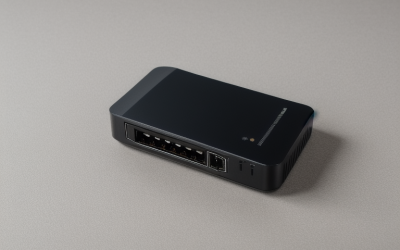
- Top Pick: 2026 1.2Gbps WiFi Extender Signal Booster, Up to 12880 Sq. Ft, Dual Band(5GHz/2.4GHz), Easy Setup WiFi Range Extender for Home with Ethernet Port, Stable Speed Repeater with 100+ Devices (White)
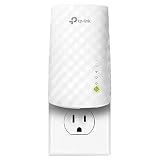
- Best Value: TP-Link AC750 WiFi Range Extender – Dual Band Cloud App Control Up to 750Mbps, One Button Setup Repeater, Internet Booster, Access Point Smart Home & Alexa Devices (RE220) (Renewed)
- Premium Choice: Like-New Amazon eero 6 mesh wifi add-on extender – Add up to 1,500 sq. ft. of Wi-Fi 6 coverage. Required eero mesh wifi system not included
A dead corner in the house is the usual reason people hunt for a WiFi extender under 100 dollars: the upstairs office that drops video calls, the garage where a smart plug keeps going offline, the back bedroom where the streaming box buffers. The catch is that the cap puts very different devices into the same search, from a single-band plug-in repeater to a WiFi 7 extender, and their titles make very different promises.
This guide is for anyone in 2026 who wants to widen coverage without replacing the router. Nine listings are compared strictly by the facts in their titles: band count, speed class, WiFi generation, Ethernet ports, mesh compatibility, and condition. Coverage numbers in titles are manufacturer claims, so treat them as a ceiling rather than a promise, and confirm the current listing still sits under 100 dollars before you commit.
Quick Picks
As an Amazon Associate we earn from qualifying purchases at no extra cost to you.




| Product | Best for | Key spec from the title |
|---|---|---|
| Anthalo 1.2Gbps Extender | Wired gaming console in a far room | Dual band, Ethernet port, 100+ devices |
| TP-Link AC750 RE220 (Renewed) | Light everyday coverage | Dual band, one-button setup, app control |
| eero 6 Add-On Extender | Existing eero owners | Wi-Fi 6, up to 1,500 sq. ft. |
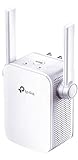
| TP-Link N300 RE105 | Smart plugs and basic browsing | Single band, 2.4GHz only, wall plug |
| AHQCK 1200Mbps Extender | Crowded households | Dual band, 105 device compatibility |
| UWDFH 1200Mbps Extender | Antenna-driven range | 4 antennas, dual band, 50 devices |
| ASUS RP-BE58 | Future-proof mesh | BE3600, WiFi 7, AiMesh extender |
| TP-Link RE1750X (Renewed) | WiFi 6 on a tight cap | AX1750, smart roaming |
| Tenda A18 V4.0 | Reliable AC1200 basics | 867Mbps 5GHz / 300Mbps 2.4GHz, one Ethernet port |
How to Choose
Match the WiFi standard to your router
An extender cannot outrun the router it repeats. If your router is WiFi 5, a WiFi 5 class extender such as an AC1200 or AC750 model is a sensible match, and a WiFi 6 unit like the RE1750X only pays off when the router speaks WiFi 6 too. The ASUS RP-BE58 is WiFi 7 class, which makes sense mostly when your router or client devices already support it.
Dual band versus single band
A single-band 2.4GHz device, such as the N300 RE105, suits smart plugs, cameras, and light browsing, but it will crawl on video calls or large downloads. Dual-band units add the 5GHz band for faster, shorter-range links. Look for the speeds split out in the title, like the 867Mbps 5GHz and 300Mbps 2.4GHz on the Tenda, rather than a single combined number.
Ports, mesh, and placement
An Ethernet port lets you plug in a console, TV, or desktop, which is often more stable than wireless. Mesh options matter too: the eero 6 add-on requires an eero system, and the ASUS is an AiMesh extender that the title says works with any router. Place any extender about halfway between router and dead zone, where signal is still strong, not inside the dead zone.
What to ignore and where corners get cut
Ignore giant coverage figures like 10000 or 12880 square feet and device counts above 50; walls, floors, and the router’s own range limit what you really get. Corners are usually cut on app polish, firmware updates, and documentation, so unbranded listings deserve extra skepticism about long-term support. Also read the condition: two picks are marked Renewed, which can be a good way to reach a faster standard but changes what you should expect from packaging and warranty.
The 9 Best Options
Anthalo 1.2Gbps WiFi Extender
The title packs in dual-band 1.2Gbps, an Ethernet port, a stable-speed repeater claim, and support for more than 100 devices, plus a white finish. It reads as a general-purpose pick for homes with many gadgets and one wired device in a far room.
- Strength: Ethernet port allows a wired connection for a console or TV.
- Strength: dual-band design adds 5GHz alongside 2.4GHz.
- Trade-off: the 12880 sq. ft. figure is a manufacturer claim and not a promise for a real house.
Skip it if you want a recognizable brand with a long support history, or if the household has few devices and no wired gear to connect. A simpler plug-in unit would then do the same job.
TP-Link AC750 RE220 (Renewed)
A known name in a compact dual-band format, with up to 750Mbps, cloud app control, one-button setup, and access point mode. The Renewed tag means it is a refurbished unit, which suits shoppers who care more about reputation than newness. App control through the cloud also makes it easy to check status from the couch.
- Strength: one-button setup keeps installation quick.
- Strength: access point mode allows wired-to-wireless use.
- Trade-off: AC750 is a lower speed class than AC1200 rivals on this list.
Skip it if you want a factory-new product or higher throughput, for example on a router that already delivers AC1200 or faster links.
eero 6 Add-On Extender
This is not a standalone extender. The title says it adds up to 1,500 sq. ft. of Wi-Fi 6 coverage and that a required eero mesh system is not included. For owners of that system, it is the cleanest way to grow coverage.
- Strength: Wi-Fi 6 generation named in the title.
- Strength: built to join an eero network, so it behaves like part of one system.
- Trade-off: it does nothing without an eero base.
Skip it if your router is any other brand; it will not pair with a non-eero base, and a standard repeater is the better fit.
TP-Link N300 RE105
The plainest model here: single band, 2.4GHz only, with a wall-plug design, internet booster role, and access point support. It targets a bedroom or hallway where basic reach matters more than speed.
- Strength: wall-plug form factor keeps it out of the way.
- Strength: access point support gives it a second job.
- Trade-off: 2.4GHz only, so heavy streaming and video calls will feel limited.
Skip it if you game online or stream in high resolution. Anyone who wants a faster 5GHz link should move up to a dual-band model.
AHQCK 1200Mbps WiFi Extender
The listing promises dual-band 1200Mbps, 12880 sq. ft. of coverage, and compatibility with 105 devices. It suits busy homes with many connected gadgets that each need only a modest slice of bandwidth.
- Strength: dual-band 1200Mbps class on paper.
- Strength: a high device compatibility figure for smart-home clutter.
- Trade-off: the title lists no Ethernet port or mesh support.
Skip it if you need a wired port or an app-driven setup. Buyers who value a documented support channel should also look at the brand-name picks.
UWDFH 1200Mbps WiFi Extender
This one leads with four antennas, dual-band 5GHz and 2.4GHz, up to 10000 sq. ft., and 50 devices. The antennas are the headline, aimed at anyone who likes visible hardware for range.
- Strength: four antennas named in the title.
- Strength: dual-band coverage on both common frequencies.
- Trade-off: the 50-device figure is lower than some rivals, so heavy smart-home use may stress it.
Skip it if you want a compact plug-in unit, since external antennas take up more shelf space and are harder to tuck behind furniture.
ASUS RP-BE58 BE3600
The forward-looking pick. The title lists BE3600, dual band, WiFi 7 (802.11be), AiMesh extender, and compatibility with any WiFi router. It fits homes where WiFi 7 gear is arriving soon and the user wants one extender to grow with it. Because it is an AiMesh extender, it can also slot into an existing ASUS setup later.
- Strength: WiFi 7 standard named, ahead of every other pick here.
- Strength: AiMesh role and any-router compatibility.
- Trade-off: full benefits need WiFi 7 clients, and it may sit near the top of the cap.
Skip it if your devices and router are WiFi 5 and likely to stay that way, because you would be carrying capability you cannot use.
TP-Link RE1750X (Renewed)
A WiFi 6 extender with a 1.75Gbps transfer rate claim and smart roaming for continuous coverage, sold in Renewed condition. It is a route to WiFi 6 for shoppers who accept refurbished stock.
- Strength: WiFi 6 with dual-band, per the title.
- Strength: smart roaming is named for moving between zones.
- Trade-off: Renewed condition means refurbished stock and varied packaging.
Skip it if you want guaranteed new hardware, or if your router is WiFi 5 and cannot use the faster link.
Tenda A18 V4.0 AC1200
The title splits speeds clearly: 867Mbps on 5GHz and 300Mbps on 2.4GHz, with one Ethernet port. That honest breakdown suits a WiFi 5 household that wants a no-nonsense repeater.
- Strength: speeds are broken out by band.
- Strength: one Ethernet port for a wired device.
- Trade-off: WiFi 5 class only, so it will not unlock newer router features.
Skip it if you own a WiFi 6 or WiFi 7 router and want to match it, because the newer features will not carry through a WiFi 5 repeater.
Which One Fits Your Situation
You run a WiFi 5 router and want a plain fix
The Tenda A18 V4.0 is the tidy answer, with split speeds and an Ethernet port for a wired device. It also keeps setup simple for relatives who dislike apps.
You already own an eero system
Buy the eero 6 Add-On Extender. Nothing else on this list integrates as cleanly with that network.
You just need smart plugs and a camera online
The TP-Link N300 RE105 does the job on 2.4GHz, and its wall-plug design stays discreet in a hallway outlet. Its access point mode is worth remembering if the room has a wired network jack.
You are planning for WiFi 7
Choose the ASUS RP-BE58. For a WiFi 6 stepping stone, the TP-Link RE1750X in Renewed condition is the alternative.
Common Mistakes
- Placing the extender inside the dead zone instead of halfway between the router and the weak area.
- Believing the square footage claim in a title, when walls and floors cut real range sharply.
- Buying a faster standard than the router supports and expecting the speed to appear.
- Choosing a single-band model for video calls or console gaming, then blaming the router when the 2.4GHz band gets crowded by neighbors.
- Ignoring the Renewed tag and then being surprised by packaging or warranty terms.
Related guides
- Battery Operated Smoke And Carbon Monoxide Detectors
- Combination Smoke And Carbon Monoxide Detectors
- Aio Liquid Coolers For High Performance Gaming
Frequently Asked Questions
Will an extender cut my speed?
Often yes, because a repeater relays the signal and uses part of the airtime. An Ethernet port or a dedicated backhaul in a mesh setup can reduce that loss. Placement matters here: a repeater that barely hears the router will pass along a weak signal, so aim for a spot where the main network still shows solid bars.
Is a WiFi extender or a mesh system better?
A mesh system roams more smoothly, but an extender is simpler and fits a limited cap. The eero add-on and ASUS AiMesh models sit in between by joining mesh networks.
Do I need dual band?
For video calls, streaming, and gaming, yes. Single-band 2.4GHz units are fine for smart plugs and basic browsing. Mixed households often pair one dual-band unit for people with one single-band unit for gadgets.
Are Renewed extenders worth considering?
They can be, especially to reach WiFi 6 under a tight cap. Just read the condition note and the return terms before buying, and keep the original box until you have confirmed the unit pairs with your router.