- Top Pick: AmpliFi HD WiFi System by Ubiquiti Labs, Seamless Whole Home Wireless Internet Coverage, HD WiFi Router, 2 Mesh Points, 4 Gigabit Ethernet, 1 WAN Port, Ethernet Cable, Replaces Router & WiFi Extenders
- Best Value: LNN-AX3000 WiFi 6 Router, No App Required | Dual-Band Wireless Internet Router for Home, Up to 1800Mbps, 20+ Devices, 5 Antennas, FCC Certified, 5 Steps Setup
- Premium Choice: AmpliFi HD WiFi Router by Ubiquiti Labs, Seamless Whole Home Wireless Internet Coverage, HD WiFi Router with Touchscreen Display, 4 Gigabit Ethernet, 1 WAN Port, Ethernet Cable, Expandable Mesh System
A home lab changes what you want from a router. Instead of “cover the whole house and stay out of the way,” the questions become: can I split traffic into separate networks, can I run my own firewall or DNS, are there enough wired ports for the switch, server and access point, and will the box stay quiet and low-power when it runs every hour of the day? The answers decide whether a consumer router, a mesh kit or a small x86 server is the right foundation.
This guide is for tinkerers building a Docker host, a NAS, a Pi-hole style filter or a practice network in 2026, and for anyone who wants to learn networking without starting from a rack of enterprise gear. Six products made the cut, judged only on what their titles say: port counts, Wi-Fi standard, mesh support, processor and memory, and operating system wording. A signal-blocking router cover was excluded because it is an accessory, not a router, and that left six real candidates.
Quick Picks
As an Amazon Associate we earn from qualifying purchases at no extra cost to you.




| Product | Best for | Key spec from the title |
|---|---|---|
| ZimaBoard 2 | A true lab router, NAS and Docker host | N150, 16GB LPDDR5, dual 2.5GbE, dual SATA3.0 |
| AmpliFi HD WiFi System | Whole-home mesh with a lab nearby | Router plus 2 mesh points, 4 Gigabit Ethernet, 1 WAN |
| AmpliFi HD WiFi Router | A single router with a touchscreen | Touchscreen, 4 Gigabit Ethernet, expandable mesh |
| AmpliFi Instant System | Small spaces and a starter mesh | Router and mesh point, 1 Gigabit Ethernet, 1 WAN |
| LNN-AX3000 WiFi 6 Router | Plug-in Wi-Fi 6 without an app | WiFi 6, dual-band, 5 antennas, 20+ devices |
| Verizon G3100 (Renewed) | An ISP-style gateway for basic needs | Home router, renewed unit |
How to Choose
Decide whether you need a router or a platform
A normal router gives you a fixed menu of settings. A small x86 board gives you an operating system on which you can install firewall software, containers and storage tools. If your goal is to learn routing, VLANs and firewall rules, look for a platform with two network ports and room to expand. If the goal is only reliable Wi-Fi next to your lab, a consumer router is enough. Many people end up with both: a mesh system for wireless and a small server for the wired core of the network.
Count the wired ports and their speeds
Labs run on cables, and every new project seems to want another port. Four Gigabit ports with one WAN port, as on the AmpliFi HD listings, fill up fast once a switch, server and access point are connected. A dual 2.5GbE pair, as on the ZimaBoard 2 title, moves data faster between machines than gigabit. Plan one spare port for every device you might add in the next year, and remember that a small unmanaged switch can stretch a single port to cover a whole shelf.
Look at Wi-Fi standard and management style
Wi-Fi 6 appears in the LNN-AX3000 title and brings better handling of many devices than older standards, which matters when phones, cameras and smart plugs all share the same wireless network as your lab. Several models here manage through an app or touchscreen, which is convenient but limits advanced controls. If you want to edit settings like a lab user, favor devices that run a full operating system.
Know where budget and older models cut corners
Budget routers often skip detailed logging, VLAN features and open firmware support, and a renewed or ISP-branded gateway may be locked to a specific provider. The title is rarely enough to settle those questions, so check the manual or the maker’s support page before committing to a plan. Read the support pages for words such as VLAN, bridge mode and custom DNS, because those terms are what a home lab user will need.
The 6 Best Options
ZimaBoard 2 x86 Home Server
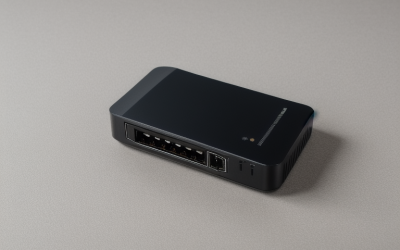
The ZimaBoard 2 is the only listing that fits the phrase “home lab” literally. It pairs an Intel N150 with 16GB of LPDDR5 memory, PCIe 3.0 x4 expansion, dual 2.5GbE ports and dual SATA3.0 connectors, and the title describes it as an all-in-one NAS, router and Docker host running ZimaOS. Low-power 24/7 operation in the title makes it an always-on node for learning.
- Strength: two 2.5GbE ports are the right layout for routing duty.
- Strength: SATA ports and Docker support add storage and containers.
- Trade-off: the title lists no Wi-Fi, so plan on a separate access point.
Skip it if you want a router that works in a few taps with no setup, or if you are not ready to install and configure software yourself.
AmpliFi HD WiFi System by Ubiquiti Labs
This kit bundles an HD router with two mesh points, four Gigabit Ethernet ports and a WAN port, plus an Ethernet cable. The title says it replaces a router and Wi-Fi extenders, which suits a larger home where a lab sits at one end and a bedroom or office sits at the other. Mesh points extend coverage while the main router handles the wired connections.
- Strength: a router with two mesh points covers distance without extra planning.
- Strength: four gigabit ports handle a small wired lab.
- Trade-off: it is built for simplicity, not for deep network customization.
Skip it if you want to run your own firewall software or fine-tune routing rules, since the product is aimed at easy whole-home coverage.
AmpliFi HD WiFi Router by Ubiquiti Labs
This is the router alone, with a touchscreen display, four Gigabit Ethernet ports, one WAN port and an Ethernet cable. The title calls it an expandable mesh system, so extra points can be added later. That makes it a flexible starting point for someone whose lab is small today but may spread across more rooms as the hobby grows.
- Strength: the touchscreen shows status without a laptop.
- Strength: mesh points can be added when the home grows.
- Trade-off: only gigabit speeds are listed, with no 2.5GbE.
Skip it if you plan to move big files between lab machines at higher speeds, because every wired port listed is gigabit or slower.
AmpliFi Instant WiFi System by Ubiquiti Labs
The Instant pairs a router with one mesh point, with one Gigabit Ethernet port and a WAN port on the listing. It is the smallest AmpliFi option and suits an apartment or a single-room lab. Because both pieces arrive together, it is the least complicated way to get a mesh network running with almost no planning.
- Strength: easy mesh pairing for small spaces.
- Strength: it replaces a router and extender with two pieces.
- Trade-off: a single Gigabit port limits wired devices.
Skip it if you need more than one or two cabled machines, or if you want room to add a switch, server and access point on the same router.
LNN-AX3000 WiFi 6 Router
The LNN-AX3000 is a dual-band Wi-Fi 6 router with five antennas, speeds listed up to 1800Mbps, 20+ devices supported and no app required. The title promises a five-step setup and FCC certification. It is a plain Wi-Fi 6 router in a lab context, useful as a wireless front end behind or beside the machines that do the real work.
- Strength: no-app setup suits people who prefer a web interface.
- Strength: Wi-Fi 6 helps in homes with many connected devices.
- Trade-off: the title says nothing about port counts or advanced lab features.
Skip it if wired speeds or VLAN support decide the purchase, or if you want a device with named lab features such as containers or storage.
Verizon G3100 Home Router (Renewed)
The title of this listing is short: a 2021 G3100 home router in renewed condition. The name suggests an ISP-style gateway, so confirm that it works with your provider before you plan around it. In a lab, a renewed gateway is best treated as a backup or a stopgap while you learn what you actually need.
- Strength: a renewed unit may suit a basic network or a backup device.
- Strength: it is a familiar home gateway format.
- Trade-off: the title lists no ports, Wi-Fi standard or lab features.
Skip it if you want documented specs or flexible settings, because the listing leaves almost everything unstated.
Which One Fits Your Situation
You want to run containers, storage and routing on one box
The ZimaBoard 2 is the one listing built around that idea, with an N150 processor, 16GB of memory and SATA connectors named in the title. Add a separate access point for Wi-Fi, and use its two network ports to separate the internet side from the home side.
You need wireless across a large home plus a few wired devices
The AmpliFi HD WiFi System covers distance with its two mesh points and four gigabit ports. Put the lab machines on the main router and let the mesh points handle the bedrooms and the yard.
Your lab lives in a small apartment
Beginners can start here and add a ZimaBoard 2 later for routing and storage experiments. The AmpliFi Instant keeps the footprint small and the setup short, with one router and one mesh point and little to configure. If you later outgrow it, the pieces can still serve as a guest or backup network.
You want modern Wi-Fi with a simple browser setup
The LNN-AX3000 offers Wi-Fi 6 without an app, though it says little about wired ports. Pair it with a switch if you need more cabled connections for lab machines.
Common Mistakes
- Choosing a mesh kit and expecting full firewall and VLAN controls that the listing never promises.
- Counting Wi-Fi speed claims, such as the 1800Mbps figure, as wired performance between lab machines.
- Forgetting a spare port for the switch or server, then having to unplug something every time a new project arrives.
- Buying an ISP-style gateway without checking provider compatibility or what the listing leaves unstated.
- Ignoring power draw on a device that runs all day, every day, in a closet with little airflow.
Related guides
- Battery Operated Smoke And Carbon Monoxide Detectors
- Combination Smoke And Carbon Monoxide Detectors
- Aio Liquid Coolers For High Performance Gaming
Frequently Asked Questions
Can a mesh kit work in a home lab?
Yes, for wireless coverage and basic routing, which is all many beginners need at first. It will not match a platform with an operating system for advanced firewall or container work, so many labs end up using both: a mesh system for wireless and a small server for the wired core.
Why do 2.5GbE ports matter?
They move data up to 2.5 times faster than gigabit between a server and a switch, which helps with backups and file shares. Your switch and other devices must support the same speed, so check every link in the chain, including the cables, before expecting the faster rate.
Do I need a separate access point?
If you use an x86 board as the router, probably yes. Add a dedicated access point to handle wireless, and connect it to one of the 2.5GbE ports or a switch on the home side of the network.
Is a renewed router a good idea?
It can work for a basic setup or as a spare. Check the return terms and confirm it is compatible with your internet provider. Treat it as a stopgap instead of the base of a serious lab, and expect to replace it once your needs grow beyond basic home networking.