

- Top Pick: TP-Link USB WiFi 6 Adapter for Desktop PC,AX1800 Dual Band WiFi Antenna | USB Wireless Network Adapter with 2.4/5GHz, High Gain 5dBi Antenna, WPA3, MU-MIMO Supports Windows 11/10 (Archer TX20U Plus)
- Best Value: TP-Link Nano USB WiFi 6 Adapter for Desktop PC -AX1800 USB Wireless Adapter | 2.4G/5G Dual-Band WiFi Dongle Desktop WiFi Adapter, OFDMA, MU-MIMO, WPA3, Travel Size, Support Win11/10 (Archer TX20U Nano)
- Premium Choice: TP-Link AX1800 Wi-Fi 6 USB WiFi Adapter for Desktop PC–5/2.4GHz WiFi Dongle | Up to 1.8 Gbps USB Wireless Adapter for PC, USB 3.0, Plug and Play, Compact Design, WPA3, Support Windows 11/10(Archer TX23U)
A gaming PC without a good wireless connection is a hard sell, and plenty of desktops still ship without Wi-Fi at all. A USB adapter is the quickest remedy, no screwdriver or open case required. What separates the options is the standard, the antenna design, and the USB interface, not the headline speed on the box. Every adapter on this list is a Wi-Fi 6 model rated at AX1800, so the real choice is about antennas, size, and port.
This guide is for gamers who cannot run an Ethernet cable to the desk and want a stable link without rebuilding the PC. We rely only on listing wording, so you will see antenna counts, USB generations, and security features, but no latency numbers we cannot verify. For a 2026 build, a USB 3.0 dual-band adapter with MU-MIMO and WPA3 is the baseline, and the remaining decisions come down to range and size.
Quick Picks
As an Amazon Associate we earn from qualifying purchases at no extra cost to you.


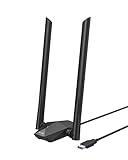

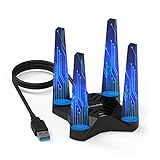


| Product | Best for | Key spec from the title |
|---|---|---|
| TP-Link AX1800 5dBi Antenna | Everyday range boost | 5dBi antenna, WPA3, MU-MIMO |
| TP-Link Nano AX1800 | Compact, low-profile use | Nano design, OFDMA, MU-MIMO |
| TP-Link AX1800 USB 3.0 | Plug-and-play simplicity | Up to 1.8 Gbps, USB 3.0 |
| TP-Link AX1800 Dual Antennas | Two-antenna reach | High gain antennas, USB 3.0 |
| BrosTrend AX1800 Long Range | Long range from a rear port | High gain antennas, USB 3.0 |
| NETGEAR Nighthawk A7500 | Name-brand router pairing | Up to 1.8 Gbps, Windows 10/11 |
| TP-Link Archer TX20U Nano | Lower-cost renewed unit | Nano, Renewed |
| WAVLINK AX1800 | Flexible placement | Magnetic base, 4x3dBi antennas |
| TP-Link AX1800 High Gain | Antenna plus modern features | 5dBi, MU-MIMO, OFDMA |
| MSI AX1800 | Gaming-brand USB 3.2 option | USB 3.2 Gen 1, beamforming |
How to Choose
Confirm Wi-Fi 6 and a dual-band design
Wi-Fi 6, also called AX, brings OFDMA and MU-MIMO, which help when many devices share one router. Dual-band means the adapter can use the 5GHz band, the one competitive gamers want because it is less crowded than 2.4GHz. All ten listings here state AX1800, but only your router’s capabilities decide whether you ever reach those peak numbers.
Check the USB interface
USB 3.0 or faster is the baseline, because a USB 2.0 port would throttle the adapter well below its rated speed. Plug it into a rear port that supports USB 3.0, ideally not a hub. One listing names USB 3.2 Gen 1 Type-A, which is the same signaling rate as USB 3.0 under a newer name. Ignore adapters that do not state a USB generation.
Weigh antennas against size
External high-gain antennas, usually listed as 5dBi or 3dBi, tend to help if your PC sits under a desk or behind a wall. Nano adapters trade range for a tiny footprint and work best near the router. If you only have a front-panel port, an extension cable can lift a nano adapter above the case.
Look for security and driver support
WPA3 is a plus, but your router needs to support it too. Windows 10 and 11 are the mainstream targets, so check that your operating system appears in the title. Budget models cut corners on driver updates, and a renewed unit may come without the original box or extras.
The 10 Best Options
TP-Link AX1800 USB WiFi 6 Adapter with 5dBi Antenna
This TP-Link adapter combines a 5dBi high-gain antenna with dual-band 2.4 and 5GHz and WPA3. The title lists MU-MIMO as well, which makes it a modern all-rounder for a PC under a desk or across a room. For a tower that lives on the floor, an antenna you can angle toward the router is a practical advantage, since a bare dongle sees the case and the desk as obstacles.
- High-gain 5dBi antenna improves reach over a bare nano.
- Dual band with WPA3 and MU-MIMO.
- Trade-off: an external antenna adds bulk and can be bumped.
Skip it if you want a stub that disappears into the port.
TP-Link Nano USB WiFi 6 Adapter (AX1800)
The nano format is the point here: a tiny dongle for a desk where space or aesthetics matter. The title mentions OFDMA, MU-MIMO, and WPA3, so it keeps the Wi-Fi 6 feature set in a small body. It is a natural fit for a living-room or bedroom desk where the router is in the same room and the dongle sits within a clear line of sight.
- Nano design sits low in the USB port.
- OFDMA and MU-MIMO support are listed.
- Trade-off: without an external antenna, range depends on placement.
Skip it if the PC is far from the router or hidden under the desk.
TP-Link AX1800 Wi-Fi 6 USB Adapter (USB 3.0)
This listing leads with the simple pitch: up to 1.8 Gbps, USB 3.0, plug and play. It is aimed at buyers who want fast setup and a dependable brand without reading a long feature list. The title calls out compatibility and a USB 3.0 link, which are the two details that most often cause trouble when a first-time buyer picks a dongle for a desktop.
- USB 3.0 interface is stated.
- Plug and play, with a dual-band 5GHz and 2.4GHz dongle.
- Trade-off: the title gives few details on antennas.
Skip it if you need to know the antenna layout before buying.
TP-Link USB WiFi 6 Adapter with High Gain Antennas (1800 Mbps)
Plural antennas distinguish this listing, which mentions high gain antennas on a USB 3.0 dongle. It reads like a range-focused option for a desktop that sits farther from the router. Two antennas can be pointed in different directions, which helps in rooms where the router is one floor away and the direct path is not obvious.
- Two high-gain antennas, as the title suggests.
- USB 3.0 and plug and play.
- Trade-off: antennas make it bulkier than the nano versions.
Skip it if your port is cramped or next to other devices.
BrosTrend AX1800 USB WiFi 6 Adapter Long Range
BrosTrend positions itself on range, with high-gain antennas and USB 3.0, and lists Windows 11 and 10 support for desktops and laptops. It is the alternative-brand pick for buyers who want something besides TP-Link. Buyers who have had trouble with one brand’s drivers sometimes like having a second maker in the mix, and a long-range label suggests the design priority is signal reach over a slim profile.
- Long-range design with high-gain antennas.
- Dual band with USB 3.0.
- Trade-off: the stated Windows list is limited to 11 and 10.
Skip it if you run an older Windows version.
NETGEAR Nighthawk A7500 USB WiFi 6 Adapter
NETGEAR brings its Nighthawk gaming name to a USB 3.0 Wi-Fi 6 dongle rated up to 1.8 Gbps. The title confirms Windows 10 and 11 support and plug-and-play use. It suits someone who already owns a NETGEAR router and likes keeping the network gear under one brand, with a straightforward adapter that avoids a large antenna array on the desk.
- Recognized networking brand with a gaming name.
- Windows 10 and 11 compatibility is named.
- Trade-off: the title does not list antenna details.
Skip it if you want a visible antenna or Linux support.
TP-Link Archer TX20U Nano (Renewed)
This is the Archer TX20U Nano sold as a renewed unit, so it likely sits at a lower price tier than a new one. It keeps the AX1800 Wi-Fi 6 spec and dual-band design. For a spare PC, a kids’ bedroom setup, or a secondary rig where the budget is tight, a renewed nano can make sense, as long as you read the seller’s return terms first.
- Nano size with dual 2.4G and 5G bands.
- Renewed condition may cut the cost.
- Trade-off: a refurbished item can differ in packaging and warranty terms.
Skip it if you want a brand-new box and a full warranty.
WAVLINK AX1800 USB WiFi 6 Adapter
WAVLINK is the setup-friendly pick: a magnetic base and four 3dBi antennas, with USB 3.0 and MU-MIMO. The magnetic base lets you stick the antenna cluster to the side of a metal case. That means the antennas can sit higher than the rear port, which matters when the tower is tucked into a desk cubby that would otherwise block the signal.
- Four 3dBi antennas for coverage.
- Magnetic base allows flexible placement.
- Trade-off: more antennas and a base add clutter.
Skip it if you want a minimal, tidy desk.
TP-Link AX1800 USB WiFi 6 Adapter, High Gain Antenna
This TP-Link listing emphasizes a 5dBi dual-band antenna alongside MU-MIMO and OFDMA. It covers the same features as its nano relative, plus the range benefit of an external antenna. Those who want a middle path, stronger than a nano but simpler than a four-antenna base, will find the single high-gain design a balanced choice for most rooms.
- High-gain antenna with MU-MIMO and OFDMA.
- Dual-band 2.4 and 5GHz.
- Trade-off: like other external antenna models, it takes more space.
Skip it if you want the smallest dongle possible.
MSI AX1800 WiFi 6 Dual-Band USB Adapter
MSI brings a gaming-hardware name to the group, listing USB 3.2 Gen 1 Type-A, MU-MIMO, an adjustable antenna, and beamforming. It suits a build already themed around MSI parts. Beamforming is meant to focus the signal toward the router, and an adjustable antenna lets you aim it, so the pair is aimed at players who care about a steady link for online matches.
- Beamforming and MU-MIMO are named in the title.
- Adjustable antenna can be angled for signal.
- Trade-off: only one adjustable antenna is mentioned.
Skip it if you want multiple antennas.
Which One Fits Your Situation
Your PC is far from the router
Go for the BrosTrend Long Range or the WAVLINK with four 3dBi antennas, both of which stress external antennas.
You want the smallest footprint
The TP-Link Nano AX1800 or the Archer TX20U Nano stay close to the port.
You like a recognized gaming brand
The NETGEAR Nighthawk A7500 and the MSI AX1800 carry gaming-oriented names.
You want to move the antenna around
The WAVLINK magnetic base and the MSI adjustable antenna give the most placement flexibility.
Common Mistakes
- Plugging a USB 3.0 adapter into a USB 2.0 port and capping its speed.
- Pairing a Wi-Fi 6 adapter with an older router and expecting AX1800 speeds.
- Hiding a nano dongle behind a metal case and blaming the adapter for a weak signal.
- Skipping driver installation and relying on a generic Windows driver.
- Choosing the 2.4GHz band for gaming when 5GHz is available.
Related guides
- Aio Liquid Coolers For High Performance Gaming
- Wireless Gaming Headsets Under 100 For Pc
- Ssds For Large Video And Raw Photo Files
Frequently Asked Questions
Is a USB adapter as good as a PCIe card?
For many setups it is close, though PCIe cards can offer more antenna flexibility. A USB 3.0 Wi-Fi 6 adapter is more than enough for typical online gaming.
Does AX1800 mean I get 1800 Mbps?
No. It is a combined theoretical figure across two bands. Real speeds depend on your router, distance, and interference.
Do I need a Wi-Fi 6 router?
The adapter still works with older routers, but you will not gain the full Wi-Fi 6 benefits without one.
Should I buy a renewed adapter?
It can lower the cost, but check the return policy and warranty first, since terms can differ from new stock.















