A home office quickly outgrows the four LAN ports on the back of a router. A desktop PC, a work laptop dock, a printer, a NAS and a VoIP phone already fill them, and that is before a wireless access point or a pair of security cameras join the list. A dedicated switch is the simple fix: one cable from the router, and every device in the room gets its own gigabit connection that stays local, wired and steady through video calls and large file transfers. The five switches below are desktop models sized for a home office rather than a server room. They cover the three shapes this purchase usually takes — an 8-port smart switch with real management features, PoE models that power phones, cameras and access points over the same cable that carries their data, and 16-port boxes for desks that have simply run out of ports.
Disclosure: As an Amazon Associate we earn from qualifying purchases.
Every figure below — port counts, PoE power totals, switching capacity, dimensions — is the maker’s published number for that model.
How to Choose a Switch for a Home Office
Count ports, then add headroom. One port is always spent on the uplink to your router, so an 8-port switch serves seven devices and a 16-port switch serves fifteen. Count everything wired or likely to become wired — docks, printers, storage, TVs, consoles — and buy the next size up if the count is close. Ports are the one thing you cannot add later without a second switch.
Unmanaged or smart managed. An unmanaged switch does one job: plug it in and it forwards traffic. A smart managed (or Easy Smart) switch adds a browser interface with VLANs to separate work traffic from the rest of the house, QoS to give calls priority, IGMP snooping for clean streaming, and port mirroring for troubleshooting. If none of those words mean anything to you today, unmanaged is the honest pick; if you run a work VLAN or a separate camera network, smart management earns its place.
PoE, and how much of it. Power over Ethernet runs phones, cameras and access points on the network cable alone, with no power brick at the device. Two numbers matter: how many ports carry power, and the total wattage shared across them. Add up the draw of your powered devices first — a switch whose total is exceeded will drop the lowest-priority ports.
Fanless for a quiet room. Every switch here is fanless, so it can sit on or under the desk of a room you also take calls in. Metal cases shed heat through the shell and tolerate being stacked under a monitor stand.
A switch is also the piece that ties your storage into the office network, and our guide to the best network attached storage NAS for home offices walks through the enclosures that plug into one.
TP-Link TL-SG108E
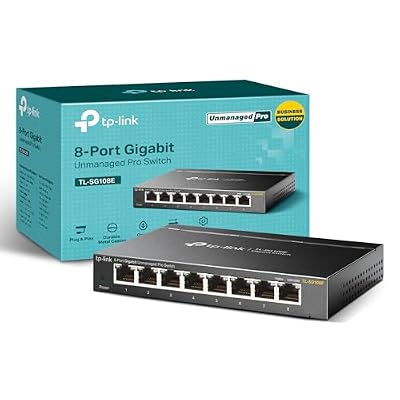
The TL-SG108E is the smart starting point for an eight-port desk. It is an Easy Smart model, so behind the plug-and-play behaviour sits a configuration utility and web interface with the controls a home office actually uses: 802.1Q, port-based and MTU VLANs for separating a work machine from household traffic, 802.1p and DSCP QoS to keep call audio ahead of a big sync job, IGMP snooping, link aggregation, loop prevention and cable diagnostics for finding a faulty run. The eight gigabit ports are non-blocking with a 16 Gbps switching capacity, the case is sturdy metal with shielded ports, and the whole unit is fanless in a 158 x 100 x 25.7 mm footprint that mounts on a wall if the desk is full. There is no PoE here, so powered devices still need their own supplies — that is the trade for the management features at this size.
Specs
- Ports: 8 x 10/100/1000 Mbps RJ45, auto-negotiation and auto MDI/MDIX
- Switching capacity: 16 Gbps
- Management: Easy Smart — web interface and configuration utility
- Features: 802.1Q, port-based and MTU VLAN; 802.1p/DSCP QoS; IGMP snooping; link aggregation; loop prevention; cable diagnostics
- Case: Metal, fanless, shielded ports
- Dimensions: 158 x 100 x 25.7 mm
- Mounting: Desktop or wall mount
- Best for: Eight ports with VLAN and QoS controls for a work-from-home desk
NETGEAR GS308EP

The GS308EP puts PoE on every port. All eight gigabit ports are PoE+ (802.3at), sharing 62W of total power with up to 30W available to a single port — enough for a VoIP phone, a ceiling access point and a couple of cameras from one small box, each on a single cable. It is one of NETGEAR’s Easy Smart Managed Essentials models, so a browser interface adds VLANs, QoS, IGMP snooping and port mirroring, plus per-port PoE controls and NETGEAR’s uninterrupted PoE, which keeps powered devices running while the switch reboots for a firmware update. NETGEAR publishes a 16 Gbps bandwidth figure, a 4K MAC table and 9,216-byte jumbo frames. At 158 x 101 x 27 mm and 0.49 kg it is the same desktop footprint as its non-PoE sibling, fanless, and mounts on a desk or a wall.
Specs
- Ports: 8 x 10/100/1000 Mbps RJ45
- PoE: 8 x PoE+ (802.3at) ports, 62W total power, up to 30W per port
- Switching bandwidth: 16 Gbps
- Management: Easy Smart — browser interface with VLAN, QoS, IGMP snooping, port mirroring, per-port PoE controls, uninterrupted PoE
- MAC table: 4K entries; jumbo frames to 9,216 bytes
- Dimensions: 158 x 101 x 27 mm
- Weight: 0.49 kg
- Mounting: Desktop or wall mount, fanless
- Best for: Powering a phone, access point and cameras from one managed 8-port switch
TP-Link TL-SG108PE

The TL-SG108PE splits the difference: eight gigabit ports, four of which carry PoE+. Ports 1 to 4 deliver 802.3at/af power with 64W of total PoE power and up to 30W per port, which suits the common home office pattern of a desk phone, an access point and one or two cameras powered from the switch while PCs and printers use the plain ports. It is an Easy Smart model with web management, VLAN support, 802.1p/DSCP QoS and IGMP snooping, and it adds a feature the others here lack: PoE Auto Recovery, which watches powered devices and automatically reboots one that stops responding, so a frozen camera comes back without a trip to the switch. TP-Link lists a metal case, fanless operation and a compact 158 x 101 x 25 mm body that sits on the desk or mounts to the wall.
Specs
- Ports: 8 x 10/100/1000 Mbps RJ45, auto-negotiation and auto MDI/MDIX
- PoE: Ports 1–4 are PoE+ (802.3at/af), 64W total power, up to 30W per port
- Management: Easy Smart — web interface
- Features: VLAN, 802.1p/DSCP QoS, IGMP snooping, PoE Auto Recovery, intelligent power management
- Case: Metal, fanless
- Dimensions: 158 x 101 x 25 mm (6.22 x 3.98 x 0.98 in)
- Mounting: Desktop or wall mount
- Best for: A mixed desk where only some devices need power over the cable
NETGEAR GS116NA

When the problem is purely port count, the GS116NA is the straightforward answer. Sixteen gigabit ports, no management layer, no configuration at all — connect the uplink and fifteen devices and it forwards traffic at a 32 Gbps bandwidth. It is an unmanaged ProSAFE model in a fanless metal desktop case, 286 x 102 x 27 mm and 0.89 kg, that sits on a desk or mounts to a wall. NETGEAR lists support for IEEE 802.3az energy-efficient Ethernet, so idle ports sip rather than draw. There are no VLANs and no PoE, and for a desk full of PCs, docks, printers and storage that need nothing more than fast, always-on wired connections, that simplicity is the point: nothing to log into, nothing to misconfigure, and silent operation in the room you work in.
Specs
- Ports: 16 x 10/100/1000 Mbps RJ45, auto-negotiation and auto MDI/MDIX
- Switching bandwidth: 32 Gbps
- Management: None — unmanaged, plug and play
- Features: IEEE 802.3az Energy Efficient Ethernet, jumbo frame support
- Case: Metal, fanless
- Dimensions: 286 x 102 x 27 mm
- Weight: 0.89 kg
- Mounting: Desktop or wall mount
- Best for: Sixteen simple, silent ports for a desk that has outgrown eight
NETGEAR GS116LP

The GS116LP is the 16-port option for an office that powers as much as it connects. All sixteen gigabit ports are PoE+ (802.3at), with up to 30W per port and 76W of total power in the base configuration — enough for a full set of desk phones plus cameras or access points. NETGEAR’s FlexPoE design makes that total upgradeable: swapping the external power supply raises it to 115W or 183W later, without replacing the switch. It stays unmanaged and plug-and-play, with a 32 Gbps switching capacity, and the fanless case (286 x 102 x 27 mm, 0.88 kg) covers desktop, wall and rack mounting, with the rack kit in the box. For a home office that is also the hub for the house’s cameras and access points, this is the single-box answer.
Specs
- Ports: 16 x 10/100/1000 Mbps RJ45
- PoE: 16 x PoE+ (802.3at) ports, 76W total power, up to 30W per port; FlexPoE upgradeable to 115W or 183W with an optional power supply
- Switching capacity: 32 Gbps
- Management: None — unmanaged, plug and play
- Features: IEEE 802.3az Energy Efficient Ethernet, jumbo frames to 9,216 bytes
- Dimensions: 286 x 102 x 27 mm
- Weight: 0.88 kg
- Mounting: Desktop, wall mount or rackmount (kit included), fanless
- Best for: Sixteen ports where phones, cameras and access points all need power too
Frequently Asked Questions
How many ports does a home office switch need?
Count every device you want wired, add the uplink port the switch spends on your router, then round up. Eight ports serve most single desks; sixteen suits a desk plus the room’s storage, cameras and access points, and saves adding a second switch later.
Is a smart managed switch worth it for a home office?
Only if you will use the controls. VLANs are the main reason — they keep a work laptop on its own segment away from household devices — with QoS for call priority and port mirroring for troubleshooting behind that. If none of those apply, an unmanaged switch does the same forwarding job with zero setup.
How much PoE power do I need?
Add up the draw of everything you plan to power. Desk phones and cameras typically draw well under 15W each and access points vary by model; the makers print each figure on the device spec sheet. Compare the total against the switch’s shared PoE wattage, not just its port count, and leave some headroom for the next device.
Can I connect a switch to another switch?
Yes — any port on one switch can link to any port on another, and gigabit links between them keep local traffic fast. Two cautions: each link spends one port on each switch, and unmanaged switches should be chained in a line rather than a loop, since a loop without management controls can flood the network.