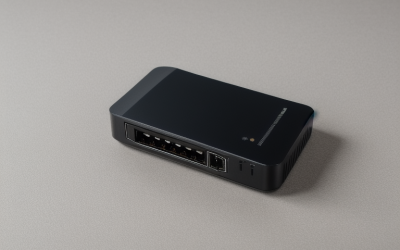
- Top Pick: STARLINK – Gen 3 Wi-Fi Router High Speed WiFi 6 Internet Dual Band WLAN Wireless for Gen 3, Gen4 4X V4, and Mini Kit Satellite
- Best Value: WiFi Router Mini, Compact Dual Band Wireless Internet Router, White, Mesh Network Compatible, Travel-Friendly Design, Compatible with Starlink V4, Gen3, Mini
- Premium Choice: Mini Mesh Wi-Fi Router Compatible with STARLINK Gen 2, Gen 3, Gen 4 & Mini Systems – Dual-Band Wireless Router, Mesh-Ready, Supports 128+ Devices
Shopping for a Starlink router splits into two different problems that share one search phrase. One is replacing or backing up the router that came with the dish, usually with a compact unit made to match the Gen 2, Gen 3, V4 or Mini kit. The other is adding a full home router behind the dish to get more Ethernet ports, a USB socket, a bigger coverage claim or a newer Wi-Fi standard. Which problem you have decides everything that follows.
The ten routers below, in 2026 listings, fall neatly into both camps: one branded Starlink Gen 3 router, five unbranded mini routers that name Starlink compatibility, and four TP-Link models from Wi-Fi 6 to Wi-Fi 7. Everything is judged from the title text alone. No router can raise the speed your dish delivers, so the goal is the right connector, the right device capacity and the right placement for your home or RV rather than a bigger number on the box.
Quick Picks
As an Amazon Associate we earn from qualifying purchases at no extra cost to you.



| Product | Best for | Key spec from the title |
|---|---|---|
| Starlink Gen 3 Wi-Fi Router | Straight replacement | Wi-Fi 6, dual band, fits Gen 3, V4 and Mini kits |
| Compact Mini Router (V4, Gen3, Mini) | Travel and spare use | Dual band, mesh network compatible, white |
| Mini Mesh Wi-Fi Router | Many devices on a small unit | Gen 2, 3, 4 and Mini, mesh-ready, 128+ devices |
| High Performance Router Mini | Compact upgrade claim | Dual band, mesh compatible, travel-friendly |
| TP-Link Archer AX21 | Simple Wi-Fi 6 backup | AX1800, gigabit, EasyMesh |
| Generic Gen 3 WiFi 6 Router | Router-only swap | Wi-Fi 6, repeater and mesh use, router only |
| Mini Router for Home, Office, RV | RV and office use | Gen 3, Mini kit and V4 compact |
| TP-Link Archer BE600 | Premium Wi-Fi 7 home | BE9700 tri-band, 10G port, 2,600 sq ft, 120 devices |
| TP-Link Archer BE400 | Mid-range Wi-Fi 7 | BE6500, dual 2.5Gbps ports, 2,400 sq ft, 90 devices |
| TP-Link Archer AX55 | Wi-Fi 6 with USB | AX3000, USB 3.0, VPN, EasyMesh |
How to Choose
Know which Starlink kit you own
Titles mention Gen 2, Gen 3, V4 and Mini, and these are not interchangeable in every case. Look at your kit label first. Whether a third-party router connects directly or needs an Ethernet adapter depends on the dish generation, so confirm that against Starlink’s own documentation before buying anything that claims compatibility.
Choose the Wi-Fi standard by device count
Wi-Fi 6 (AX1800, AX3000) is enough for most homes with a few laptops and phones. Wi-Fi 7 (BE6500, BE9700) matters when you run many modern clients and want 2.5Gbps wired ports. Ignore the headline numbers such as AX3000 or BE9700; they are combined theoretical figures across bands, not what any single device receives.
Match ports and coverage to the space
Count the wired devices you need to plug in: consoles, a PC, a printer, a network drive. Wired connections avoid Wi-Fi interference and suit anything that stays in one spot. A 2,400 or 2,600 square foot claim suits a larger house, while a mini router suits an RV or a single room. Budget-tier units often have fewer Ethernet ports and no USB, so confirm the back panel matches what you own.
Understand what a router cannot fix
The dish sets the speed ceiling and the latency, so a bigger router does not make the satellite link faster. Standard satellite service also typically places you behind carrier-grade NAT, which limits inbound connections regardless of router. If you host game servers, a router change alone will not unlock that.
The 10 Best Options
Starlink Gen 3 Wi-Fi Router
The only branded Starlink item in the group, listed as a Wi-Fi 6 dual-band router for Gen 3, Gen 4 (4X V4) and Mini kits. It suits owners who want a like-for-like replacement without compatibility guesswork, and the Starlink name on the title means support questions have an obvious place to go.
- Strength: made for the Starlink hardware families it names.
- Strength: Wi-Fi 6 dual-band operation.
- Trade-off: the title lists no port count or coverage figure.
Skip it if you want Wi-Fi 7, a USB socket or a bigger coverage claim for a large house.
Compact Mini Router (V4, Gen 3, Mini)
An unbranded white mini router described as compact, dual band and mesh network compatible, with a travel-friendly design and compatibility with Starlink V4, Gen 3 and Mini. It targets a spare unit for a cabin or trip, where a lightweight white box can ride in a bag beside the dish cable.
- Strength: compact body for travel bags.
- Strength: mesh compatibility is named.
- Trade-off: no Wi-Fi standard or device capacity appears in the title.
Skip it if you need a clear Wi-Fi generation on paper.
Mini Mesh Wi-Fi Router
Listed for Starlink Gen 2, Gen 3, Gen 4 and Mini systems, this dual-band unit is mesh-ready and says it supports 128+ devices. It has the widest generation coverage of the mini group, which helps owners of an older Gen 2 dish who cannot use the Gen 3 titles.
- Strength: Gen 2 through Gen 4 compatibility is named.
- Strength: a stated 128+ device capacity.
- Trade-off: the device number is a maker claim, not a measured result.
Skip it if you want a recognized networking brand.
High Performance Router Mini
This listing repeats the compact dual-band, mesh-compatible, travel-friendly mini formula for V4, Gen 3 and Mini kits, with “high performance” added to the title. It looks like a sibling of the other white mini router, so read both pages side by side and pick on warranty or seller details rather than the name.
- Strength: compact white body made for travel.
- Strength: mesh network compatibility.
- Trade-off: “high performance” is not backed by any figure in the title.
Skip it if numbers matter more than adjectives.
TP-Link Archer AX21
The AX1800 Wi-Fi 6 router (Archer AX21 V5) offers dual band, gigabit ports, EasyMesh and Alexa support. It suits a small home that wants a known brand behind the dish, with a handful of phones, laptops and a console to serve.
- Strength: gigabit ports and EasyMesh.
- Strength: an established networking brand.
- Trade-off: it is a general router, not Starlink-specific hardware.
Skip it if you need Wi-Fi 7 or USB.
Generic Gen 3 WiFi 6 Router
This listing is plainly labeled router only, pitched as an all-in-one repeater and mesh solution for the Gen 3 kit with Wi-Fi 6. It is a bare swap for someone replacing a failed unit, with the wording stressing that the box holds the router alone and no extra cables or dish parts.
- Strength: Wi-Fi 6 named for the Gen 3 kit.
- Strength: described for repeater and mesh use.
- Trade-off: no brand or capacity figures are given.
Skip it if you own anything other than a Gen 3 kit.
Mini Router for Home, Office, RV
A compact white mini router listing Gen 3, mini kit and V4 compatibility and naming home, office, RV and travel as uses. It is the most scenario-focused of the unbranded group, a fit for a shed office or camper where one small unit covers a short distance.
- Strength: use cases are spelled out.
- Strength: compact footprint.
- Trade-off: no Wi-Fi standard or port detail is listed.
Skip it if you need to see a spec sheet before buying.
TP-Link Archer BE600
The Archer BE600 is the flagship, a tri-band BE9700 Wi-Fi 7 router with a 10G port, a 2.5G port, three 2.5G LAN ports and 320MHz channel support. It claims coverage up to 2,600 square feet and 120 devices, aimed at a large house with a heavy mix of phones, TVs and smart-home gear.
- Strength: multi-gig wired ports and VPN with HomeShield security.
- Strength: the highest device and coverage figures here.
- Trade-off: it is the largest and most premium-tier unit in the group.
Skip it if you want a travel-friendly router.
TP-Link Archer BE400
A dual-band BE6500 Wi-Fi 7 router with dual 2.5Gbps ports, USB 3.0, a quad-core CPU and HomeShield. It claims up to 2,400 square feet and 90 devices, a mid-range Wi-Fi 7 step that suits a mid-size home with a NAS or external drive plugged into the USB port.
- Strength: dual 2.5Gbps ports with USB 3.0.
- Strength: Private IoT network is mentioned.
- Trade-off: dual-band rather than tri-band.
Skip it if you only need basic Wi-Fi 6.
TP-Link Archer AX55
An AX3000 Wi-Fi 6 gigabit router with EasyMesh, VPN client and server, HomeShield, OFDMA, MU-MIMO and USB 3.0. It suits a household wanting security features without Wi-Fi 7, such as running a VPN server so you can reach home files while away.
- Strength: USB 3.0 and VPN functions.
- Strength: OFDMA and MU-MIMO for busy networks.
- Trade-off: gigabit ports, not multi-gig.
Skip it if you need 2.5Gbps wired links.
Which One Fits Your Situation
You just need to replace a dead router
The Starlink Gen 3 Wi-Fi Router matches the families it names, which is the simplest route to a swap.
You live in an RV or travel with the dish
The Mini Router for Home, Office, RV or the Compact Mini Router suits a small bag. Pack the power adapter and any needed Ethernet cable with it so setup works the first night at a campsite.
You have a larger home with wired devices
The TP-Link Archer BE400 or BE600 add multi-gig ports and larger coverage claims. The BE600 suits the larger or busier house, while the BE400 is the lower tier that still keeps dual 2.5Gbps ports.
You want features without Wi-Fi 7
The TP-Link Archer AX55 offers USB 3.0, VPN and EasyMesh on Wi-Fi 6, a practical middle road between the mini units and the Wi-Fi 7 models.
Common Mistakes
- Buying without matching the router to your Starlink kit generation, then finding the connector or adapter does not fit.
- Expecting a new router to increase the satellite speed.
- Trusting capacity claims like 128+ devices without a spec sheet.
- Choosing Wi-Fi 7 for devices that cannot use it, when a Wi-Fi 6 model would serve every phone and laptop you own.
- Ignoring the cable or adapter needed to connect a third-party router.
Related guides
- Battery Operated Smoke And Carbon Monoxide Detectors
- Combination Smoke And Carbon Monoxide Detectors
- Aio Liquid Coolers For High Performance Gaming
Frequently Asked Questions
Can I use a TP-Link router with Starlink?
Generally yes, as a router behind the dish’s connection, but how it connects depends on your kit. Confirm the setup steps in Starlink’s documentation.
Is Wi-Fi 7 worth it for Starlink?
It helps with local device-to-device speed and many clients, and with multi-gig wired ports on the BE400 and BE600. The dish speed itself stays the same, so a household with few devices gains little.
What does mesh compatible mean?
It means the router can work with other units to extend coverage, though the titles do not say which mesh system they support.
Do generic routers offer warranty details?
The titles here do not list any, so check before you buy. The TP-Link entries come from a known networking brand, which usually makes support and firmware updates easier to find than with an unbranded box.