A full-size mouse can force small hands into an awkward stretch, and that stretch shows up as missed flicks, sore fingers, and a grip that slips during long matches. The real decision is not which mouse has the biggest sensor number on the box. It is which short, narrow shell lets your fingers rest naturally, keeps the weight low enough for quick lifts, and still tracks cleanly when you move fast across the pad.
This guide is for players with smaller hands, claw and fingertip grippers, travellers who want a compact mouse for a laptop bag, and anyone whose current mouse feels too long or too wide. Each pick below is a mini or small gaming mouse, chosen from the name and specifications shown on its Amazon listing, with attention to length, width, weight, sensor, connection, and grip fit.
Quick Picks
As an Amazon Associate we earn from qualifying purchases
| Product | Best for | Key spec from title |
|---|---|---|
| Razer Viper Mini | Claw and fingertip players who want a light wired mouse | 8,500 DPI optical sensor, 61 g |
| HyperX Pulsefire Haste 2 Mini Wireless | Small hands that want wireless freedom without a heavy shell | HyperX 26K sensor, up to 26,000 DPI, 59 g |
| Glorious Model O- (Minus) | Medium and small hands that like a honeycomb shell | Pixart 3360 sensor, 58 g |
| Glorious Model O 2 Mini | Fast flick aiming in the lightest wired shell here | BAMF 2.0 sensor, up to 26,000 DPI, 49 g |
| Logitech G305 LIGHTSPEED | Long sessions without charging or a cable | HERO 12K sensor, up to 12,000 DPI, 250 hours on one AA battery |
How to Choose
Measure your hand and grip before you chase a sensor
Hand length decides fit more than any sensor figure does. Measure from the base of your palm to the tip of your middle finger, then compare that number with the length and width listed for each mouse. A shell around 116 to 120 mm long suits many hands under 18 cm, while a width near 53 to 62 mm changes how far your thumb and ring finger must reach. Claw grippers often want a shorter shell with a clear hump, fingertip grippers want a low, narrow body, and palm grippers with small hands need enough length to support the palm without pushing the fingers past the buttons.
Treat weight as a handling choice, not a contest
A lighter mouse lifts and resets faster, which matters in games where you reposition often, yet a very light shell can feel twitchy if you rest your whole hand on it. The mice in this guide run from 49 g to 99 g, and that spread is useful: the 49 g wired pick rewards quick flicks, the 59 g and 61 g picks balance speed with control, and the 99 g wireless pick trades lightness for a long battery and a familiar egg shape. Hold the weight in context too, because a wired mouse adds cable drag while a wireless mouse carries its battery inside the shell.
Match the connection to where you play
Wired mice never need charging and keep the same response every session, which suits a fixed desk setup and players who dislike managing batteries. Wireless mice suit shared desks, laptops, and travel, but the details matter: check whether the mouse uses a 2.4 GHz dongle, Bluetooth, or both, and whether it can play while charging through its cable. Bluetooth alone can feel fine for everyday use and casual games, while a dedicated 2.4 GHz link is the safer choice for fast competitive play. If you move between a desktop and a laptop, dual wireless gives you a useful backup.
Check buttons, software, and the small details that cause returns
Six programmable buttons cover the usual binds for most players, but their placement matters more than the count, especially the side buttons, which should sit where your thumb lands without a stretch. Look at the software as well: it controls DPI steps, polling, lighting, and onboard profiles, and a single onboard profile may be enough if you play on one computer, while frequent travellers may want more. Also check the feet, cable, and switch durability on the listing, because stiff feet, a rigid cable, or a shell that is too flat can undo an otherwise good fit.
The 5 Best Options
Razer Viper Mini
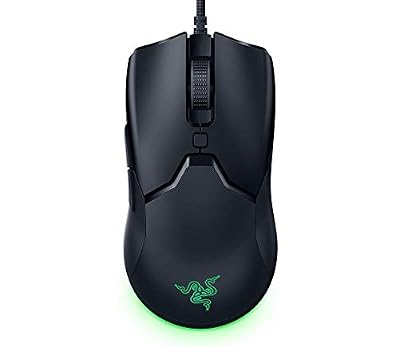
The Razer Viper Mini suits claw and fingertip players who want a proven small shape without moving to wireless. At 118.3 mm long and 53.5 mm wide, it is one of the narrowest mice in this guide, so fingers do not have to splay wide to reach the main buttons. The 61 g body and flexible Speedflex cable keep drag low during fast swipes, and the symmetrical shape works for either hand, although the side buttons sit on the left side only. Chroma RGB underglow adds lighting without changing the grip.
Specs
- Weight: 61 g, excluding cable
- Dimensions: 118.3 x 53.5 x 38.3 mm
- Sensor: Optical sensor, up to 8,500 DPI
- Buttons: 6 programmable buttons
- Switches: Optical mouse switches rated for 50 million clicks
- Connection: Wired, with Razer Speedflex cable
- Lighting: Chroma RGB underglow
- Feet: PTFE mouse feet
- Onboard memory: 1 onboard profile, with Razer Synapse 3 support
Best for: Claw and fingertip players who want a narrow, light wired mouse for fast games.
Watch out for: It is wired only, and the side buttons are on the left side, so left-handed players lose thumb-button access.
HyperX Pulsefire Haste 2 Mini Wireless

The HyperX Pulsefire Haste 2 Mini Wireless suits small-handed players who want a flagship-style sensor in a compact wireless shell. It weighs 59 g, measures 116.6 mm long, and pairs a 2.4 GHz wireless link with Bluetooth, so it works on a desktop and a laptop without swapping hardware. The HyperX 26K sensor tracks up to 26,000 DPI at up to 650 IPS, and the battery lasts up to 100 hours on a full charge, with play while charging through USB-C. Adhesive grips in the box help when the smooth shell feels slippery.
Specs
- Weight: 59 g
- Dimensions: 116.6 x 61.9 x 36.5 mm
- Sensor: HyperX 26K sensor, up to 26,000 DPI, up to 650 IPS, 50G acceleration
- Buttons: 6 programmable buttons
- Switches: HyperX switches rated for 100 million clicks
- Connection: 2.4 GHz wireless, Bluetooth 5.1, and wired USB-C
- Battery: Up to 100 hours on a full charge
- Polling rate: Up to 1000 Hz
- Software: HyperX NGENUITY software
- Feet: PTFE skates
Best for: Small hands that want a light wireless mouse with dual wireless and a long battery.
Watch out for: The symmetrical shell is wider than the Razer Viper Mini, so check the width against your grip before choosing it.
Glorious Model O- (Minus)

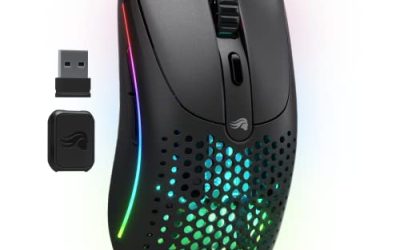
The Glorious Model O- (Minus) suits players who like a honeycomb shell and a straightforward wired mouse for medium and small hands. The open honeycomb design keeps the weight at 58 g while the ambidextrous shape stays comfortable for either hand, and the Pixart 3360 sensor gives clean tracking for competitive play. RGB lighting runs through the shell, the PTFE G-Skates glide smoothly on a pad, and the flexible Ascended cord reduces drag during quick movements. It is a simple pick with no battery to manage.
Specs
- Weight: 58 g
- Sensor: Pixart PMW-3360 optical sensor, up to 12,000 DPI
- Buttons: 6 buttons with macro support
- Switches: Omron switches rated for 20 million clicks
- Connection: Wired, with Ascended cord
- Polling rate: 1000 Hz
- Lift-off distance: Less than 0.7 mm
- Lighting: RGB lighting
- Feet: Glorious Skates, virgin PTFE
- Shape: Ambidextrous, listed as ideal for medium and small hands
Best for: Players who want a light honeycomb wired mouse with an ambidextrous shape.
Watch out for: The honeycomb holes can collect dust and skin oils, so the shell needs regular cleaning to stay comfortable.
Glorious Model O 2 Mini
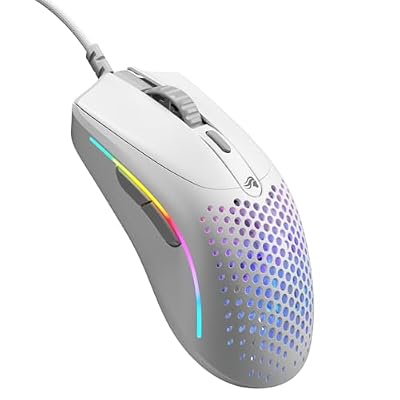
The Glorious Model O 2 Mini suits players who want the lightest shell in this guide for fast flick aiming. At 49 g, it is noticeably lighter than the other wired picks, yet it keeps a modern BAMF 2.0 sensor with up to 26,000 DPI, 650 IPS tracking, and Motion Sync. The compact symmetrical shape is listed for palm, claw, and fingertip grips, and the six programmable buttons cover the usual binds without adding bulk. Its switches are rated for 80 million clicks, which suits heavy daily use.
Specs
- Weight: 49 g
- Dimensions: 120 x 62 x 36 mm
- Sensor: Glorious BAMF 2.0 optical sensor, up to 26,000 DPI, 650 IPS, 50G acceleration
- Buttons: 6 programmable buttons
- Switches: Rated for 80 million clicks
- Connection: Wired, USB Type-A
- Polling rate: 1000 Hz
- Lighting: RGB lighting
- Feet: PTFE skates
- Shape: Symmetrical, compact, listed for small to medium-sized hands
Best for: Fast flick aiming and long sessions where a very light wired mouse reduces wrist effort.
Watch out for: At 62 mm wide it is broader than the Viper Mini, so fingertip players with very narrow hands should check the width first.
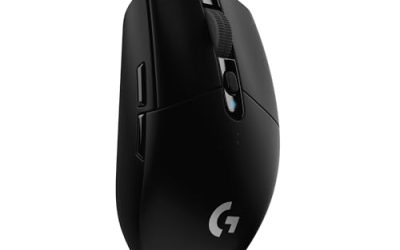
Logitech G305 LIGHTSPEED

The Logitech G305 LIGHTSPEED suits players who want a compact wireless mouse that runs for months without charging. Its HERO 12K sensor reaches up to 12,000 DPI with zero smoothing, filtering, or acceleration, and the LIGHTSPEED wireless link reports at 1 ms for responsive input. One AA battery powers up to 250 hours of continuous play, and the receiver stores inside the mouse for travel. The symmetrical egg shape suits claw and fingertip grips, and six programmable buttons plus onboard memory cover everyday binds.
Specs
- Weight: 99 g, with AA battery installed
- Sensor: Logitech HERO 12K optical sensor, up to 12,000 DPI, 400 IPS
- Buttons: 6 programmable buttons
- Connection: LIGHTSPEED wireless, 1 ms report rate, USB receiver
- Battery: Up to 250 hours on one AA battery
- Memory: Onboard memory
- Software: Logitech G HUB
- Shape: Compact, symmetrical design with built-in receiver storage
- Compatibility: PC and Mac
Best for: Long wireless sessions and travel, where battery life and a stored receiver matter most.
Watch out for: It uses a single AA battery and a USB receiver only, with no Bluetooth and no wired mode, so keep a spare battery nearby.
Which One Fits Your Situation
You play fast shooters with a claw or fingertip grip
Choose the Razer Viper Mini or the Glorious Model O 2 Mini. The Viper Mini is narrower and suits a tight fingertip grip, while the Model O 2 Mini is lighter and suits rapid flicks across a large pad. Both are wired, so neither needs charging mid-session, and both keep the shell short enough for small hands.
You want wireless without a heavy shell
Choose the HyperX Pulsefire Haste 2 Mini Wireless. At 59 g it is far lighter than most wireless mice, it offers both 2.4 GHz and Bluetooth, and its battery lasts up to 100 hours. It suits a desk that doubles as a workspace and a laptop bag where a cable would get in the way.
You want the longest time between battery changes
Choose the Logitech G305 LIGHTSPEED. One AA battery lasts up to 250 hours, the receiver stores inside the body, and the shape is easy to pick up after a break. It is the simplest wireless pick here for players who dislike charging cables and software routines. That long run time also makes it a strong travel companion for long trips away from a charger.
You like a honeycomb shell and an ambidextrous shape
Choose the Glorious Model O- (Minus). Its open shell keeps the weight at 58 g, the shape works for either hand, and the PTFE feet glide well on most pads. It suits players who found solid shells too heavy or too warm during long sessions. The open design also keeps the shell cool during long sessions, which helps when your hand tends to warm up.
Common Mistakes
- Buying by DPI alone, when length, width, and grip shape decide whether a mini mouse actually fits your hand.
- Choosing a shell that is short but wide, then finding the thumb and ring finger still have to stretch across it.
- Picking a wireless mouse without checking whether it has Bluetooth, a 2.4 GHz dongle, or both, and whether it can play while charging.
- Ignoring battery type, so a mouse that needs regular charging or frequent AA swaps interrupts long sessions.
- Skipping the side-button check, then finding the thumb buttons sit too far forward or too far back for a comfortable claw grip.
Frequently Asked Questions
What size counts as a mini gaming mouse?
A mini gaming mouse is usually around 110 to 120 mm long, with a narrower width than a full-size shell, and it is shaped for small to medium hands. Length alone is not enough, because a short mouse can still feel wide, so check width, height, and weight together before you decide.
Are mini gaming mice good for claw and fingertip grips?
Yes, most mini mice suit claw and fingertip grips well, because the shorter shell lets the fingers curl naturally and the palm stays free to lift the mouse. Palm grippers with small hands can still use them, but they should look for a shell with enough length and hump height to support the palm.
Is a wired or wireless mini mouse better?
A wired mini mouse is better for a fixed desk and players who never want to charge a mouse, while a wireless mini mouse is better for laptops, travel, and tidy desks. The best choice depends on where you play, not on the connection alone, so check battery life and wireless modes first.
How heavy should a mini gaming mouse be?
Most mini gaming mice in this guide weigh between 49 g and 99 g, and lighter shells suit fast flicks and frequent lifts. A heavier shell is not automatically worse, because it can feel steadier for players who rest their hand on the mouse, so match weight to your grip and game style.