If you want a Logitech gaming mouse from this segment, start with the G305 LIGHTSPEED for wireless freedom, the G502 HERO for maximum buttons and features, or the G203 LIGHTSYNC for the most affordable way into the lineup. All five mice below are current Logitech G models sold on Amazon US, and every one uses a proven sensor, programmable buttons, and Logitech G HUB support. The real differences are connection type, weight, button count, and shell shape, so the right pick depends on your grip and the games you play.
As an Amazon Associate, we earn from qualifying purchases.
Logitech G305 LIGHTSPEED

The G305 is the standout of this segment because it removes the cable without removing the performance. Its LIGHTSPEED wireless connection reports at the same rate as a wired mouse, and the HERO sensor delivers accurate tracking with none of the smoothing or acceleration that ruins flick shots. Battery life is the other headline: a single AA cell runs the mouse for months of regular play, so you are not managing a charging cable every week. The shell is a compact, safe shape that suits fingertip and claw grips, and the primary switches feel crisp for a mouse in this class. If you play competitive shooters and hate cable drag, this is the default recommendation.
Specs
- Sensor: HERO optical, 200 to 12,000 DPI
- Connection: LIGHTSPEED 2.4 GHz wireless, USB nano receiver
- Report rate: 1,000 Hz (1 ms)
- Battery: one AA, rated up to 250 hours
- Weight: 99 g including battery
- Buttons: 6 programmable
- Extras: onboard memory, receiver storage compartment
Tier: premium pick of the segment
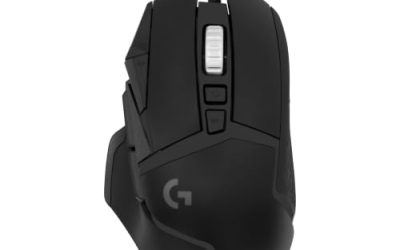
Logitech G502 HERO

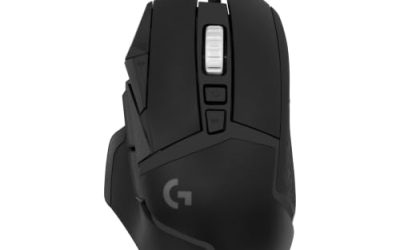
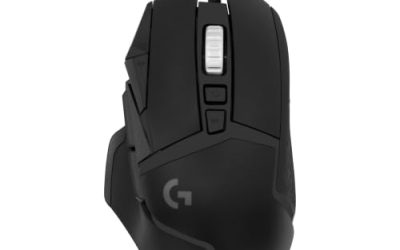
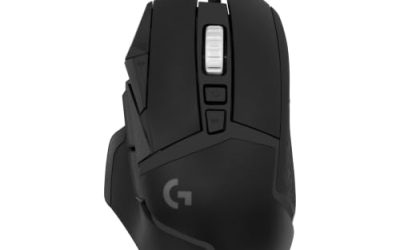
The G502 HERO is the feature-heavy option. You get eleven programmable buttons, a dual-mode scroll wheel that switches between ratcheted steps and free spinning, and a tunable weight system that lets you add mass in small increments until the glide feels right. The HERO 25K sensor is the same flagship-grade tracker Logitech puts in its higher lines, so tracking quality is never the weak point. The trade-off is heft: even with no extra weights fitted, this is one of the heavier mice here, and the sculpted right-handed shell with its thumb rest suits palm and relaxed claw grips far better than fingertip play. For MMO, MOBA, and productivity-heavy gaming where extra buttons earn their keep, it is the strongest choice in the group.
Specs
- Sensor: HERO 25K optical, 100 to 25,600 DPI
- Connection: wired, braided cable
- Report rate: 1,000 Hz (1 ms)
- Buttons: 11 programmable
- Weight: 121 g base, up to 18 g of optional added weights
- Scroll wheel: dual-mode hyper-fast, tilt clicks
- Extras: LIGHTSYNC RGB, onboard memory, DPI shift button
Tier: mid-range
Logitech G502 X Wired

The G502 X is the modern redesign of the G502 formula. It keeps the eleven-plus control layout and the hyper-fast scroll wheel but drops the weight dramatically and swaps the main switches for LIGHTFORCE hybrid optical-mechanical units, which actuate with light for speed while keeping a mechanical feel. Clicks register faster and the switches are rated for far longer life than purely mechanical contacts. At 89 g it flicks and stops noticeably easier than the older HERO model, which makes it the better G502 for fast-paced shooters. The removable DPI-shift button is a thoughtful touch: keep it for a sniper button, or swap in the flat cover if it gets in your way. Choose this one if you like the G502 shape and button layout but want current-generation hardware.
Specs
- Sensor: HERO 25K optical, 100 to 25,600 DPI
- Connection: wired
- Report rate: 1,000 Hz (1 ms)
- Buttons: 13 programmable controls
- Weight: 89 g
- Switches: LIGHTFORCE hybrid optical-mechanical
- Extras: hyper-fast scroll wheel, removable DPI-shift button, PTFE feet
Tier: mid-range
Logitech G203 LIGHTSYNC

The G203 LIGHTSYNC is the entry point of the Logitech G line and the easiest recommendation for a first gaming mouse. The gaming-grade sensor tracks up to 8,000 DPI, which is more range than most players ever use, and the classic six-button shell is a shape Logitech has refined for years: medium-small, symmetrical, and comfortable for claw and fingertip grips. LIGHTSYNC RGB runs along the rear strip and logo, and G HUB handles button remapping, DPI stages, and lighting. There is no wireless and no weight tuning, but there is also nothing here that will hold a casual or competitive player back. For a spare mouse, a laptop bag, or a younger player’s first setup, it covers the essentials properly.
Specs
- Sensor: gaming-grade optical, 200 to 8,000 DPI
- Connection: wired
- Report rate: 1,000 Hz (1 ms)
- Buttons: 6 programmable
- Weight: 85 g
- Lighting: LIGHTSYNC RGB
- Extras: onboard memory, mechanical button tensioning
Tier: budget
Logitech G300s

The G300s is the veteran of the lineup, and it survives in this segment because of one thing the newer mice dropped: a true ambidextrous shell with nine programmable controls arranged around the top of the mouse. Left-handed players and anyone who prefers a symmetrical shape get a layout that puts extra buttons under both sides of the hand. The optical sensor tops out at 2,500 DPI, which is low on paper, but for the strategy, MMO, and casual play this mouse suits, it tracks consistently and predictably. Onboard memory stores three profiles, so your bindings travel with the mouse between computers without software. It is the oldest design here and the materials feel a step behind the G203, yet for ambidextrous use at the bottom of the segment it remains a sensible, proven pick.
Specs
- Sensor: optical, 250 to 2,500 DPI
- Connection: wired
- Report rate: 1,000 Hz (1 ms)
- Buttons: 9 programmable
- Shape: ambidextrous
- Lighting: adjustable RGB zones
- Extras: onboard memory with three profiles, on-the-fly DPI shifting
Tier: budget
What This Segment Does and Does Not Include
It helps to know where Logitech draws the line between this group and its flagship mice. None of these five models offers wireless charging, an infinite-scroll metal wheel of the kind found on the MX Master line, or the ultra-light magnesium shells of the PRO X range. What you keep is the part that decides games: every mouse here uses a sensor with accurate, prediction-free tracking, a one-millisecond report rate, and switches that register clicks cleanly. The savings come from simpler shells, fewer exotic materials, and in the wired models, the absence of a battery and radio. For most players that trade is invisible in game and very visible in value.
Software support is uniform across the group. Logitech G HUB handles DPI stages, button remapping, lighting, and profile storage for all five mice, and onboard memory means those settings live on the mouse itself. If you split time between a desktop and a laptop, or play on a machine where you cannot install software, that onboard storage is worth more than any single hardware feature. One caution applies to the whole segment: buy from a listing that clearly identifies the exact model and colour, because Logitech sells several near-identical variants of the G203, G502, and G305 lines, and the variant codes are not interchangeable.
How to Choose
Start with the connection. Wireless removes cable drag and desk clutter, and in this lineup that means the G305; everything else here is wired, which guarantees a consistent connection and never needs a battery. Next, match the shell to your grip. Palm grippers with medium or large hands will be happiest with the G502 HERO or G502 X. Claw and fingertip players should look at the lighter G305 and G203. Left-handed players, or anyone who wants a symmetrical shell, only have one real option here: the G300s.
Then count buttons against your games. Six buttons cover shooters and general play. Eleven or more, as on the two G502 models, pays off in MMOs, MOBAs, and games with long ability bars. Finally, ignore headline DPI numbers. Every sensor in this roundup tracks accurately at the sensitivities people actually use, which for most players sit between 400 and 3,200 DPI. Sensor quality, shape, and weight will change how you aim far more than a five-digit DPI ceiling.
Weight deserves one last word, because this group spans a wide range. The G502 X and G203 sit at the light end and reward quick, low-sensitivity arm aim with fast stops. The G502 HERO sits at the heavy end and rewards smooth, deliberate tracking, especially with its extra weights fitted. Neither approach is better in the abstract; match the mouse to the aiming style you already have rather than the one a spec sheet tells you to want.
Frequently Asked Questions
Is the G305 LIGHTSPEED good enough for competitive shooters?
Yes. The LIGHTSPEED connection reports every millisecond, the same as the wired mice here, and the HERO sensor tracks without smoothing or acceleration. It has been a common sight in competitive play for years precisely because the wireless link does not give up anything in responsiveness.
Which of these mice is best for palm grip?
The G502 HERO and G502 X. Both use a tall, sculpted right-handed shell with a thumb rest that supports the whole hand. The G502 X is the lighter of the two, so it suits palm players who still make fast corrections, while the HERO adds adjustable weight for those who prefer a planted feel.
Do these mice work without Logitech G HUB installed?
Yes, for everyday use. Every mouse here stores its core settings in onboard memory, so DPI stages and button assignments you save once will carry to another computer with no software. You only need G HUB when you want to change profiles, fine-tune lighting, or update settings.
Which Logitech mouse here should a left-handed player buy?
The G300s. It is the only ambidextrous model in this group, with a symmetrical shell and extra buttons mirrored for either hand. The G203 and G305 use symmetrical bodies too, but their thumb buttons sit on the left side only, which makes them right-hand mice in practice.
Final Verdict
For most players, the G305 LIGHTSPEED is the best Logitech gaming mouse in this segment: genuinely wireless, light, accurate, and frugal on battery. If you want maximum buttons and features, the G502 HERO delivers them, and the G502 X refines the same idea with far less weight and faster switches. On the tightest budget, the G203 LIGHTSYNC covers the essentials cleanly, while the G300s remains the ambidextrous specialist. Pick by grip and button needs first; every sensor on this list is good enough that shape, not specs, decides the winner.
Product and ASIN Reference
| Product | ASIN |
|---|---|
| Logitech G305 LIGHTSPEED Wireless Gaming Mouse | B07CMS5Q6P |
| Logitech G502 HERO Wired Gaming Mouse | B07GBZ4Q68 |
| Logitech G502 X Wired Gaming Mouse (White) | B0943J7HJG |
| Logitech G203 LIGHTSYNC Wired Gaming Mouse (Black) | B07YN82X3B |
| Logitech G300s Optical Gaming Mouse | B00RH6R7C4 |