As an Amazon Associate we earn from qualifying purchases.
Path of Exile asks more of a mouse than most games. Play is built around constant clicking, rapid cursor movement between packs of enemies, and a row of flask and skill inputs that need to be reached without looking down. A mouse for this game is therefore judged on a different set of specifications than a shooter mouse. Programmable button count matters because flasks, movement skills, and utility abilities can be moved under the thumb. Switch durability matters because the main buttons absorb an unusually high number of clicks over a league. Weight and shape matter because sessions are long and the hand repeats the same motions for hours. Sensor accuracy matters, but headline maximum DPI matters far less than consistent tracking at the moderate settings most players actually use.
This guide compares four gaming mice against those criteria, using the specifications in their Amazon listings: button counts, switch ratings where the listing states them, weight, sensor type and maximum sensitivity, and connection type. It does not claim practical play experience with any of them in Path of Exile. Instead, it maps each mouse’s published specifications to the demands the game’s control scheme creates, so you can match a specification sheet to your own build and habits.
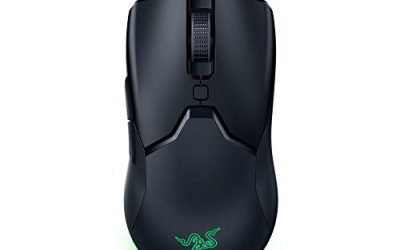
The four picks divide into clear roles: an eleven-button wired all-rounder, a wireless model with swappable side panels, a dedicated seventeen-button wired grid mouse, and a lightweight nine-button wired option.
A note on bindings before the picks: Path of Exile allows extensive key rebinding, and mouse software from each maker below lets you assign keyboard commands to mouse buttons. That is how flask keys and skill keys end up under the thumb. Stay within the game’s rules by assigning one input per button press rather than automating sequences, and check current game policy if you plan anything more complex than simple remapping.
Quick Picks
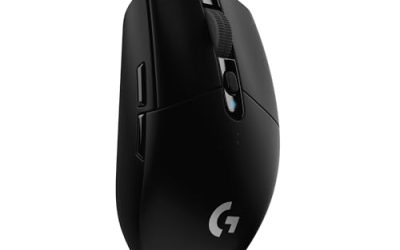
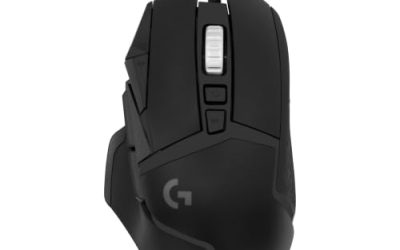
- Best all-round specification balance: Logitech G502 HERO — Eleven programmable buttons, a HERO 25K sensor up to 25,600 DPI, and an adjustable weight system starting at 121 grams, in a wired design with onboard memory.
- Best for maximum buttons, wireless: Razer Naga V2 Pro — Swappable side plates with 2, 6, and 12-button layouts for up to 20 programmable buttons, a Focus Pro 30K optical sensor, and HyperSpeed wireless with Bluetooth.
- Best dedicated thumb grid, wired: Corsair Scimitar RGB Elite — Seventeen programmable buttons including a repositionable twelve-button side panel, an 18,000 DPI PixArt PMW3391 sensor, and Omron switches rated for 50 million clicks.
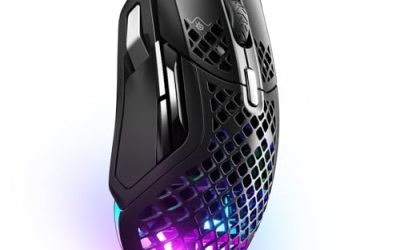
- Best lightweight option: SteelSeries Aerox 5, Wired — Nine programmable buttons at 66 grams, a TrueMove Air sensor up to 18,000 DPI, Golden Micro IP54 switches, and AquaBarrier protection rated IP54.
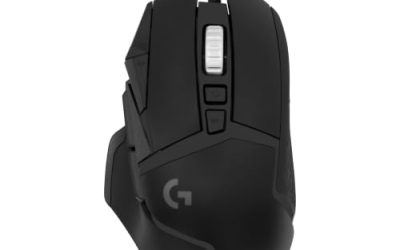
1. Logitech G502 HERO

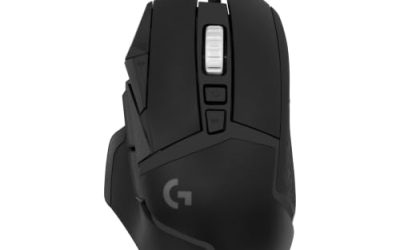
The G502 HERO is the most flexible specification sheet in this guide for a typical Path of Exile setup. Eleven programmable buttons are enough to cover the inputs most players move to the mouse: several flask slots, a movement skill, and a guard or utility skill, while the main skills stay on the keyboard. The dual-mode scroll wheel adds fast and ratcheted scrolling in one part, and onboard memory stores up to five profiles, so a per-character or per-league binding set can live on the mouse itself rather than in software that must always be running.
Its sensor is the HERO 25K, listed up to 25,600 DPI with 1-to-1 tracking and no smoothing, filtering, or acceleration, so tracking stays predictable at the modest DPI values most ARPG players use. The listing also describes a mechanical switch tensioning system with metal springs and pivot hinges in the main buttons, designed for a crisp click feel in a game where the main buttons are pressed constantly.
Weight is the specification to check carefully. The mouse starts at 121 grams and accepts up to five 3.6-gram tuning weights, so it can be made heavier and its balance shifted, but it cannot be made light. Players who prefer a heavy, planted mouse for controlled clicking will read that as a feature. Players who flick the cursor across the screen for hours may prefer the Aerox 5 below. The wired connection removes battery concerns during long sessions entirely.
Specs
- Sensor: HERO 25K optical, 100 to 25,600 DPI as listed
- Buttons: 11 programmable buttons, dual-mode hyper-fast scroll wheel
- Weight: 121 grams, plus up to five removable 3.6-gram tuning weights
- Switch design: Mechanical switch button tensioning with metal spring system as described in the listing
- Memory: Onboard memory for up to five profiles
- Connectivity: Wired USB
- Lighting: Programmable RGB with LIGHTSYNC as listed
Pros
- Eleven buttons cover flasks and key skills without overwhelming the thumb
- Adjustable weight and balance through removable tuning weights
- Onboard profiles keep bindings on the mouse itself
- Wired connection suits long sessions with no charging to manage
Cons
- Heavy starting weight, and the tuning system only adds more
- Right-handed shape does not suit left-handed players
- Wired cable adds drag that wireless and lightweight models avoid
2. Razer Naga V2 Pro

The Naga V2 Pro is built for players who want the mouse to carry as much of the control scheme as possible. Its defining specification is the set of three magnetic side plates, offering 2, 6, and 12-button side layouts, which brings the total to up to 20 programmable buttons with the twelve-button plate fitted. For Path of Exile, that grid can hold flasks, movement and guard skills, portal and utility commands, and other binds in one thumb panel, and the six-button plate offers a middle ground for builds with fewer active inputs. Swapping plates also means the same mouse can be simplified for other games rather than replaced.
The sensor is Razer’s Focus Pro 30K optical sensor, listed up to 30,000 DPI, and the main buttons use third-generation Razer Optical Mouse Switches. It connects over HyperSpeed wireless and Bluetooth, and works wired while charging. Battery figures in listing material are up to 150 hours on HyperSpeed and up to 300 hours on Bluetooth, as manufacturer ratings under stated conditions.
The costs of that flexibility are size and weight. At around 134 grams in published specifications, this is a heavy mouse, and the wide body that houses the side grid suits palm grips and larger hands better than small hands or fingertip grips. Players who only need five or six extra binds will carry hardware they never use. Players who genuinely bind a full utility bar to the mouse will find this the most complete specification here.
Specs
- Sensor: Razer Focus Pro 30K optical, up to 30,000 DPI
- Buttons: Up to 20 programmable buttons, with swappable 2, 6, and 12-button side plates
- Switches: Razer Optical Mouse Switches Gen-3 as listed
- Weight: Approximately 134 grams in published specifications
- Connectivity: HyperSpeed wireless, Bluetooth, wired while charging
- Battery: Manufacturer ratings up to 150 hours on HyperSpeed and up to 300 hours on Bluetooth as listed
- Scroll wheel: HyperScroll Pro wheel as listed
Pros
- Largest programmable button capacity in this guide
- Swappable side plates adapt one mouse to different builds and games
- Wireless freedom with a wired fallback while charging
- Optical switch design on the main buttons
Cons
- Heavy and wide, which will not suit small hands or fingertip grips
- Many players will not use the full twelve-button grid
- Wireless convenience adds charging to session planning, even with long rated battery life
3. Corsair Scimitar RGB Elite
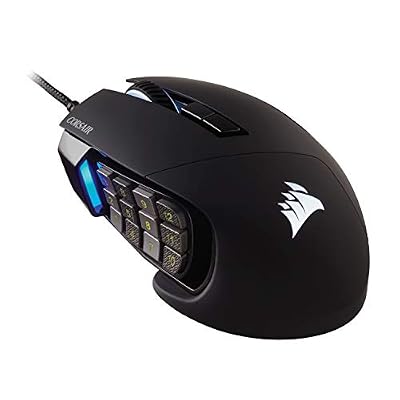
The Scimitar RGB Elite takes the dedicated route: a wired MOBA and MMO mouse with seventeen fully programmable buttons, centred on a twelve-button side panel. What separates its specification from the Naga’s is the patented Key Slider system, which lets the side panel be repositioned along the body and locked in place. Thumb length varies a lot between players, and a fixed grid that sits slightly too far forward or back is a grid you will mis-press. A panel that can be moved to sit under your thumb addresses that problem at the hardware level.
The sensor is a custom PixArt PMW3391 optical sensor, native 18,000 DPI and adjustable in one-DPI steps. Durability is stated plainly, which is valuable for this game: the main buttons use Omron switches rated for 50 million clicks. Onboard profile storage keeps bindings on the mouse, and Corsair’s iCUE software handles macro programming and remapping as described in the listing.
As a wired, button-dense mouse, it makes no attempt to be light or minimal. Listing records place it at about 122 grams, the side grid has a learning curve before presses become automatic, and iCUE is another software suite to maintain. For a player whose priority is a full flask and skill grid under the thumb, on a wired connection that never needs charging, those are acceptable terms.
Specs
- Sensor: PixArt PMW3391 optical, native 18,000 DPI, adjustable in 1 DPI steps as listed
- Buttons: 17 programmable buttons, including a 12-button side panel
- Side panel: Key Slider system to reposition and lock the side buttons as listed
- Switches: Omron switches rated for 50 million clicks as listed
- Weight: Approximately 122 grams in listing records (4.3 ounces)
- Connectivity: Wired, braided cable
- Software: Corsair iCUE for macros, remapping, and lighting as listed
Pros
- Twelve-button thumb grid sized for flasks plus a full skill set
- Repositionable side panel fits different thumb lengths
- Published 50 million click switch rating speaks directly to ARPG click volume
- Wired connection with onboard profile storage
Cons
- Button grid takes practice before presses are reliable without looking
- Heavier, larger body than minimalist mice
- Full feature set depends on iCUE software
4. SteelSeries Aerox 5, Wired

The Aerox 5 is the counterpoint to the two grid mice. It weighs 66 grams, roughly half the G502 HERO and Naga V2 Pro, because its shell uses a holey design protected by AquaBarrier. For Path of Exile players who move the cursor with frequent, wide sweeps and who find heavy mice tiring across a long mapping session, that weight specification is the headline. A lighter mouse also changes how clicking feels: there is less inertia to overcome on each reposition, which suits a fast, fingertip or claw style of play.
Nine programmable buttons include a five-button side panel and an up and down flick switch, enough for a movement skill, a guard skill, and the flasks you reach for most. The TrueMove Air optical sensor, co-developed with PixArt, is listed up to 18,000 DPI with 1-to-1 tracking. The main buttons use Golden Micro IP54 switches, and AquaBarrier protection is IP54 rated against dust and splashes. Glide comes from pure PTFE skates, and the detachable USB-C Super Mesh cable reduces drag.
The compromises are the smaller button count and the holey shell itself. Nine buttons will not hold a full utility bar, so keyboard-centric players are the audience, not grid players. The perforated body will not appeal to anyone who dislikes that texture under the palm, and the right-handed shape excludes left-handed players. Within its role, though, the specification is coherent: light, fast, protected, and just programmable enough for this game.
Specs
- Sensor: TrueMove Air optical, co-developed with PixArt, up to 18,000 DPI
- Buttons: 9 programmable buttons, including a 5-button side panel and an up/down flick switch
- Switches: Golden Micro IP54 switches as listed
- Weight: 66 grams
- Protection: AquaBarrier, IP54 rated as listed
- Connectivity: Wired, detachable USB-C Super Mesh cable
- Glide skates: Pure PTFE as listed
- Model: 62401
Pros
- Lightest mouse in this guide by a wide margin
- Nine buttons still cover core flask and skill binds
- IP54-rated protection is unusual and practical for a holey shell
- Detachable, low-drag cable reduces the usual wired drawback
Cons
- Cannot hold a full utility bar on the mouse alone
- Holey shell texture divides opinion
- Right-handed shape only
How to Choose
Count your binds first. List the inputs you actually want off the keyboard: usually three to five flasks, a movement skill, and one or two utility skills. If that list fits in five side buttons, the Aerox 5 or G502 HERO covers it with room to spare. If you also want portal, loot, and additional skills on the mouse, only the twelve-button grids on the Naga V2 Pro and Scimitar RGB Elite hold everything, and you should choose between them on connection and panel design rather than on sensor numbers.
Weigh the mouse, literally. Published weight predicts fatigue better than almost any other specification in a game played in long sessions. The 66-gram Aerox 5 and the 121-gram G502 HERO will feel like different categories of tool, and neither is objectively correct. Match weight to your grip and sweep style: fingertip and claw players making constant corrections often prefer light, while palm players who click from a planted hand often prefer substance.
Read the switch specification. Path of Exile generates click counts that expose weak main buttons, so a published rating, such as the Scimitar’s 50 million click Omron rating, or an optical switch design, such as the Naga V2 Pro’s third-generation optical switches, is worth weighting heavily. It is a more useful durability signal than general build claims.
Wired mice, three of the four here, never interrupt a session for charging. Wireless removes cable drag at the cost of weight and charging discipline. Finally, treat maximum DPI as minor: all four sensors list maximums far above typical settings, and tracking consistency, shape, buttons, and weight matter more.
FAQs
How many programmable buttons does a Path of Exile mouse need?
It depends on how much you move off the keyboard. Five side buttons can cover a movement skill and the flasks you press most. A twelve-button grid can hold flasks, skills, and utility commands together. Count your intended binds before choosing, rather than buying the largest grid by default.
Is a heavier or lighter mouse better for long ARPG sessions?
Neither is universally better. Published weights in this guide range from 66 grams to about 134 grams. Lighter mice reduce the effort of constant repositioning, while heavier mice feel more planted for deliberate clicking. Grip style and session length decide which trade-off suits you.
Does a high maximum DPI improve performance in Path of Exile?
Not in a meaningful way for most players. The game is played from an isometric view with the cursor used for targeting and movement, typically at moderate sensitivity. Consistent tracking, which all four listings describe, matters more than a maximum figure you will never set.
Can mouse buttons be used for flasks and skills?
Yes, through each maker’s configuration software, which assigns keyboard commands to mouse buttons, combined with the game’s own rebinding options. Assign one input per press and avoid automated sequences, and check the game’s current rules if you are unsure about a specific binding.
Wired or wireless for this game?
Wired models avoid charging entirely and dominate this guide for that reason, and modern detachable cables reduce drag considerably. The wireless Naga V2 Pro suits players who value a clear desk and will keep up with charging, helped by its long manufacturer battery ratings and its wired fallback while charging.
Conclusion
The best gaming mouse for Path of Exile is the one whose specifications match your binding count, grip, and session length. Choose the Logitech G502 HERO for a balanced eleven-button wired setup with tunable weight, the Razer Naga V2 Pro for the largest and most adaptable button capacity in a wireless body, the Corsair Scimitar RGB Elite for a repositionable twelve-button grid with a clearly stated switch rating, or the SteelSeries Aerox 5 for a 66-gram wired mouse that trades grid size for speed. Judge each on buttons, switches, weight, and sensor as listed, and the right match for your build becomes straightforward.
Disclosure: This article contains affiliate links. If you buy through links on this page, we may earn a commission at no additional cost to you.