- Top Pick: Patriot Memory 64GB EP A1/V30 Micro SD Card,Android Phones,Tablets,4K | Performance classes: V30, A1; Compatible with Android
- Best Value: SANDISK 256GB Ultra microSD UHS-I Card – Up to 195MB/s Read Speed, Full HD Video, V10, U1, C10, A4 – SDSQUJQ-256G-GZ6MA
- Premium Choice: Patriot LX Series Micro SD Flash Memory Card 64GB
Android is one of the few phone platforms that still lets you add storage with a microSD card, and that small slot is where a lot of people go wrong. The card that fits is not always the card that behaves well. Apps run sluggishly from a slow card, 4K clips stutter, and a capacity label that looks generous can be misleading when the performance markings underneath it are weak. Choosing among the best micro SD cards for Android phones comes down to three markings: capacity, speed class, and application class.
This 2026 guide is for anyone who wants to stretch a phone with limited internal storage, move photos and downloads off the main drive, or give a tablet room for offline video. Seven cards are covered, from a 32GB budget-tier option to a 512GB card for heavy libraries. Each is described only from its listing, so use the notes as a way to narrow the field, then confirm your phone’s maximum supported card size in its own manual.
Quick Picks
As an Amazon Associate we earn from qualifying purchases at no extra cost to you.


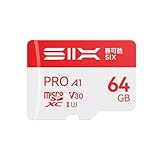


| Product | Best for | Key spec from the title |
|---|---|---|
| Patriot EP 64GB A1/V30 | Apps plus 4K clips on a phone | 64GB, A1, V30 |
| SanDisk Ultra 256GB | Large photo and video libraries | 256GB, up to 195MB/s read, U1, C10, A4 label |
| Patriot LX 64GB | Basic everyday storage | 64GB microSD |
| SIX M100 64GB | One card across phone, drone, and dash cam | 64GB, A1, U3, V30, adapter included |
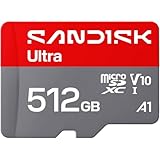
| SanDisk Ultra 512GB | Offline media for a tablet or phone | 512GB, up to 195MB/s read, A3 |
| DIGIERA 128GB CT100 | Mid-size card with the standard A2 class | 128GB, U3, V30, A2 |
| Patriot LX 32GB | Small documents and music | 32GB microSD |
How to Choose
Capacity: match it to what the phone supports
Every Android phone has a ceiling on card size, and it is usually printed in the specs. Cards of 32GB, 64GB, and 128GB suit most phones and sit comfortably in the budget tier. Cards of 256GB and 512GB are microSDXC cards that need a phone with exFAT support, which most recent handsets have. Pick a size that matches your actual files: 64GB holds a large music library and a few thousand photos, while 4K video fills 256GB quickly. If you travel and shoot a lot, remember that a single large card concentrates risk. Two 128GB cards can be a safer arrangement than one 512GB card, because a failure or loss then affects half of your files, not all of them.
Speed class: U1, U3, V10, and V30 explained
These letters describe sustained write speed. U1 and V10 guarantee 10MB/s, which is fine for photos and Full HD video. U3 and V30 guarantee 30MB/s, which is the safer choice for 4K recording on a phone. The headline “up to” read speed on a package describes a best case, not the speed you will see for every file. Ignore large read numbers if your plan is recording video or saving burst photos. Read speed mostly shows up when you copy files to a computer, so it deserves less weight than the write-oriented U and V markings for everyday phone use.
Application class: A1, A2, and what it means for apps
Application class measures random read and write behavior, which matters when apps or games load from the card. A1 is the minimum for running apps from storage, and A2 raises that target. Some phones cannot take advantage of A2, so treat it as a bonus, not a requirement. If you only store photos and music, application class barely matters. If you plan to move games onto the card, favor A1 or higher. Note that the standard classes are A1 and A2, so if a listing shows a label such as A3 or A4, treat it as a marketing designation and confirm the details on the card’s own packaging before relying on it.
Where budget cards cut corners
Low-capacity cards with no listed class are fine for music and documents but are the wrong pick for apps or video. Titles that omit the speed class leave you guessing. Look for A1, U3, V30 markings and a clear capacity. An included SD adapter is useful when you move files to a laptop. Avoid paying attention to marketing language like “high-speed” unless a class marking backs it up. Finally, buy from a seller that clearly ships the named brand, since mislabeled capacity is a known problem with unfamiliar listings, and format a new card in the phone itself before moving anything onto it.
The 7 Best Options
Patriot EP 64GB A1/V30
A practical card for someone who wants app support and 4K video recording in a single mid-capacity package, such as a commuter who shoots short clips and keeps a few apps off the main drive. The title lists A1 and V30 performance classes, plus compatibility with Android phones, tablets, and 4K recording.
- V30 supports sustained video recording for 4K clips.
- A1 class allows apps to run from the card.
- Trade-off: 64GB fills up quickly if you shoot long 4K videos.
Skip it if your phone handles heavy 4K recording and you need a larger card.
SanDisk Ultra 256GB
This one is meant for owners with big photo and video libraries who want a high-capacity card from a well-known brand. The listing states UHS-I, up to 195MB/s read speed, Full HD video support, V10, U1, C10, and an A4 designation.
- 256GB gives plenty of room for photos, music, and downloads.
- Read speeds up to 195MB/s speed up file transfers to a computer when you copy files off the card.
- Trade-off: V10 and U1 are lower sustained-write classes than V30 cards, and the A4 label is not a standard class, so it is less ideal for 4K recording or app loading.
Skip it if 4K video capture is your main purpose for the card.
Patriot LX 64GB
A basic 64GB card for people who need extra space for photos, music, and documents without paying attention to speed classes, for example a parent clearing space for family pictures. The title identifies it as a micro SD flash memory card in the LX Series and gives nothing more.
- 64GB is a useful middle capacity for most phones.
- Straightforward product with simple naming.
- Trade-off: no application class or video class is listed, so it is hard to judge for app use or 4K video.
Skip it if you plan to run apps from the card or record 4K video.
SIX M100 64GB
A flexible choice for someone who wants one card to move between devices, perhaps a hobbyist who swaps it from a phone to a drone or action camera. The listing names up to 100MB/s read speed, A1, U3, V30, 4K UHD support, an adapter, and uses ranging from Android phones and tablets to dash cams, action cameras, drones, and consoles.
- U3 and V30 markings suit 4K recording.
- An included adapter helps when moving files to a computer.
- Trade-off: only 64GB of capacity.
Skip it if you want a larger card so one memory card can cover all of your devices.
SanDisk Ultra 512GB
This card is for buyers with a phone or tablet that supports large microSDXC cards and a collection of offline films, music, and photos. The listing mentions UHS-I, up to 195MB/s read speed, Full HD video, V10, U1, C10, and A3.
- 512GB is the largest capacity here.
- The title lists an A3 application label, a step above the A1 cards in this group on paper.
- Trade-off: V10 and U1 classes suit Full HD more than 4K recording.
Skip it if your phone cannot read cards above 256GB, so check the manual first.
DIGIERA 128GB CT100
A middle path for those who want both a solid capacity and the A2 application class, one of the two standard app tiers. The title lists microSDXC UHS-I, up to 100MB/s, Class 10, U3, V30, 4K UHD, and A2, with an adapter included.
- A2, U3, and V30 combine app and video support in one marking set.
- 128GB hits a sweet spot for many phones.
- Trade-off: the brand is less familiar than the major names.
Skip it if brand recognition is important to you.
Patriot LX 32GB
A small card aimed at users who want to offload music, documents, and a modest photo set, such as someone with an older handset and a short list of files. The title is brief: LX Series micro SD flash memory card, 32GB.
- Small capacity suits older phones with limited card support.
- Simple, low-pressure choice for light use.
- Trade-off: no speed or application class is listed.
Skip it if you plan to store video or games.
Which One Fits Your Situation
Moving apps and games to the card
The DIGIERA 128GB CT100 lists the standard A2 class along with U3 and V30, so it pairs app loading with video support. The Patriot EP 64GB with A1 is a smaller alternative, and the SIX M100 64GB offers A1 with a bundled adapter.
Recording 4K video on the phone
Choose a card with V30 and U3 markings. The SIX M100 64GB and the Patriot EP 64GB both state V30, and the DIGIERA card adds more capacity.
Offloading a huge photo and music library
The SanDisk Ultra 256GB or 512GB offers the most room. Confirm that the phone supports microSDXC cards of that size first.
Light storage for older devices
The Patriot LX 32GB or 64GB works for music and documents on a phone that does not need performance-class markings. These are the simplest way to free internal space for a tablet or an older handset that mostly plays stored songs, holds PDFs, and keeps a modest photo folder, and neither listing adds claims that need checking.
Common Mistakes
- Buying a card larger than the phone’s supported maximum.
- Reading “up to” speeds as guaranteed sustained performance.
- Choosing a V10 or U1 card for 4K recording, which calls for V30 or U3, or trusting an unfamiliar listing that gives only a capacity and no class markings at all.
- Running apps from a card with no application class.
- Forgetting to format the card in the phone, which prevents compatibility issues.
Related guides
- Aio Liquid Coolers For High Performance Gaming
- How To Lower Input Delay In Competitive Shooters
- Wireless Gaming Headsets Under 100 For Pc
Frequently Asked Questions
Which speed class do I need for 4K video on an Android phone?
Look for U3 or V30, which guarantee 30MB/s of sustained write speed. Lower classes may work for Full HD but can drop frames in 4K.
Can I run apps from a microSD card?
Many Android phones allow it, but results vary by device and by Android version, and some apps refuse to move at all. An A1 or A2 card is the sensible choice if you try it, and a smaller game or two is a safer first experiment than your whole library.
Is a bigger card always better?
Not necessarily. Your phone has a maximum supported size, and a large card with weak classes can feel slower than a smaller one with better markings.
Do I need the adapter that comes with some cards?
It is useful when you want to read the card in a laptop’s full-size SD slot. If you use a USB reader, the adapter stays unused.