The first decision is not capacity. It is whether your exact ThinkPad can take a module at all, and if it can, which generation, speed and voltage its slots were built for. A DDR5 stick will never seat in a DDR4 slot, a 2666MHz machine gains nothing from a faster kit, and a growing number of slim ThinkPads have every chip soldered down, leaving no slot to fill.
This guide is for owners of socketed models who want a matched, low-risk upgrade: people extending an older T-series workhorse, buyers adding a second stick beside soldered memory, and anyone speccing a newer DDR5 machine for heavier multitasking or virtual machines. Every pick below was chosen from the name and specifications printed on its Amazon product page, not from generic compatibility claims.
Quick Picks
As an Amazon Associate we earn from qualifying purchases.
| Product | Best for | Key spec from title |
|---|---|---|
| Crucial 32GB DDR4 RAM Kit (2x16GB) CT2K16G4SFRA32A | Two-slot DDR4 ThinkPads moving to a full 32GB | 3200MHz (PC4-25600) CL22 SODIMM 260-Pin |
| A-Tech 32GB (2x16GB) DDR4 2666MHz Kit | Older 2666MHz ThinkPads such as T480 and T490 era machines | 2666MHz PC4-21300 (PC4-2666V) CL19 SODIMM |
| Samsung 16GB DDR4 3200MHz SODIMM M471A2K43DB1-CWE | Filling one free slot beside existing memory | 3200MHz PC4-25600 CL22 2Rx8 1.2V 260-Pin |
| Crucial 32GB DDR5 RAM Kit (2x16GB) CT2K16G56C46S5 | Two-slot DDR5 ThinkPads that run 5600MHz memory | 5600MHz (or 5200MHz or 4800MHz) 262-Pin SODIMM |
| Kingston FURY Impact 32GB (2x16GB) DDR5 5600 Kit | DDR5 owners who want tighter CL40 timings | 5600MT/s DDR5 CL40, Intel XMP 3.0, Plug N Play |
How to Choose
Confirm Your Model Actually Has a Slot
Start with the full machine type, not the family name on the lid. Lenovo sells near-identical ThinkPads in soldered and socketed versions: many X1 Carbon and X13 generations carry LPDDR memory fixed to the board, while T14, T15, P-series and E-series models of similar age often keep one or two SO-DIMM slots. Check the Lenovo PSREF specification for your exact configuration, or open Task Manager and look at the slots-used field under Memory. If the spec sheet lists memory as soldered with no slot count, stop here, because no kit in this guide can change that machine.
Match the DDR Generation and Speed
DDR4 and DDR5 modules use different notch positions, 260 pins against 262, so the wrong generation physically refuses to fit. Match the generation your processor platform shipped with, then match speed to the figure Lenovo lists. A T480-era system built for DDR4-2400 or 2666 will run a 3200MHz kit only at its own lower ceiling, which is harmless but buys nothing. The reverse hurts more: fitting 4800MHz DDR5 in a 5600MHz DDR5 ThinkPad leaves performance on the table every day. When in doubt, copy the speed printed on the module you remove.
Decide Capacity and Single Versus Dual Stick
Two matched sticks enable dual-channel operation, which matters most when the machine also drives its display from integrated graphics. A two-slot ThinkPad jumping from 8GB is usually best served by a matched pair, such as 2x16GB for 32GB total. A model with 8GB or 16GB soldered plus one open slot needs a single stick instead, sized so the soldered portion still runs in dual-channel mode where possible. Also respect the per-slot ceiling in the spec sheet: some older platforms accept 16GB per slot, others 32GB, and exceeding it can mean a machine that never boots.
Check Voltage, Rank and ECC Details
Standard DDR4 laptop memory runs at 1.2V and DDR5 at 1.1V; avoid low-voltage DDR3L-era listings and any desktop DIMM, which is longer and will not fit. Most ThinkPads take non-ECC unbuffered modules, and only certain mobile workstations accept ECC, so confirm before paying extra for it. Rank, written as 1Rx8 or 2Rx8, rarely blocks an upgrade, yet matching the rank style of an existing stick when you add just one module reduces surprises. Finally, ignore XMP headline speeds on business laptops: ThinkPad firmware generally runs the JEDEC profile the module reports, not a gaming overclock.
The 5 Best Options
Crucial 32GB DDR4 3200MHz Kit (2x16GB)
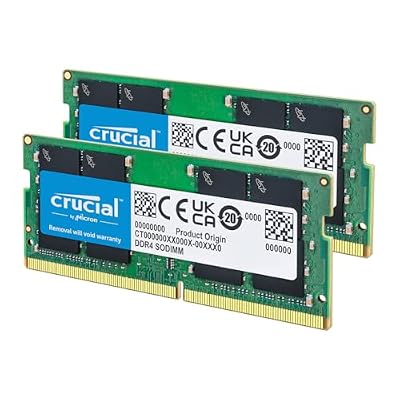
For a two-slot DDR4 ThinkPad that feels tight at 8GB or 16GB, this matched pair is the straightforward full replacement. Both slots get identical 16GB modules, so dual-channel operation is guaranteed rather than hoped for. The 3200MHz rating also downclocks to 2933MHz or 2666MHz, which suits later DDR4 generations whose controllers run below the kit ceiling, including T14 and T15 Gen 1 and Gen 2 configurations and similar P-series models with two DDR4 slots. If your current setup mixes sizes from earlier partial upgrades, replacing both sticks with this pair removes that mismatch in one step.
Specs
- Capacity: 32GB kit (2x16GB)
- Memory technology: DDR4
- Speed: 3200MHz (PC4-25600), downclockable to 2933MHz and 2666MHz
- Latency: CL22
- Voltage: 1.2V
- Form factor: SO-DIMM, 260-pin
- Model: CT2K16G4SFRA32A
Best for: Owners of two-slot DDR4 ThinkPads who want a clean move to 32GB in dual channel.
Watch out for: Confirm both slots exist and are empty-able; some models pair one slot with soldered memory, where a single stick is the smarter buy.
ASIN: B08C4X9VR5
A-Tech 32GB DDR4 2666MHz Kit (2x16GB)

Plenty of long-serving ThinkPads, the T480, T490, X280 and their contemporaries, were specified around DDR4-2666, and this kit speaks exactly that language. Speed, CL19 timing and 1.2V operation all line up with what those platforms expect, so the modules should train at full rated speed without the fallback behaviour faster kits trigger. A-Tech sells the pair as a laptop upgrade kit with a limited lifetime warranty stated on the listing, which suits IT hand-me-downs and refurbished machines being prepared for several more years of office, browsing and light development work.
Specs
- Capacity: 32GB (2x16GB modules)
- Memory technology: DDR4
- Speed: 2666MHz, PC4-21300 (PC4-2666V)
- Latency: CL19
- Voltage: 1.2V, JEDEC DDR4 standard
- Form factor: SO-DIMM, 260-pin, non-ECC unbuffered
- Model: AT16G2D4S2666NA0N12V
Best for: Extending 2666MHz-era ThinkPads that still have both slots socketed.
Watch out for: Check the maximum your model supports; a few contemporaries cap total memory below 32GB or reserve one side for soldered chips.
ASIN: B07KGNXL2H
Samsung 16GB DDR4 3200MHz Single Module

Not every ThinkPad needs a pair. Machines built with 8GB soldered and one open slot, and two-slot models where one stick already matches your target, call for a single well-specified module instead. This Samsung part is the kind of module factories fitted originally: DDR4-3200, CL22, dual-rank 2Rx8 construction at the standard 1.2V. Adding it beside an existing 16GB stick yields 32GB in dual channel, while pairing it with 8GB gives a useful 24GB step. Because the part number is printed in the listing title, you can cross-check it against Lenovo FRU lists before ordering.
Specs
- Capacity: 16GB (1x16GB module)
- Memory technology: DDR4
- Speed: 3200MHz (PC4-25600 / PC4-3200AA)
- Latency: CL22
- Rank: 2Rx8 dual rank
- Voltage: 1.2V
- Form factor: SO-DIMM, 260-pin, non-ECC unbuffered
- Part number: M471A2K43DB1-CWE
Best for: Topping up one free slot while keeping the memory already installed.
Watch out for: A single stick runs single-channel if the other side is soldered at a different size; check how your model reports its slot layout first.
ASIN: B08QR2YGKX
Crucial 32GB DDR5 5600MHz Kit (2x16GB)

Newer ThinkPads that kept socketed DDR5, including selected P-series workstations and T-series configurations ordered with SO-DIMM memory rather than soldered LPDDR5X, need 262-pin DDR5. This Crucial pair covers the three speeds those platforms use, running at 5600MHz where supported and stepping down to 5200MHz or 4800MHz where the processor or firmware asks for less. That flexibility makes it the safer DDR5 choice when you know the generation but are unsure which speed tier your configuration shipped with. The 1Rx8 layout and standard 1.1V operation match the plain JEDEC profile ThinkPad firmware expects at first boot.
Specs
- Capacity: 32GB kit (2x16GB)
- Memory technology: DDR5
- Speed: 5600MHz (or 5200MHz or 4800MHz), PC5-44800
- Latency: CL46
- Voltage: 1.1V
- Form factor: SODIMM, 262-pin
- Rank and configuration: 1Rx8, non-ECC
Best for: Two-slot DDR5 ThinkPads where the exact speed tier is uncertain.
Watch out for: Many DDR5 ThinkPads are soldered-only; verify your configuration lists SO-DIMM slots in its Lenovo specification before buying any DDR5 kit.
ASIN: B0BLTDRRLF
Kingston FURY Impact 32GB DDR5 5600MHz Kit (2x16GB)

Kingston’s kit is the pick when two DDR5 slots are confirmed and you want the tightest timings a listing here offers. Its CL40 latency undercuts the CL46 of standard JEDEC 5600 modules, and the Plug N Play design is built to run at its highest published speed without manual setup. On a ThinkPad, expect the firmware to settle on the fastest profile the platform itself supports, so treat the XMP 3.0 certification as headroom rather than a promise. For workstation-style loads, compiling, virtual machines and large datasets, a matched 32GB pair like this keeps both channels evenly fed.
Specs
- Capacity: 32GB kit (2x16GB)
- Memory technology: DDR5
- Speed: 5600MT/s
- Latency: CL40
- Voltage: 1.1V
- Form factor: SO-DIMM
- Profiles: Intel XMP 3.0 certified, Plug N Play automatic overclocking
- Model: KF556S40IBK2-32
Best for: Confirmed two-slot DDR5 ThinkPads where lower latency is worth choosing over the standard kit.
Watch out for: ThinkPad BIOS menus rarely expose XMP controls; if your model caps memory at 4800MHz, the CL40 advantage shrinks, so confirm the supported speed first.
ASIN: B0BRTJ4Q94
Which One Fits Your Situation
Your Older ThinkPad Has Two Slots and 8GB
Machines from the DDR4-2666 period respond best to a matched pair at their native speed. Choose the A-Tech 32GB kit if your specification lists 2666MHz, or the Crucial 3200MHz kit if your later DDR4 model lists 2933MHz or 3200MHz support. Either way, replacing both sticks together avoids mixing ages, ranks and timings in a machine you rely on daily.
Half Your Memory Is Soldered and One Slot Is Free
This layout is common on slimmer T and X models, and it changes the maths. A single Samsung 16GB module fills the open slot and, beside 8GB or 16GB soldered, lifts the total to 24GB or 32GB. Before ordering, read our guide to the best ThinkPad laptops if you are weighing an upgrade against replacing the machine entirely, since a soldered-heavy layout may limit how far this one can go.
Your DDR5 ThinkPad Is New but Light on Memory
If the specification confirms two DDR5 SO-DIMM slots, the Crucial 5600MHz kit is the low-risk default because it steps down gracefully to 5200MHz or 4800MHz platforms. Pick the Kingston FURY Impact kit instead when your model is documented to run DDR5-5600 and you value its CL40 timings for heavier multitasking. Recheck the slot count once more; several DDR5 ThinkPad configurations are fully soldered despite sharing a name with socketed ones.
You Are Refurbishing a Machine for Someone Else
Predictability beats peak specification when the laptop is headed to a relative, student or small office. A matched JEDEC kit at the platform’s original speed, the A-Tech 2666MHz pair for older units or the Crucial DDR4 pair for newer ones, gives the next owner memory that simply trains and works, with no profiles to set and no mismatched sticks to diagnose later.
Common Mistakes
- Ordering by family name alone, then discovering the exact configuration has soldered memory and no slot at all.
- Buying DDR5 for a DDR4 machine, or the reverse; the two generations use different pin counts and cannot be interchanged.
- Paying for a 5600MHz or XMP-rated kit when the ThinkPad firmware will only run a lower JEDEC speed.
- Mixing one new stick with an old stick of different rank, timing and size, then chasing instability that a matched pair would have avoided.
- Forgetting the per-slot capacity ceiling, so a 32GB module goes into a platform that only accepts 16GB per slot.
Frequently Asked Questions
How do I know if my ThinkPad RAM is soldered?
Look up the full machine type in Lenovo PSREF and read the memory line: soldered configurations say so directly and list no SO-DIMM slots. In Windows, Task Manager shows slots used on socketed machines. If the specification mentions LPDDR4X or LPDDR5X, that memory is almost always soldered and cannot be replaced with any kit in this guide.
Can I mix a new stick with the RAM already fitted?
Often yes, provided the generation, voltage and form factor match. The system will run both sticks at the slower module’s speed and timings, and unequal sizes can leave part of the memory in single-channel mode. For a machine you depend on, a matched pair removes those compromises, which is why most picks here are two-stick kits.
Will a 3200MHz kit work in a 2666MHz ThinkPad?
Yes, in most cases. DDR4 kits such as the Crucial pair above are built to downclock, so a 2666MHz platform simply runs them at 2666MHz with its own timings. The extra speed rating goes unused, but nothing is harmed. The opposite direction also works, although fitting slower memory than the platform expects gives up performance permanently.
How much RAM does a ThinkPad actually need?
For office work, browsing and video calls, 16GB is a comfortable floor in 2026, and moving from 8GB to 16GB is the single most felt upgrade. Choose 32GB if you run virtual machines, large spreadsheets, photo editing or many simultaneous applications. Beyond that, check your model’s stated maximum first, because several ThinkPad generations cap out at 32GB or 40GB.