Disclosure: As an Amazon Associate we earn from qualifying purchases.
LSPDFR (LSPD First Response) is a free modification for the PC version of Grand Theft Auto V, published by the team behind LCPDFR.com, that turns the game into a police patrol simulator. It runs on top of a legitimate copy of GTA V through the RAGE Plugin Hook, and the mod’s own documentation recommends a first install on a clean, unmodded copy of the game. That matters for hardware shopping, because a laptop for LSPDFR is really a laptop for two workloads at once: GTA V itself, and the stack of callout plugins, scripts and add-on vehicles most players layer over it. Those extras lean hardest on the processor, on memory, and on storage speed, so this guide weights those areas more heavily than raw graphics power alone.
What LSPDFR Actually Needs
Rockstar’s published system requirements for GTA V are modest. The minimum lists a quad-core processor in the class of Intel’s Core 2 Quad Q6600 or AMD’s Phenom 9850, 4 GB of RAM, a 1 GB DirectX 10 graphics card such as the NVIDIA 9800 GT or AMD HD 4870, and 72 GB of available storage. The recommended specification steps up to an Intel Core i5 3470 or AMD FX-8350, 8 GB of RAM, and a 2 GB card such as the NVIDIA GTX 660 or AMD HD 7870. Any current gaming laptop clears those figures easily, so they are a floor, not a target.
The mod layer is what pushes requirements upward:
- CPU headroom for scripts. LSPDFR itself, plus callout and traffic-stop plugins, runs extra simulation logic on the processor every frame. A modern six-core or better laptop CPU with high boost clocks keeps patrols smooth when several plugins are active at once.
- RAM beyond the base game. 16 GB is the sensible floor for a modded install; players who stack many plugins and run background apps (voice chat, recording tools) are better served by 32 GB or by a chassis whose memory can be upgraded later.
- Fast, roomy storage. GTA V needs roughly 72 GB before mods, and a typical modded setup keeps a separate mods folder that duplicates game files, plus downloaded vehicle packs. A fast NVMe SSD shortens load times, and 1 TB of total space (or a free second slot) avoids constant juggling.
- GPU and VRAM. High-resolution add-on vehicles and texture packs raise graphics memory use, so a current mid-range laptop GPU with 6–8 GB of VRAM is the comfortable zone for 1080p patrols. GPU power limits still matter: the same GPU model runs at different wattages in different chassis.
- Edition note. LSPDFR 0.4 is built for the Legacy edition of GTA V; published guides note that support for the Enhanced edition is newer and less settled, so check which edition your library copy is before planning an install.
The Picks
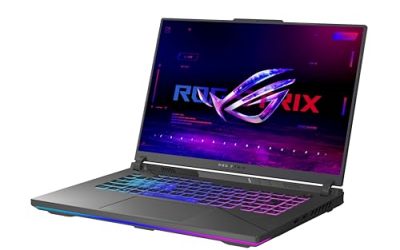
1. ASUS ROG Strix G16 (2023) — G614JV-AS73

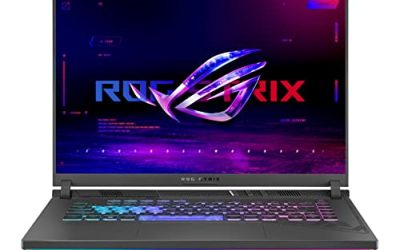
The Strix G16 is the strongest all-round fit here because it pairs a high-power processor with a full-power GPU. Its Intel Core i7-13650HX has the core count and boost headroom that plugin-heavy patrols reward, and ASUS runs the GeForce RTX 4060 Laptop GPU at a 140W maximum TGP according to the listing, the top of that chip’s laptop range. The 16-inch FHD+ (1920 x 1200) panel refreshes at 165Hz and covers 100% of sRGB per the listing, and a MUX switch with Advanced Optimus routes frames directly from the discrete GPU. Storage is the one figure to plan around: the fitted 512 GB PCIe SSD holds GTA V and a modest mods folder, and Notebookcheck’s coverage of this model notes an additional NVMe slot, so adding a second drive for a growing mod library is a documented path. ASUS also fits liquid-metal cooling on the CPU in this series, which suits long patrol sessions.
Specs
- CPU: Intel Core i7-13650HX
- GPU: NVIDIA GeForce RTX 4060 Laptop GPU, 140W max TGP, 8 GB GDDR6
- Display: 16″ FHD+ 1920 x 1200, 165Hz, 100% sRGB
- RAM: 16 GB DDR5-4800
- Storage: 512 GB PCIe 4.0 SSD (second NVMe slot noted by Notebookcheck)
- Ports: USB-C with Thunderbolt 4, 2x USB-A
- Wireless: Wi-Fi 6E
- Weight: approx. 5.51 lb
2. MSI Katana 15 — B13VFK-1264US

The Katana 15 is the storage-first pick: it ships with a 1 TB NVMe SSD, which is the comfortable size for GTA V plus a duplicated mods folder and a library of add-on vehicles, with no drive swap needed on day one. The Intel Core i7-13620H and GeForce RTX 4060 (8 GB GDDR6) are well matched to 1080p patrols, and MSI’s specification sheet for this model puts the GPU’s maximum graphics power at 105W with Dynamic Boost — lower than the Strix above, a fair trade in a slimmer chassis. MSI’s sheet is also explicit about upgrades: the 16 GB of DDR5 sits in two slots and supports up to 64 GB, so moving to 32 GB for a heavier plugin stack is a planned, documented upgrade rather than a guess. The 15.6-inch FHD panel runs at 144Hz.
Specs
- CPU: Intel Core i7-13620H (10 cores, up to 4.9 GHz)
- GPU: NVIDIA GeForce RTX 4060 Laptop GPU, up to 105W with Dynamic Boost, 8 GB GDDR6
- Display: 15.6″ FHD 1920 x 1080, 144Hz
- RAM: 16 GB DDR5 (2 slots, up to 64 GB per MSI)
- Storage: 1 TB NVMe PCIe Gen4 SSD
- Ports: USB-C (USB 3.2 Gen 1 with DisplayPort 1.4), USB-A ports
- OS: Windows 11 Pro
3. Acer Nitro V 15 — ANV15-52-76NK

The Nitro V 15 is the value route into LSPDFR that does not cut the two things the mod cares about: memory and storage. It pairs an Intel Core i7-13620H with a GeForce RTX 4050 Laptop GPU, 16 GB of DDR5 and a 1 TB Gen 4 SSD, so a full modded install fits with room to spare and load times stay short. The RTX 4050 sits a step below the 4060 machines above, which at 1080p mainly means dialling back the heaviest texture packs rather than giving up smooth patrols; GTA V’s own recommended specification is far below this hardware. The 15.6-inch FHD IPS display refreshes at 165Hz per the listing, the fastest panel in this group, which keeps driving sequences fluid.
Specs
- CPU: Intel Core i7-13620H
- GPU: NVIDIA GeForce RTX 4050 Laptop GPU
- Display: 15.6″ FHD IPS 1920 x 1080, 165Hz
- RAM: 16 GB DDR5
- Storage: 1 TB PCIe Gen 4 SSD
- Wireless: Wi-Fi 6
- OS: Windows 11 Home
4. ASUS ROG Strix G16 (2023) — G614JV-AS74, 1 TB Configuration

This is the same Strix G16 chassis as the first pick, sold under a separate listing with a 1 TB PCIe Gen4 SSD fitted instead of 512 GB. It exists in this guide for one reason: LSPDFR installs grow. Between the base game, a duplicated mods folder, vehicle packs and saved backups of a working install, storage fills faster than most players expect, and this configuration removes the issue without opening the laptop. Everything else matches the G614JV specification above — the i7-13650HX, the RTX 4060 at 140W max TGP per the listing, 16 GB of DDR5 and the 165Hz FHD+ panel — so choose between the two Strix listings purely on how much storage you want on day one.
Specs
- CPU: Intel Core i7-13650HX
- GPU: NVIDIA GeForce RTX 4060 Laptop GPU, 140W max TGP, 8 GB GDDR6
- Display: 16″ FHD+ 1920 x 1200, 165Hz
- RAM: 16 GB DDR5
- Storage: 1 TB PCIe Gen4 SSD
- Wireless: Wi-Fi 6E
- OS: Windows 11 Home
How to Choose
Start with the processor and storage, then the GPU. LSPDFR’s plugin layer is CPU-bound long before it is GPU-bound, so an HX- or H-series chip with strong boost clocks is worth more here than a small step up in graphics. For storage, treat 512 GB as workable only if the chassis has a free second slot; otherwise start at 1 TB. Memory of 16 GB covers the base mod and a typical plugin set, and models with two accessible slots (the Katana 15 documents its ceiling in MSI’s own specification sheet) let you move to 32 GB later. If you prefer an AMD processor instead, our roundup of the best gaming laptop AMD Ryzen models applies the same CPU, memory and storage checks to Ryzen-based machines.
Two habits protect any LSPDFR install regardless of hardware. First, follow the mod team’s own guidance and build your first install on a clean copy of GTA V, adding one plugin at a time so conflicts are easy to trace. Second, keep a backup of the working game folder on the SSD before each big change — restoring a backup is faster than reinstalling the game and the mod stack. Warranty terms vary by model and seller, so check the warranty information linked on each listing before ordering, and confirm the exact configuration (CPU, GPU wattage, RAM and SSD size) on the listing matches the specification you intended, since gaming laptop model names cover several configurations.