Call of Duty: Warzone rewards hardware that can hold high, stable frame rates while rendering large maps and fast close-quarters fights. A laptop can look strong on a spec sheet and still disappoint if its graphics chip runs at a low power limit, its display is slow, or it ships with too little memory and storage.
This guide focuses on gaming laptops currently sold on Amazon US that meet the real demands of Warzone: a modern discrete GPU, a capable CPU, at least 16GB of RAM, a fast SSD, and a high-refresh display. Every pick is listed with its product name and ASIN so the exact configuration can be checked on Amazon before buying.
As an Amazon Associate we earn from qualifying purchases
What Warzone Actually Needs From a Laptop
Warzone is more CPU-sensitive than many shooters, especially in large lobbies. A modern Intel Core i7 HX-series or AMD Ryzen 7 processor helps keep frame times consistent, and cooling matters too, because a laptop that throttles will feel slower than its processor name suggests.
For the GPU, an RTX 4060 Laptop GPU with 8GB of GDDR6 is a sensible starting point for 1080p and 1440p play, while an RTX 4070 Laptop GPU with 8GB of GDDR6 gives more headroom for higher settings. The model name alone is not enough: laptop GPUs are configured at different power levels, and a higher-wattage version generally outperforms a lower-wattage version of the same chip. Always check the exact model’s manufacturer specification for its GPU power limit.
Sixteen gigabytes of DDR5 is the practical minimum alongside voice chat and launchers, and 32GB gives more room for multitasking. Warzone is a large install, so a 1TB PCIe Gen 4 SSD is far more comfortable than a smaller drive.
For the display, 144Hz is the minimum worth targeting, and 165Hz or 240Hz panels make motion clearer. Resolution is a trade-off: 1080p is easier to drive at very high frame rates, while a 1600p or 1440p-class panel looks sharper but demands more from the GPU. G-SYNC helps smooth frame-rate variation.
For AMD-focused alternatives, see our guide to best gaming laptop AMD Ryzen machines.
Quick Comparison
| Model | ASIN | CPU | GPU | Display | RAM / SSD |
|---|---|---|---|---|---|
| ASUS ROG Strix G16 (2024) G614JIR-AS94 | B0CRCVJFQM | Intel Core i9-14900HX | RTX 4070 | 16-inch QHD 240Hz | 16GB DDR5 / 1TB |
| Lenovo Legion Pro 5i Gen 8 | B0CDQRY4HX | Intel Core i7-13700HX | RTX 4070 | 16-inch WQXGA 165Hz | 32GB DDR5 / 1TB |
| MSI Katana 15 B13VGK-2000US | B0CT4BHS2M | Intel Core i7-13620H | RTX 4070 | 15.6-inch QHD 165Hz | 16GB DDR5 / 1TB |
| Acer Predator Helios 16 PH16-71-74UU | B0BXMNSXDD | Intel Core i7-13700HX | RTX 4060 | 16-inch 2560 x 1600 165Hz | 16GB DDR5 / 1TB |
| ASUS TUF Gaming A15 FA507NV-EH74 | B0CJSY4PLN | AMD Ryzen 7 7735HS | RTX 4060 | 15.6-inch FHD 144Hz | 16GB DDR5 / 1TB |
1. ASUS ROG Strix G16 (2024) G614JIR-AS94 — Best for High-Refresh 1440p Play

Product name: ASUS ROG Strix G16 (2024) Gaming Laptop, G614JIR-AS94
ASIN: B0CRCVJFQM
This configuration pairs an Intel Core i9-14900HX with an NVIDIA GeForce RTX 4070 Laptop GPU — a strong combination for Warzone, where the HX-class CPU helps in crowded fights and the RTX 4070 can push a high-refresh panel at native resolution.
The display is a 16-inch 16:10 QHD ROG Nebula Display with a 240Hz refresh rate. It suits players who want sharper visuals than 1080p without giving up motion clarity.
It ships with 16GB of DDR5-5600 and a 1TB PCIe Gen 4 SSD, plus Wi-Fi 6E, USB ports, HDMI, and Ethernet for a wired connection. Confirm the exact port layout on the G614JIR-AS94 listing, as Strix variants can differ. On upgradeability, this model family uses SO-DIMM memory and M.2 SSD storage per the manufacturer’s design for the exact model, so RAM and storage upgrades are possible. Check the ASUS support page for this model first, and confirm warranty coverage on the Amazon listing, as terms vary by seller.
Choose this one for a fast 240Hz display and top-end CPU performance at 1440p-class resolution.
2. Lenovo Legion Pro 5i Gen 8 — Best All-Round Balance

Product name: Lenovo Legion Pro 5i Gen 8 Gaming Laptop, 16-inch WQXGA 165Hz, Intel Core i7-13700HX, NVIDIA RTX 4070, 32GB DDR5 RAM, 1TB SSD
ASIN: B0CDQRY4HX
This model combines an Intel Core i7-13700HX with an NVIDIA GeForce RTX 4070 with 8GB of GDDR6. The standout detail is the 32GB of DDR5 RAM, which is generous for Warzone plus voice chat, a browser, and streaming software at the same time.
Its 16-inch WQXGA display runs at 2560 x 1600 with a 165Hz refresh rate — sharper than 1080p, but less demanding than filling a 240Hz panel at native resolution. The port layout includes USB, HDMI, and Ethernet, with useful connections at the rear to keep cables tidy.
Storage is a 1TB SSD. For upgradeability, Legion Pro 5i models in this generation use replaceable SO-DIMM memory and M.2 SSD slots per Lenovo’s design for the exact model, so adding storage later is realistic. Verify the slot configuration in Lenovo’s support documentation, and check the warranty statement on the Amazon listing.
Choose this one for a balanced machine with extra RAM already installed.
3. MSI Katana 15 B13VGK-2000US — RTX 4070 in a 15.6-Inch Chassis

Product name: MSI Katana 15 15.6-inch 165Hz QHD Gaming Laptop, Intel Core i7-13620H, NVIDIA GeForce RTX 4070, 16GB DDR5, 1TB NVMe SSD, B13VGK-2000US
ASIN: B0CT4BHS2M
This model puts an Intel Core i7-13620H and an NVIDIA GeForce RTX 4070 into a more compact 15.6-inch format, with 16GB of DDR5 and a 1TB NVMe SSD. For players who move between desks, that smaller footprint matters.
The QHD display runs at 165Hz, a strong match for the RTX 4070 at this size: QHD on a 15.6-inch screen looks crisp, and 165Hz is fast enough that the display is unlikely to limit most matches.
MSI lists Cooler Boost 5 cooling for this model. Ports include USB Type-C, USB-A, HDMI, and Ethernet. For upgrades, Katana 15 models of this generation use SO-DIMM memory and M.2 storage per MSI’s specifications for the exact model. Confirm the supported configuration on MSI’s page for the B13VGK-2000US, and review the warranty terms shown by the seller.
Choose this one for RTX 4070 performance in a smaller laptop.
4. Acer Predator Helios 16 PH16-71-74UU — Strong RTX 4060 Option With a 1600p Display
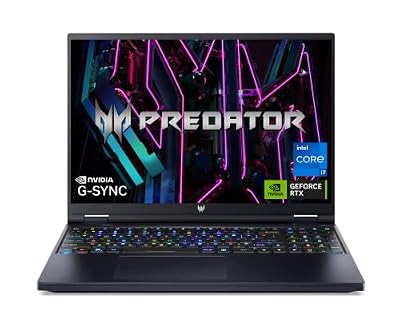
Product name: Acer Predator Helios 16 Gaming Laptop, 13th Gen Intel Core i7-13700HX, NVIDIA GeForce RTX 4060, 16-inch 2560 x 1600 165Hz G-SYNC Display, 16GB DDR5, 1TB Gen 4 SSD, PH16-71-74UU
ASIN: B0BXMNSXDD
This configuration pairs an Intel Core i7-13700HX with an NVIDIA GeForce RTX 4060. The HX processor is a highlight, and it sits well above the game’s recommended requirements.
The 16-inch display runs at 2560 x 1600 with a 165Hz refresh rate and G-SYNC support, according to the Amazon listing. G-SYNC helps when frame rates fluctuate between areas of the map. Players chasing maximum frame rates can run at a lower internal resolution, while players who prefer clarity can use the full resolution with adjusted settings.
It includes 16GB of DDR5, a 1TB Gen 4 SSD, and Killer Wi-Fi 6E. Wired Ethernet is still the safer choice for competitive sessions. On upgradeability, Predator Helios 16 models use SO-DIMM memory and M.2 SSD bays per Acer’s design for the exact model. Check Acer’s support documentation for the PH16-71-74UU, and confirm warranty coverage on the Amazon page.
Choose this one for a powerful CPU and a sharp G-SYNC display in a 16-inch machine.
5. ASUS TUF Gaming A15 FA507NV-EH74 — Best Value-Oriented Pick

Product name: ASUS TUF Gaming A15 (2023) Gaming Laptop, 15.6-inch FHD 144Hz, GeForce RTX 4060, AMD Ryzen 7 7735HS, 16GB DDR5, 1TB PCIe SSD, FA507NV-EH74
ASIN: B0CJSY4PLN
The TUF Gaming A15 is the AMD-based pick here. It combines an AMD Ryzen 7 7735HS with an NVIDIA GeForce RTX 4060 Laptop GPU. ASUS lists this model’s RTX 4060 at up to 140W maximum TGP — an important detail, because a full-power RTX 4060 is exactly what to look for in Warzone, where low-power variants of the same GPU name perform differently.
The 15.6-inch Full HD display runs at 144Hz with 100 percent sRGB coverage listed for this model. For Warzone, 1080p at 144Hz is a practical competitive target that the RTX 4060 can drive more easily than 1440p or 1600p.
It ships with 16GB of DDR5, a 1TB PCIe SSD, and Wi-Fi 6. The TUF line uses SO-DIMM memory and M.2 storage in this model family per ASUS specifications for the exact model, so later upgrades are supported by the design. Verify details on the ASUS support page for the FA507NV-EH74, and check warranty information on the Amazon listing.
Choose this one for high frame rates at 1080p from a full-power RTX 4060.
How to Choose Between These Picks
Start with resolution. For the highest frame rates on the built-in screen, a 1080p 144Hz configuration such as the TUF Gaming A15 is easiest to drive. For a sharper image, a 1600p or QHD panel paired with an RTX 4070 — the Legion Pro 5i, Strix G16, or Katana 15 — makes more sense.
Next, check GPU power, not just GPU name. Two RTX 4060 laptops can perform differently if their power limits differ. Trust the manufacturer specification for the exact model, checked on the Amazon listing and the manufacturer’s page.
Then look at memory and storage together. Sixteen gigabytes of RAM and a 1TB SSD is the comfortable baseline here, and 32GB, as in the Legion Pro 5i configuration, helps with streaming and multitasking. Replaceable memory and an extra M.2 slot extend useful life, because storage is usually what Warzone players run out of first.
Finally, plan the setup: use Ethernet for competitive play, confirm HDMI if you use an external monitor, and check there are enough USB ports for a mouse, headset, and controller. Warranty terms differ by brand, model, and seller, so read the coverage for the exact ASIN.
Conclusion
The best gaming laptop for Warzone is not simply the one with the biggest GPU name. It is the one whose CPU, GPU power limit, display, memory, and storage match how Warzone actually plays. The Strix G16 suits high-refresh 1440p play, the Legion Pro 5i offers the most balanced specification with 32GB of RAM, the Katana 15 packs an RTX 4070 into a smaller chassis, the Predator Helios 16 pairs a strong HX CPU with a G-SYNC display, and the TUF Gaming A15 delivers a full-power RTX 4060 for 1080p. Check the exact ASIN, the manufacturer’s specifications, and the warranty on the listing before choosing.