SEO work looks light — mostly a browser, a spreadsheet, and a few web tools — but it is memory work in practice. A typical session can mean dozens of open tabs, a keyword tool, an analytics dashboard, a crawler, a document editor, and a video call at once. That load rewards RAM, screen space, and a responsive processor far more than a powerful graphics card.
As an Amazon Associate we earn from qualifying purchases.
The four laptops below were chosen for that pattern. Each is listed on Amazon US in the exact configuration named here, and each is judged on CPU and graphics, power limits, display, RAM and SSD, ports, warranty, and upgradeability.
If your work also covers broader office duties, our guide to the best laptop for professionals is a useful companion read alongside this one.
What SEO Professionals Should Prioritise
RAM comes first
Browser tabs and web-based tools consume memory steadily. Sixteen gigabytes is a sensible floor, leaving room for Windows or macOS, many tabs, and a crawler or spreadsheet on top. Every pick below ships with 16GB. Where they differ is what happens later: some let you change memory, and some do not.
Display size and resolution shape the working day
Keyword tables and analytics reports are wide. A 15.6-inch or larger screen, ideally at Full HD or above, makes side-by-side work easier. One pick below trades resolution for sheer size, and that trade-off is flagged clearly.
CPU, GPU, and power limits
Most SEO tools run in the browser or cloud, so integrated graphics are normally enough. The processors below are mobile U-series or Apple silicon parts within tight power limits. That favours quiet, cooler running over sustained workstation performance. For large local crawls and exports, core count still helps, which is why the eight-core option stands out.
The Picks
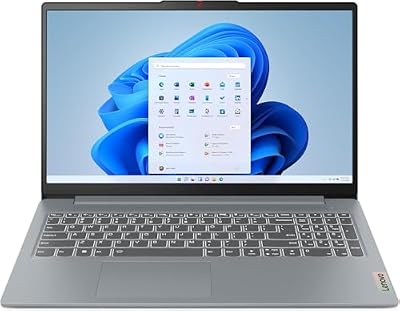
1. Lenovo IdeaPad Slim 3 15.6-inch Touchscreen — Ryzen 7 5825U, 16GB RAM, 512GB SSD
- Amazon US: https://www.amazon.com/dp/B0F2MLQPL3
This listing uses an AMD Ryzen 7 5825U, an eight-core processor listed at up to 4.5 GHz, with integrated AMD Radeon graphics. Of the Windows picks, it offers strong core count for crawling sessions, large exports, and demanding browser tools together. As a U-series chip, it works within mobile power limits, aimed at responsive multitasking rather than prolonged heavy rendering.
The display is a 15.6-inch Full HD 1920 x 1080 touchscreen, a practical size for search results and spreadsheets without making the machine hard to carry. The listed configuration includes 16GB of DDR4 memory, a 512GB SSD, Wi-Fi 6, Bluetooth 5.2, and a 720p HD camera for client calls, according to the Amazon listing.
Upgradeability needs care. Lenovo’s PSREF for the IdeaPad Slim 3 15ABR8 states memory is soldered, with no slots, and the 16GB configuration is not upgradable. Storage uses an M.2 SSD. Buy it for the memory it already has. Check the listing for warranty terms for this exact seller and configuration.
2. ASUS Vivobook 16 F1605ZA-AS56 — Intel Core i5-1235U, 16GB Memory, 512GB SSD

- Amazon US: https://www.amazon.com/dp/B0CWJ642YM
The ASUS Vivobook 16 F1605ZA-AS56 uses an Intel Core i5-1235U, a ten-core mobile processor, with Intel Iris Xe graphics. It is another power-limited U-series design, matched to browser work, documents, and calls, and less suited to sustained graphics work — which SEO rarely requires.
Its advantage is the screen. The 16-inch WUXGA display runs at 1920 x 1200, offering more vertical room than standard Full HD. ASUS lists the X1605 panel as IPS-level and anti-glare. That extra height helps with long keyword lists and analytics tables.
ASUS documentation for the Vivobook 16 X1605 family lists USB-C, two USB 3.2 Gen 1 Type-A ports, a USB 2.0 Type-A port, HDMI 1.4, and a combined audio jack — enough for a monitor, mouse, and common accessories. Confirm the layout on the exact AS56 listing, because the family includes several variants.
For upgradeability, ASUS lists one DDR4 SO-DIMM slot for this family, alongside onboard memory. The SO-DIMM portion is changeable, while the onboard portion is fixed — unlike the fully soldered Lenovo. Storage is a single M.2 SSD in ASUS documentation. Check the listing for warranty cover on this exact configuration.
3. HP 17.3-inch Laptop 17-cp2199nr — AMD Ryzen 5 7520U, 16GB RAM, 512GB SSD

- Amazon US: https://www.amazon.com/dp/B0DWPQDLM5
If screen size matters more than pixel density, this HP is the largest option here. Its 17.3-inch display gives spreadsheets and dashboards plenty of physical room.
The trade-off is resolution. Amazon describes an HD+ 1600 x 900 anti-glare panel, so text is less sharp than on the Lenovo or ASUS above. The AMD Ryzen 5 7520U has four cores and eight threads, up to 4.3 GHz, with integrated Radeon graphics — enough for browser tools and calls, with fewer cores for large local crawls than the Lenovo.
The listed configuration includes 16GB LPDDR5 memory and a 512GB PCIe NVMe M.2 SSD. Amazon describes the memory as onboard, with a maximum of 16GB, so treat RAM as fixed. Ports include one USB Type-C port for data only — it does not support charging or external monitors — plus two USB Type-A ports, HDMI 1.4b, and a combo jack. An external display therefore goes through HDMI. The listing states a 45W adapter and a one-year limited hardware warranty for units shipped from and sold by Amazon.
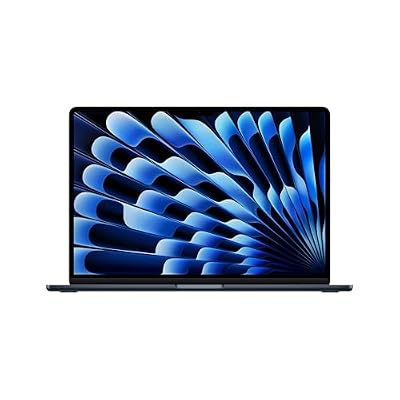
4. Apple 2025 MacBook Air 15-inch — M4 Chip, 16GB Unified Memory, 512GB SSD, Midnight
- Amazon US: https://www.amazon.com/dp/B0DZD9VLQ4
The MacBook Air is the macOS route. This listing is the 2025 15-inch model with Apple M4, 16GB unified memory, and 512GB SSD in Midnight. The 15.3-inch Liquid Retina display provides a large working area, and the listing includes a 12MP Center Stage camera and Touch ID.
The M4 works within a slim, fanless enclosure, suiting quiet desk and travel work, browser tools, and calls. Graphics are part of the M4 chip rather than a separate card, which is fine for SEO software and everyday content image editing.
Upgradeability is the clearest limitation. Unified memory is part of the Apple silicon design, so the 16GB and 512GB here are fixed at purchase. If your tab load is especially heavy, a higher-memory configuration at purchase is the only route. Check the listing for warranty and return terms.
Side-by-Side Comparison
| Model | CPU | Display | RAM / SSD | RAM upgradeability |
|---|---|---|---|---|
| Lenovo IdeaPad Slim 3 15ABR8 configuration | Ryzen 7 5825U, 8 cores | 15.6-inch FHD touchscreen | 16GB / 512GB | No — soldered, per Lenovo PSREF |
| ASUS Vivobook 16 F1605ZA-AS56 | Core i5-1235U, 10 cores | 16-inch WUXGA 1920 x 1200 | 16GB / 512GB | One DDR4 SO-DIMM slot in family documentation |
| HP Laptop 17-cp2199nr | Ryzen 5 7520U, 4 cores | 17.3-inch HD+ 1600 x 900 | 16GB / 512GB | No — onboard memory listed |
| MacBook Air 15-inch, M4 | Apple M4 | 15.3-inch Liquid Retina | 16GB / 512GB | No — unified memory, fixed at purchase |
Who Each Laptop Is For
- Freelance SEO consultants who crawl and audit often: the Lenovo IdeaPad Slim 3 configuration, for its eight-core Ryzen 7 processor and Full HD touchscreen, provided 16GB of fixed memory fits your workload.
- In-house marketers who live in spreadsheets and dashboards: the ASUS Vivobook 16, for its taller 1920 x 1200 display and its SO-DIMM slot, which gives it the most memory flexibility here.
- SEO professionals who want the biggest screen and mostly work at a desk: the HP 17-cp2199nr, accepting the lower HD+ resolution and data-only USB-C port in exchange for a 17.3-inch display.
- SEO professionals committed to macOS who travel light: the 15-inch MacBook Air with M4, provided you choose enough memory and storage at purchase, because neither can be changed later.
- Anyone already pushing past 16GB of memory use: none of these exact configurations should be bought on the assumption of a later RAM upgrade, except the ASUS where only the SO-DIMM portion is changeable. In that case, begin by looking at higher-memory configurations instead.
Final Advice
For most SEO professionals, the decision comes down to two questions. Do you want the taller ASUS screen, the Lenovo’s cores, the HP’s sheer size, or the MacBook Air’s macOS route? And will 16GB be enough for the life of the machine? On the Lenovo, HP, and Apple picks, that must be settled at purchase, because memory is fixed. Check the exact configuration, ports, and warranty on the Amazon listing before ordering, since laptop families often share a name across different specifications.