A solar charger that works for a phone does not automatically work for a laptop. Phones accept low-wattage USB power, while most laptops expect USB-C Power Delivery or a DC input in a higher wattage range, and may charge only while asleep when the supply falls short. The best solar chargers for laptops are folding panels that publish a meaningful rated wattage and offer USB-C PD or DC output, not small pocket panels aimed at handsets.
As an Amazon Associate we earn from qualifying purchases.
This guide compares four foldable panels sold on Amazon US that meet that condition, using only published specifications: rated watts, USB-C PD output where a maker states it, DC output, folded size, weight and whether the panel stores energy. None of these four panels contains a battery.
What a laptop actually needs from a solar panel
Start with the label on your laptop charger. Many thin laptops and handheld PCs charge over USB-C PD and accept supplies in the 45W to 65W class, while larger gaming laptops often need far more and may only accept their own barrel-plug adapter. A panel whose USB-C port tops out at 40W or 45W can suit the first group in strong sun, but not the second.
There are two ways to connect. The direct route plugs the laptop into the panel’s USB-C PD or DC port while the sun is available. The buffered route feeds a portable power station or large power bank during the day, then charges the laptop from stored energy later, which is more forgiving because the battery smooths out passing clouds. For smaller gear, our guide to the best solar phone chargers covers lower-wattage panels better matched to handsets.
One warning applies to every panel here, stated by the manufacturers in their listing notes: real output depends on sunlight conditions. Rated wattage is a maximum under strong, direct sun with the panel angled toward it. Cloud, shade, a flat angle, heat and time of day all reduce what reaches your laptop.
The four panels at a glance
| Product | Rated power | Laptop-relevant outputs | Folded size | Weight |
|---|---|---|---|---|
| FlexSolar 60W Portable Solar Panel | 60W | USB-C PD 3.0 up to 40W, DC up to 60W | 9.8 x 12 x 1 in | 2.64 lb |
| BigBlue 100W Portable Solar Panel | 100W | USB-C PD 45W, DC 18V/5.5A | 16.5 x 14.3 x 1.9 in | — |
| Renogy 100W Portable Solar Panel | 100W | USB-C PD up to 45W, MC4 output | 22.99 x 22.54 x 1.57 in | 7.28 lb |
| ZOUPW 100W Portable Solar Panel | 100W | USB-C port, DC via 5-in-1 cable | 24.13 x 21.06 x 1.77 in | 9.48 lb |
FlexSolar 60W Portable Solar Panel

- Amazon link: https://www.amazon.com/dp/B0D6B5X2N9
The FlexSolar 60W is the smallest and lightest option here. Its listing states a maximum power of 60W and three outputs: a QC 3.0 USB-A port at up to 18W, a PD 3.0 USB-C port at up to 40W, and a DC output rated at up to 60W across 20V to 28V. A 40W PD supply suits laptops and handhelds that accept lower-wattage USB-C charging, especially while asleep or doing light work, but sits below the adapter rating of many larger laptops.
The listing gives a folded size of 9.8 x 12 x 1 inches, an unfolded size of 54.8 x 12 x 1 inches and a weight of 2.64 pounds. The maker states up to 24 percent conversion from its monocrystalline cells and an IP67 rating in the product title, while noting that the junction box is not waterproof. It also describes 60W as achievable in direct sunlight, with a lower range when a little cloudy. There is no battery, so charging stops when the light does.
Choose this one if carry weight comes first and your laptop accepts USB-C charging at or below its PD output. Skip it if your laptop needs a higher-wattage adapter.
BigBlue 100W Portable Solar Panel with PD 45W USB-C
- Amazon link: https://www.amazon.com/dp/B083NS75XH
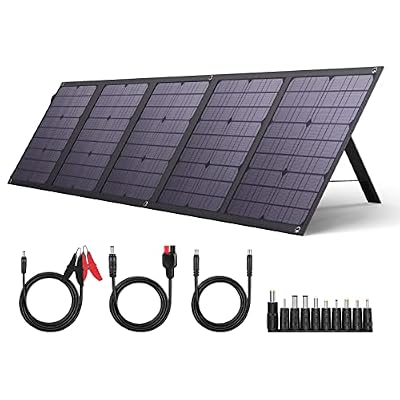
This BigBlue panel raises rated power to 100W, with a 45W Type-C Power Delivery port, an 18W maximum USB port and a DC port with a stated maximum of 18V/5.5A. The listing names notebooks among the devices the 45W Type-C input suits, and positions the DC output for power stations and 12V batteries. A 10-in-1 connector kit is listed in the package contents, along with DC to Anderson and DC to DC cables and an alligator clip cable.
The panel folds into a briefcase shape with a TPE rubber handle and built-in kickstands. Folded dimensions are 16.5 x 14.3 x 1.9 inches, and unfolded size is 70.8 x 16.5 x 1.2 inches. The listing describes the materials as water-resistant, and states that this item cannot store electricity and that cloudy weather or a lack of sunlight will affect its output.
Choose this one if you want a single 100W panel that can feed a laptop over USB-C PD and a power station over DC. Skip it if you need the smallest folded footprint.
Renogy 100W Portable Solar Panel

- Amazon link: https://www.amazon.com/dp/B0D12RJXBQ
Renogy’s 100W portable panel leads on published efficiency. The listing states 25 percent conversion efficiency from 16BB N-type cells, a USB-C PD port at up to 45W and two USB-A ports rated at 18W and 15W, allowing three devices to charge at once according to the maker. For stored power, it offers MC4 output for a portable power station or 12V battery system, and names laptops among the devices its direct charging is intended for.
At 7.28 pounds, it is lighter than the ZOUPW below, and its quadfold design packs to 22.99 x 22.54 x 1.57 inches, described as backpack size. A magnetic closure replaces snaps, four kickstands handle positioning, and a built-in pouch keeps cables with the panel. A separate 4-in-1 adapter cable is sold separately, so buyers whose station does not accept MC4 should factor that in. It has no battery of its own.
Choose this one if efficiency and a lighter 100W carry matter, and if your station already accepts MC4 or you are happy to add the adapter cable.
ZOUPW 100W Portable Solar Panel

- Amazon link: https://www.amazon.com/dp/B0CR42CFJ9
The ZOUPW 100W panel is built around connector coverage. Its listing describes a 5-in-1 solar cable with DC8020, XT60, Anderson, DC7909 and DC5521 connectors, plus a set of DC adapters, and a built-in controller with one USB-C port and two USB-A ports for direct device charging. The specification table lists USB-C output with steps up to 20V/3A, an optimum operating voltage of 20.16V at 4.96A, and a rated maximum power of 100W.
The maker states 23.5 percent efficiency from monocrystalline cells, an ETFE coating and an IP67 waterproof rating. At 9.48 pounds it is the heaviest panel here, folding to 24.13 x 21.06 x 1.77 inches. That weight buys the broadest cable set, useful if a kit contains stations from more than one brand. The listing cautions that some stations have a maximum input limit below what a 100W panel can produce, so the station sets the ceiling in that pairing. This panel stores no energy itself.
Choose this one if compatibility with several power stations is the priority.
Who each panel is for
- For laptop-bag travel: the FlexSolar 60W — closest in folded size and weight to the laptop it charges, with a 40W USB-C PD port.
- For one panel covering laptop and power station: the BigBlue 100W — 45W USB-C PD, an 18V/5.5A DC port and a 10-in-1 connector kit.
- For efficiency in a lighter 100W panel: the Renogy 100W — stated 25 percent efficiency, 45W USB-C PD and a 7.28-pound quadfold body.
- For mixed-brand power stations: the ZOUPW 100W — its 5-in-1 cable and adapters cover the widest range of station inputs here.
- For gaming laptops with high-wattage adapters: none of these panels replaces a wall adapter. Charge a suitable power station from the panel, then run the laptop from the station within its limits.
Buying checks before you order
First, confirm your laptop’s charging input. If it charges only from a proprietary barrel plug, a USB-C PD panel will not help directly, so plan around a power station instead. Second, compare the panel’s USB-C PD ceiling with your adapter rating; a panel below that rating may still add charge while the laptop sleeps, but set expectations by the published port numbers, not the headline wattage, which describes the whole panel rather than a single port. Third, check the connector your power station expects, since MC4, XT60, Anderson and the DC sizes are not interchangeable without the right cable.