Flight simulators punish a PC in ways most games never do. Instead of rendering an arena, a simulator builds an entire planet around you, streams in photogrammetry scenery as you fly, tracks airliner systems, and feeds it all through a main simulation thread that leans heavily on the CPU. A machine that breezes through shooters can still stutter on final approach in Microsoft Flight Simulator 2024 because its processor cannot keep that thread fed, or because its storage and memory cannot keep up with the streaming scenery.
That is why the best gaming PC for flight simulators is not a generic high-end rig. It needs strong single-core CPU performance, generous RAM, a fast SSD, and a graphics card with enough VRAM for high resolutions, multiple monitors, or a VR headset. The hardware logic is shared across simulator hobbies, so readers planning a combined sim room often compare notes with our guide to the best gaming PC for golf simulator setups. Below are five prebuilt systems sold on Amazon US that match what flight simulation actually demands, measured against those published requirements.
As an Amazon Associate we earn from qualifying purchases
What a Flight Simulator Actually Asks of a PC
Microsoft publishes three official hardware tiers for Microsoft Flight Simulator 2024, and they explain nearly every buying decision here. The minimum tier lists a Ryzen 5 2600X or Core i7-6800K, a Radeon RX 5700 or GeForce GTX 970 with 4 GB of VRAM, and 16 GB of RAM. The recommended tier steps up to a Ryzen 7 2700X or Core i7-10700K, a Radeon RX 5700 XT or GeForce RTX 2080 with 8 GB of VRAM, and 32 GB of RAM. The ideal tier is where serious simmers should aim: a Ryzen 9 7900X or Core i7-14700K, a Radeon RX 7900 XT or GeForce RTX 4080 with 12 GB of VRAM, and 64 GB of RAM.
Three demands sit behind those numbers. First, CPU load: the simulator’s main thread handles flight modelling, systems, traffic, and scenery, so per-core speed and cache matter more than core count. Published benchmark coverage from outlets such as Gamers Nexus and Hardware Unboxed has consistently ranked AMD’s 3D V-Cache processors at the top in Flight Simulator testing, which is why X3D chips feature heavily below. Second, scenery streaming: the 2024 simulator streams much of its world from the cloud, with the ideal tier calling for a 100 Mbps connection, and it leans on a rolling cache on your SSD, while add-on airports and aircraft add up on top of the published 50 GB base installation. Third, memory and VRAM headroom: 32 GB of RAM covers the sim plus charts and traffic utilities, 64 GB suits heavy add-on use, and VR or triple-monitor cockpits multiply the rendered resolution beyond a single screen, which pushes VRAM needs well past the ideal tier’s 12 GB figure.
The Five Picks at a Glance
| PC | CPU | GPU | RAM | SSD | Upgradeability |
|---|---|---|---|---|---|
| Skytech Aqua | Ryzen 7 9800X3D | RTX 5080 16 GB | 32 GB DDR5 | 2 TB Gen4 NVMe | AM5 platform, 850W ATX 3 PSU headroom |
| CyberPowerPC Gamer Supreme SLCAI21000A3 | Ryzen 9 9950X3D | RTX 5080 16 GB | 64 GB DDR5 | 4 TB PCIe 4.0 | Listing states memory support up to 192 GB |
| MSI Infinite RS 14NUI9-630US | Core i9-14900KF | RTX 4090 24 GB | 64 GB DDR5 | 2 TB NVMe | DIY friendly, four memory slots |
| Skytech King 95 ST-KING95-3018-B-AM | Core Ultra 7 270K Plus | RTX 5080 16 GB | 32 GB DDR5 | 1 TB Gen4 NVMe | 850W ATX 3 PSU, plan a second SSD |
| CyberPowerPC Gamer Supreme SLC8480A3 | Ryzen 7 7800X3D | RTX 4070 Ti Super 16 GB | 32 GB DDR5 | 2 TB PCIe Gen4 | AM5 platform, room to grow CPU and RAM |
Skytech Aqua

The Skytech Aqua pairs the processor flight simmers ask for by name with a current flagship-class GPU. AMD publishes the Ryzen 7 9800X3D as an eight-core chip at 4.7 GHz with boost clocks up to 5.2 GHz, and its stacked 3D V-Cache is exactly the design that published simulator benchmarks reward, because the main thread keeps more of its working data inside that enlarged cache. Around it, Skytech fits an RTX 5080, 32 GB of DDR5, and a 2 TB drive, a combination that meets or clears the published recommended tier everywhere and reaches toward the ideal tier on graphics.
Specs
- CPU: AMD Ryzen 7 9800X3D, 4.7 GHz base, up to 5.2 GHz boost
- GPU: NVIDIA GeForce RTX 5080, 16 GB GDDR7
- RAM: 32 GB DDR5 6000 RGB
- Storage: 2 TB Gen4 NVMe SSD
- Power supply: 850W Gold ATX 3
- Cooling: 360 mm ARGB liquid cooler
- Operating system: Windows 11
For a single high-resolution monitor or a VR headset, this is the most balanced configuration here. The 16 GB of VRAM clears the ideal tier’s 12 GB figure, the 2 TB SSD leaves space for the rolling cache and add-on scenery, and the 850W ATX 3 power supply and AM5 platform leave sensible upgrade paths.
CyberPowerPC Gamer Supreme (SLCAI21000A3)

This Gamer Supreme is the only pick that matches Microsoft’s published ideal tier on memory and storage out of the box. Its Ryzen 9 9950X3D doubles the core count of the 9800X3D, which does little for the sim’s main thread but helps everything running beside it, such as streaming software, moving maps, and voice applications, while the 3D V-Cache design still serves the simulation thread. The headline numbers are the 64 GB of RAM and the 4 TB SSD.
Specs
- CPU: AMD Ryzen 9 9950X3D, 4.3 GHz base
- GPU: NVIDIA GeForce RTX 5080, 16 GB GDDR7
- RAM: 64 GB DDR5, with listing-stated support up to 192 GB
- Storage: 4 TB PCIe 4.0 SSD
- Operating system: Windows 11 Home
Four terabytes suits a serious scenery library, multiple simulators installed side by side, and a generous rolling cache, while 64 GB of RAM matches the ideal specification with room for complex airliners and companion utilities. Choose it if you want the flagship specification with the least need to open the case later.
MSI Infinite RS (14NUI9-630US)
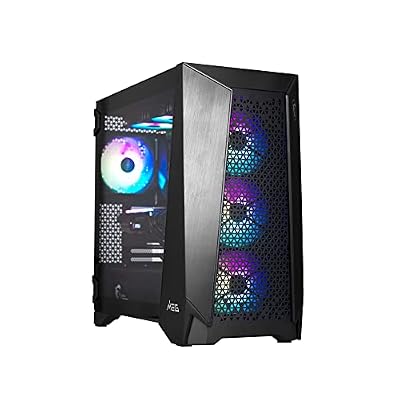
The Infinite RS is the Intel-powered alternative and the VR and multi-monitor specialist. Its GeForce RTX 4090 carries 24 GB of VRAM, double the ideal tier’s published figure, and that capacity is what triple-screen cockpits and high-resolution VR headsets consume as they render several wide views at once. The Core i9-14900KF brings high clock speeds for the main thread, and MSI markets this line as DIY friendly, which matters to simmers who treat the PC as part of the cockpit project.
Specs
- CPU: Intel Core i9-14900KF
- GPU: NVIDIA GeForce RTX 4090, 24 GB VRAM
- RAM: 64 GB DDR5 across four memory slots
- Storage: 2 TB M.2 NVMe SSD
- Cooling: Liquid cooling
- Connectivity: Wi-Fi 7, keyboard and mouse included
- Operating system: Windows 11 Pro
With 64 GB of RAM fitted, it also meets the ideal memory specification, and its serviceable layout suits owners who expect to add drives and swap components over years of simulator updates. It is the natural choice for a dedicated cockpit build driving several displays.
Skytech King 95 (ST-KING95-3018-B-AM)

The King 95 takes the Intel route with a Core Ultra 7 270K Plus, which Skytech lists at clock speeds up to 5.4 GHz, paired with the same RTX 5080 GPU as the two AMD flagships. Strong per-core performance is what the simulator’s main thread consumes, and this configuration delivers it alongside 32 GB of DDR5 6000 memory and an 850W Gold ATX 3 power supply, so the graphics and processing side clear the recommended tier and approach the ideal tier.
Specs
- CPU: Intel Core Ultra 7 270K Plus, up to 5.4 GHz
- GPU: NVIDIA GeForce RTX 5080, 16 GB GDDR7
- RAM: 32 GB DDR5 6000
- Storage: 1 TB Gen4 NVMe SSD
- Power supply: 850W Gold ATX 3
- Cooling: 360 mm ARGB liquid cooler
- Connectivity: Wi-Fi 6
- Operating system: Windows 11
The honest compromise here is storage. One terabyte fills quickly once the rolling cache, a second simulator, and add-on scenery accumulate, so plan on a second NVMe drive as the first upgrade. The power supply headroom and standard tower layout make that an easy addition rather than a rebuild.
CyberPowerPC Gamer Supreme (SLC8480A3)

Not every simmer needs a flagship. This Gamer Supreme keeps the ingredient that matters most, an X3D processor, and pairs it with a step-down GPU that carries 16 GB of VRAM. The Ryzen 7 7800X3D runs at a 4.2 GHz base clock with boost up to 5.0 GHz per AMD’s published figures, and its 3D V-Cache keeps frame delivery smooth in the CPU-limited situations flight simulation creates, such as dense airports and busy online traffic.
Specs
- CPU: AMD Ryzen 7 7800X3D, 4.2 GHz base, up to 5.0 GHz boost
- GPU: NVIDIA GeForce RTX 4070 Ti Super, 16 GB GDDR6X
- RAM: 32 GB DDR5
- Storage: 2 TB PCIe Gen4 SSD
- Operating system: Windows 11 Home
For a single 1440p or 4K monitor with sensible settings, this is the balanced buy, and the AM5 platform means a later processor or memory upgrade stays straightforward. Pilots planning a VR cockpit should step up to the RTX 5080 or RTX 4090 configurations above instead.
How to Choose a Flight Simulator PC
Start with the processor, because the main thread decides your frame rate in busy scenery. Match the GPU to your display setup: a 1440p screen is comfortable on the RTX 4070 Ti Super class, while 4K, triple monitors, and VR justify the RTX 5080 or the 24 GB RTX 4090. Treat 32 GB of RAM as the floor and 64 GB as the target for heavy add-on use, following Microsoft’s recommended and ideal tiers. Buy storage generously, 2 TB or more, and check that the case, power supply, and motherboard leave room for a second SSD and more memory, because simulators grow every year.
Frequently Asked Questions
Is 32 GB of RAM enough for Microsoft Flight Simulator 2024?
Yes, for most pilots. Microsoft’s published recommended tier specifies 32 GB, and that capacity covers the simulator alongside charts and traffic utilities. The published ideal tier raises the figure to 64 GB, which suits complex study-level airliners, scenery collections, and several companion applications.
Which matters more for flight simulation, the CPU or the GPU?
It depends on the display setup. On a single monitor, frame rates are limited by the CPU’s main thread, especially near airports, so per-core speed and cache come first. As resolution climbs toward 4K, multiple monitors, or VR, the GPU and its VRAM take over as the limiting factor, which is why the flagship picks pair strong processors with 16 GB or 24 GB graphics cards.
How much SSD space does a flight simulator PC need?
More than the box suggests. The published base installation for the 2024 simulator is 50 GB, but the rolling cache, world updates, and add-on airports and aircraft grow steadily, and many simmers keep a second simulator such as X-Plane 12 installed as well. A 2 TB drive is the sensible minimum, and 4 TB removes storage management from your routine.
Is VR harder to run than a normal monitor setup?
Yes. A VR headset renders a view for each eye at high resolution and needs high frame rates to stay comfortable, so it stresses the GPU and VRAM far more than a single screen. If VR is the goal, prioritise the configurations with the RTX 5080 or the 24 GB RTX 4090, and keep the processor strong, because the main thread still sets the ceiling.
Final Verdict
For most simmers, the Skytech Aqua is the sweet spot: an X3D processor, an RTX 5080, and 2 TB of storage. The CyberPowerPC Gamer Supreme SLCAI21000A3 is the no-compromise pick, matching the published ideal tier with 64 GB of RAM and 4 TB of storage, while the MSI Infinite RS is the cockpit builder’s choice thanks to its 24 GB of VRAM and 64 GB of memory. Intel loyalists are well served by the Skytech King 95, provided they plan a second SSD, and the Gamer Supreme SLC8480A3 delivers the X3D experience for a single-screen setup. Prioritise the processor, feed it memory and storage, and the simulator will reward you on every approach.
Product and ASIN Reference
| Product | ASIN |
|---|---|
| Skytech Aqua Gaming PC (ST-AQUA-2114-BL-AM) | B0FG2T8KYF |
| CyberPowerPC Gamer Supreme Gaming PC (SLCAI21000A3) | B0DXVD6QFJ |
| MSI Infinite RS Gaming Desktop (14NUI9-630US) | B0CLBF68NS |
| Skytech King 95 Gaming PC (ST-KING95-3018-B-AM) | B0GVMWJN45 |
| CyberPowerPC Gamer Supreme Liquid Cool Gaming PC (SLC8480A3) | B0CSMKTXDQ |