Destiny 2 is easy to run on paper and easy to buy wrong in practice. Bungie’s published requirements are modest, but the live game is a large install with frequent content updates, and its busiest activities load many players, effects and streamed assets at once. A laptop that merely clears the minimum spec will launch the game, yet it may stutter in six-player raids, dip frames in the Crucible, and struggle at high settings at 1080p or 1440p.
This guide matches five real gaming laptops currently sold on Amazon US against what Destiny 2 actually rewards: strong per-core CPU performance for consistent frame pacing, a discrete GPU with enough VRAM for 1080p and 1440p textures, 16 GB of RAM as a sensible floor, and a fast SSD with room for the install plus expansions. Every pick clears Bungie’s recommended tier by a wide margin, and each is checked for refresh rate, ports, warranty and upgradeability using manufacturer-published specifications only.
As an Amazon Associate we earn from qualifying purchases
What Destiny 2 Compatibility Actually Requires
Bungie’s official PC requirements set the minimum tier at an Intel Core i3-3250 or Pentium G4560, or an AMD FX-4350, paired with 6 GB of RAM and a GeForce GTX 660 or GTX 1050 with 2 GB of VRAM, or a Radeon HD 7850 with 2 GB. The recommended tier steps up to an Intel Core i5-2400 or i5-7400, or an AMD Ryzen 5 1600X, with 8 GB of RAM and a GeForce GTX 970 with 4 GB, a GTX 1060 with 6 GB, or a Radeon R9 390 with 8 GB. Both tiers call for 105 GB of available storage and a 64-bit version of Windows 10, and Bungie ended support for Windows 7, Windows 8 and Windows 8.1 in June 2024.
Those numbers explain the compatibility traps. First, the game needs a genuine x86 Windows laptop: Destiny 2 and its BattlEye anti-cheat are not supported on Windows on ARM machines, so a thin Snapdragon laptop is a poor match. Second, integrated graphics alone sit below the spirit of the recommended tier, so a discrete GPU matters. Third, the 105 GB install footprint means a 512 GB SSD fills quickly once Windows, launchers and a second game are added, which is why most picks here carry 1 TB. For the full official breakdown, see Destiny 2 PC requirements for 2026, which tracks Bungie’s published minimum and recommended tiers.
In practice, Destiny 2 is sensitive to single-core CPU speed because its engine keeps a heavy main thread, and frame rates in busy public events and PvP depend on that thread keeping up. Modern HX and H-series processors here are generations beyond the recommended chips, so the real differences between the picks are GPU tier, VRAM, screen refresh rate and how much power the chassis feeds the graphics chip. An RTX 4060 at high wattage will outpace the same GPU in a thin chassis with a low power limit, which is why the power figures below come from each maker’s specification sheet.
How to Choose a Laptop for Destiny 2
Start with the GPU and its power limit. An RTX 4060 laptop GPU with 8 GB of GDDR6 handles Destiny 2 at 1080p high settings and remains comfortable at 1440p with sensible adjustments, while an RTX 4070 laptop GPU with 8 GB adds headroom for higher refresh play at 1440p. Bungie’s recommended tier tops out at desktop cards with 4 GB to 8 GB of VRAM, so 8 GB on a modern architecture is a sound target.
Next, look at the screen. Destiny 2 PvP rewards refresh rate, and every laptop here ships with at least a 144 Hz panel, with several at 165 Hz. A 165 Hz display makes Crucible and Trials matches feel more responsive than a 60 Hz panel, and G-SYNC support on some models smooths the dips in crowded destinations.
RAM and storage are simpler. Bungie recommends 8 GB, but 16 GB is the practical floor for a machine that also runs Discord, a browser and capture software, and 32 GB removes memory pressure entirely. For storage, treat 512 GB as workable only if Destiny 2 is your main game, and prefer 1 TB otherwise. Finally, check upgradeability: two SO-DIMM slots and two M.2 slots let you add RAM and storage later.
ASUS ROG Strix G16 (G614JV-AS74)

The ROG Strix G16 pairs a 13th-generation Intel Core i7-13650HX with an NVIDIA GeForce RTX 4060 laptop GPU that ASUS rates at a 140 W maximum TGP, the full-power implementation of that chip. The GPU is never held back by a low chassis limit, and the 8 GB of GDDR6 VRAM covers 1080p and 1440p texture loads with room to spare. The 16 GB of DDR5 memory meets the practical floor, and the 1 TB PCIe Gen 4 SSD swallows the 105 GB install several times over.
The 16-inch FHD+ panel runs at 165 Hz, which suits Crucible play, and the ports cover a wired setup well: Thunderbolt 4, USB-C with DisplayPort output, USB-A ports, HDMI 2.1, an RJ45 Ethernet jack and a headset jack. ASUS publishes two SO-DIMM slots and two M.2 PCIe slots for this model, so memory and storage can both be upgraded later. The laptop carries the standard ASUS limited warranty; confirm the exact term on the product page before ordering.
Key specs: Intel Core i7-13650HX, GeForce RTX 4060 at up to 140 W, 8 GB GDDR6, 16 GB DDR5, 1 TB PCIe Gen 4 SSD, 16-inch 1920 x 1200 display at 165 Hz, Wi-Fi 6E, Windows 11.
Lenovo Legion Pro 5i Gen 8

The Legion Pro 5i Gen 8 is the step-up pick for players who want 1440p headroom. Its Intel Core i7-13700HX has sixteen cores and strong per-core clocks, and the GeForce RTX 4070 laptop GPU with 8 GB of GDDR6 runs at up to 140 W in this chassis according to Lenovo’s specifications. Destiny 2 is not a demanding ray tracing title, so that power goes directly into higher, steadier frame rates at the panel’s native resolution.
That panel is a 16-inch WQXGA 2560 x 1600 IPS display at 165 Hz, a sharp match for 1440p-class gaming. This configuration doubles memory to 32 GB of DDR5 and includes a 1 TB SSD, suiting players who record gameplay or keep several large titles installed. Ports include USB-C with DisplayPort output and Thunderbolt 4, USB-A ports, HDMI 2.1, RJ45 Ethernet and a webcam with a privacy shutter. Lenovo’s published service manual shows two SO-DIMM slots and two M.2 slots, keeping upgrades simple. It is covered by Lenovo’s standard limited warranty; check the listing for the term for this configuration.
Key specs: Intel Core i7-13700HX, GeForce RTX 4070 at up to 140 W, 8 GB GDDR6, 32 GB DDR5, 1 TB SSD, 16-inch 2560 x 1600 display at 165 Hz, Wi-Fi 6, Windows 11 Home.
Acer Predator Helios Neo 16 (PHN16-71-76H5)

The Predator Helios Neo 16 is the value-leaning route to this hardware class. It combines an Intel Core i7-13650HX with a GeForce RTX 4060 laptop GPU and 8 GB of GDDR6, and Acer fits a 16-inch WUXGA 1920 x 1200 display running at 165 Hz with G-SYNC support, which helps smooth frame dips in busy strikes and public events. The 16 GB of DDR5 memory matches the recommended working set for Destiny 2 plus voice chat and a browser.
Storage is the one compromise: the 512 GB Gen 4 SSD holds Destiny 2 and its expansions, but a second large game will force some library management. Acer’s specifications list two SO-DIMM slots and two M.2 slots, so adding a second drive later is straightforward. Connectivity is strong, with Killer Wi-Fi 6E, an RJ45 Ethernet port, Thunderbolt 4, HDMI 2.1 and USB-A ports. The machine carries Acer’s standard limited warranty; verify the duration on the product page.
Key specs: Intel Core i7-13650HX, GeForce RTX 4060, 8 GB GDDR6, 16 GB DDR5, 512 GB Gen 4 SSD, 16-inch 1920 x 1200 display at 165 Hz with G-SYNC, Killer Wi-Fi 6E.
MSI Katana A15 AI (B8VF-448US)
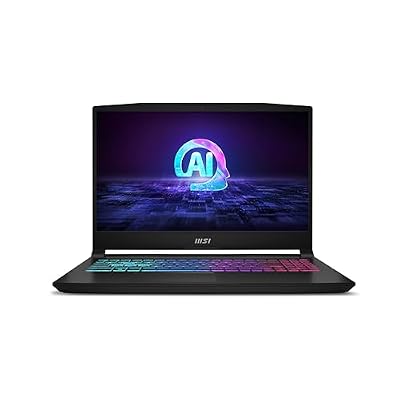
The Katana A15 AI is the AMD-based option here. Its Ryzen 7 8845HS brings eight Zen 4 cores with strong single-thread performance, which is what Destiny 2’s main thread leans on, and the GeForce RTX 4060 laptop GPU provides 8 GB of GDDR6 for 1080p play. MSI publishes a lower maximum graphics power for this slimmer chassis than the 140 W designs above, so expect it to trail those machines slightly at maximum settings while remaining far beyond Bungie’s recommended tier.
This configuration is generous where it counts: 32 GB of DDR5 memory and a 1 TB NVMe SSD as standard. The 15.6-inch Full HD panel runs at 144 Hz, plenty for Crucible, and ports include USB-C with DisplayPort output, USB-A ports, HDMI 2.1 and RJ45 Ethernet. Per MSI’s specification sheet, memory sits in two SO-DIMM slots and storage can be expanded with an additional M.2 drive. The laptop is covered by MSI’s standard limited warranty in the US; confirm the term on the listing.
Key specs: AMD Ryzen 7 8845HS, GeForce RTX 4060, 8 GB GDDR6, 32 GB DDR5, 1 TB NVMe SSD, 15.6-inch 1920 x 1080 display at 144 Hz, Windows 11.
ASUS TUF Gaming A15 (FA507NV-EH74)

The TUF Gaming A15 rounds out the list with a durability-first design and full-power graphics. The AMD Ryzen 7 7735HS is an eight-core chip well above Bungie’s recommended processors, and ASUS runs the GeForce RTX 4060 laptop GPU at a 140 W maximum TGP in this model, matching the Strix G16. With 8 GB of GDDR6, Destiny 2 at 1080p high settings is squarely in its comfort zone.
The 15.6-inch Full HD display refreshes at 144 Hz and covers the full sRGB color space according to ASUS. Memory is 16 GB of DDR5 and storage is a 1 TB PCIe SSD, and ASUS publishes two SO-DIMM slots and two M.2 slots for this chassis, so both can grow later. Ports include USB-C with DisplayPort output, USB-A ports, HDMI 2.1 and RJ45 Ethernet. The TUF line carries the standard ASUS limited warranty; check the product page for the coverage period.
Key specs: AMD Ryzen 7 7735HS, GeForce RTX 4060 at up to 140 W, 8 GB GDDR6, 16 GB DDR5, 1 TB PCIe SSD, 15.6-inch 1920 x 1080 display at 144 Hz, Wi-Fi 6, Windows 11.
FAQ
Will these laptops run Destiny 2 at 1440p?
Yes. Bungie’s recommended tier lists desktop cards such as the GTX 1060 with 6 GB, and every laptop here uses an RTX 4060 or RTX 4070 laptop GPU with 8 GB of VRAM. The Legion Pro 5i is the most natural 1440p pick thanks to its 2560 x 1600 panel and RTX 4070, while the RTX 4060 models handle 1440p with a few settings adjusted.
Is 16 GB of RAM enough for Destiny 2?
It is enough for the game, since Bungie recommends 8 GB, and leaves room for Discord and a browser. Players who stream or record should look at the 32 GB configurations of the Legion Pro 5i and Katana A15 AI, or choose a model with two SO-DIMM slots and upgrade later.
Does Destiny 2 work on any Windows laptop, including ARM models?
No. Destiny 2 requires a 64-bit Windows system on x86 hardware, and Bungie does not support Windows on ARM devices; the BattlEye anti-cheat also expects a standard x86 environment. All five laptops here use Intel or AMD x86 processors and discrete NVIDIA graphics, so compatibility is not a concern.
How much storage should I set aside for Destiny 2?
Bungie’s current requirements call for 105 GB of available space, and the footprint grows with expansions and updates. A 512 GB SSD works if Destiny 2 is your main title, but 1 TB is safer, and models with a second M.2 slot let you add storage without replacing the original drive.
Final Verdict
Every laptop here clears Bungie’s recommended Destiny 2 specification by a wide margin, so the right choice comes down to resolution, screen and storage priorities rather than basic compatibility. The Legion Pro 5i Gen 8 is the strongest all-round pick for 1440p and high-refresh play, with the RTX 4070, 32 GB of memory and a 2560 x 1600 panel. The ROG Strix G16 and TUF Gaming A15 deliver full-power RTX 4060 graphics for excellent 1080p and capable 1440p performance, while the Predator Helios Neo 16 trades storage for a G-SYNC screen and strong connectivity. The Katana A15 AI stands out for shipping with 32 GB of RAM and 1 TB of storage in an AMD-based design. Confirm the exact configuration and warranty term on the product page, since laptop families include several variants.
Product and ASIN Reference
| Product | ASIN |
|---|---|
| ASUS ROG Strix G16 (G614JV-AS74) | B0CRDCXRK2 |
| Lenovo Legion Pro 5i Gen 8 | B0CDQRY4HX |
| Acer Predator Helios Neo 16 (PHN16-71-76H5) | B0CX27GY7N |
| MSI Katana A15 AI (B8VF-448US) | B0CXVGSY2H |
| ASUS TUF Gaming A15 (FA507NV-EH74) | B0CJSY4PLN |