Dota 2 asks more of a keyboard than most games. A single team fight can call for four abilities, two or three active items, a control group switch and a stop command, all inside a couple of seconds. Your board has to register every input cleanly, in order, with no missed or doubled keystrokes. That is why the best gaming keyboard for Dota 2 is not simply the fastest board on the market: it needs dependable switches, full N-key rollover, a layout that keeps the function row within reach, and software that stores per-hero profiles.
As an Amazon Associate we earn from qualifying purchases.
The five keyboards below cover the main ways players solve that problem in 2026. Three use analog magnetic or optical switches with adjustable actuation and rapid trigger, one adds wireless freedom on a 75% layout, and one is a classic mechanical tenkeyless board. If you are upgrading the rest of the rig too, our guide to the best CPU for Dota 2 covers the processor side of the build.
What Dota 2 Actually Asks From a Keyboard
Bind density. Between abilities, six item slots, control groups, courier commands, quick buy and chat wheels, a Dota 2 player uses far more keys than a shooter player. A tenkeyless or 75% layout keeps the F-row for control groups and scoreboard duties while freeing desk space for wide mouse movements.
Clean, repeatable inputs. Stutter-stepping, orb walking and animation cancelling all depend on keys that reset predictably. This is where rapid trigger earns its place: on analog switches, a key resets the moment it starts moving back up rather than at a fixed point, so repeated taps register more consistently. Adjustable actuation lets you set a shallow point for ability keys you spam and a deeper point for keys you never want to trigger by accident.
Rollover and reliability. Simultaneous presses are constant in Dota 2, so full N-key rollover with anti-ghosting is a baseline requirement, not a bonus. Every pick here meets it.
Software that stays out of the way. Dota 2 has its own deep binding system, including quickcast and per-hero overrides, so keyboard software matters mainly for hardware-level features: actuation settings, rapid trigger behaviour, profiles and single-key remapping.
SteelSeries Apex Pro TKL Gen 3 — Best Overall for Dota 2

The Apex Pro TKL Gen 3 is built around SteelSeries’ OmniPoint 3.0 adjustable HyperMagnetic switches. SteelSeries publishes an actuation range of 0.1 mm to 4.0 mm, adjustable per key, which maps neatly onto Dota 2: set Q, W, E and R shallow for instant casts, and rarely used keys deeper so a resting finger never fires them. Rapid Trigger handles fast repeated inputs, while Rapid Tap prioritises the most recent of two opposing keys. Protection Mode reduces the sensitivity of keys around your main cluster, preventing accidental presses during frantic fights.
The tenkeyless layout keeps the F-row and arrow keys, the OLED Smart Display shows actuation and profile information, and QuickSet presets inside SteelSeries GG apply per-game settings automatically. Double-shot PBT keycaps and a detachable USB-C cable round out a board aimed squarely at competitive players who want the deepest tuning options available.
Specs
- Layout: Tenkeyless (TKL)
- Switches: OmniPoint 3.0 adjustable HyperMagnetic (Hall effect)
- Actuation: Adjustable 0.1–4.0 mm per key (manufacturer figure)
- Features: Rapid Trigger, Rapid Tap (SOCD), Protection Mode, dual actuation
- Display: OLED Smart Display
- Keycaps: Double-shot PBT
- Connection: Wired, detachable USB-C
- Software: SteelSeries GG with QuickSet presets
Check the SteelSeries Apex Pro TKL Gen 3 on Amazon
Razer Huntsman V3 Pro TKL — Best Analog Optical Pick

Razer’s Huntsman V3 Pro TKL uses Analog Optical Switches Gen-2, which read key position with light rather than a physical contact. Razer publishes an adjustable actuation range of 0.1 to 4.0 mm and a 100 million keystroke lifespan for the switches. Rapid Trigger Mode resets keys as soon as they travel upward, and Razer Snap Tap prioritises the latest input between two selected keys for cleaner directional changes.
A practical advantage for Dota 2 is the onboard adjustment: a multi-function digital dial, dedicated control buttons and an LED array let you change actuation settings without opening software, so you can tune a hero profile between matches. The chassis pairs a 5052 aluminium alloy top plate with textured doubleshot PBT keycaps, and a magnetic leatherette wrist rest is included. Razer Synapse handles deeper remapping and profile storage.
Specs
- Layout: Tenkeyless, 87 keys
- Switches: Razer Analog Optical Switches Gen-2
- Actuation: Adjustable 0.1–4.0 mm (manufacturer figure)
- Features: Rapid Trigger Mode, Razer Snap Tap, onboard actuation adjustment
- Switch lifespan: 100 million keystrokes (manufacturer figure)
- Build: 5052 aluminium alloy top plate, doubleshot PBT keycaps
- Extras: Multi-function digital dial, control buttons, magnetic wrist rest
- Connection: Wired, detachable USB-C
- Software: Razer Synapse
Check the Razer Huntsman V3 Pro TKL on Amazon
Logitech G PRO X TKL Rapid — Best for G HUB Users

Logitech’s entry in the analog category is the G PRO X TKL Rapid, a wired tenkeyless board with magnetic analog switches and Rapid Trigger. Actuation points are adjusted in fine steps through Logitech G HUB, and the software’s KEYCONTROL layer lets you assign more than one action level to a single key based on press depth, which suits players who want a normal cast and a quickcast behaviour on the same key at different depths.
The board keeps the pro-focused formula of the PRO X line: a compact TKL footprint for tournament desks, a detachable USB-C cable, a volume roller and media buttons, and LIGHTSYNC RGB that can follow in-game alerts through G HUB. If your mouse and headset already live in G HUB, this is the analog board that slots into that setup with the least friction.
Specs
- Layout: Tenkeyless (TKL)
- Switches: Magnetic analog (Hall effect), linear
- Features: Rapid Trigger, adjustable actuation, KEYCONTROL multi-level key actions
- Connection: Wired, detachable USB-C
- Extras: Volume roller, media buttons, LIGHTSYNC RGB
- Software: Logitech G HUB
Check the Logitech G PRO X TKL Rapid on Amazon
Keychron K2 HE — Best Wireless Hall Effect Pick
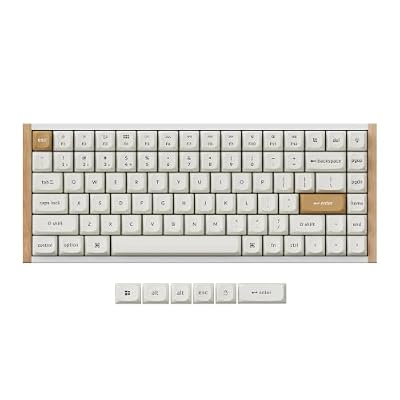
The K2 HE brings magnetic switches to a 75% wireless board. Its Gateron double-rail magnetic switches support Rapid Trigger and adjustable actuation, configured through the Keychron Launcher web app rather than an installed utility, and the board is QMK-based with hot-swappable switches. The 75% layout keeps a full function row in a footprint smaller than a TKL, which matters for Dota 2 players who rely on F-keys for control groups but want maximum mouse room.
Connectivity is the headline: 2.4 GHz wireless for gaming, Bluetooth 5.2 for a second machine, and wired USB-C when you want it. Double-shot PBT keycaps and an aluminium frame with wood accents make it the most flexible pick here for players who split time between a gaming PC and a work laptop.
Specs
- Layout: 75%, 84 keys
- Switches: Gateron double-rail magnetic (Hall effect), hot-swappable
- Features: Rapid Trigger, adjustable actuation, QMK support
- Connection: 2.4 GHz wireless, Bluetooth 5.2, wired USB-C
- Keycaps: Double-shot PBT
- Frame: Aluminium with wood accents
- Compatibility: Windows and macOS
- Software: Keychron Launcher web configurator
Check the Keychron K2 HE on Amazon
HyperX Alloy Origins Core — Best Classic Mechanical Pick

Not everyone wants analog switches. The Alloy Origins Core is a traditional mechanical tenkeyless board, and HyperX boards have a long track record in professional Dota 2: ProSettings’ tracking of professional players lists HyperX among the most used keyboard brands in the scene. This model uses HyperX’s own Red linear switches, with manufacturer figures of a 45 g actuation force, a 1.8 mm actuation point and an 80 million keystroke lifespan.
The full aircraft-grade aluminium body keeps the board planted during heavy key spam, the USB-C cable detaches for travel, and HyperX NGENUITY software handles per-key RGB lighting and macro customisation, with onboard memory storing up to three profiles. There is no rapid trigger or actuation adjustment here, just a consistent, well-built mechanical board at the simpler end of the range.
Specs
- Layout: Tenkeyless (TKL)
- Switches: HyperX Red mechanical, linear
- Actuation: 45 g force, 1.8 mm actuation point (manufacturer figures)
- Switch lifespan: 80 million keystrokes (manufacturer figure)
- Body: Full aircraft-grade aluminium
- Connection: Wired, detachable USB-C to USB-A cable
- Lighting: Per-key RGB
- Software: HyperX NGENUITY, onboard memory for three profiles
Check the HyperX Alloy Origins Core on Amazon
How to Choose the Right Board for Your Hero Pool
Start with layout. If you use control groups heavily, keep a physical F-row: that means TKL or 75%, not a 60% board. Next, decide whether analog features will change how you play. Rapid trigger and adjustable actuation genuinely help with stop-command movement, repeated last-hit timing and heroes built around fast ability cycling, but they reward players who will spend time tuning them. If you prefer to plug in and play with Dota 2’s own binding and quickcast options, a fixed mechanical board like the HyperX remains a rational choice. Finally, think about where you play: wireless boards suit multi-device desks, while wired boards remove charging from the equation for long ranked sessions.
Verdict
For most Dota 2 players, the SteelSeries Apex Pro TKL Gen 3 is the strongest all-round choice: its per-key actuation range, Rapid Trigger and Protection Mode map directly onto the game’s bind-heavy, spam-heavy inputs. The Razer Huntsman V3 Pro TKL is the better pick if you want analog optical switches and hardware controls you can adjust mid-session. Choose the Logitech G PRO X TKL Rapid if your setup already runs on G HUB, the Keychron K2 HE if you want Hall effect switches with wireless freedom, and the HyperX Alloy Origins Core if you want a proven mechanical TKL without analog extras.
FAQ
Do professional Dota 2 players use rapid trigger keyboards?
Analog and Hall effect boards have become increasingly common in professional play, but plenty of pros still use conventional mechanical keyboards. ProSettings’ tracking of professional Dota 2 players lists Razer, HyperX, SteelSeries and Logitech G as the most used keyboard brands, which is why this guide mixes analog flagships with a classic mechanical option.
Is a tenkeyless or 75% keyboard better for Dota 2?
Both keep the function row that Dota 2 players use for control groups and replay controls, and both drop the numpad that the game rarely needs. A 75% board such as the Keychron K2 HE is slightly narrower, while a TKL keeps standard spacing around the arrow and navigation keys. Pick based on desk space and how much you use the navigation cluster.
What actuation point should I set for Dota 2?
There is no single correct setting, but a common approach on adjustable boards is a shallow point on ability and item keys for faster registration, and a deeper point on keys like the scoreboard or chat so they are never triggered accidentally. All three analog picks here let you set actuation per key, so you can tune by hero rather than using one global value.
Can I use keyboard macros in Dota 2?
Keyboard software from SteelSeries, Razer, Logitech and HyperX all support remapping and macros as published features, and Dota 2 itself offers extensive in-game binding, quickcast and per-hero options. The safe approach is to use software for profiles, lighting and single-key remaps, and to do your ability and item binding inside Dota 2’s own settings, which keeps everything within the game’s normal rules.
Product and ASIN Reference
| Product | ASIN |
|---|---|
| SteelSeries Apex Pro TKL Gen 3 | B0DGZLHN8G |
| Razer Huntsman V3 Pro TKL | B0CG7BWG7J |
| Logitech G PRO X TKL Rapid | B0DJD163HT |
| Keychron K2 HE | B0DCVSBSQG |
| HyperX Alloy Origins Core (HyperX Red) | B07YMHGP86 |