Rainbow Six Siege is one of the easiest modern shooters to run, but the Siege X update quietly raised the floor: Ubisoft’s current PC specification requires DirectX 12, a solid-state drive, and Windows 10 or 11, and its recommended tiers now target 120 FPS rather than 60. Laptop compatibility therefore means more than clearing the minimum. It means matching the laptop’s GPU tier, memory, storage and screen refresh rate to the specific Ubisoft tier you actually want to play at.
Every laptop below is sold on Amazon US and matched against those published requirements. As an Amazon Associate we earn from qualifying purchases. One caution applies throughout: laptop GPUs share names with desktop cards but run at lower, model-specific power limits, so treat the tier matching as a class comparison, not a frame-rate guarantee.
Ubisoft’s Official Siege X PC Requirements
Ubisoft published these tiers for Siege X in its official specs announcement; they anchor every pick in this guide.
| Tier (Ubisoft) | Target | CPU | GPU | RAM | Storage |
|---|---|---|---|---|---|
| Minimum | 1080p, 60 FPS | Ryzen 3 3100 / Core i3-8100 | GTX 1650 4GB / RX 5500 XT 4GB / Arc A380 6GB | 8GB | 65GB SSD |
| Recommended High, 1080p | 120 FPS (Core Siege), 60 FPS (Dual Front) | Ryzen 5 3600 / Core i5-10400 | RTX 2060 6GB / RX 6600 8GB / Arc A750 8GB | 16GB | 65GB SSD |
| Recommended High, 1440p | 120 FPS (Core Siege), 60 FPS (Dual Front) | Ryzen 5 3600 / Core i5-10400 | RTX 3070 8GB / RX 6700 XT 8GB / Arc B580 12GB | 16GB | 65GB SSD |
| Recommended High, 2160p | 120 FPS (Core Siege), 60 FPS (Dual Front) | Ryzen 7 3700X / Core i5-11600K | RTX 3080 10GB / RX 6800 XT 16GB | 16GB | 65GB SSD |
| Recommended Ultra, 2160p | 120 FPS | Ryzen 5 5600X / Core i5-11600K | RTX 4070 Ti Super 16GB / RX 7900 XT 20GB | 16GB | 110GB SSD |
Three details matter for laptop shoppers. First, an SSD is mandatory at every tier, and the Ultra tier’s 110GB figure reflects the optional high-resolution texture pack. Second, 16GB of RAM is the recommended standard everywhere above minimum. Third, Ubisoft’s targets top out at 120 FPS, and Dual Front is specced at 60 FPS in the recommended tiers — a 240Hz screen is headroom for players who lower settings competitively, not a requirement.
How to Read These Specs as a Laptop Buyer
Desktop and laptop GPUs are not interchangeable. An RTX 4070 Laptop GPU is a different, lower-power part than a desktop RTX 4070, and its total graphics power (TGP) varies by chassis — ASUS, for example, publishes a 140W maximum TGP for the Strix G16 below, while slim machines run the same class of chip at far lower wattage. Where a manufacturer publishes a TGP figure, it is listed in the specs; where none is published, none is quoted.
CPU demands are modest: every laptop here uses a current HX- or H-class processor well above Ubisoft’s recommended line. Siege also supports DLSS upscaling and NVIDIA Reflex on GeForce RTX hardware. Finally, check the panel: Siege is a competitive game, so refresh rate matters more than resolution for most players.
The Five Picks
Acer Nitro V 15 (ANV15-51-51H9) — the entry point
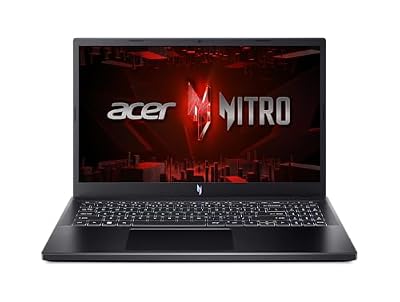
The Nitro V 15 is the cheapest way onto the ladder. Its RTX 4050 Laptop GPU sits a full generation above Ubisoft’s GTX 1650 minimum, and the Core i5-13420H clears the minimum CPU easily. The honest caveat is memory: it ships with 8GB, which is Ubisoft’s minimum rather than the 16GB recommended figure. Acer fits two DDR5 slots and rates the machine for up to 32GB, so a memory upgrade is the most worthwhile change a buyer can make, and a second M.2 slot adds storage room beyond the 65GB the game needs. The 144Hz Full HD panel matches the machine’s realistic role: 1080p play with refresh headroom above the 60 FPS minimum target.
Specs (Acer listing):
- CPU: Intel Core i5-13420H
- GPU: NVIDIA GeForce RTX 4050 Laptop GPU, 6GB GDDR6
- Display: 15.6-inch Full HD (1920×1080) IPS, 144Hz
- RAM: 8GB DDR5, two slots, up to 32GB
- Storage: 512GB PCIe Gen 4 SSD, two M.2 slots
- Connectivity: Wi-Fi 6, Gigabit Ethernet, Thunderbolt 4, HDMI 2.1
- OS: Windows 11 Home
See the Acer Nitro V 15 on Amazon
ASUS ROG Zephyrus G14 (2024) — the portable pick

The Zephyrus G14 is the travel option: a 3.31 lb aluminium laptop whose Ryzen 9 8945HS and RTX 4060 cover Ubisoft’s 1080p Recommended High tier on paper, with a 120Hz OLED screen. ASUS lists a maximum TGP of 90W with Dynamic Boost for this configuration — lower than the full-size machines below, which is the trade-off for the size. The 2880×1800 native resolution is sharper than Siege needs; most players will run the game at a reduced render resolution to hold high frame rates. Upgradability is the weak point: the 16GB of LPDDR5X memory is soldered and cannot be expanded, although the single M.2 SSD can be replaced. Buy it for portability, not for a long upgrade path.
Specs (ASUS listing):
- CPU: AMD Ryzen 9 8945HS
- GPU: NVIDIA GeForce RTX 4060 Laptop GPU, 8GB GDDR6, up to 90W TGP with Dynamic Boost (ASUS-published)
- Display: 14-inch OLED, 2880×1800, 120Hz
- RAM: 16GB LPDDR5X, soldered, not upgradeable
- Storage: 1TB M.2 PCIe 4.0 SSD, one slot
- Battery: 76Wh
- Weight: 3.31 lb
- OS: Windows 11 Home
See the ASUS ROG Zephyrus G14 (2024) on Amazon
MSI Katana 15 (B13VGK-2000US) — QHD value

The Katana 15 pairs an RTX 4070 Laptop GPU with a 15.6-inch QHD screen running at 165Hz, which maps neatly onto Ubisoft’s 1440p Recommended High tier without paying for flagship construction. The Core i7-13620H is comfortably above the recommended CPU line, and the 16GB of DDR5 matches the recommended memory figure out of the box, with the listing rating the two slots for up to 64GB if you later want more. MSI does not headline a TGP figure for this model in its listing data, so none is quoted here; what is documented is the Cooler Boost 5 dual-fan cooling and a 1TB NVMe SSD that swallows the game’s install several times over.
Specs (MSI listing):
- CPU: Intel Core i7-13620H
- GPU: NVIDIA GeForce RTX 4070 Laptop GPU, 8GB GDDR6
- Display: 15.6-inch QHD, 165Hz
- RAM: 16GB DDR5, two slots, up to 64GB
- Storage: 1TB NVMe SSD
- Cooling: Cooler Boost 5
- OS: Windows 11 Home
See the MSI Katana 15 on Amazon
ASUS ROG Strix G16 (2024) — full-power 240Hz

The Strix G16 (G614JIR-AS94) is built around sustained power. ASUS runs its RTX 4070 Laptop GPU at a published 140W maximum TGP — the top of that chip’s laptop power range — and pairs it with a Core i9-14900HX and a 16-inch QHD+ (2560×1600) ROG Nebula display at 240Hz with G-SYNC. Against Ubisoft’s table, this is the 1440p Recommended High tier with substantial headroom, plus a screen fast enough for players who drop settings to chase frame rates beyond Ubisoft’s 120 FPS targets. A MUX switch with Advanced Optimus lets the discrete GPU drive the display directly. Memory and storage are both serviceable: two SO-DIMM slots and two M.2 slots, per ASUS’s published layout.
Specs (ASUS listing):
- CPU: Intel Core i9-14900HX
- GPU: NVIDIA GeForce RTX 4070 Laptop GPU, 8GB GDDR6, 140W maximum TGP (ASUS-published)
- Display: 16-inch QHD+ (2560×1600) ROG Nebula IPS, 240Hz, G-SYNC, 100% DCI-P3
- RAM: 16GB DDR5-5600, two SO-DIMM slots
- Storage: 1TB PCIe Gen 4 SSD, two M.2 slots
- Connectivity: Wi-Fi 6E
- OS: Windows 11 Home
See the ASUS ROG Strix G16 (2024) on Amazon
Lenovo Legion Pro 7i Gen 9 — the flagship

The Legion Pro 7i Gen 9 (83DE001SUS) is the desktop-replacement option. Lenovo rates its RTX 4080 Laptop GPU at up to 175W, the highest power class available in a laptop GPU, and backs it with a Core i9-14900HX, 32GB of DDR5-5600 and a 16-inch QHD+ 240Hz IPS panel rated at 500 nits with G-SYNC. This is the machine aimed at Ubisoft’s 2160p tiers — the pick for players who dock to an external 4K or high-refresh 1440p monitor, since no laptop GPU is a desktop RTX 4070 Ti Super, and DLSS or a reduced render scale is the sensible route to the Ultra tier’s 120 FPS target. Both memory and storage scale, with two SO-DIMM slots (up to 64GB) and two M.2 slots holding the 2TB array.
Specs (Lenovo listing):
- CPU: Intel Core i9-14900HX (24 cores, up to 5.8 GHz)
- GPU: NVIDIA GeForce RTX 4080 Laptop GPU, 12GB GDDR6, up to 175W (Lenovo-published)
- Display: 16-inch IPS QHD+ (2560×1600), 240Hz, 500 nits, G-SYNC, 100% DCI-P3
- RAM: 32GB DDR5-5600 (2×16GB SO-DIMM), up to 64GB
- Storage: 2TB SSD (2×1TB M.2 PCIe Gen 4), two slots
- Battery: 99.9Wh
- Weight: approx. 2.62 kg
- OS: Windows 11 Pro
See the Lenovo Legion Pro 7i Gen 9 on Amazon
Verdict: Which Laptop for Which Siege Player
- Just want to play: the Acer Nitro V 15 clears Ubisoft’s minimum with room to spare; add a second memory stick and it meets the recommended RAM figure too.
- Play anywhere: the Zephyrus G14 is the only genuinely light machine here, and its RTX 4060 covers the 1080p recommended tier — accept the soldered memory as the price of the size.
- 1440p on a budget: the MSI Katana 15 delivers the RTX 4070 and a QHD 165Hz screen without flagship pricing.
- Competitive 1440p: the ROG Strix G16’s full-power RTX 4070 and 240Hz G-SYNC panel are the best match for ranked play at native resolution.
- Desktop replacement: the Legion Pro 7i Gen 9 has the GPU power, memory and storage headroom for docked 4K or high-refresh external-monitor play, and the longest upgrade path.
If you split your time between PC and console, or simply prefer a pad for casual sessions, our guide to the best controller for Rainbow Six Siege covers the options that work on PC.
FAQ
Can a laptop with integrated graphics run Siege X?
Ubisoft’s minimum specification lists discrete GPUs — the GTX 1650, RX 5500 XT and Arc A380 — so integrated graphics sit below the published minimum. Every laptop in this guide has a dedicated GeForce RTX GPU.
How much RAM does Siege X need on a laptop?
Ubisoft lists 8GB as the minimum and 16GB in every recommended tier. Treat 16GB as the practical standard; the Nitro V 15 is the only pick here that ships below it, and it has the slots to fix that.
Is a 240Hz laptop display worth it for Siege?
Ubisoft’s published targets top out at 120 FPS, so a 240Hz panel is not required. It still suits competitive players who lower in-game settings to push frame rates as high as possible, and it suits other esports titles too.
How much storage does Siege X take up?
Ubisoft specifies a 65GB SSD at most tiers, rising to 110GB at the Ultra tier with the high-resolution texture pack. An SSD is required — a hard drive does not meet the specification at any tier.
Product and ASIN Reference
| Product | ASIN |
|---|---|
| Acer Nitro V 15 (ANV15-51-51H9) | B0CP8D4SM2 |
| ASUS ROG Zephyrus G14 (2024) GA403UV | B0D9JH9CW3 |
| MSI Katana 15 B13VGK-2000US | B0CT4BHS2M |
| ASUS ROG Strix G16 (2024) G614JIR-AS94 | B0CRCVJFQM |
| Lenovo Legion Pro 7i Gen 9 (83DE001SUS) | B0D3D86PHS |