Most gaming laptops are sold on graphics muscle, but emulation flips the usual buying logic on its head. An emulator has to translate a console’s instructions in real time, and that translation work lands mainly on one or two CPU threads. A laptop with a flagship GPU and a modest processor can lose to a cheaper machine with a faster single core, which is why the best gaming laptop for emulators is picked on CPU speed, cache size, and cooling first, and on graphics second.
This guide explains what each class of emulation actually demands, from 8-bit and 16-bit libraries through PlayStation 3 and Switch-class titles, and then compares four gaming laptops currently sold on Amazon US that fit those demands. Every pick below was chosen because its processor can hold high boost clocks under a sustained single-threaded load, and each model section states the maker-published power limits, upgrade paths, and warranty terms so you can judge the machine on facts rather than marketing. One ground rule before anything else: emulate games you own. The laptops here are simply fast, general-purpose PCs; what you run on them is your responsibility.
As an Amazon Associate we earn from qualifying purchases
Why Emulation Is a CPU Test First
Classic emulation is light work. Front ends such as RetroArch run 8-bit, 16-bit, and early 3D cores comfortably on almost any modern laptop processor, integrated graphics included. The load climbs sharply with each console generation. Dolphin, covering GameCube and Wii, leans on two fast threads and benefits from a GPU that can handle internal resolution upscaling. PCSX2, for PlayStation 2, is happiest with strong single-thread performance and a discrete GPU once you raise the rendering resolution above native.
The heaviest mainstream cases are PlayStation 3 emulation through RPCS3 and Switch-class emulation through Ryujinx-class software. RPCS3 recompiles the Cell processor’s code on the fly and is famously sensitive to single-core speed and cache; the RPCS3 team also notes that AVX-512 instruction support helps in the most demanding titles, a feature none of the four laptops below includes, so treat the very heaviest PS3 games as a stretch goal on any current laptop rather than a promise. Switch-class emulation splits the load differently: the CPU still matters most, but the GPU starts to matter once you upscale, because the emulator renders the game’s 3D scenes at your chosen resolution on your graphics hardware.
Two practical conclusions follow. First, core quality beats core count: a six- or eight-performance-core HX or HS chip with a high boost clock and a large L3 cache is worth more here than a thin laptop with more, slower cores. Second, cooling decides whether the spec sheet survives contact with reality. An emulator can pin a couple of threads near maximum boost for hours, and a chassis that throttles after ten minutes will feel slower than its processor suggests. That is why every pick below is a full-size gaming laptop with a real cooling system rather than a thin-and-light.
How to Choose a Gaming Laptop for Emulators
Start with the processor tier. Intel’s HX chips and AMD’s HS chips are the sweet spot: both are built to sustain high clocks in a gaming chassis, and both carry the large caches that recompilation workloads like. Readers who prefer AMD should also look at our roundup of the best gaming laptop AMD Ryzen models, which covers the wider Ryzen field; the TUF Gaming A15 below is the Ryzen representative in this guide.
Next, match the GPU to your upscaling ambitions. At native resolution, any current discrete GPU is more than enough for Dolphin and PCSX2. If you want PlayStation 3 or Switch-class games rendered at two or three times their native resolution, step up to an RTX 4070-class card with 8GB of VRAM, as fitted to the Legion Pro 5i and the Katana 15 below. Memory and storage are easier: 16GB of RAM is a sensible floor, 32GB gives shader compilation and big front-end libraries more breathing room, and a fast NVMe SSD keeps large game libraries and shader caches loading quickly. Finally, check the upgrade path. Emulation libraries grow, and a second M.2 slot or socketed RAM extends a laptop’s useful life far more cheaply than replacing the machine.
Lenovo Legion Pro 5i Gen 8

Key specs: Intel Core i7-13700HX (16 cores, up to 5.0 GHz, 30MB cache), NVIDIA GeForce RTX 4070 8GB, 32GB DDR5, 1TB SSD, 16-inch WQXGA 2560 x 1600 display at 165Hz, Wi-Fi 6, Windows 11 Home.
The Legion Pro 5i Gen 8 is the strongest emulator host in this group because its processor was built for exactly this kind of work. The Core i7-13700HX pairs eight performance cores with high boost clocks and a 30MB cache, and Notebookcheck’s processor rankings consistently place it near the top of its generation for single-thread speed, which is the metric RPCS3 and PCSX2 care about most. Lenovo rates this model’s total system power at up to 200W, and the RTX 4070 runs at a full-power configuration rather than the cut-down wattages found in thinner machines, so high-resolution upscaling in Dolphin and Switch-class emulators has real headroom.
The rest of the specification supports long sessions. The 16-inch 2560 x 1600 panel gives upscaled games room to look sharp, and the port selection covers the peripherals emulation setups tend to accumulate: USB-C with display output, multiple USB-A ports for controllers and adapters, full-size HDMI, and wired Ethernet. Upgradeability is a genuine strength. The 32GB of DDR5 sits in two SO-DIMM slots, and Lenovo fits two M.2 slots, so a second SSD for a growing library drops in without disturbing the boot drive. Warranty coverage is Lenovo’s standard limited warranty for the Legion line; confirm the exact term shown on the product page for this configuration before ordering.
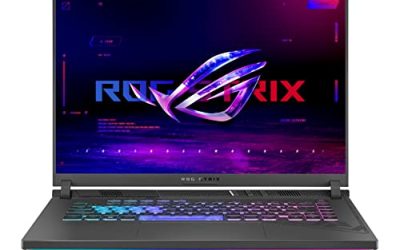
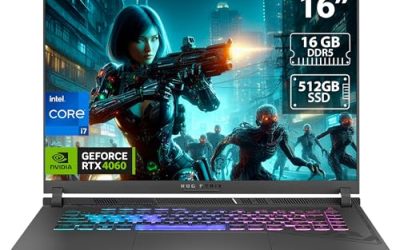
ASUS ROG Strix G16 (G614JV-AS73)

Key specs: Intel Core i7-13650HX (14 cores, up to 4.9 GHz, 24MB cache), NVIDIA GeForce RTX 4060 8GB at 140W max TGP, 16GB DDR5, 512GB SSD, 16-inch FHD+ 1920 x 1200 display at 165Hz, Wi-Fi 6E, Windows 11 Home.
The Strix G16 is the balanced pick: an HX-class processor and a full-power GPU in a chassis tuned for sustained loads. Its Core i7-13650HX boosts to 4.9 GHz with a 24MB cache, which keeps Dolphin, PCSX2, and the bulk of the RPCS3 catalogue running at full speed, and ASUS runs the RTX 4060 at its 140W maximum TGP, the highest wattage NVIDIA allows for this GPU, so upscaling performance matches desktop-class RTX 4060 laptops rather than the weaker low-wattage variants.
For emulator use, the supporting details are well judged. The 1920 x 1200 screen is a natural target for two- and three-times upscaling of standard-definition consoles, and the port mix includes Thunderbolt 4, a second USB-C with display output, HDMI, and Ethernet for wired controller and network play. Inside, the 16GB of DDR5 occupies two SO-DIMM slots and ASUS provides two M.2 PCIe 4.0 slots, so both memory and storage can grow; the fitted 512GB SSD is the one figure here that fills quickly once a library accumulates, which makes that second slot more than a footnote. The Amazon listing states a one-year warranty for this model, and ASUS registration can add accidental damage protection in the first year, so check the listing terms when you buy.
ASUS TUF Gaming A15 (FA507NV-EH74)

Key specs: AMD Ryzen 7 7735HS (8 cores, up to 4.75 GHz, 16MB L3 cache), NVIDIA GeForce RTX 4060 8GB, 16GB DDR5, 1TB PCIe SSD, 15.6-inch Full HD display at 144Hz with full sRGB coverage, Wi-Fi 6, Windows 11 Home.
The TUF Gaming A15 is the Ryzen option, and it makes the case that emulation does not require an HX-class chip. The Ryzen 7 7735HS is an eight-core Zen 3+ processor with strong single-core performance for its class, and every one of its cores is a full performance core, which suits emulators that load a small number of threads unevenly. In practice it covers RetroArch, Dolphin, and PCSX2 without drama and handles a large share of Switch-class titles; only the heaviest RPCS3 games will expose the gap to the HX machines above. ASUS pairs it with an RTX 4060 running at up to 140W with Dynamic Boost and a MUX switch, so the GPU is never the bottleneck at this screen’s native resolution.
Daily-use details are sensible. The 15.6-inch 144Hz panel covers the full sRGB range, storage starts at a roomier 1TB, and the chassis carries USB-C with display output, HDMI, and Ethernet alongside its USB-A ports. Upgradeability follows the TUF pattern: two SO-DIMM slots for memory and two M.2 slots for storage, both confirmed in ASUS’s published specifications for this model, so the machine can grow with your library. It carries ASUS’s standard limited warranty for the TUF line; as with every pick here, verify the exact term on the product page for the configuration you choose.
MSI Katana 15 (B13VGK)

Key specs: Intel Core i7-13620H (10 cores, up to 4.9 GHz, 24MB cache), NVIDIA GeForce RTX 4070 8GB, 32GB DDR5, 1TB SSD, 15.6-inch Full HD display at 144Hz, Wi-Fi 6, Windows 11 Pro.
The Katana 15 approaches emulation from the GPU side. Its Core i7-13620H is an H-series chip rather than an HX, but it still boosts to 4.9 GHz with a 24MB cache, and that is enough single-thread speed for Dolphin, PCSX2, and most Switch-class emulation at full speed. Where this model earns its place is the RTX 4070: Notebookcheck reports MSI runs it at a 105W TGP in this chassis, below the GPU’s maximum but still a clear step above RTX 4060 laptops when an emulator is rendering at high internal resolutions, which is exactly where GPU limits appear first.
The configuration sold under this listing is generous where it counts for a media-heavy hobby: 32GB of DDR5 and a 1TB SSD as standard, plus Windows 11 Pro. Ports include a USB-C port with Thunderbolt 4, HDMI, USB-A, and Ethernet. MSI’s published specifications give the Katana 15 two SO-DIMM slots supporting up to 64GB of memory and a replaceable M.2 SSD, so upgrades stay open even though it ships well specified. Cooling is handled by MSI’s Cooler Boost 5 dual-fan system; expect fan noise under sustained emulation loads, as with most laptops in this class. Warranty is MSI’s standard limited warranty for gaming laptops; confirm the term on the product page before ordering.
FAQ
Do I need a powerful GPU for emulation?
Only for part of the job. CPU single-core speed decides whether most emulators run at full speed at all. The GPU matters once you raise the internal rendering resolution in Dolphin, PCSX2, RPCS3, or Switch-class emulators, where an RTX 4060 is a comfortable baseline and an RTX 4070 buys extra upscaling headroom.
How much RAM does an emulation laptop need?
Sixteen gigabytes is a workable floor for RetroArch, Dolphin, and PCSX2. Thirty-two gigabytes, as fitted to the Legion Pro 5i and Katana 15 above, gives RPCS3, shader compilation, and a large front-end library more room to breathe, and it removes memory from the list of things to upgrade later.
Is emulation legal?
Emulators themselves are legal software, and the accepted rule is simple: emulate games you own. Dumping your own discs or cartridges for personal use is the standard the emulation community works to. This guide deliberately links to no game files or download sources, and you should be wary of any site that bundles them.
Can a laptop replace a desktop for high-end emulation?
For most libraries, yes. HX and HS processors in current gaming laptops match or beat many desktop chips in single-thread speed, which is what emulation rewards. The honest exceptions are the heaviest PlayStation 3 titles in RPCS3, where the emulator’s own documentation points to AVX-512 support as a help and no current laptop processor line offers it across the board.
Final Verdict
Buy on the processor, then check the cooling, then pick the GPU that matches your upscaling plans. The Lenovo Legion Pro 5i Gen 8 is the strongest all-round emulation laptop here, with the fastest single-core performance, a full-power RTX 4070, and the easiest upgrade path. The ASUS ROG Strix G16 is the balanced alternative, trading a little storage for a full-power RTX 4060 and Thunderbolt 4. The ASUS TUF Gaming A15 proves a Ryzen HS chip covers most libraries happily, with the best storage starting point of the four. The MSI Katana 15 suits players who upscale aggressively and want 32GB of memory fitted from the start. Any of the four will run classic libraries effortlessly; they differ in how far into the PlayStation 3 and Switch-class catalogues they can comfortably reach.
Product and ASIN Reference
| Product | ASIN |
|---|---|
| Lenovo Legion Pro 5i Gen 8 (Core i7-13700HX, RTX 4070, 32GB, 1TB) | B0CDQRY4HX |
| ASUS ROG Strix G16 G614JV-AS73 (Core i7-13650HX, RTX 4060, 16GB, 512GB) | B0BV8H8HVD |
| ASUS TUF Gaming A15 FA507NV-EH74 (Ryzen 7 7735HS, RTX 4060, 16GB, 1TB) | B0CJSY4PLN |
| MSI Katana 15 B13VGK (Core i7-13620H, RTX 4070, 32GB, 1TB) | B0C2RPQ61L |